Questions
How to map extra mouse buttons on a Mac
Bind them in a mapper: InputConfig, the free app I make, reads every mouse button up to Button 32 and gives each any job, in every app. Mice with more than two side buttons, MMO mice with a grid of thumb keys among them, often seem half dead on a Mac because macOS hands each press to the app in front, and almost no Mac app has a job for Button 6 or Button 12.
The catch is that not every extra button is a mouse button, so this page starts with how to tell.
On this page: 8 sections
Find out which kind of button it is
| The button is | How you can tell | What to do |
|---|---|---|
| A standard mouse button | Scan names it: Button 6, Button 9, and so on | Bind it to anything. InputConfig reads up to Button 32. |
| A key in disguise | Scan names a key, often 1 to 0, minus or equals, and the key types in other apps | Set it to F13 to F20 in the mouse's own software, then bind that key. |
| A button the mouse keeps to itself | Nothing scans at all | DPI, profile and some gesture buttons talk only to the maker's software. No other app can read them, InputConfig included. |
- You: Add a row, press Scan, and click the button.
- InputConfig: Names what arrived.
- Check: A mouse button name means the first kind; a key name means the second; nothing means the third.
Scan tells you in one click which kind you have.
 InputConfig is free on the Mac App Store. macOS 14 or later, no account, no tracking, open source.
Bind a button
Install InputConfig from the Mac App Store and allow Accessibility access first.
- You: Make a preset and add a row. Press Scan and click the button, or set the input type to Mouse and the kind to Button and pick it from the menu. Choose the output: a key combination, a macro, Type Text, Open App, Run Siri Shortcut, or a system function.
- InputConfig: Lists Left click, Right click, Middle click and Button 4 to Button 8, with More buttons holding Button 9 to Button 32.
- Check: Activate the preset. The button works in every app while it runs.
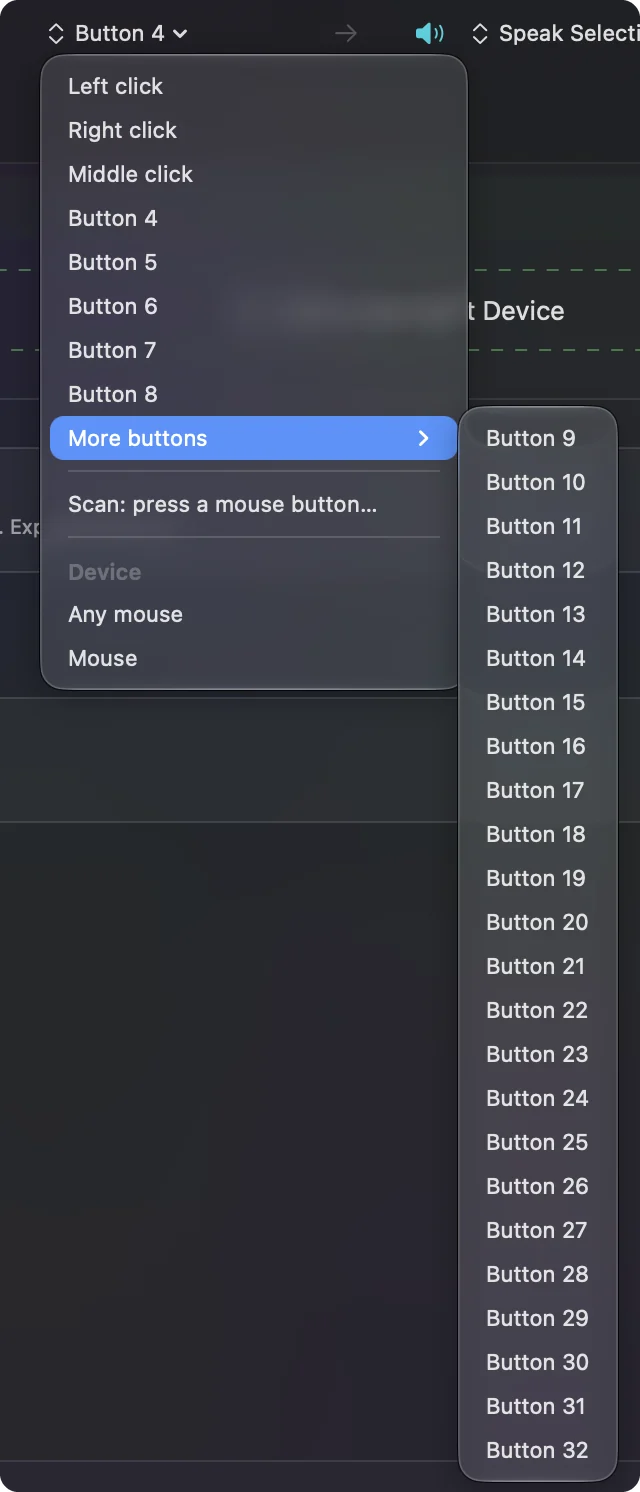
The activity log notes the first press of any mouse button above Button 5, so a saved report shows exactly what your mouse sends.
Stop the button doing its old job too
InputConfig listens alongside macOS, so a button keeps whatever it already did and the new job happens on top. For the middle button and every side button, a row can switch that off.
- You: Open the row's Options and, in the Press box, turn on Block the button's own action.
- InputConfig: While the preset runs, apps stop seeing that button, so it does only what the row says.
- Check: Stop the preset and the button works as usual.
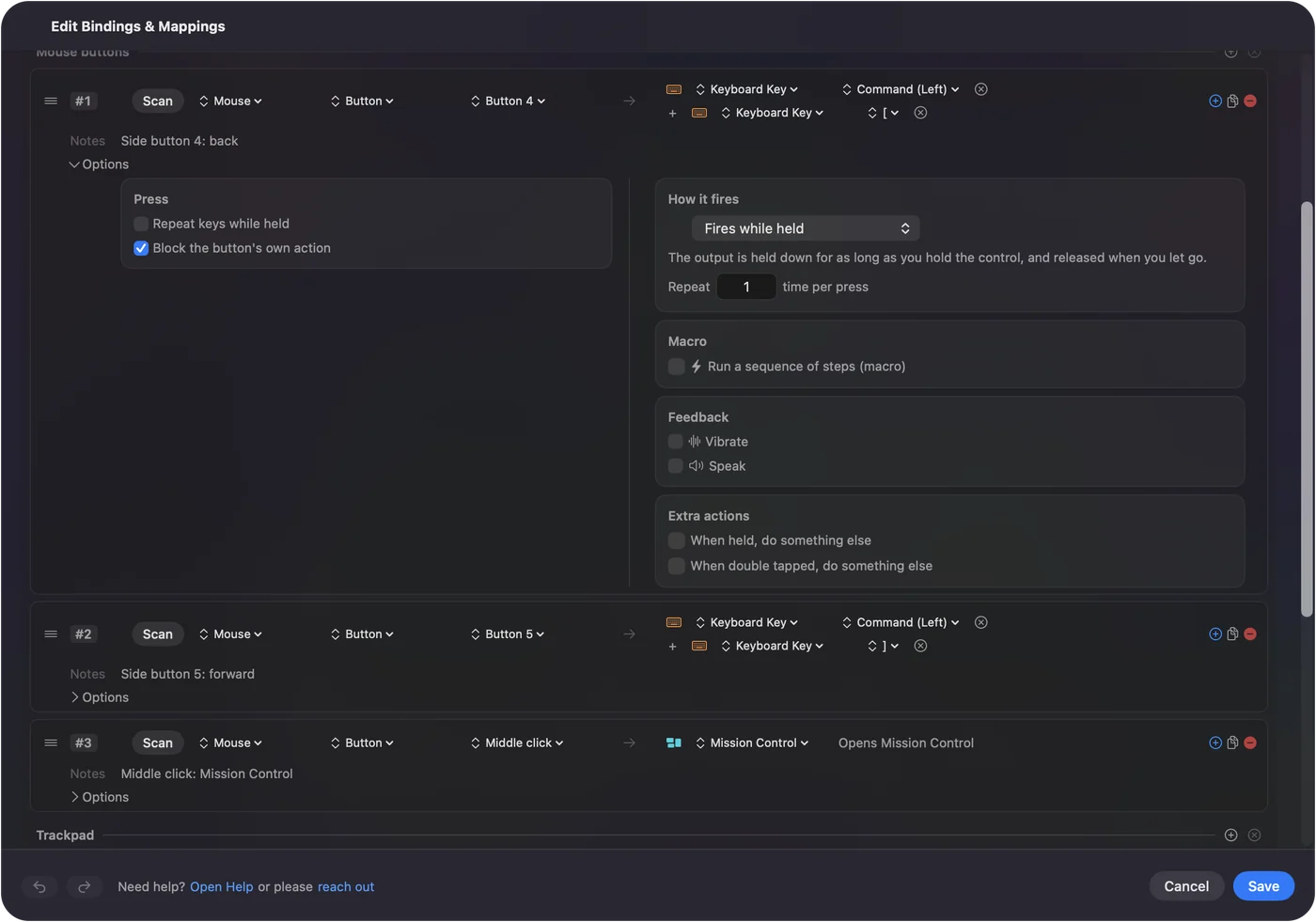
Left click and right click are never offered, so a click cannot be lost. Keys are different: InputConfig cannot block a key, which is why thumb keys that send numbers belong on F13 to F20.
Fix gaming mice whose buttons send keys
A Razer Naga, Logitech G600 or Corsair Scimitar reaches the Mac partly as a keyboard: out of the box the thumb grid often sends the number row, so a game sees keys it already knows. On a Mac that means each thumb key types a digit in every app. InputConfig reads those keys, but it reads every keyboard as one, so the thumb grid's 1 and the 1 above Q are the same key to it, and it cannot stop either from typing.
- Change the keys in the mouse. In the mouse's own software or its onboard memory, set the thumb keys to F13 to F20, which no Mac app uses. Skip F21 to F24, which macOS does not pass to apps.
- Use another computer if you must. Many gaming mice keep their key settings in their own memory, so if the maker's software does not run on your Mac you can set them once on another computer; the manual says whether yours does.
- Scan each one. Then bind it like any key.
The F13 to F19 page explains why those keys are the clean choice. F13 to F20 on the thumb grid, and every thumb key becomes a clean button of its own.
Fill a grid of buttons
- One layout per app. Make a preset per app and turn on auto-switch, so the same twelve buttons are editing shortcuts in one app and spells in a game.
- A held modifier. A row that sends Command holds it for as long as the button is down.
- Two jobs per button. A Mouse row of the kind Double click fires on the second click of a pair, so a single click keeps its own job. A hold action adds a third.
- Phrases and sequences. Type Text for snippets, and a macro for timed sequences.
- The Mac itself. Spaces, Mission Control, Start Dictation and media keys as system functions.
The built-in Double Click Deck preset shows the double click idea on an ordinary mouse.
What it cannot do
- Hardware settings. It does not change DPI, pointer speed, acceleration or lighting. The mouse maker's app handles the hardware.
- Two mice apart. It cannot give two mice different jobs for the same button, because every mouse connected to the Mac counts as one.
- Pointer feel. Apps such as LinearMouse, Mac Mouse Fix or SteerMouse handle scrolling and pointer feel, and they run alongside InputConfig without trouble.
For the two ordinary side buttons and back and forward, see mouse side buttons on a Mac. InputConfig gives buttons jobs; the maker's app and the pointer apps do the rest.
The short version
- Scan first. A mouse button name means bind it; a key name means move it to F13 to F20.
- Block the old job. On side and middle buttons, in the row's Options.
- Nothing scans. That button belongs to the mouse's own software.
Every button your mouse reports can do something useful on a Mac.
Questions
How many mouse buttons can a Mac use?
macOS numbers mouse buttons up to 32, and InputConfig can bind all of them: Left, Right and Middle click, then Button 4 to Button 32. How many a mouse actually sends is up to the mouse.
Why does button 6 on my mouse do nothing on a Mac?
macOS passes it to the app in front, and few Mac apps have a job for it. Bind it in InputConfig and it works in every app while the preset runs.
Do I need Razer Synapse or Logitech G Hub on a Mac?
Not for buttons the mouse reports as standard buttons. You need the maker's software only to change what a button sends, such as moving thumb keys from numbers to F13 to F20, or for DPI and lighting.
Can an extra mouse button stop doing what it did before?
Yes for the middle button and the side buttons: turn on Block the button's own action in the row's Options and it does only its new job while the preset runs. A button that sends a key cannot be blocked.
Can I use extra mouse buttons in games?
Yes. A row can send any key the game expects, and a preset can switch itself on when the game comes to the front.
Related
Free. macOS 14 or later. No account, nothing leaves your Mac. Open source on GitHub.