How do I use an MMO mouse with a thumb grid on a Mac?
 InputConfig is completely free on the Mac App Store. You don't have to make an account, there are no subscriptions, and nothing is locked. Optimized for Apple silicon.
Set the thumb grid to keys that type nothing, F13 to F20, in the mouse's own software or onboard memory, and then bind those keys with InputConfig, a free Mac app. The reason is that most MMO mice, the Razer Naga, the Logitech G600, the Corsair Scimitar, the Redragon M908 Impact and the UtechSmart Venus among them, send the grid as keyboard keys, and a Mac then thinks you are typing.
This page is a general guide, so each maker's own page has the details: Razer, Corsair Scimitar and Logitech G HUB.
On this page: 12 sections
Steps
- Plug in the mouse. The pointer, clicks and wheel work, and the thumb grid probably types numbers.
- In the maker's software, or on a Windows PC if the software is Windows only, set the grid buttons to F13 through F20.
- Save the profile to the mouse so it keeps it.
- In InputConfig, add a Keyboard Key row for each grid button, press Scan and press the button.
- Give each row a job, then press Activate and test it.
Know what a thumb grid sends and what runs on a Mac
| Mouse | What I read | On a Mac |
|---|---|---|
| Logitech G600 | 20 buttons with 12 thumb buttons, and G HUB is optional, per Logitech's page | Works as a mouse. Logitech's page lists macOS 10.11 or later, and G HUB sets the buttons. |
| Razer Naga | A thumb grid. The Naga V2 Pro is on Synapse for Mac's list | See the Razer page for the list. |
| Corsair Scimitar | A 12 key side panel, set in iCUE | iCUE for macOS exists. |
| Redragon M908 Impact | Listings say 12 side buttons | Listings say it works on a Mac but full programming is Windows only. |
| UtechSmart Venus | I could not confirm its button count or software | Press Scan to see. |
Whatever the grid is set to is what the Mac sees. Left at its default, a grid usually sends the number row, 1 to 0, then minus and equals.
A thumb grid is a keyboard until you change it, and changing it is a one time job in the mouse's own software.
Pick F13 to F20 for the grid
The brief for the keys is easy: they must type nothing, and apps must be able to receive them. F13 to F20 do both. F21 to F24 are not passed to apps by macOS, so stay out of them.
- Twelve buttons, eight keys. Use F13 to F20 for eight, and leave four as mouse buttons if the software allows it, or as hold and double tap targets.
- Same keys on every profile. If the mouse has profiles for different games, give each the same F keys so one InputConfig preset covers them.
- Check before you save. Use Scan on each button after you set it.
- Save to the mouse. Software that runs only on Windows can write the profile into the mouse, and the Mac then reads it.
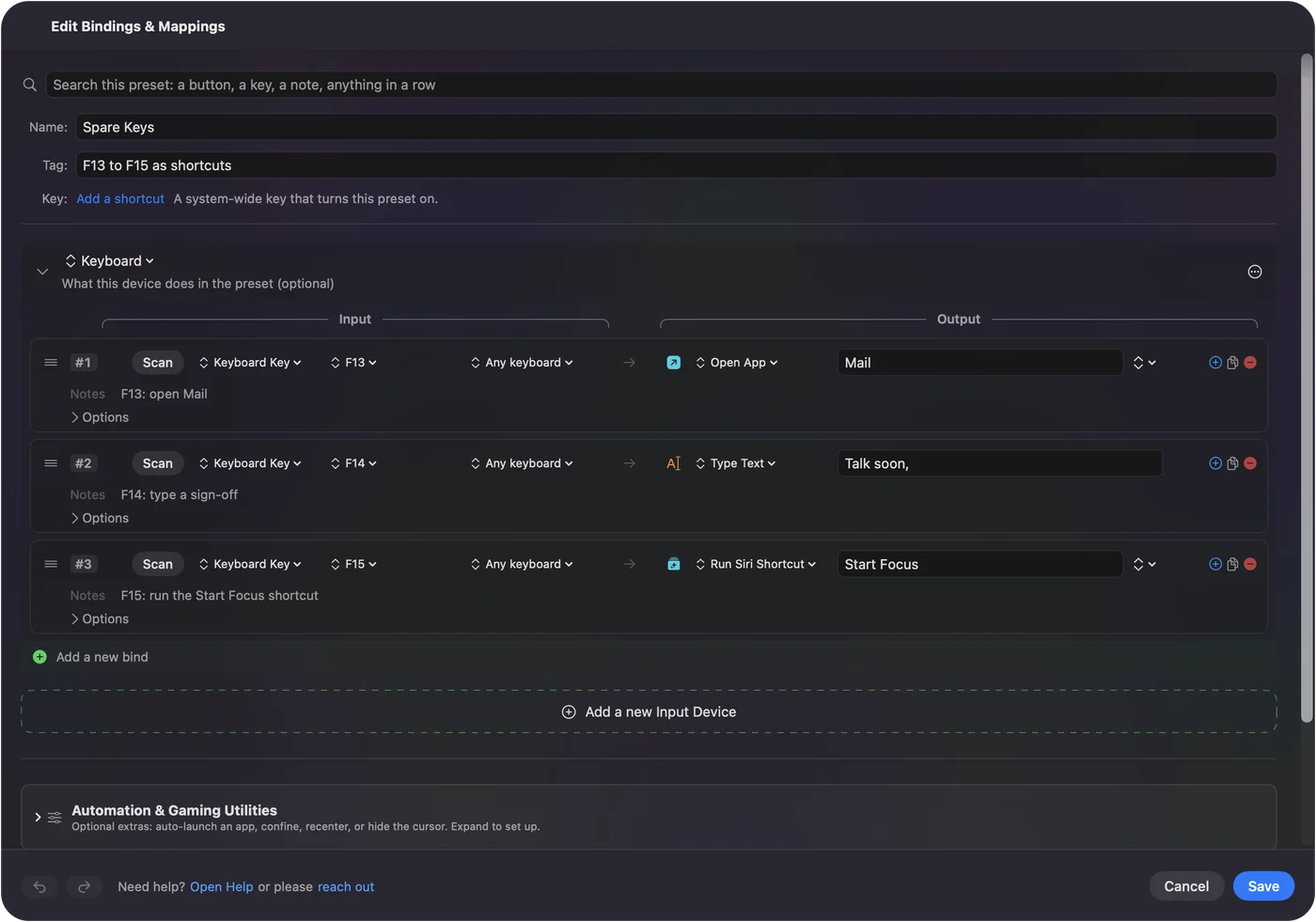
F13 to F19 keys on a Mac explains the idea.
Find out what each grid button sends
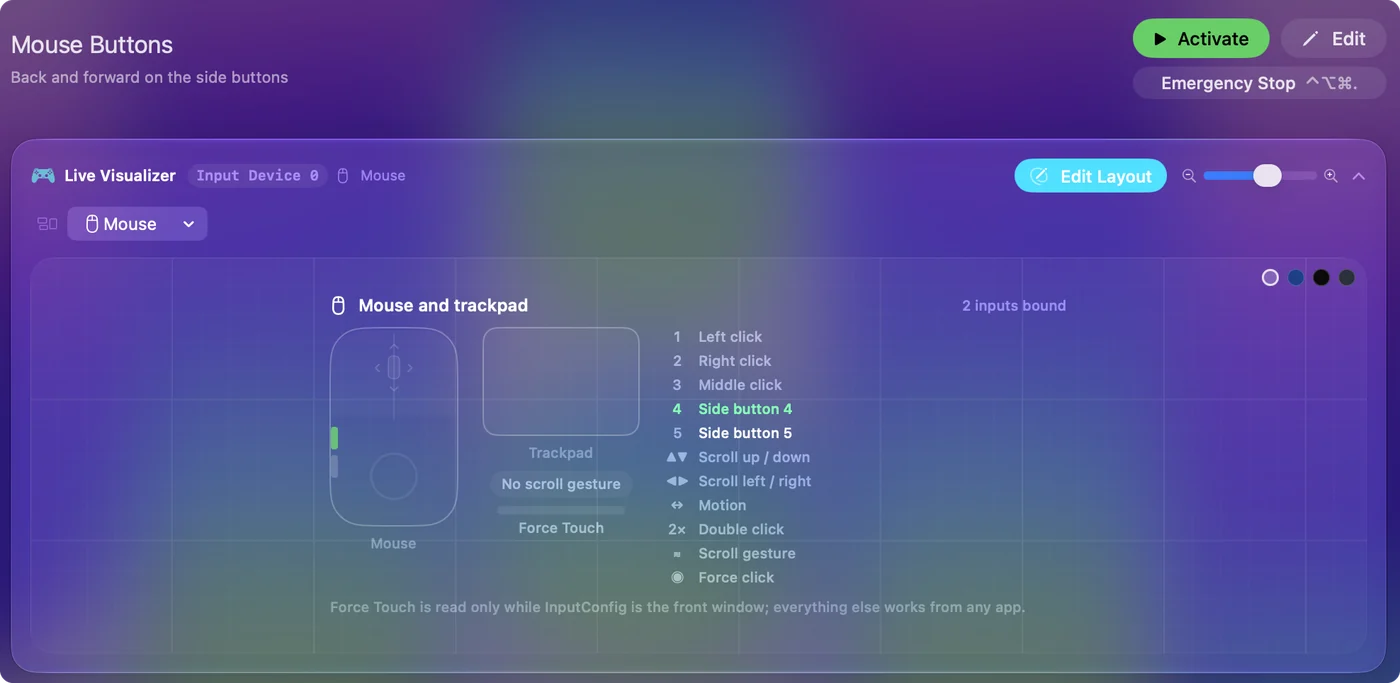
- You: Open InputConfig, add a row, set it to Keyboard Key, press Scan and press a grid button.
- InputConfig: Names the key it sees, such as F13 or 1.
- Check: If a grid button reports 1, it still types a 1. Change it in the mouse's software.
The buttons that report as mouse buttons, such as a thumb rest button, appear as Button 4 and up. A panel of 12 may mix both.
Bind the grid
- You: Add a Keyboard Key row, press Scan, press the grid button, and then choose the output.
- InputConfig: Runs that output each time you press that button.
- Check: Press the grid button in a text box. Nothing should type, and the job should run.
Outputs are Keyboard Key with modifiers, Type Text, a macro, System Function, Run Siri Shortcut, mouse clicks, scrolling, and MIDI. Once the grid sends F13 to F20, every button is free to assign.
Lay out a grid for World of Warcraft
The grid works as a hotbar. The best use I know of for it is to send the same keys you would press on the keyboard, so use InputConfig to send Keyboard Key outputs with modifiers.
- Buttons 1 to 4. Your main rotation keys, sent as the keys your bars already use.
- Buttons 5 to 8. Shift or Control versions of those keys, so one grid covers eight bar slots.
- Buttons 9 to 12. Targeting, mount and the map, or a macro that runs several of them.
- A hold action. One button can send a key on a tap and a modifier plus that key on a hold.
Each row can have a hold and a double tap, so twelve buttons give you thirty six jobs. Be careful in a game that detects injected input, and I have not tested every game.
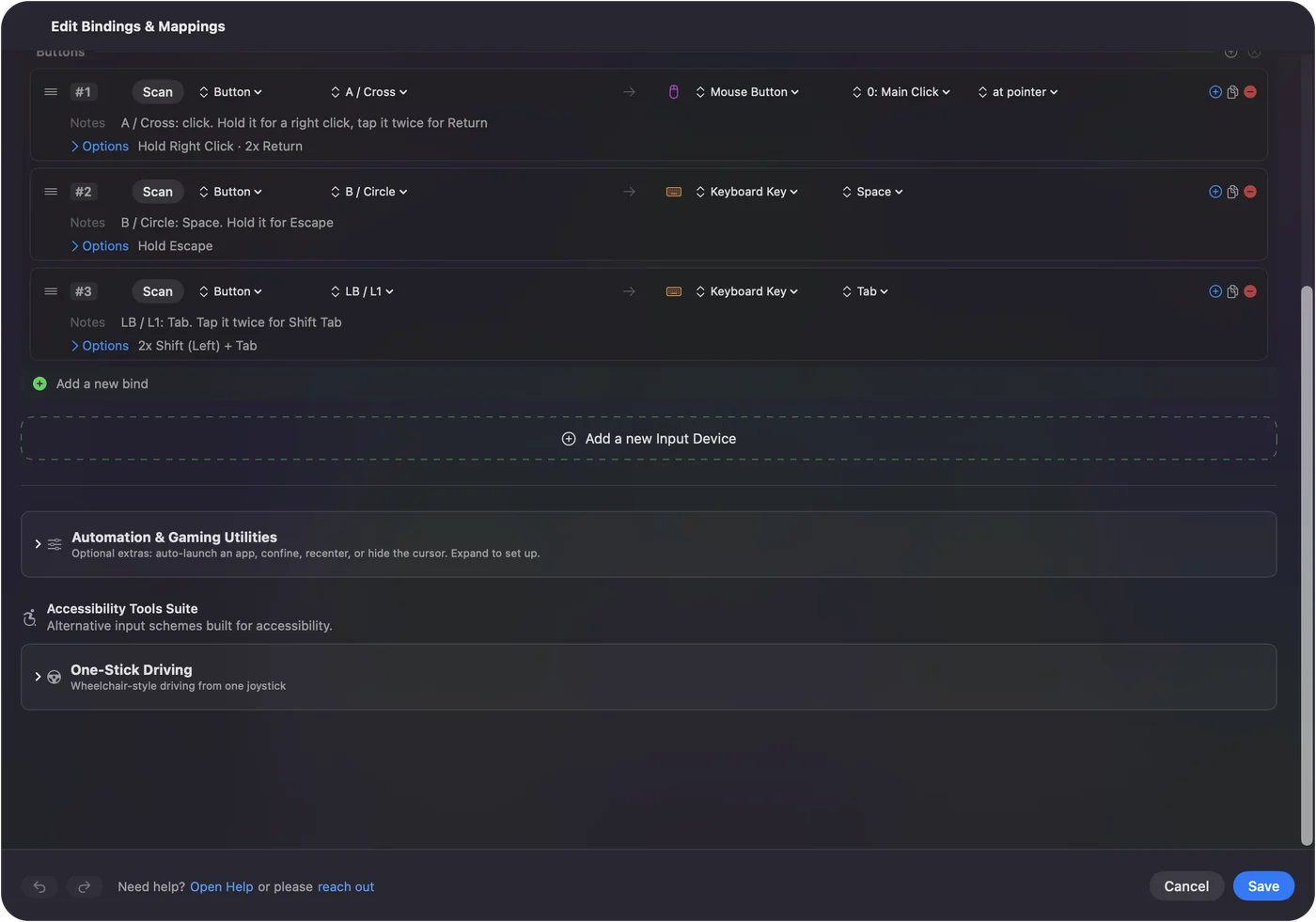
Lay out a grid for Final Fantasy XIV
FFXIV uses crossbar bars on a controller and hotbars on a keyboard, and the grid fits the hotbar. Put the keys of hotbar one on buttons 1 to 6 and hotbar two on buttons 7 to 12, and use a hold for the Shift bar. The MMO, MOBA and strategy games with a controller page has the controller version.
Let the layout follow the game, and use another preset for work.
Use the grid for work
- Editing. Copy, paste, undo, redo, cut, save and select all on buttons 1 to 7.
- Spreadsheets. Fill down, bold, currency and a macro for your most used formula.
- Writing. Type Text for signatures, addresses and canned replies.
- Mac control. Mission Control, Spotlight, a screenshot and Lock Screen.
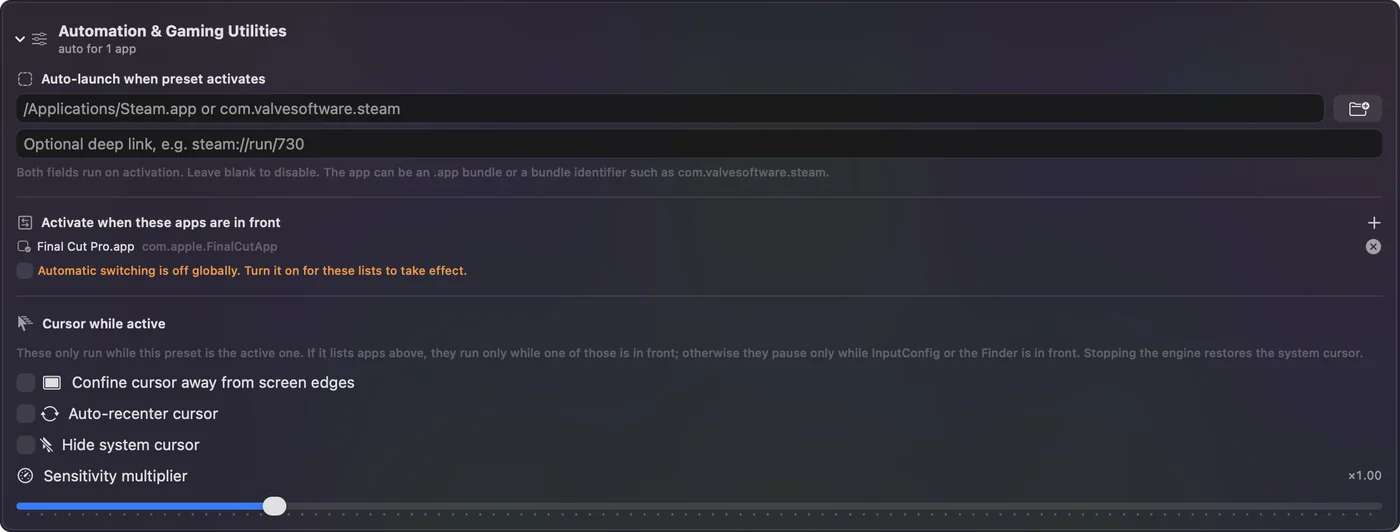
List the apps under Automation and Gaming Utilities, and turn on Switch presets when the front app changes in Settings, Advanced. Only one preset runs at a time.
If a grid button misbehaves
Climb this ladder, smallest step first:
- Scan it. See what it really sends.
- Check for a typed number. The profile still sends 1 to 0.
- Check the profile. If the mouse has onboard profiles, the wrong one may be active.
- Check Accessibility. System Settings, Privacy and Security, Accessibility must list InputConfig.
- Use the emergency stop. Control Option Command period turns the preset off.
- Look for a hidden mode button. Some mice have a small button that switches the side buttons to media keys or another stored layer, so a button can seem dead when the mouse is in a different mode. Press it once and Scan again.
What it cannot do
- Block a typed key. InputConfig listens to the keyboard and does not block or remap a key itself.
- Replace the maker's software. DPI, lighting and the profile stay there.
- Read buttons that send nothing. Profile and DPI buttons may stay in the mouse.
- Use F21 to F24. macOS does not pass them to apps.
The short version
- Grid. Set it to F13 to F20 in the mouse's software.
- Bind. InputConfig gives each key any job.
- Layouts. One for the game, one for work.
The grid is yours as soon as it types nothing.
Questions
Do MMO mice work on a Mac?
As mice, yes. The thumb grid usually sends number keys, so it types until you change it in the mouse's software.
How do I bind a Naga thumb grid on a Mac?
Set the grid to F13 through F20 in Razer's software, saved to the mouse, then bind those keys in InputConfig.
Does the Logitech G600 work on a Mac?
Yes. Logitech's page lists macOS 10.11 or later, and G HUB is optional but gives full programming.
Can I use an MMO mouse for World of Warcraft on a Mac?
Yes. Send the same keys as your hotbars from the grid, and use hold and double tap to get extra jobs per button.
Which keys should the grid send?
F13 to F20. They type nothing and apps can receive them. macOS does not pass F21 to F24 to apps.
Do I need the maker's software to use a thumb grid on a Mac?
Only once, to set the grid to F13 through F20 and save it to the mouse. After that InputConfig binds the keys, though software that is Windows only means doing that step on a PC.
Related
This page in other languages: العربية, Čeština, Dansk, Deutsch, Español, Suomi, Français, עברית, Magyar, Bahasa Indonesia, Italiano, 日本語, 한국어, Norsk, Nederlands, Polski, Português, ไทย, 繁體中文, 简体中文
Completely free. You don't have to make an account, there are no subscriptions, and nothing is locked. Optimized for Apple silicon. Open source on GitHub.
Updated