Does an ASUS ROG mouse work on a Mac?
 InputConfig is completely free on the Mac App Store. You don't have to make an account, there are no subscriptions, and nothing is locked. Optimized for Apple silicon.
Yes, as a mouse: an ASUS ROG mouse moves the pointer and clicks on a Mac over its cable, its 2.4 GHz dongle or Bluetooth, with nothing installed. Armoury Crate, ASUS's settings program, is built for Windows, and the Mac edition, Armoury Crate Gear for Mac, covers only a short list of devices. Of the mice people ask about, I found one on that list, the ROG Harpe Ace Aim Lab Edition, and none of the Keris, Gladius or Chakram models.
What a Mac can still do is give the buttons a job. I make InputConfig, a free Mac app that reads a mouse's extra buttons and binds each one. I have not tested an ROG mouse myself, so every ROG detail on this page comes from ASUS pages and reviews, and I say where I could not confirm something.
On this page: 12 sections
Steps
- Plug in the mouse, or pair it over Bluetooth, or use its 2.4 GHz dongle. The pointer and clicks work at once.
- Check ASUS's Armoury Crate Gear for Mac list for your model.
- If it is not listed, set DPI and button memory once on a Windows PC, since many ROG mice keep settings in the mouse.
- In InputConfig, add a row, press Scan and press each side button to see what arrives.
- Bind the buttons that scan, and save and activate the preset.
See which ROG mice have Mac software
ASUS's support page for Armoury Crate Gear for Mac, which I read on October 21, 2026, lists four devices: the ROG Azoth Extreme, the ROG Azoth, the ROG Falchion RX Low Profile and the ROG Harpe Ace Aim Lab Edition. The first three are keyboards. It asks for macOS 13.6 or later, has a separate Intel build, and asks for Bluetooth, Accessibility and Input Monitoring permissions. The page shows the Intel build for the Harpe Ace as coming soon.
| Mouse | What I found | Mac software |
|---|---|---|
| ROG Keris Wireless AimPoint | Five programmable buttons, tri-mode | Not on the Gear for Mac list |
| ROG Gladius III Wireless AimPoint | Six programmable buttons, tri-mode | Not on the list |
| ROG Harpe Ace Aim Lab Edition | Five programmable buttons, tri-mode | On the list, with device configuration added in v1.4.11 |
| ROG Chakram X | 11 programmable buttons, an analog joystick, tri-mode | Not on the list |
The button counts come from ASUS listings that I read in a search on October 21, 2026, so check your model's page before relying on them. RTINGS' review of the Chakram Core says that mouse has no customization software for macOS and that its joystick is unsupported there. Only one ROG mouse that I found has Mac software, so plan for the rest to be set up elsewhere.
Know what works with nothing installed
- Pointer, clicks and wheel. Any ROG mouse is a normal mouse to macOS.
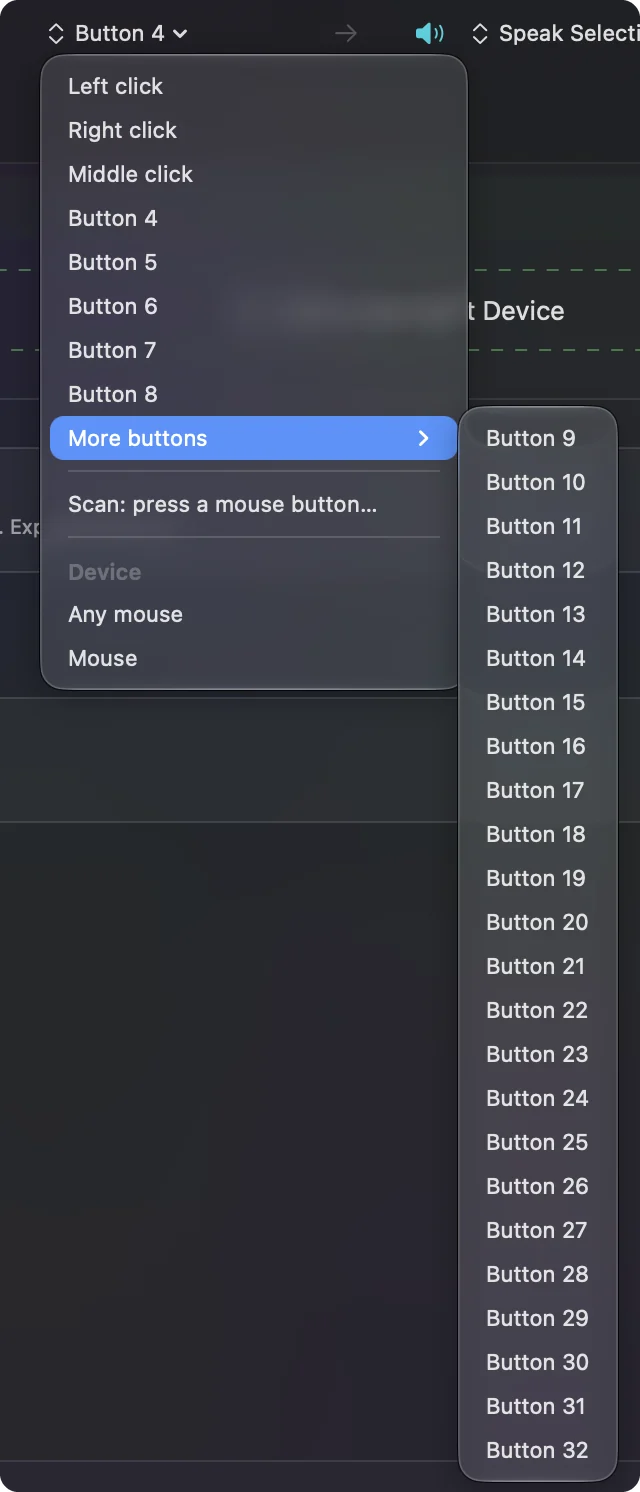
- Side buttons. They should arrive as Button 4 and Button 5, and press Scan to confirm.
- DPI and lighting. The DPI button works inside the mouse. A Mac has no way to change the steps or the lighting.
- Settings stored in the mouse. I could not confirm that every ROG model keeps profiles onboard, so test one change on your own model first.
ASUS says macOS needs its Gear for Mac app for the listed devices, and for the rest I found nothing from ASUS at all. If your mouse is not listed, set it up on a Windows PC once and see whether the settings stay.
Find out what each button sends
Open InputConfig, add a row, press Scan and click each button once. The Chakram family is the one with surprises, because its joystick and its extra buttons are far from a plain mouse.
| Control | What to expect | What I would do |
|---|---|---|
| Left, right and wheel click | Left click, Right click and Middle click | Bind the wheel click if you want, and leave the others |
| Two thumb buttons | Probably Button 4 and Button 5 | Scan to confirm, then bind |
| Extra side buttons on a Chakram X or Gladius | Button numbers, or nothing | Scan each one. Anything that scans can be bound |
| Chakram joystick | I could not confirm what it sends on a Mac | Press Scan and push it each way. If rows appear, bind them. If not, the mouse keeps it for Armoury Crate |
| DPI or profile button | Often nothing the Mac sees | If Scan stays blank, a Mac app cannot read it |
I say "expect" because I have not scanned these mice. A button that talks only to Armoury Crate sends nothing to macOS, so nothing scans and no app can read it. Press Scan on everything and let that decide, not the box.
Bind the buttons
- You: Add a row, choose Mouse, press Scan and click the button. Then pick an output: a key with modifiers, Type Text, a macro, a System Function or a Siri Shortcut.
- InputConfig: Names the button, such as Button 5, and runs the output whenever you press it.
- Check: Click Save and Activate, press the button in an app, and watch the job happen.
For the thumb buttons, Back and Forward are the default job: Command [ and Command ] work in Safari, Finder and many apps. For Gladius-style side buttons, Mission Control and Show Desktop are good picks because nothing else on a Mac uses those buttons. Ticking Block the button's own action for a side button stops an app from seeing it twice.
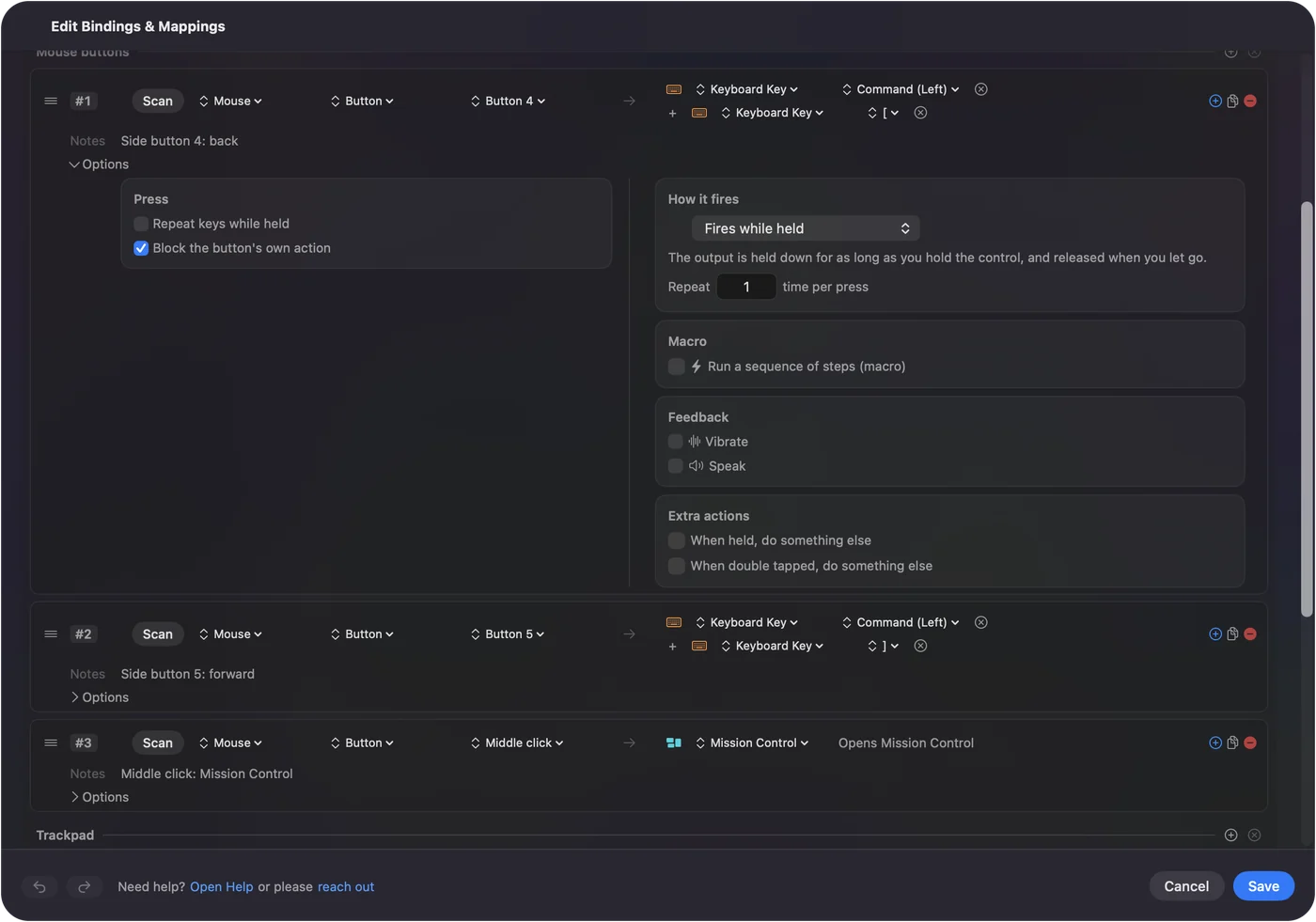
Need the basics first? Mouse side buttons on a Mac has the full walk-through.
Use a Chakram joystick and extra buttons
The Chakram X is the one that makes people ask. It has an analog joystick under the thumb and, per ASUS, 11 programmable buttons. In Armoury Crate the joystick can be set to a few jobs. On a Mac I could confirm nothing about what it sends, and RTINGS says it is unsupported for macOS on the Core.
- If the joystick scans. Each direction becomes its own row, and arrows or a pair of Spaces shortcuts are a natural fit.
- If it does not scan. Then the mouse sends nothing a Mac can see, and setting it up on a Windows PC to send keys is the only route.
- Set keys to F13 to F20. If a button sends a key, move it to F13 to F20 in Armoury Crate on Windows and bind those. F21 to F24 do not reach apps on macOS.
InputConfig listens to the keyboard alongside macOS, so a button that sends a plain key still types it. Move the button to F13 to F20 and the typing stops. See F13 to F19 on a Mac.
Macros, hold and per-app layouts
- A macro. In a row's Options, tick Run a sequence of steps (macro) and add key, shortcut and click steps, each with a wait and a hold time. Copy, wait and paste on one button is the classic.
- Hold and double tap. Every row can have both, so one thumb button carries three jobs.
- Repeat while held. Hold a button to keep stepping through tabs or frames.
- A second control. Use While also holding to build a combo, such as a side button plus the wheel click.
- Per app. List apps in a preset under Automation & Gaming Utilities and it follows the app in front.
Mouse macros on a Mac and different actions per app go further.
Ideas for ROG mouse owners
- An FPS player on a Mac. Keep the mouse buttons the game reads as they are, and put quick-save or push to talk on the side buttons only in the apps that need them.
- A Chakram X in a drawing app. Undo and redo on the side buttons, a brush-size key on a second one.
- A Keris for travel. With so few buttons, give each a hold action so five buttons do ten jobs.
- A dual setup. If one mouse is shared with a Windows PC, the settings stored in the mouse follow it, while InputConfig jobs stay on the Mac.
Games that read the mouse directly will still see the raw button, so test in the game itself.
If a button does nothing
Climb this ladder, smallest step first:
- Scan the button. If it records a Button number, the Mac receives it and the issue is the preset.
- Check it is not a profile or DPI button. Those often stay inside the mouse.
- Activate the preset and check Accessibility. System Settings, Privacy & Security, Accessibility must list InputConfig.
- Quit other mouse tools. SteerMouse, LinearMouse and Mac Mouse Fix may already be using the button.
- Set it up on Windows. If the button sends a key you do not want, change it to F13 to F20 in Armoury Crate once.
If Scan stays blank, the button is for Armoury Crate only.
What it cannot do
InputConfig does not change DPI, polling rate, lighting or the tracking feel, and it does not run Armoury Crate profiles. It cannot read a button that sends nothing to macOS. It also cannot give two mice different jobs for the same button. Use Armoury Crate on a Windows PC, or Gear for Mac if your model is on the list, for the mouse itself.
The short version
- Works. Pointer, clicks and wheel on any ROG mouse.
- Software. Armoury Crate is Windows software, and Gear for Mac covers only a few devices, one of them a mouse.
- Buttons. Scan, bind, and set stubborn buttons to F13 to F20 on Windows.
Scan every button first, because what arrives decides what you can do.
Questions
Does Armoury Crate work on a Mac?
Not the Windows program. ASUS has Armoury Crate Gear for Mac, but its list had only four devices when I read it in October 2026, and the only mouse was the ROG Harpe Ace Aim Lab Edition.
Does the ROG Chakram work on a Mac?
As a mouse, yes. RTINGS reports that the Chakram Core has no macOS customization software, and its joystick is unsupported there.
How do I use ROG mouse side buttons on a Mac?
Press Scan in InputConfig and click each button. Any that scan can send Back, Forward, a shortcut or a macro.
Can I set up an ROG mouse on Windows and use it on a Mac?
That is the usual workaround for mice that store settings onboard, but I could not confirm which ROG models do. Try one setting and check it on the Mac.
Is there ROG Keris software for Mac?
I did not find any on ASUS's Gear for Mac list. The Keris works as a mouse, and its buttons can be bound by a mapper.
Related
This page in other languages: العربية, Čeština, Dansk, Deutsch, Español, Suomi, Français, עברית, Magyar, Bahasa Indonesia, Italiano, 日本語, 한국어, Norsk, Nederlands, Polski, Português, ไทย, 繁體中文, 简体中文
Completely free. You don't have to make an account, there are no subscriptions, and nothing is locked. Optimized for Apple silicon. Open source on GitHub.
Updated