How to give a mouse different button actions in each app on a Mac
 InputConfig is completely free on the Mac App Store. You don't have to make an account, there are no subscriptions, and nothing is locked. Optimized for Apple silicon.
Yes, a mouse can do a different job in each app on a Mac, if you use InputConfig, the free app I make. You make one preset per app, list the app inside it, and turn on automatic switching, so the same thumb buttons are undo in Photoshop, cut and marker in Final Cut Pro, back and forward in Safari and a reload key in a game.
The idea is the same as per-app keyboard shortcuts, and this page applies it to a mouse. The button side is in mapping extra mouse buttons.
On this page: 9 sections
How a preset follows the app in front
A preset is a set of buttons and what they do. A preset can also name the apps it belongs to. Only one preset runs at a time, and with automatic switching on, the app in front decides which one.
When you leave a listed app for one with no preset, the preset you had before comes back. That makes one everywhere preset the home, and every app a copy of it that changes a few rows.
Set up the switching
Step 1: Turn on switching
- You: Open Settings, Advanced, and turn on Switch presets when the front app changes.
- InputConfig: Starts watching which app is in front. It is off until you turn it on.
- Check: The switch shows on. Nothing moves until a preset lists an app.
Step 2: Build the everywhere preset
- You: Add the mouse as an input, scan Button 4, Button 5 and any other buttons you use, and give them jobs you want everywhere, such as back and forward. Click Activate.
- InputConfig: Runs that preset when no app has its own.
- Check: Press the buttons in the Finder and the jobs run.
Step 3: Copy it for an app
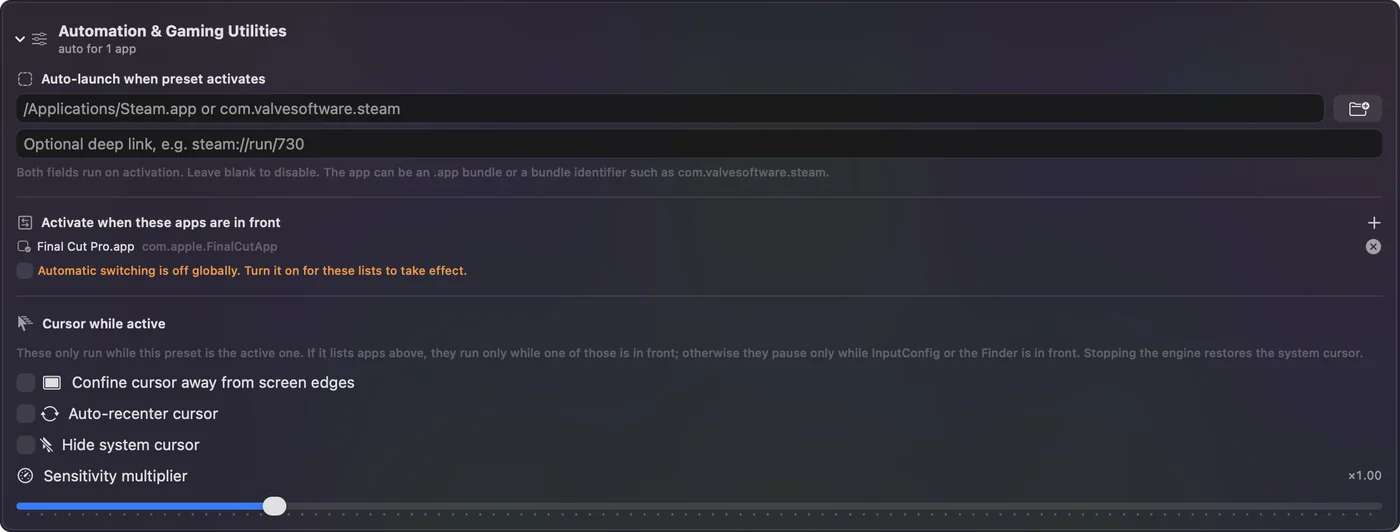
- You: Right-click the preset in the sidebar and choose Duplicate. Rename the copy after the app. Change the rows that should differ. Then open Automation & Gaming Utilities in the copy and, under Activate when these apps are in front, press the plus button and pick the app.
- InputConfig: Switches to the copy when the app comes to the front, and back when you leave.
- Check: Switch between the app and another one. The activity log in the main window records each switch and the app that caused it.
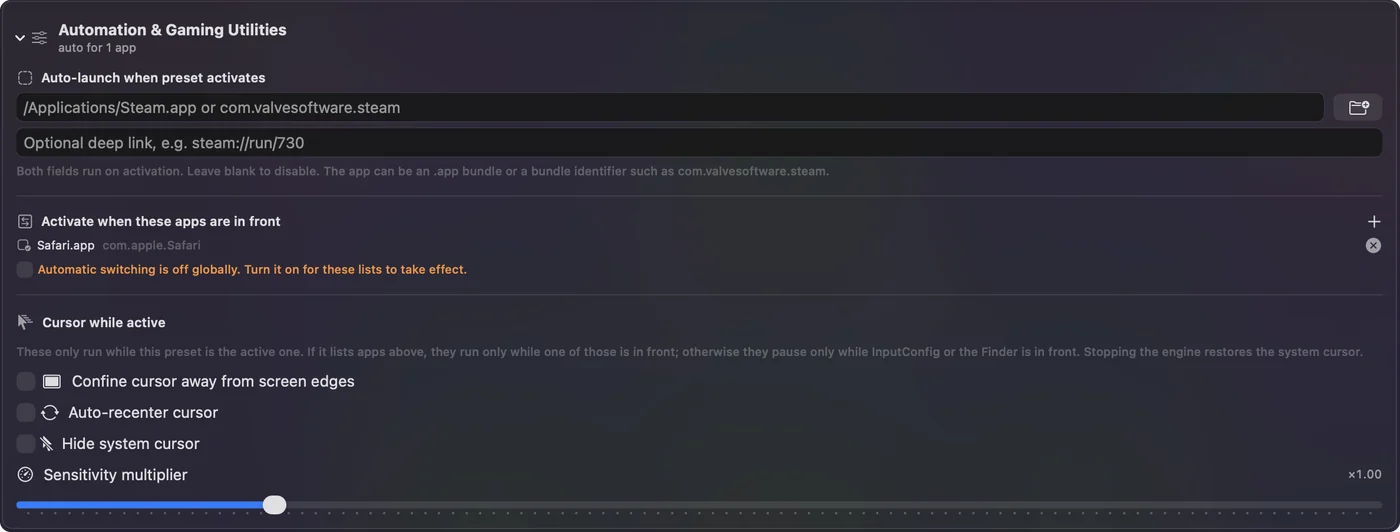
Keep the rows you want everywhere in each copy, because only one preset runs at a time and a copy does not borrow from the home preset.
Four layouts for the same mouse
These are layouts I would start from. I checked the Final Cut Pro shortcuts against Apple's keyboard shortcuts page on October 21, 2026. The Photoshop and Premiere Pro ones are Adobe's usual defaults, so I would still check each against the app's own menu, because an app can change them.
| Button | Everywhere | Photoshop | Final Cut Pro or Premiere | A game |
|---|---|---|---|---|
| Button 4 | Command left bracket (back) | Command Z (undo) | Command Z (undo) | Reload |
| Button 5 | Command right bracket (forward) | Option Command Z (step backward) | Shift Command Z (redo) | Push to talk |
| Middle click | Mission Control | X (swap colors) | M (add marker) | Ping or an ability |
| A higher thumb button | Command W | Command 0 (fit on screen) | B (blade tool in Final Cut Pro) or C (razor tool in Premiere Pro) | A second ability |
Both editors can also cut at the playhead without changing tools: Command B in Final Cut Pro and Command K in Premiere Pro. A held button or a single press of that is steadier than switching tools. The game column is deliberately plain. I do not know your game's keys, so put the keys that game lists. If a game reads the mouse directly, test the button in a menu first.
Photoshop, Premiere, Final Cut and Safari in practice
- Photoshop. Undo and step backward on the thumb buttons, and the bracket keys, which resize a brush, on the buttons you can reach without lifting the pen hand. A held button can switch to a tool and release back, with a hold action.
- Premiere or Final Cut. Cut and marker on the thumb buttons mean the hand on the mouse never goes back to the keyboard during a rough cut. The Final Cut Pro example on per-app keyboard shortcuts uses B for the blade and M for a marker.
- Safari. List Safari, Chrome and Firefox in one preset. Back, forward, close tab and reopen the last closed tab cover most of a browsing day.
- A game. Games can need the pointer in their menus. Pick the game's own app in the app list, not the launcher, and read the guard-the-pointer notes in per-app auto-switch.
Block the old job in each copy
An app can have its own idea of a thumb button, and InputConfig listens alongside macOS. In each copy, open the row's Options and tick Block the button's own action for a side or middle button, so an app that already goes back on Button 4 does not do it twice. The setting is per row, so you can leave it off in an app where you want the old job too.
Switching presets changes which rows run, and Block is the part that keeps the app out of the way.
If the layout does not switch
Climb this ladder, smallest step first:
- Check the switch. Settings, Advanced, Switch presets when the front app changes must be on.
- Check the app list. The app must be under Activate when these apps are in front. For a Steam game, list the game's own app, not Steam.
- Check for a duplicate. If two presets list the same app, the one higher in the sidebar wins.
- Read the activity log. It records every automatic switch and the app that caused it.
- Pick by hand. A preset you choose by hand stays until you change it, and the automatic return is off for that visit.
What it cannot do
- Switch by website. It follows the app in front, not the tab. Use a browser only for the site if you need that.
- Give two mice different jobs. Every mouse connected counts as one.
- Run two presets at once. Only one runs, so each copy needs the rows you want everywhere.
The short version
- One home preset. With no apps listed.
- One copy per app. With the app in the list.
- Switching on. In Settings, Advanced.
Set it up once, and the same buttons change jobs every time you change apps.
Questions
Can a mouse button do different things in different apps on a Mac?
Yes. In InputConfig, make a preset per app, list the app in the preset, and turn on Switch presets when the front app changes.
How do I make Photoshop use different mouse buttons than Safari?
Build two presets, list Photoshop in one and Safari in the other, and give the same buttons different outputs in each.
What happens when I leave the app?
The preset you had before comes back, so an everywhere preset with no apps listed works as the fallback.
Does it work in full-screen games?
The switch happens when the game becomes the front app. For a Steam game, list the game's own app, not Steam.
Related
This page in other languages: العربية, Čeština, Dansk, Deutsch, Español, Suomi, Français, עברית, Magyar, Bahasa Indonesia, Italiano, 日本語, 한국어, Norsk, Nederlands, Polski, Português, ไทย, 繁體中文, 简体中文
Completely free. You don't have to make an account, there are no subscriptions, and nothing is locked. Optimized for Apple silicon. Open source on GitHub.
Updated