How to use mouse buttons in Excel and Google Sheets on a Mac
 InputConfig is completely free on the Mac App Store. You don't have to make an account, there are no subscriptions, and nothing is locked. Optimized for Apple silicon.
The jobs worth putting on a mouse button in a spreadsheet are the ones you do between cells: undo, redo, fill down, fill right and moving to the next sheet. Neither Excel nor Google Sheets has a mouse button setting, so a button presses the shortcut key instead. InputConfig, the free Mac app I make, scans any mouse button and sends a key or a whole shortcut, and it can follow Excel as the front app. This app is completely free, and you do not have to make an account.
The keys come from Microsoft's Excel keyboard shortcuts page and Google's Sheets keyboard shortcuts page, which I read on October 21, 2026. Sheets runs in a browser, which changes the per-app part, and I explain how below.
On this page: 10 sections
What Excel, Sheets and macOS give a mouse
Both apps read the left button, the right button and the wheel. Excel is a Mac app, so a preset can follow it. Google Sheets is a web page, so the app in front is Safari or Chrome, and a preset that follows Chrome follows every tab in it. That is the one thing to plan around.
Many Mac mice send Button 4 and Button 5 as back and forward, which in a browser leaves the spreadsheet and goes to the previous page. That is a nasty surprise in the middle of a long sheet, and it is the first reason to bind these buttons yourself. In Sheets the side buttons can be the dangerous ones, so block them or give them a spreadsheet job.
Find out what each button sends
A mouse button reaches the Mac as Left click, Right click, Middle click or Button 4 and up. Press Scan, then click the button. If Scan names a key instead of a mouse button, the mouse is sending a key, and the fix is on F13 to F19 on a Mac.
| Button | How it usually reports | A good spreadsheet job |
|---|---|---|
| Left click and right click | Left click and Right click | Leave them. They cannot be blocked. |
| Wheel press | Middle click | Fill down, or Paste values only. |
| Side buttons | Button 4 and Button 5 | Undo and redo, or previous and next sheet. |
| Thumb grid or extra buttons | Button 6 and higher | Fill right, Find, Paste Special. |
| Tilt wheel | Sideways scroll | Scroll across wide sheets. See the tilt wheel page. |
| DPI or profile button | Often nothing the Mac can read | Nothing. If Scan hears no press, no app can read it. |
The tilt wheel page covers sideways scrolling, which is the other thing a spreadsheet mouse is good for.
Put the shortcuts on the buttons
Step 1: Scan and give it undo
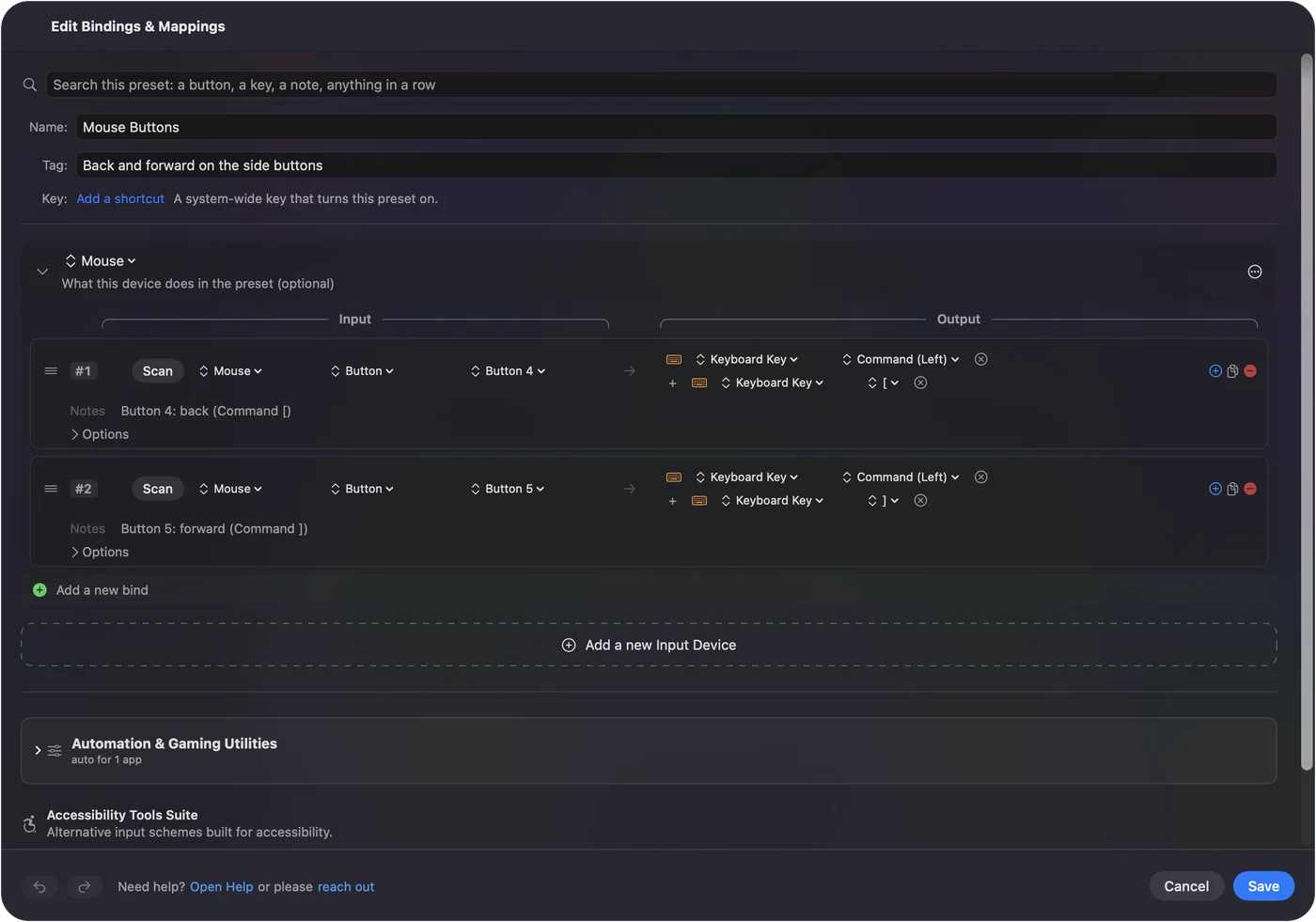
- You: Add a row, set the device to This Mac's mouse or trackpad, the input to Mouse and the kind to Button, then press Scan and click the side button. Set the output to Keyboard Key, pick Command under Modifier Keys, click the plus button and add Z.
- InputConfig: Presses Command Z each time you press the button.
- Check: Type something in a cell, press the button, and the entry goes away.
Step 2: Stop the old job
- You: Open the row's Options and tick Block the button's own action in the Press box.
- InputConfig: While the preset runs, apps stop seeing that button.
- Check: In a browser, the button no longer goes back a page.
| Job | Excel on a Mac | Google Sheets on a Mac |
|---|---|---|
| Undo | Command Z | Command Z |
| Redo | Command Y or Shift Command Z | Command Y or Shift Command Z |
| Fill down | Command D | Command D |
| Fill right | Command R | Command R |
| Next sheet | Option Right Arrow | Option Right Arrow on a MacBook, Option Down Arrow otherwise |
| Previous sheet | Option Left Arrow | Option Left Arrow on a MacBook, Option Up Arrow otherwise |
| Paste special or paste values | Command Control V opens Paste Special | Shift Command V pastes values only |
| Fill a selected range | Not on this list | Command Return |
| Find and replace | Shift Command H | Shift Command H |
Microsoft's page also lists Control Page Down for the next sheet, and the Option arrows are the ones it gives alongside for a Mac. If one pair does nothing on your keyboard, try the other.
Macros and multi-step jobs
A macro is a row with Run a sequence of steps ticked, and each step is a key, a shortcut or a click with its own wait. Three that suit a spreadsheet:
- Fill down, then fill right. Command D, a short wait, then Command R. Select a block first, and it copies the top row and the left column across it.
- Copy, then paste values. Command C, then Shift Command V in Sheets. Select the destination before you press it.
- Today's date and on. Sheets lists Command semicolon for the date. Add Tab as the next step to land in the next cell.

I have not run these in Excel or Sheets myself, so try each on a copy of a sheet. A macro that fills cells overwrites them, so test it where the overwrite is harmless.
Hold, repeat, tap twice and switch by app
- A tap and a hold. Undo on the tap and redo on the hold. A quick tap sends the normal output, and holding past a time you set sends something else.
- Repeat keys while held. For stepping through sheets, a held button keeps pressing. For undo it can walk back further than you meant, so leave it off.
- Double click. A row of the kind Double click fires on the second click of a pair. It suits the wheel press for fill down.
- Block the button's own action. Available for the middle button and the side buttons.
For Excel, open the preset's Automation & Gaming Utilities section, add Excel under Activate when these apps are in front, and in Settings, Advanced, turn on Switch presets when the front app changes. Only one preset runs at a time, so each app gets its own preset.
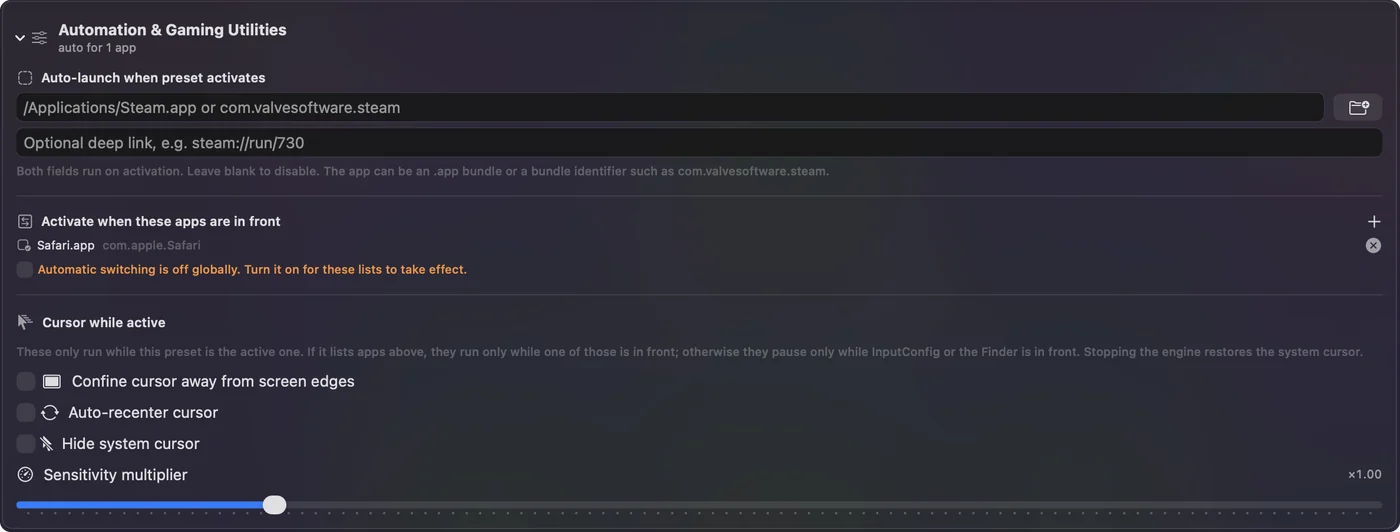
For Sheets, I would not use a per-app preset for the browser at all, because Command Y and Command D do other things in other tabs. A preset you turn on when you work on spreadsheets and off afterward is safer. The emergency stop is Control Option Command period. In a browser, a spreadsheet layout is live in every tab, so keep it for the hours you need it.
Layouts for the mouse you have
- A thumb grid mouse. Undo, redo, fill down and fill right on the first row, sheet moves and Find on the second.
- A trackball. The ball positions the cell cursor. The small buttons do undo and redo.
- A vertical mouse. Two side buttons: undo and redo, or previous and next sheet if you live in a workbook.
- A mouse for data entry. A hold on the wheel press can type a repeated word with the Type Text output, such as a status you enter all day.
Undo and redo first, then fill down.
If a button does nothing in Excel or Sheets
Climb this ladder, smallest step first:
- Check the preset is on. Click Activate, and make sure the app in front is the one the preset follows.
- Check Accessibility. In System Settings, Privacy & Security, Accessibility.
- Click a cell. Many spreadsheet shortcuts need the grid in focus, not the formula bar or a dialog.
- Try the other key. Redo has two keys and sheets have two pairs. Try the second if the first does nothing.
- Check the Scan. If the button scans as a key, set it to F13 to F20 in the maker's software first.
- Quit the maker's software. Logi Options+ and similar apps can take a button over.
What it cannot do
- Read the sheet. InputConfig sends keys, clicks and scrolls. It cannot read a cell or know which sheet is open.
- Follow a single browser tab. A preset follows the app in front, and Chrome is one app for all its tabs.
- Tell two mice apart. Every mouse connected counts as one device.
- Change scroll feel. Scroll speed and direction are macOS, the maker's app, or LinearMouse, Mac Mouse Fix and SteerMouse.
The short version
- Keys, not buttons. Command Z, Command Y, Command D and Command R work in both apps.
- Block the browser buttons. A Back button in Sheets leaves the page, so block it or rebind it.
- Follow the app, with care. Excel can follow its own preset. Sheets lives in the browser, so use a preset you switch on yourself.
Undo and redo on the two side buttons is the change I would make first.
Questions
Can I use mouse side buttons for undo in Excel on a Mac?
Yes. Scan the button in InputConfig and give it Command Z, with Command Y or Shift Command Z for redo on the other. Tick Block the button's own action so the button stops doing its old job.
How do I switch sheets in Excel with a mouse button?
Give one side button Option Right Arrow and the other Option Left Arrow, which Microsoft lists for the next and previous sheet on a Mac. Control Page Down and Control Page Up are the other pair.
Why does my mouse back button leave Google Sheets?
In a browser, Button 4 is usually back, so it goes to the previous page. Bind the button to a spreadsheet shortcut in InputConfig and block its original action.
What is the shortcut for fill down on a Mac?
Command D in both Excel and Sheets. Command R fills right.
Can a preset follow only the Google Sheets tab?
No. A preset follows the app in front, and a browser is one app for all its tabs, so turn the layout on yourself when you need it.
Related
This page in other languages: العربية, Čeština, Dansk, Deutsch, Español, Suomi, Français, עברית, Magyar, Bahasa Indonesia, Italiano, 日本語, 한국어, Norsk, Nederlands, Polski, Português, Русский, Slovenčina, Svenska, ไทย, Türkçe, Українська, Tiếng Việt, 繁體中文, 简体中文
Completely free. You don't have to make an account, there are no subscriptions, and nothing is locked. Optimized for Apple silicon. Open source on GitHub.
Updated