How to give one mouse button three jobs on a Mac
 InputConfig is completely free on the Mac App Store. You don't have to make an account, there are no subscriptions, and nothing is locked. Optimized for Apple silicon.
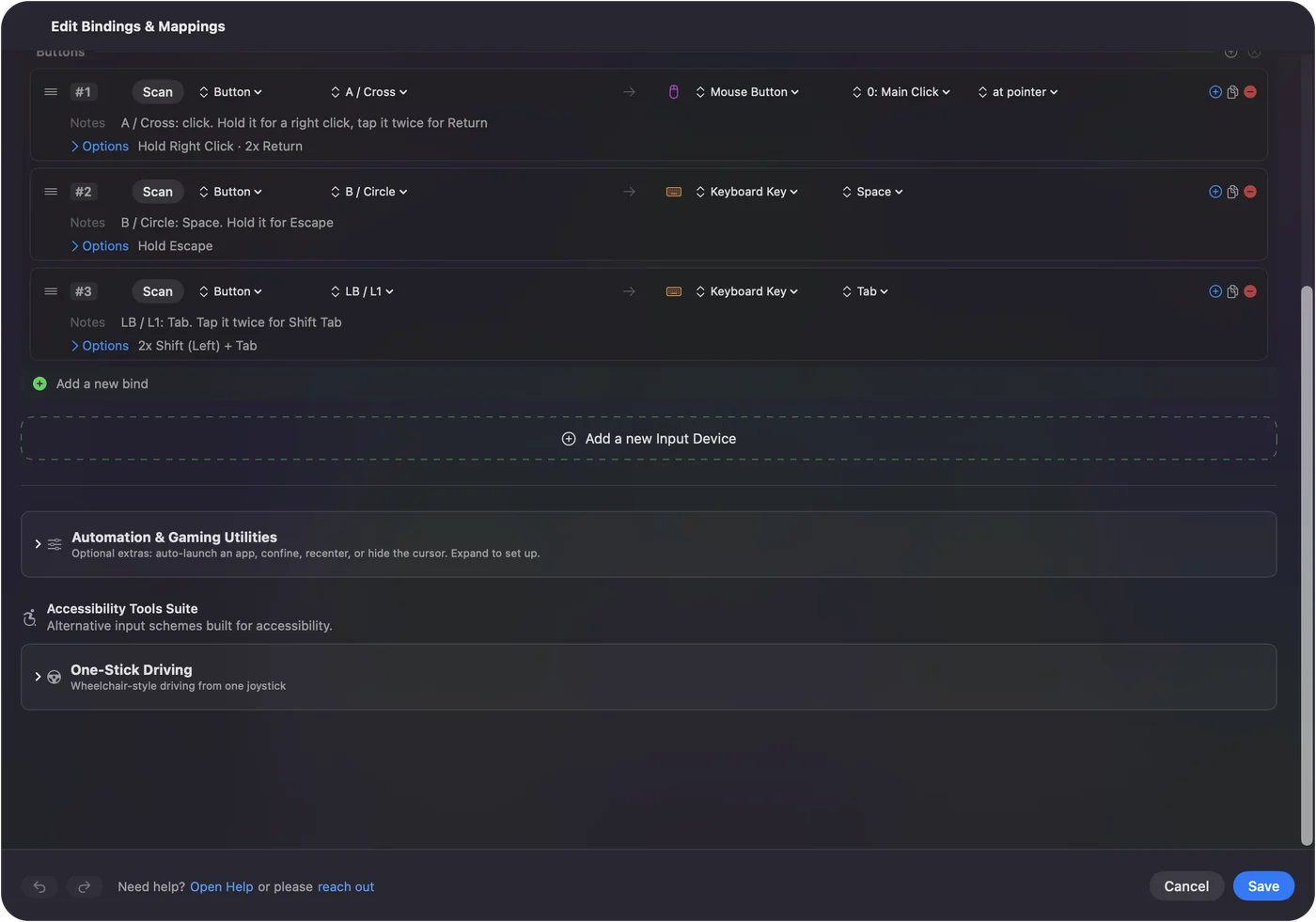
You can give one mouse button three jobs on a Mac with InputConfig, the free app I make: one job on a quick press, another when you hold it, and a third when you double tap it. Each row in the editor can carry a hold action and a double tap action, and each one is a full output of its own.
Pressing several keys at once is hard for my hands, so this is one I use. A mouse has a handful of buttons, and three jobs on each of two thumb buttons is six, with no extra reach. The background is in hold and double tap, and this page is the mouse version.
On this page: 10 sections
Two ways to get a double click from a mouse
InputConfig offers two different things that sound alike, and picking the right one saves a lot of confusion.
- The Double click input kind. A Mouse row of the kind Double click fires on the second click of a pair. A single click keeps doing what it always did, so nothing is delayed. The built-in Double Click Deck preset shows it.
- The double tap action. Any button row can have When double tapped, do something else in its Options. It waits for a possible second press inside a window you set, so it works on a side button, which has no system double click.
Use the Double click kind for the clicks the Mac already understands, and the double tap action for a button that has none.
Add a hold action to a mouse button
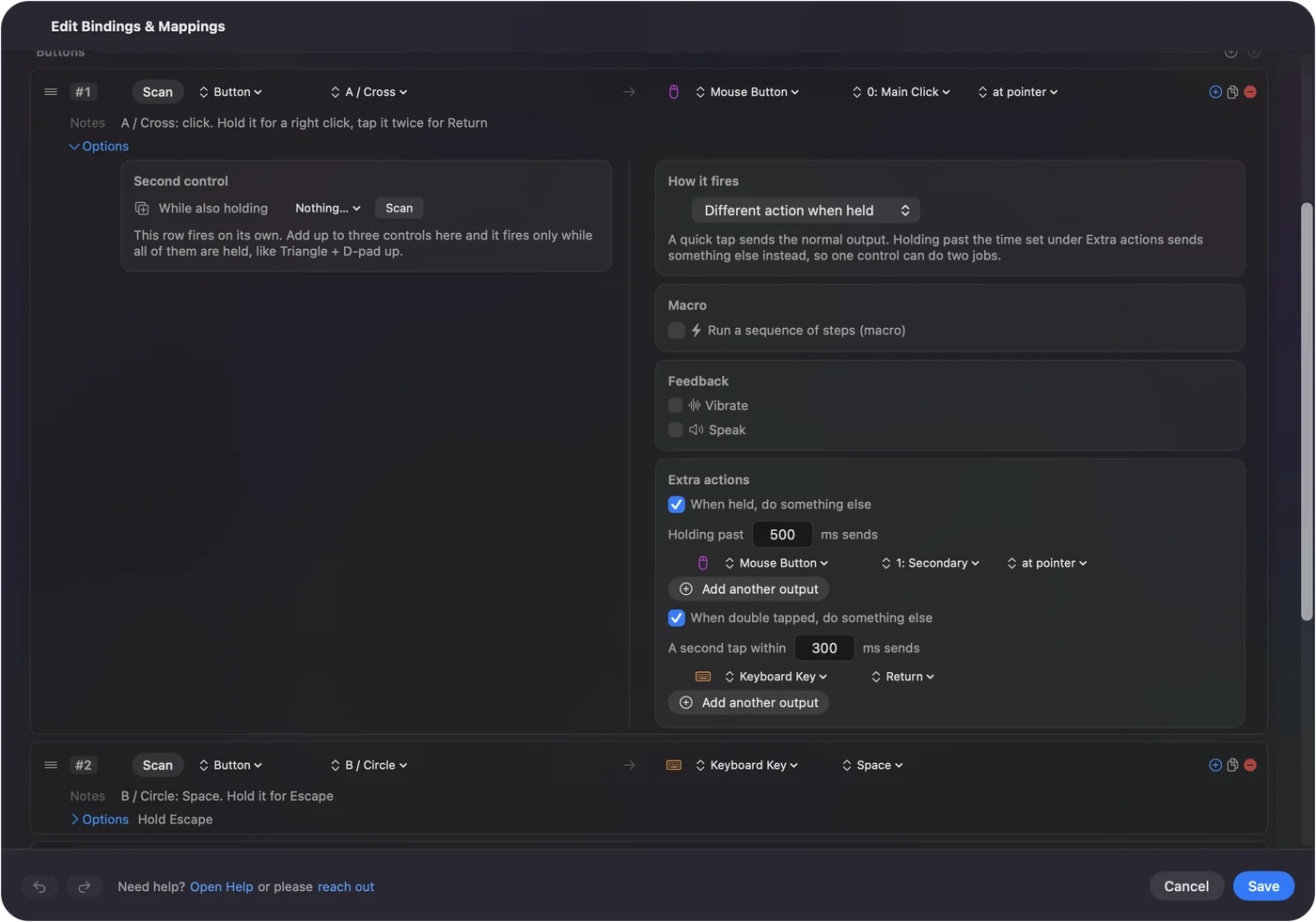
- You: Scan the button, give it its normal output, open Options, and under Extra actions tick When held, do something else. Set the hold time and pick the hold output, which can be any output or several.
- InputConfig: Sends the normal output on release for a press shorter than the hold time, and the hold output instead for a press past it.
- Check: Tap the button and the normal output fires. Hold it past the time and the hold output fires.
400 to 600 ms feels natural to me. Go longer for a button you press by accident, because a longer time is the cure for a hold that fires when you did not mean it.
Add a double tap action
- You: Under Extra actions, tick When double tapped, do something else, set the window and pick the output.
- InputConfig: Waits for a possible second press. Two presses inside the window fire the double tap output.
- Check: Double tap the button and the double tap output fires. A single press fires when the window closes, not at once.
250 to 350 ms suits most hands, and a longer window helps a hand that moves slowly. Every double tap row delays its single press by the window, so keep the window as short as your hand allows.
Three jobs on a mouse that work
| Button | Press | Hold | Double tap |
|---|---|---|---|
| Button 4 | Back (Command left bracket) | Mission Control | Close the tab (Command W) |
| Button 5 | Forward (Command right bracket) | Start Dictation | Reopen a closed tab (Shift Command T) |
| Middle click | Whatever the wheel press already does | Play or pause the music | Screenshot of an area |
| A higher thumb button | Command Z | Command Shift Z | Command S |
Pick jobs that belong together. Undo, redo and save is a family. A hold that quits or closes should be something you can undo, because a hold is the likeliest to fire by accident.
Make it comfortable and safe
- Block the old job. On a side or middle button, tick Block the button's own action, so an app does not also react to the press.
- Guard the big ones. Put Command Q or a close on the hold, not on the press.
- Leave the left click alone. A hold or a double tap on the left button delays every click. Use the Double click kind there, or leave it alone.
- Combine with a second control. Hold, double tap and While also holding can all sit on one row.
Find your own timing
The numbers on this page are where I would start, not rules. Hands differ, and so do mice, because a light switch under a thumb button takes less effort than a stiff one. Change the hold time or the window by 100 ms at a time, test each of the three jobs, and keep the numbers that never misfire for a day of real work. A hold that you have to think about is too long, and a double tap that sometimes counts as two single presses needs a longer window.
If the hold or double tap misbehaves
Climb this ladder, smallest step first:
- Lengthen the hold time. A hold that fires by accident needs 600 ms or more.
- Shorten the double tap window. If a single press feels slow, the window is too long.
- Check the preset is on. Rows do nothing until you click Activate.
- Scan again. The button may be a key in disguise. Set it to F13 to F20 in the maker's software, then scan the F key.
- Check the click speed. Accessibility, Pointer Control, Double-click speed is the system setting. The double tap window in the row is separate.
What it cannot do
- A macro on a hold. A row with a macro has no hold action. Give the macro its own row, as in mouse macros.
- Turbo and toggle on the same row. Other press modes do not combine with a hold or a double tap, so put them on a separate row.
- An instant single press. A button with a double tap action waits for the window before it fires. A hold repeats only when Repeat keys while held is on.
The short version
- Hold. A different action when held, 400 to 600 ms.
- Double tap. A different action when double tapped, 250 to 350 ms.
- Double click kind. For the left button, with no delay.
Three jobs on one button is often the difference between a layout that fits your hand and one that does not.
Questions
Can one mouse button do three things on a Mac?
Yes. In InputConfig a row can have its normal output, a hold action and a double tap action, each a full output of its own.
What is the difference between the Double click kind and the double tap action?
The Double click kind fires on the second click of a pair and delays nothing. The double tap action waits for a second press inside a window you set, so it also works on side buttons.
How long should the hold time be?
I would start at 400 to 600 ms and go longer for a button you press by accident.
Can a hold action run a macro?
No. A row with a macro has no hold action, so put the macro on its own row.
Related
This page in other languages: العربية, Čeština, Dansk, Deutsch, Español, Suomi, Français, עברית, Magyar, Bahasa Indonesia, Italiano, 日本語, 한국어, Norsk, Nederlands, Polski, Português, ไทย, 繁體中文, 简体中文
Completely free. You don't have to make an account, there are no subscriptions, and nothing is locked. Optimized for Apple silicon. Open source on GitHub.
Updated