Questions
How to get a real double click from an auto clicker on a Mac
Yes, a Mac can double click from one press. In InputConfig, set Repeat to 2 on a click row left on Fires while held, and the two clicks go out as a true double click that opens a file. An auto clicker run is the opposite, on purpose: every click is a single click, so a fast run never opens files or selects words by accident.
Mac apps tell a double click from two single clicks by a count that each click carries, and the app sending the click sets it. That is why the two jobs need two different settings.
On this page: 8 sections
Steps
- Install InputConfig from the Mac App Store and allow Accessibility access.
- Click Add a new bind, press Scan and press the control you want to double click with.
- Set the output to Mouse Button and leave its button on 0: Main Click, the left button.
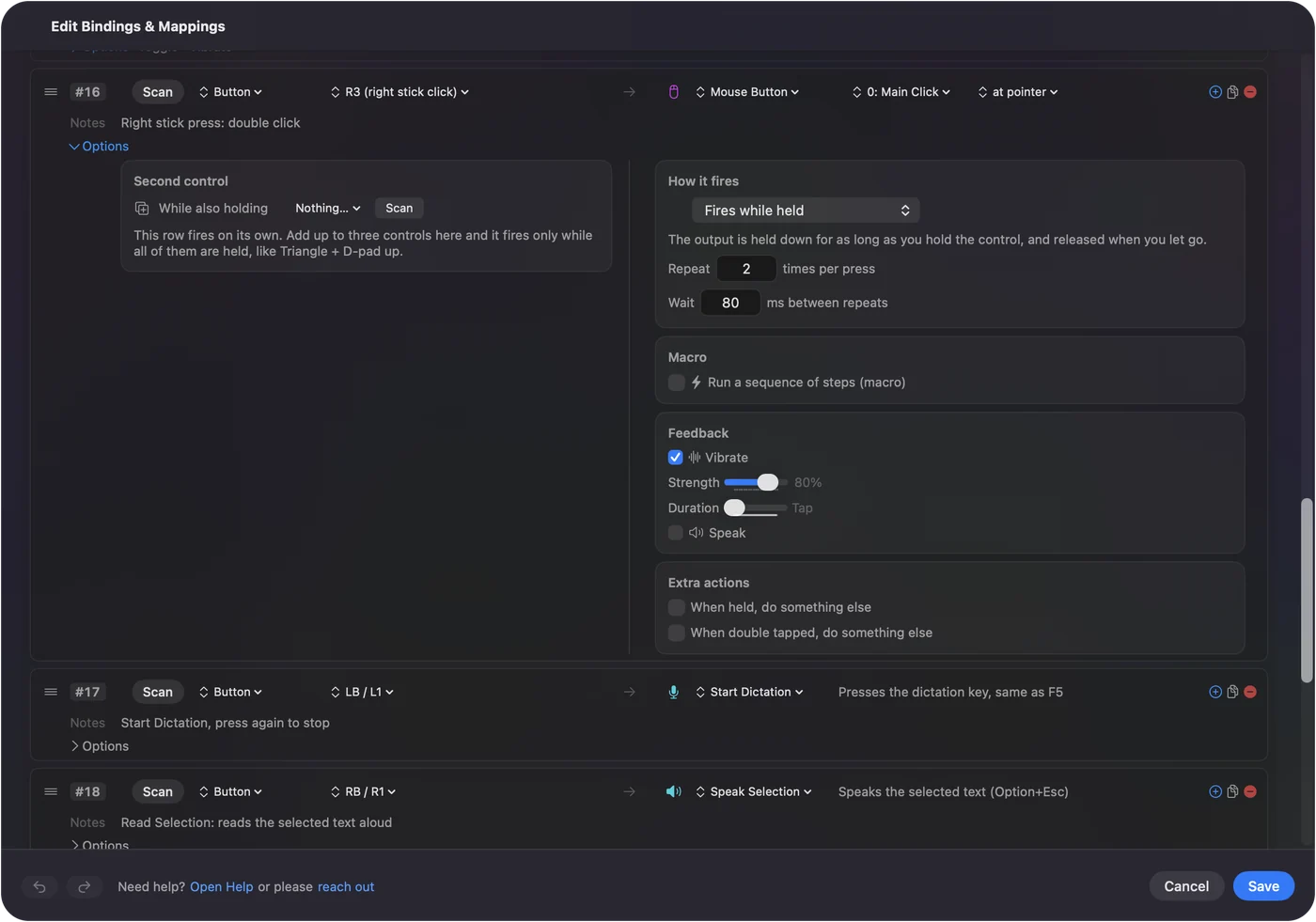
- In Options, leave How it fires on Fires while held and set Repeat to 2 times per press.
- Leave Wait at 100 ms, then save, close the editor and activate the preset.
- Point at a file in the Finder and press the control once, and the file opens.
Know why an auto clicker run never double clicks
Each click a Mac app receives carries a number: 1 for a single click, 2 for the second click of a double click, 3 for a triple. Apps read that number. InputConfig counts an ordinary click as the next one of a pair only when it is the same button, inside the Mac's double-click speed, and within 4 points of the last click.
- Repeating rows. Every click from Repeats until pressed again or Repeats while held goes out as click 1, however fast the run. A 10-a-second run over a file in the Finder selects it and never opens it.
- After a run. The next ordinary click starts fresh too, so it never becomes the second half of a double click with the run's last click.
- Double clicks on purpose. New in 1.6, the clicks InputConfig sends carry that count, so a Double click row or two quick presses of a click row open a file the way a mouse does.
A run of single clicks is what an auto clicker should send, so that is what it sends.
 InputConfig is free on the Mac App Store. macOS 14 or later, no account, no tracking, open source.
Send a real double click from one press
- You: On a click row left on Fires while held, set Repeat to 2. The Wait field appears; leave it at 100 ms.
- InputConfig: Sends two clicks for each press, each held for 50 ms with the Wait between them, and marks the second one as the second click of a double click.
- Check: Point at a file in the Finder and press once. The file opens, exactly as it would from a double click on the mouse.
- Keep the Wait short. Both clicks have to land inside the Mac's double-click speed, set in System Settings, Accessibility, Pointer Control. A 100 ms Wait is well inside it unless the speed is set very fast.
- Keep the pointer still. The two clicks must land within 4 points of each other, which they do unless something moves the pointer between them.
- Repeat 3. A triple click, which selects a whole line or paragraph in most text.
- Repeat 4 and up. A string of single clicks, so a Repeat of 10 cannot open a file ten times over.
Repeat 2 is a double click, Repeat 3 a triple, and anything more is single clicks.
Use a double click as the trigger
Sometimes the job is the reverse: a double click of a spare mouse button should do something. That is an input, not an output.
- Double Click Deck. The built-in Double Click Deck preset opens Mission Control on a double click of side button 4, Launchpad on side button 5, and Spotlight on the middle button.
- A single click keeps its job. A Double click input fires on the second click of a pair, so a single click still does what it always did, with no wait.
- On a controller. Controller buttons, keys and MIDI pads have a double tap of their own. See hold and double tap.
A double click on a spare button is a free shortcut that costs the button nothing.
If the double click opens nothing
Climb this ladder, smallest step first:
- Find the Repeat field. It shows only on a row left on Fires while held with no hold or double-tap action, or on a row that runs a macro. On a repeating or toggled row it is hidden, because those modes do not use it.
- Shorten the Wait. If the Mac's double-click speed is set fast, two clicks 150 ms apart can miss it. Try a Wait of 50 ms.
- Keep the pointer still. If a stick or a fixed point on another row moves the pointer between the two clicks, they count as two single clicks.
- Close the editor and check the permission. Test with the editor closed, and if the menu bar icon is orange, the running preset needs Accessibility.
If one press selects the file but does not open it, the Wait is too long for the Mac's double-click speed.
What it cannot do
- Double click on a timer. There is no repeating double click mode. A repeating row sends single clicks, and Repeat fires only when you press, so the closest thing is pressing a Repeat 2 control each time.
- Change the Mac's double-click speed. That is a macOS setting, in System Settings, Accessibility, Pointer Control.
- Stop another app's clicks from pairing up. Only clicks InputConfig sends are counted this way.
The short version
- A run. Always single clicks, so it never opens files by accident.
- A double click from one press. Fires while held, Repeat 2, Wait 100 ms.
- A double click as a trigger. The Double Click Deck preset, or a Double click input of your own.
Use a repeating row to click many times and Repeat 2 to double click once.
Single clicks and double clicks also have a part in the full auto clicker guide.
Questions
Why does my auto clicker open files instead of just clicking?
It is sending clicks that count up into double clicks. InputConfig's repeating rows send every click as a single click, so a run selects a file without opening it.
How do I make one button double click on a Mac?
In InputConfig, give a row a Mouse Button output on 0: Main Click, leave it on Fires while held, and set Repeat to 2 times per press. Each press sends a real double click.
Can it auto double click over and over?
No. There is no repeating double click mode; a Repeat 2 row double clicks once for each press.
Can one press triple click?
Yes. Set Repeat to 3. Four or more repeats go out as single clicks.
What decides whether two clicks are a double click?
The click count each click carries, set by the app that sends it. InputConfig counts up only for the same button, inside the Mac's double-click speed, within 4 points.
Related
Free. macOS 14 or later. No account, nothing leaves your Mac. Open source on GitHub.