How to assign a keyboard shortcut to a mouse button on a Mac
 InputConfig is completely free on the Mac App Store. You don't have to make an account, there are no subscriptions, and nothing is locked. Optimized for Apple silicon.
To assign a keyboard shortcut to a mouse button on a Mac, scan the button in InputConfig, the free app I make, and give its row the output Keyboard Key with the keys of the shortcut. One press of the button then sends the whole shortcut, such as Command W or Command Shift 4. macOS has no setting for this, because its shortcut list only binds keys.
The general version, for any button, pedal or pad, is a keyboard shortcut on one button. This page is about the mouse: which button to use, what to do about its old job, and which shortcuts earn the spot.
On this page: 10 sections
What macOS offers and what it does not
macOS can change its own keyboard shortcuts in System Settings, Keyboard, Keyboard Shortcuts, and on some mice, Desktop & Dock, Shortcuts puts Mission Control, Application windows or Show Desktop on a button. That is the whole list. It cannot make a mouse button press Command Z or any other chord.
Putting a chord on a button is the job of a mapper, and this is the case I use mine for most.
Pick the mouse button that carries the shortcut
Not every button is a good home. InputConfig listens alongside macOS, so the button keeps its old job and gets a second one on top, and a button that does nothing is the best choice. Here is how I would rank them:
| Button | How good it is | Why |
|---|---|---|
| Button 4 and Button 5 | Best | The side buttons. Many apps use them for back and forward, and you can block that. |
| Button 6 and higher | Excellent | A thumb grid or extra buttons that no app uses. |
| Middle click | Good | The wheel press. Block the original if you do not want a new tab or autoscroll. |
| Scroll wheel and tilt | Good | Works as an input too. See scroll wheel shortcuts. |
| Left click and right click | Avoid | They cannot be blocked, so every normal click would also fire the shortcut. |
If you are not sure how a button reports, press Scan and see. A button that sends a key instead of a mouse button needs to be set to F13 to F20 in the mouse's own software first, and F13 to F19 on a Mac explains why.
Put the shortcut on the button
Step 1: Scan the button
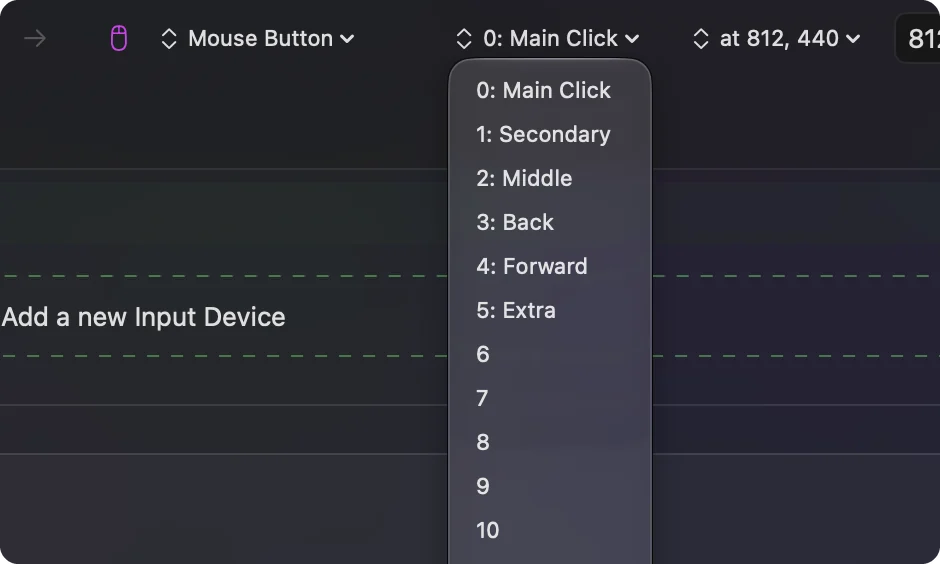
- You: Add a row, set the device to This Mac's mouse or trackpad, the input to Mouse and the kind to Button, then press Scan and click the button.
- InputConfig: Names it, for example Button 5.
- Check: The row shows the button's name.
Step 2: Add the keys
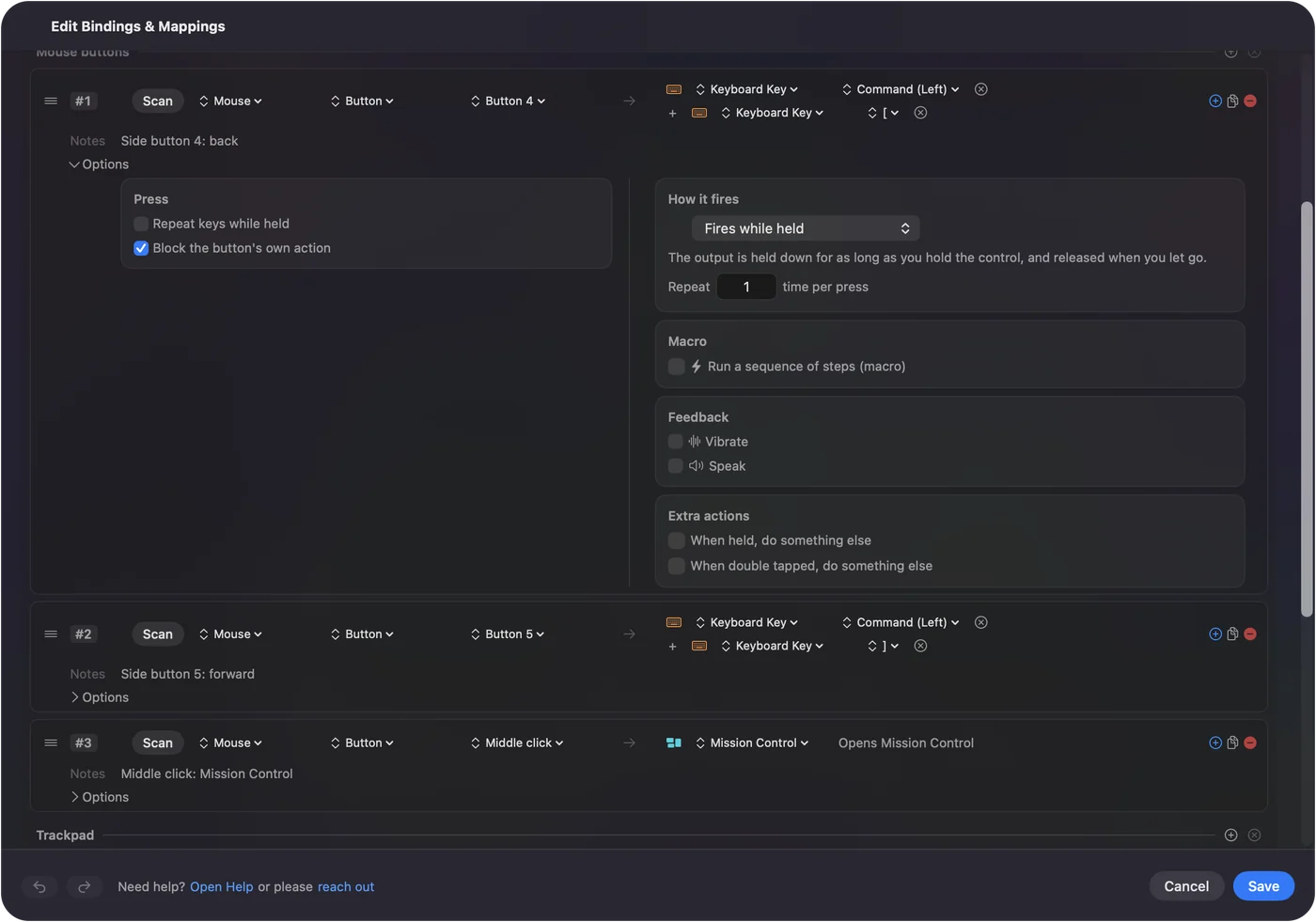
- You: Set the output to Keyboard Key and pick Command under Modifier Keys. Click the plus button on the row and pick the letter. For a third key, such as Command Shift 4, click the plus button again.
- InputConfig: Presses the keys together each time you press the button.
- Check: The row lists the outputs in order, the modifiers first and the letter last.
Step 3: Stop the old job
- You: Open the row's Options and, in the Press box, tick Block the button's own action.
- InputConfig: While the preset runs, apps stop seeing that button.
- Check: In a browser, press the button once. It should do the shortcut and nothing else, instead of going back and running the shortcut.
Shortcuts worth putting on a mouse button
| Button | Shortcut | What it does |
|---|---|---|
| Button 4 | Command left bracket | Back in Safari, Chrome and the Finder |
| Button 5 | Command right bracket | Forward in the same places |
| A thumb button | Command W | Close the tab or window |
| A thumb button | Command Z | Undo |
| The wheel press | Shift Command T | Reopen the last closed tab in a browser |
| A thumb button | Command Shift 4 | A screenshot of an area |
Some common jobs need no keys at all. Mission Control, volume, a screenshot and the media keys are in the System Function list, so use them instead of remembering the chord.
Keep a dangerous shortcut safe
A thumb button is easy to catch by accident, and Command Q or Command W costs more when you do. There are two guards:
- A hold. Put the risky shortcut on the row's hold action, so a quick press does something harmless and a long press quits or closes. See double click and hold actions on a mouse button.
- A combo. Use While also holding, so the shortcut only fires while a second control is down.
Pair two buttons that belong together
Shortcuts come in families, and a mouse has buttons in pairs. Back and forward are one pair, undo and redo another, and copy and paste a third. Put the two halves on neighboring buttons, such as Button 4 and Button 5, so your thumb learns them as one gesture. Keep the more dangerous half on the button that is harder to hit. A pair you can feel with your thumb, without looking, is the real test.
If the shortcut does nothing
Climb this ladder, smallest step first:
- Check the preset is on. Rows do nothing until you click Activate.
- Check Accessibility. In System Settings, Privacy & Security, Accessibility.
- Check the order. Put the modifier first and the letter last.
- Check the button scans. If Scan names a key, set the button to F13 to F20 in the maker's software, then scan the F key.
- Test in Notes or TextEdit. Some apps and games read keys before macOS does, so a plain app tells you whether the shortcut itself works.
What it cannot do
- Remove the old job without Block. A left or right click always keeps its own action.
- Tell two mice apart. Every mouse connected counts as one.
- Read private buttons. A DPI or profile button that never reaches the Mac cannot carry a shortcut.
The short version
- Scan. Name the button.
- Add the keys. The modifier first, then the letter, with the plus button.
- Block. The old job on a side or middle button.
Back and forward on Button 4 and Button 5 is the setup I would try first.
Questions
Can I assign a keyboard shortcut to a mouse button on a Mac?
Yes, with an app. In InputConfig, scan the mouse button, set the output to Keyboard Key, and add the modifier and the letter on one row.
Which mouse button is best for a shortcut?
The side buttons, Button 4 and Button 5, or any higher thumb button. Left and right click are poor choices because they cannot be blocked.
How do I stop a side button doing its old action as well?
Open the row's Options and tick Block the button's own action in the Press box. It works for the middle button and the side buttons.
Can one mouse button send Command Shift 4?
Yes. Add Command as the first output, click the plus button and add Shift, then add 4. They press together.
Related
This page in other languages: العربية, Čeština, Dansk, Deutsch, Español, Suomi, Français, עברית, Magyar, Bahasa Indonesia, Italiano, 日本語, 한국어, Norsk, Nederlands, Polski, Português, ไทย, 繁體中文, 简体中文
Completely free. You don't have to make an account, there are no subscriptions, and nothing is locked. Optimized for Apple silicon. Open source on GitHub.
Updated