How to put a keyboard shortcut on one button on a Mac
 InputConfig is completely free on the Mac App Store. You don't have to make an account, there are no subscriptions, and nothing is locked. Optimized for Apple silicon.
A shortcut such as Command Z takes two fingers, and Command Shift 4 takes three. InputConfig sends the whole shortcut from one press: a controller button, a mouse side button, a foot pedal, a MIDI pad or a spare key. You add the keys to one row and they are pressed together.
I make InputConfig, a free Mac app. Pressing two keys at once is hard for my hands, and this is the feature people ask me about most.
Steps
- Open a preset in InputConfig and click Add a new bind.
- Press Scan and press the button to use.
- Set the output to Keyboard Key and pick the modifier, such as Command.
- Click the plus button on the row and pick the second key, such as Z.
- Click Save and Activate.
Build the shortcut on one row
- You: Open a preset and click Add a new bind. Press Scan and press the button to use. Set the output to Keyboard Key and pick Command under Modifier Keys.
- You: Click the plus button on the row to add a second output, and pick Z.
- InputConfig: Presses Command and Z together each time you press the button.
- Check: Click Save and Activate, type a word in Notes, and press the button. The word is undone.
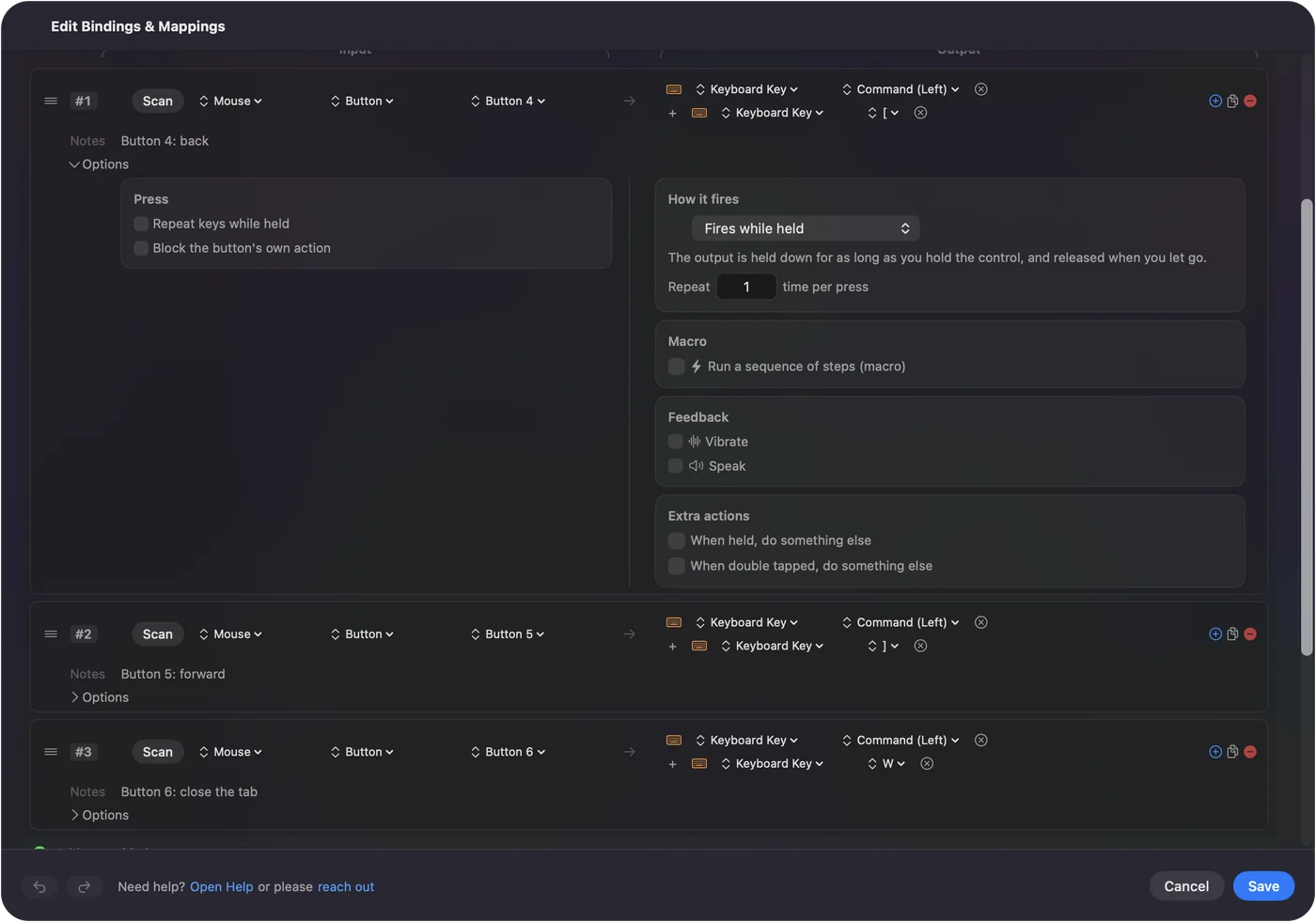
Add a third output for a three-key shortcut such as Command Shift 4.
Shortcuts people put on a button
| Shortcut | What it does |
|---|---|
| Command Z | Undo |
| Command C and Command V | Copy and paste |
| Command Q | Quit the front app |
| Command W | Close the window or tab |
| Command Tab | Next app |
| Command Space | Spotlight |
| Command Shift 4 | Screenshot of an area |
Some common ones need no keys at all: Mission Control, a screenshot, volume and the media keys are in the System Function list. See system functions.
Hold it to repeat
A row can repeat a held key the way a real keyboard does. Turn that on in the row's Options and a held Command Z button keeps undoing, because a key with modifiers repeats with them. Repeat a key from a button has the settings.
Keep a dangerous one safe
A shortcut like Command Q is easy to hit by accident on a button. Two ways to guard it:
- A combo. Make it fire only while another button is held. See button combos.
- A hold. Put it on the row's hold action, so a quick press does something harmless and a long press quits. See hold and double tap.
Give it a different job in each app
The same button can be undo in one app and something else in another. Tie a preset to an app and turn on automatic preset switching in Settings, Advanced. Per-app keyboard shortcuts walks through it.
If the shortcut does nothing
- Check Accessibility. InputConfig needs the Accessibility permission to press keys.
- Check the preset is running. Rows do nothing until you click Activate.
- Check the order. Put the modifier first and the letter last.
- Try another keyboard layout. Shortcuts in presets follow your keyboard layout, so Command A is select all on AZERTY and QWERTZ too.
The short version
- One row. A modifier as the first output, the key as the second, added with the plus button.
- Any input. Controller, mouse button, pedal, pad or a spare key.
- Guard the risky ones. With a combo or a hold.
Any shortcut you can press, one button can press for you.
Questions
How do I map Command Z to a controller button on a Mac?
In InputConfig, add a row for the button, set the output to Keyboard Key and pick Command, then click the plus button and add Z. The two are pressed together.
Can one button send a three-key shortcut?
Yes. Add a third output to the row. Command Shift 4 is three outputs on one row.
Can a mouse side button send a keyboard shortcut?
Yes. Mouse buttons, controller buttons, foot pedals, MIDI pads and spare keys can all send shortcuts.
Will holding the button repeat the shortcut?
It can. Turn on repeat for the row and a key with modifiers repeats with them, so a held undo button keeps undoing.
Related
Completely free. You don't have to make an account, there are no subscriptions, and nothing is locked. Optimized for Apple silicon. Open source on GitHub.
Updated