Questions
How to make a button repeat a key on a Mac
Tick Repeat keys while held on the row in InputConfig 1.6, and a held controller button repeats its key the way a held keyboard key does. For a faster or steadier repeat than the keyboard's, there is turbo.
In most mappers a held button sends the key once and keeps it down. Games want exactly that, which is why it is the default. For text, lists and undo you usually want the repeat.
On this page: 8 sections
Know why a held button sends one press
Key repeat is something macOS does for a keyboard: Delay until repeat and Key repeat rate in System Settings, Keyboard, decide how long it waits and how fast it goes. A key pressed by an app is held down as one press unless that app sends the repeats itself.
InputConfig holds a key for exactly as long as you hold the button and sends no repeats unless you ask, so W walks, Shift sprints and a held click drags the way a game expects.
 InputConfig is free on the Mac App Store. macOS 14 or later, no account, no tracking, open source.
Repeat like a keyboard key
New in 1.6. Install InputConfig from the Mac App Store and allow Accessibility access first.
- You: Add a row, press Scan, press the button, and set the output to Keyboard Key, for example Down or Backspace. Open the row's Options and tick Repeat keys while held, in the Press box, or in the Stick box on a stick row. Save, close the editor and activate the preset.
- InputConfig: Repeats the key after the Mac's own delay, at the Mac's own rate, marked as a repeat the way a keyboard marks it.
- Check: Hold the button in a text field and the key repeats.
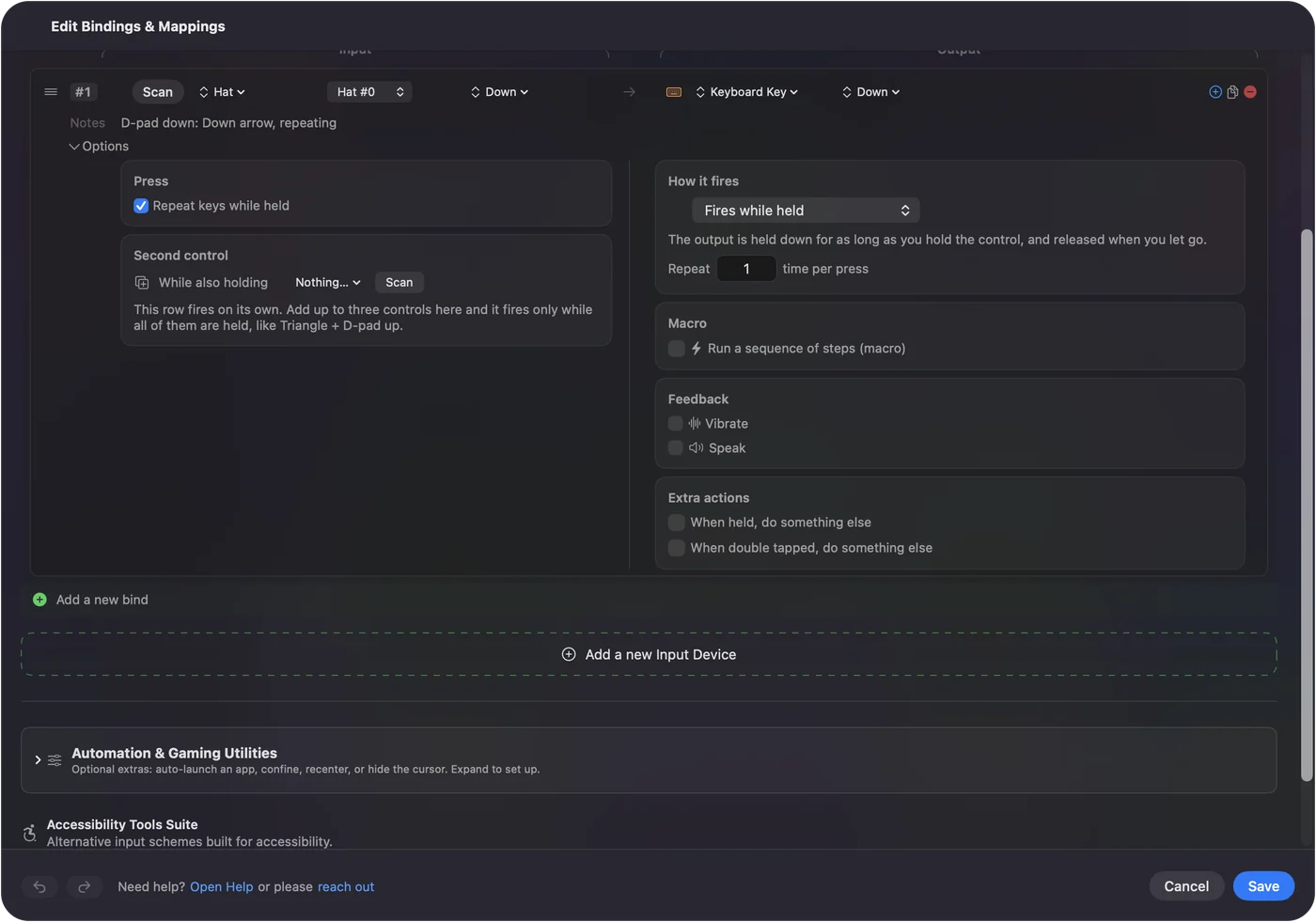
- Modifiers come along. A key with modifiers repeats with them, so a held Command Z button keeps undoing.
- One key at a time. The last one pressed repeats, as on a keyboard, so a D-pad diagonal does not send two arrows interleaved.
- Where the box appears. On rows that fire while held, or have a different action when held, with an ordinary key among the outputs.
- Where it does not. A modifier alone, and media, volume, brightness and Globe keys, never repeat. On a toggle, turbo or macro row the box is hidden because those rows repeat in their own way.
The repeat follows your Mac's keyboard settings, so it feels exactly like the keyboard.
Repeat at your own speed with turbo
- You: Set How it fires to Repeats while held, and set the gap in Every, from 5 ms up to a minute.
- InputConfig: Presses and releases the output over and over for as long as you hold the button, starting at once. The row shows the rate it works out to.
- Check: Hold the button; a game sees separate presses.
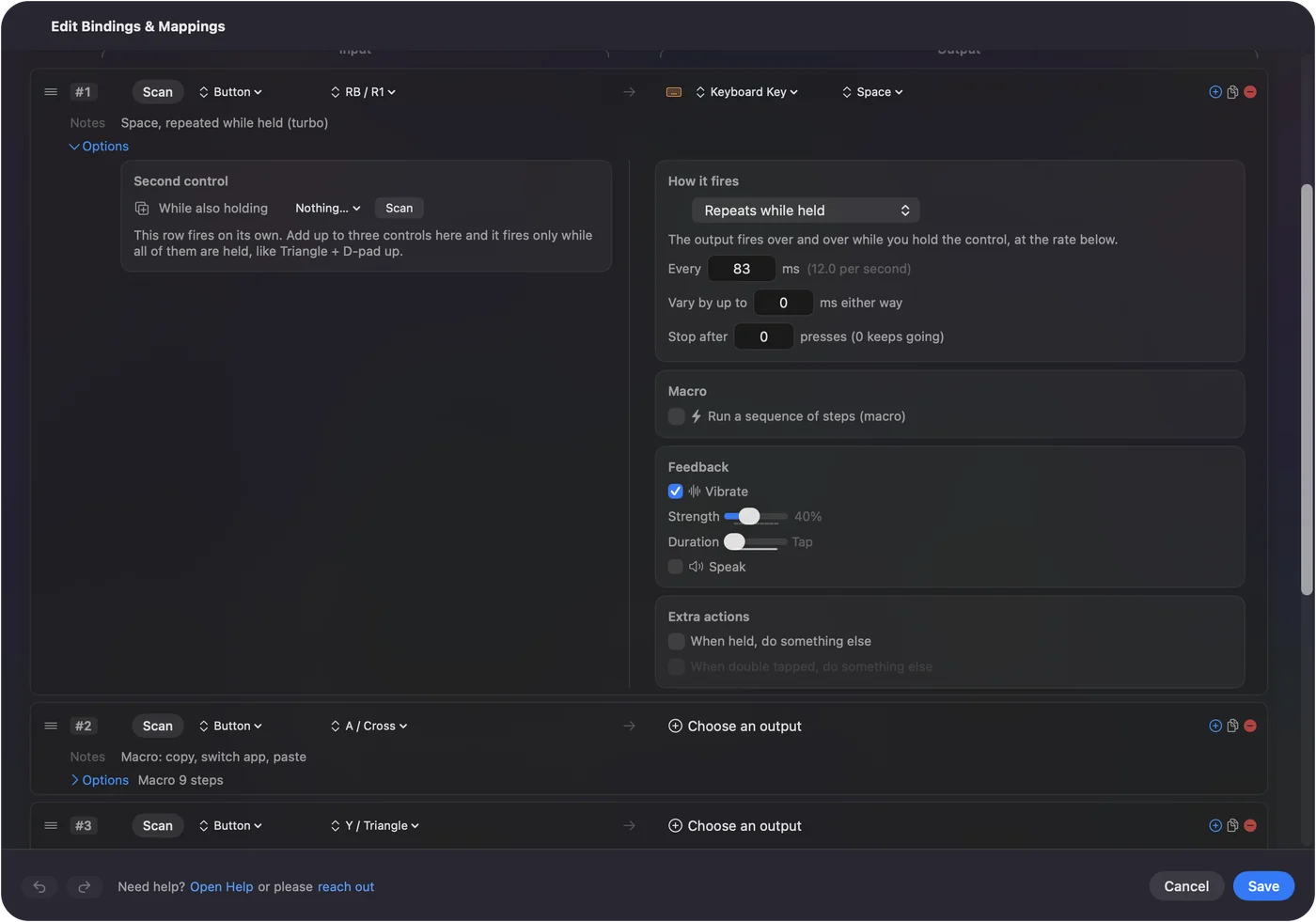
- Vary by up to. Adds a random plus or minus to each gap.
- Stop after. Ends the run after a number of presses.
- Repeats until pressed again. The same with a latch: one press starts it, the next stops it. That is the auto key presser and the auto clicker.
Each turbo repeat is a full press and release, which is what rapid fire needs and what keyboard-style repeat is not.
Pick the right one
| You want | Use | Where |
|---|---|---|
| Arrows, Backspace or undo to keep going while held, like a keyboard | Repeat keys while held | Press box in Options |
| Rapid fire, or a repeat faster or steadier than the keyboard's | Repeats while held | How it fires |
| Repeating with your hands off the controller | Repeats until pressed again | How it fires |
| Exactly three presses from one tap | Repeat, times per press | How it fires |
| The key held down, no repeats | Fires while held (the default) | How it fires |
The Repeat field sends the output a set number of times per press, with a Wait in milliseconds between them. The built-in Macros & Turbo preset shows two of these side by side: RB repeats Space twelve times a second while held, and LB sends J three times per press. Text wants keyboard repeat; games want turbo.
Put it where it helps
- The D-pad in lists and text. Arrow keys that repeat scroll a long list or move the cursor through a paragraph without a press per line.
- Backspace. Held to erase a word or a line, on a controller used for writing.
- Command Z. Held to undo several steps.
- Command Tab. Held to walk the app switcher. See switching apps from a controller.
- A hold action. The box also covers the key a row sends when held, so a tap can be one key and a hold a repeating other key.
I would start with repeating arrows on the D-pad.
If it does not repeat
Climb this ladder, smallest step first:
- Close the preset editor. Keys are held back while it is open.
- Check the box is there. If it is missing, the row is set to toggle, turbo or a macro, or its only key is a modifier.
- Adjust the Mac's rate. Too slow or too quick: change Key repeat rate and Delay until repeat in System Settings, Keyboard. InputConfig follows them.
- Use an arrow or Backspace in text. Holding a letter in a text field may bring up the accent menu instead of repeating, as it does on a Mac keyboard.
- Use turbo in games. Many games read a held key and ignore repeats, as they do from a keyboard. Use Repeats while held there.
If the keyboard does not repeat in that place, the controller will not either.
The short version
- Like a keyboard. Options, Press box, Repeat keys while held.
- Rapid fire. How it fires, Repeats while held, with Every in milliseconds.
- Old presets. Nothing changes until you tick the box.
One checkbox turns a D-pad into arrow keys you can hold.
Questions
Can a controller button repeat a key when held on a Mac?
Yes. In InputConfig 1.6, tick Repeat keys while held on the row and the key repeats like a held keyboard key, at the rate set in System Settings, Keyboard.
What is the difference between key repeat and turbo?
Key repeat waits, then sends repeats at the keyboard's rate, the way text fields expect. Turbo starts at once and sends full presses at a gap you choose, from 5 ms to a minute, the way rapid fire works.
Will my old presets start repeating after the update?
No. The option is off on every row until you turn it on.
Can a key on my keyboard repeat a different key?
Yes. A keyboard row works the same way. The key you press still does its own job too, since InputConfig listens alongside macOS, and keys from every keyboard count as the same key, so choose one that types nothing, such as F13 to F19.
Related
Free. macOS 14 or later. No account, nothing leaves your Mac. Open source on GitHub.