Questions
How to use a controller as an auto clicker on a Mac
Yes, a game controller can run an auto clicker on a Mac. In the built-in Auto Clicker preset in InputConfig, the free mapper I make, pull the right trigger once and the Mac left clicks 10 times a second where the pointer is, until you pull it again. The left stick moves the pointer, so you can aim and click without touching the mouse.
It works with the PlayStation, Xbox and Switch Pro controllers macOS reads, and with many others. Pads that vibrate give a short buzz when a run starts.
On this page: 11 sections
Steps
- Connect the controller to the Mac over Bluetooth or a USB cable.
- Install InputConfig from the Mac App Store and allow Accessibility access.
- In the sidebar, open Desktop & Productivity, click Auto Clicker and press Activate.
- Move the pointer with the left stick, then pull the right trigger to start clicking.
- Pull the right trigger again to stop.
Learn the preset's controller rows
The preset names the buttons the Xbox way. On a PlayStation pad the same places are R2, L2, R1, Triangle, Square and Cross; on a Switch pad, ZR, ZL, R, and the buttons in the same places on the face.
| Control | What it does | How it fires |
|---|---|---|
| Right trigger | Left clicks 10 times a second | On and off |
| Left trigger | Right clicks 5 times a second | On and off |
| Right bumper | Left clicks 20 times a second | Only while held |
| Y, the top face button | Left clicks 100 times, 10 a second, then stops | On, and off by itself |
| X, the left face button | Left clicks at 150 ms, give or take 40 | On and off |
| Left stick | Moves the pointer | While pushed |
| A, the bottom face button | One left click | Each press |
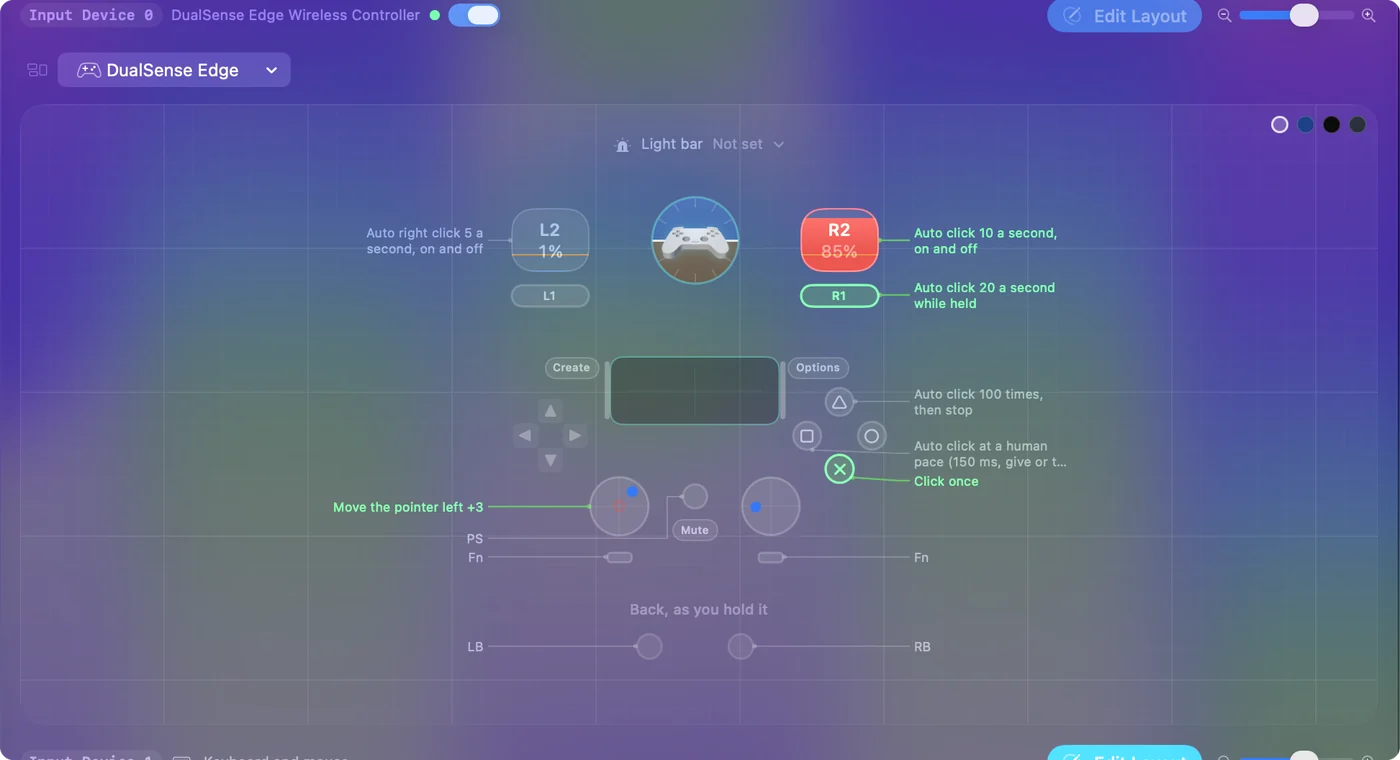
The on and off rows buzz when a run starts, on pads that vibrate, such as a DualSense. The triggers start and stop, the bumper bursts, and the stick aims.
 InputConfig is free on the Mac App Store. macOS 14 or later, no account, no tracking, open source.
Start, aim and stop
- You: Push the left stick to put the pointer on something harmless, then pull the right trigger once and let go.
- InputConfig: Buzzes the pad once and left clicks 10 times a second wherever the pointer is. The stick still moves the pointer during the run, and the clicks follow it.
- Check: Pull the right trigger again and the clicking stops. If nothing happened, climb the ladder below.
The bumper suits short bursts: it clicks only while you hold it, so letting go is the stop. Pull once to start, once to stop, and steer with the stick in between.
Change the speed or the button
- You: Select Auto Clicker and press Edit. Open the Options of the row whose note reads Auto click 10 a second, on and off.
- InputConfig: Shows How it fires, set to Repeats until pressed again, with Every, Vary by up to and Stop after under it.
- Check: Change Every, 50 ms for 20 a second or 200 ms for 5, and watch the rate beside it. Save, close the editor and pull the trigger.
To move the clicker to another button, press Scan on that row and press the button you want. To click one spot on screen every time, see clicking the same spot; for the sums, CPS and milliseconds.
Make any button a turbo key for a game that reads keys
The same press modes repeat keys, not only clicks. For a game you play with the keyboard, a controller button can press a key over and over.
- You: On a row for the button, set the output to Keyboard Key and choose the key, then set How it fires to Repeats while held and pick a gap in Every.
- InputConfig: Presses and releases that key at the gap for as long as you hold the button.
- Check: Hold the button in a text field and the key repeats; let go and it stops.
The built-in Macros & Turbo preset fires Space 12 times a second from the right bumper, and making a button repeat a key covers the rest. Turbo works wherever the game reads the keyboard or mouse.
If the game also reads the controller
Many games read a controller themselves. Then the game sees your trigger pull as its own input, and InputConfig's clicks arrive as well, so every press counts twice.
- Turn off the game's controller support. If the game has a setting for it, the preset becomes the only thing the game hears.
- Use a button the game ignores. Move the clicker to a control the game leaves unbound, with Scan.
- Use the keyboard rows. fn F6 and fn F7 in the same preset start and stop clicks with no controller at all.
InputConfig cannot hide the controller from a game, and it cannot make the game's own trigger fire faster, because it sends keyboard and mouse, not a virtual controller. A running preset adds to what the game hears; it never takes the pad away.
Stop everything from the controller
Pulling the trigger again ends a run. For a stop that ends everything, the emergency stop has a controller hold.
- You: Hold View and Menu together, Create and Options on a PlayStation pad, or Minus and Plus on a Switch pad.
- InputConfig: Buzzes a second in, so you know it is coming, and at three seconds turns the preset off and lets go of every key and mouse button it was holding.
- Check: The Mac plays the Funk sound and the clicking stops. The same hold starts the preset again.
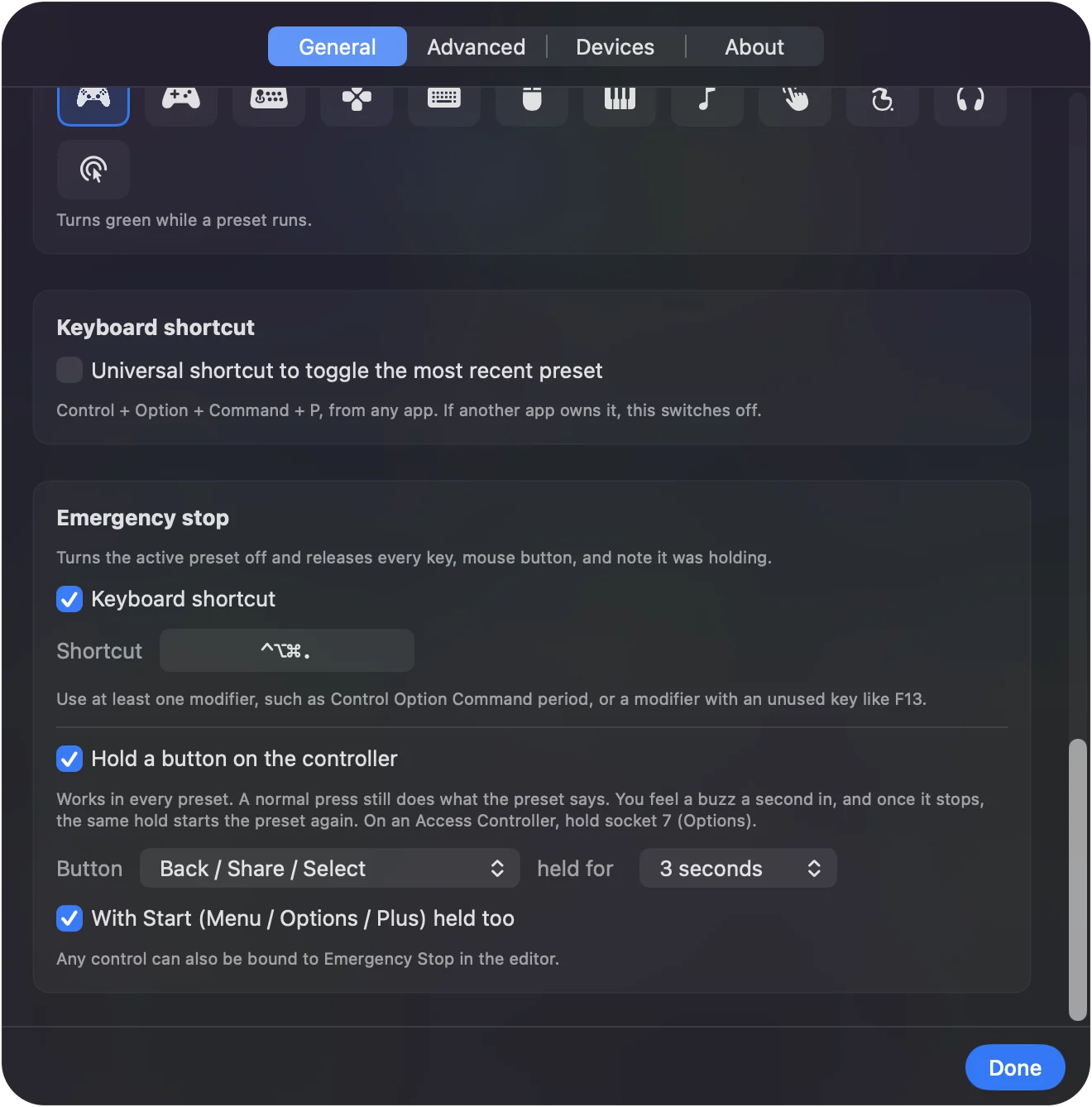
Settings, General, Emergency stop changes the button and the hold, from one to five seconds. The keyboard chord, Control Option Command period, works too. Learn the hold once, and the controller in your hands is always a way out.
If the trigger does nothing
Climb this ladder, smallest step first:
- Check the controller is connected. It appears at the top of InputConfig's sidebar. Press a button to wake it.
- Check the preset is active. The menu bar icon turns green while a preset runs.
- Close the editor. While it is open, InputConfig holds most outputs back, and opening it ends any run.
- Check the permission. An orange menu bar icon means the running preset needs Accessibility. See the Accessibility permission.
- Scan the row again. Some generic USB pads number their buttons differently. Press Scan on the trigger's row and pull the trigger.
If the stick moves the pointer, the controller is fine, and the problem is the row.
What it cannot do
- Act as a controller. InputConfig sends keyboard and mouse, so it cannot add turbo to a game's own controller buttons.
- Read every pad. macOS cannot read an Xbox 360 controller. The Switch 2 Pro Controller and the GameCube controller over USB-C, and the 2026 Steam Controller, are experimental in 1.6.
- Promise a game allows it. Many online games forbid auto clickers in their rules and some detect them. Check before you use it there.
The short version
- Start. Pull the right trigger in the Auto Clicker preset; pull again to stop.
- Aim. The left stick moves the pointer, even mid-run.
- Other jobs. Left trigger right clicks, the bumper bursts, Y counts to 100, X keeps a human pace.
- Way out. Hold View and Menu for three seconds.
The controller does the clicking, the aiming and the stopping, so the mouse can stay where it is.
For the keyboard and mouse side too, see the complete auto clicker guide.
Questions
Can a PS5 controller be an auto clicker on a Mac?
Yes. With InputConfig's Auto Clicker preset active, pull R2 once and the Mac left clicks 10 times a second until you pull it again. L2 does the same with right clicks.
Does it work with an Xbox or Switch Pro controller?
Yes. Any controller macOS reads works, and the preset's rows are the same: the right trigger starts and stops left clicks, and the left stick moves the pointer.
Does the controller vibrate when the auto clicker starts?
Yes, on pads that vibrate, such as a DualSense: the preset's on and off rows give a short buzz when a run starts.
Can I make a turbo button for a game?
Yes, for a game that reads the keyboard or mouse. Put the key on a row with Repeats while held. It cannot speed up a game's own controller buttons.
How do I stop it from the controller?
Pull the trigger again, or hold View and Menu together for three seconds for the emergency stop, which turns the whole preset off.
Related
Free. macOS 14 or later. No account, nothing leaves your Mac. Open source on GitHub.