Does a gaming mouse work on a Mac?
 InputConfig is completely free on the Mac App Store. You don't have to make an account, there are no subscriptions, and nothing is locked. Optimized for Apple silicon.
Yes. Any gaming mouse works on a Mac as a mouse, and the part that varies is the maker's software. Some makers publish a Mac app, some do not, and DPI, polling rate and lighting are stored in the mouse either way. The buttons are the other half, and InputConfig, a free Mac app, reads what the mouse sends and binds every button that reaches macOS.
The maker facts on this page come from the maker pages I read on October 21, 2026, linked in the table below.
On this page: 12 sections
- Steps
- See what works without any app
- Check which vendor apps run on macOS
- Keep DPI and polling rate in the mouse
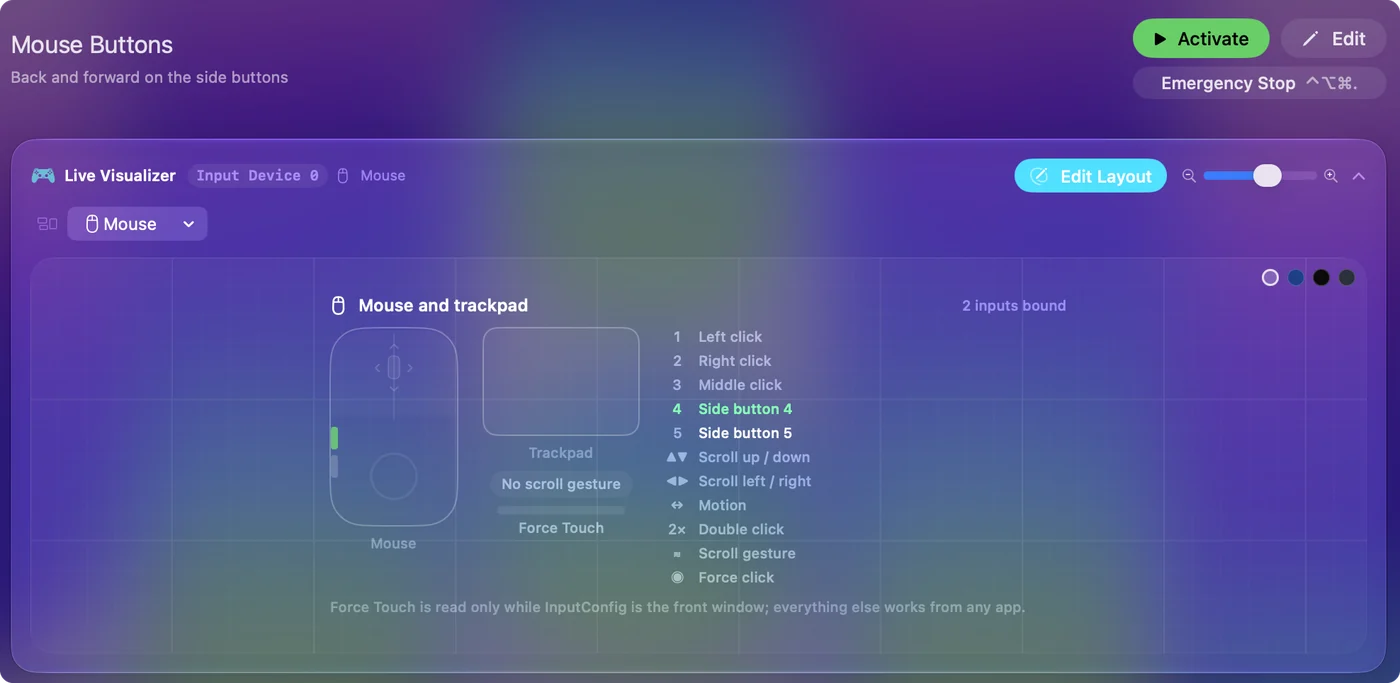
- Find out what each button sends
- Bind every button with InputConfig
- Add macros and the options that matter
- Ideas for gaming mouse users
- If a button does nothing
- What it cannot do
- The short version
- Questions
Steps
- Plug in the mouse. The pointer, clicks and wheel work with no software.
- Check the maker's page to see whether its app runs on macOS.
- Set DPI, polling rate and lighting in the app, or on the mouse, and save them to the mouse.
- In InputConfig, add a row, press Scan and press each button.
- Bind the buttons that arrive, and set keys that type to F13 through F20.
See what works without any app
- Pointer, clicks and wheel. All work at once.
- Side buttons. They arrive as Button 4 and Button 5, and an app has to give them a job.
- DPI button. It steps through levels stored in the mouse, and macOS does not see it.
- Polling rate. It is set in the mouse, by its software or a button.
A gaming mouse is a good Mac mouse out of the box, and the software is for the extras.
A mouse that seems to have dead side buttons on a Mac is almost never broken. The buttons arrive, and no app has been told what to do with them. That is the gap InputConfig fills, and it is also why a button can work in a game that reads Button 4 itself and do nothing in Finder.
Check which vendor apps run on macOS
| Maker | App | On macOS |
|---|---|---|
| Razer | Synapse | Has a Mac version for a short list of mice. See the Razer page. |
| SteelSeries | GG | See the SteelSeries page. |
| Logitech | G HUB | Logitech's G600 page lists macOS 10.11 or later. |
| Corsair | iCUE | A macOS version exists, and it needs a cable or the receiver. See the Corsair page. |
| Glorious | CORE | Mac version, with the first wired Model O and D excluded. See the Glorious page. |
| HyperX | NGENUITY | Windows only, says HyperX. See the Pulsefire page. |
| ROCCAT and Turtle Beach | Swarm | I found no Mac version. See the Kone page. |
| Zowie | None | Driverless. See the Zowie page. |
Mac support for these apps changes over time, so check the maker's page before you buy a mouse for a Mac.
Keep DPI and polling rate in the mouse
DPI and polling rate live in the mouse, which is the reason you can set them once, on any computer, and carry them to a Mac.
- Onboard memory. Most gaming mice store profiles, so setting them on a Windows PC works for a Mac.
- A button on the mouse. Many mice step DPI with a button, and that button usually reaches no app.
- macOS tracking speed. System Settings, Mouse changes how far the pointer moves for the same movement, and it sits on top of DPI.
For pointer acceleration, how to turn off mouse acceleration on a Mac shows the options. InputConfig does not change DPI, polling rate, acceleration or scroll feel.
If you are buying with a Mac in mind, onboard memory is the feature to look for. A mouse that stores its profile keeps your DPI levels, lighting and button assignments no matter which computer it is plugged into. Apps such as LinearMouse, Mac Mouse Fix and SteerMouse handle pointer and scroll feel and run alongside InputConfig. People on forums report that some of those tools do not register the extra buttons on certain gaming mice, so use Scan to see what your own mouse sends before you buy anything.
Find out what each button sends
- You: Open InputConfig, add a row, set the input device to This Mac's mouse or trackpad, press Scan and click each button.
- InputConfig: Names each button and lights it in the Live Visualizer.
- Check: A button that types a letter reports as a key, and one that sends nothing is one the mouse keeps.
| Kind of button | How it reports | What to do |
|---|---|---|
| Main buttons, wheel click | Left click, Right click, Middle click | Bind freely. Left and right cannot be blocked. |
| Side buttons | Button 4 to Button 8 | Bind and block the original action if needed. |
| Many extra buttons | Button 9 to Button 32 | Under More buttons in the menu. |
| Thumb grid or keypad | Keyboard keys | Set to F13 to F20, see the MMO mouse page. |
| DPI or profile button | Nothing | The mouse keeps it. |
Bind every button with InputConfig
- You: Add a row per button, choose its input, and pick an output.
- InputConfig: Runs the job each time you press it.
- Check: Press the button in the app you care about.
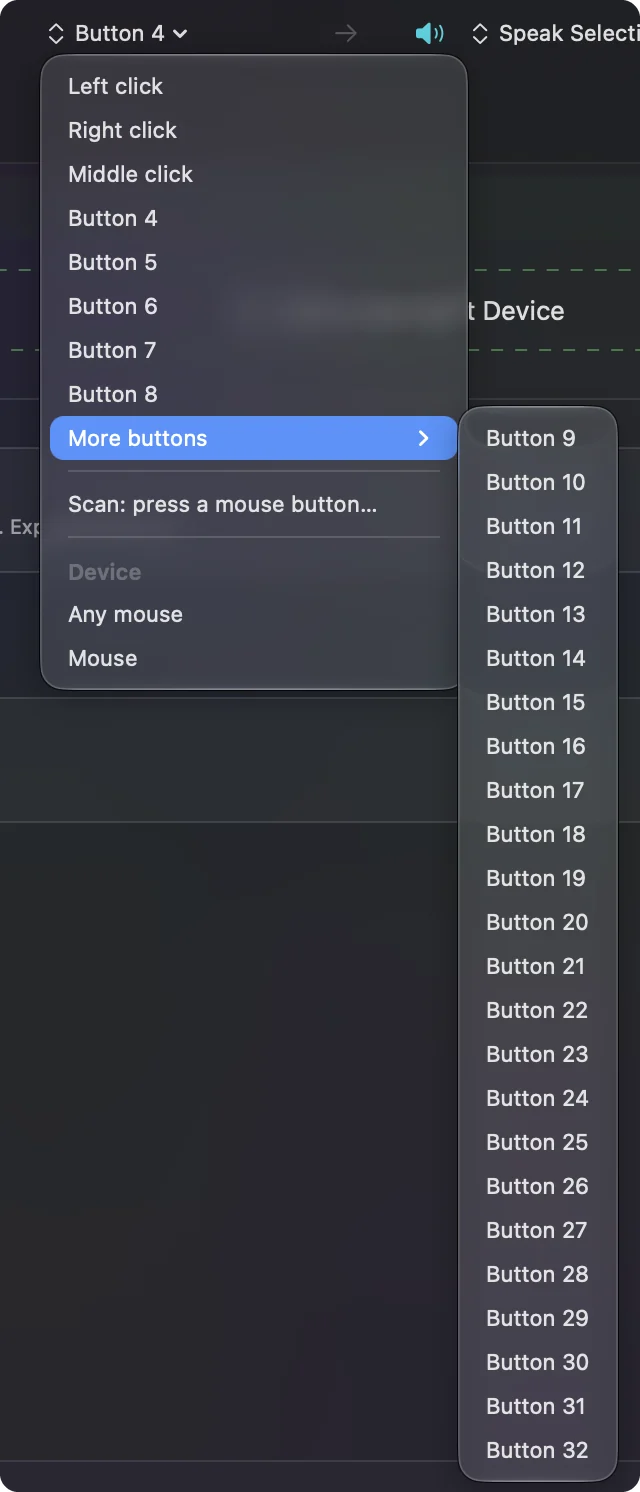
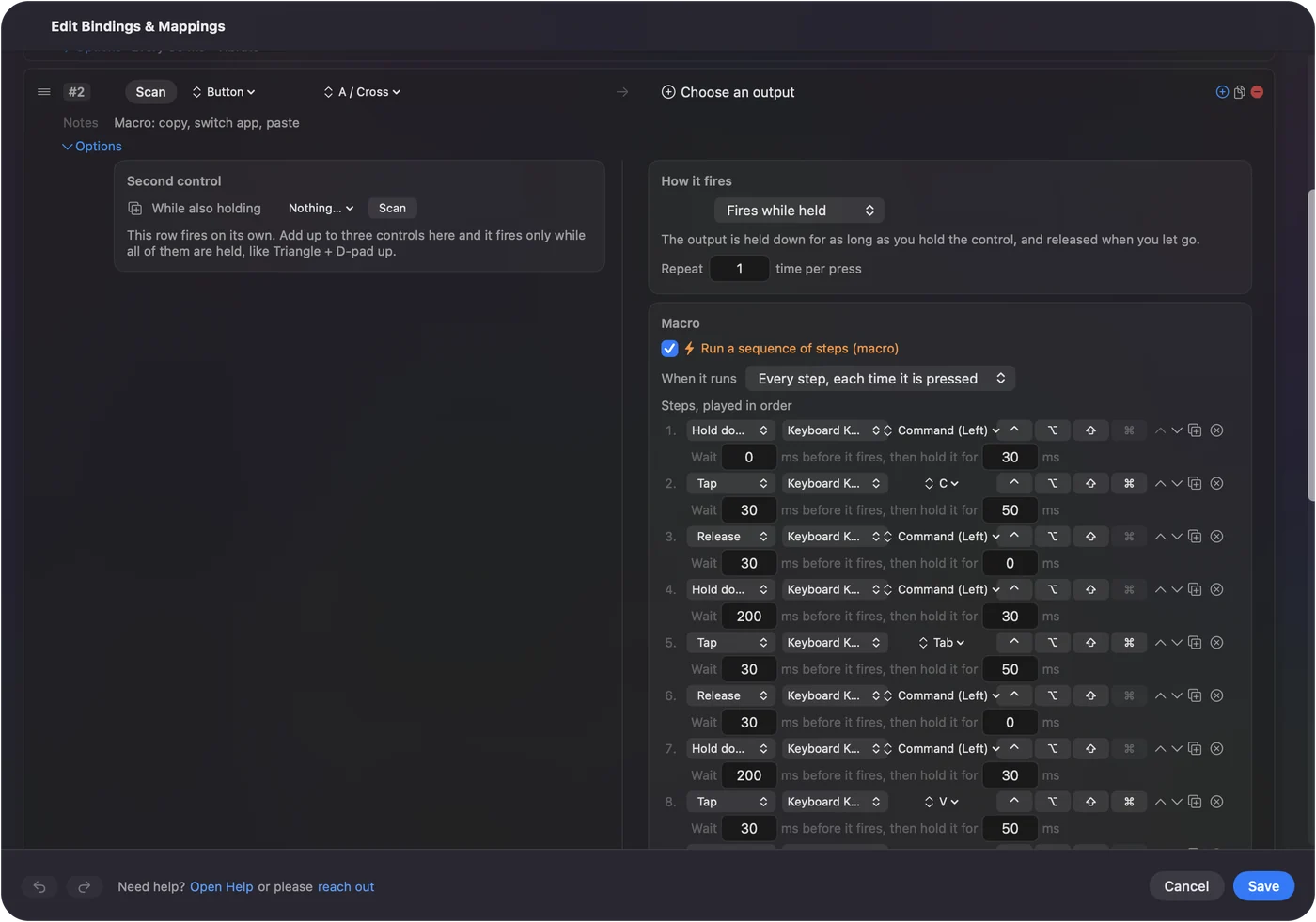
Outputs include a key with modifiers, Type Text, a macro, System Function, Run Siri Shortcut, clicks, scrolling and MIDI. A button that reaches the Mac can be bound to nearly anything the Mac can do. How to map extra mouse buttons on a Mac walks through each step.
Add macros and the options that matter
- Macros. Tick Run a sequence of steps (macro) in Options and add key, shortcut and click steps.
- Hold and double tap. Each row can carry both.
- Block the original action. For the middle and side buttons.
- Repeat while held. A held button can repeat its output.
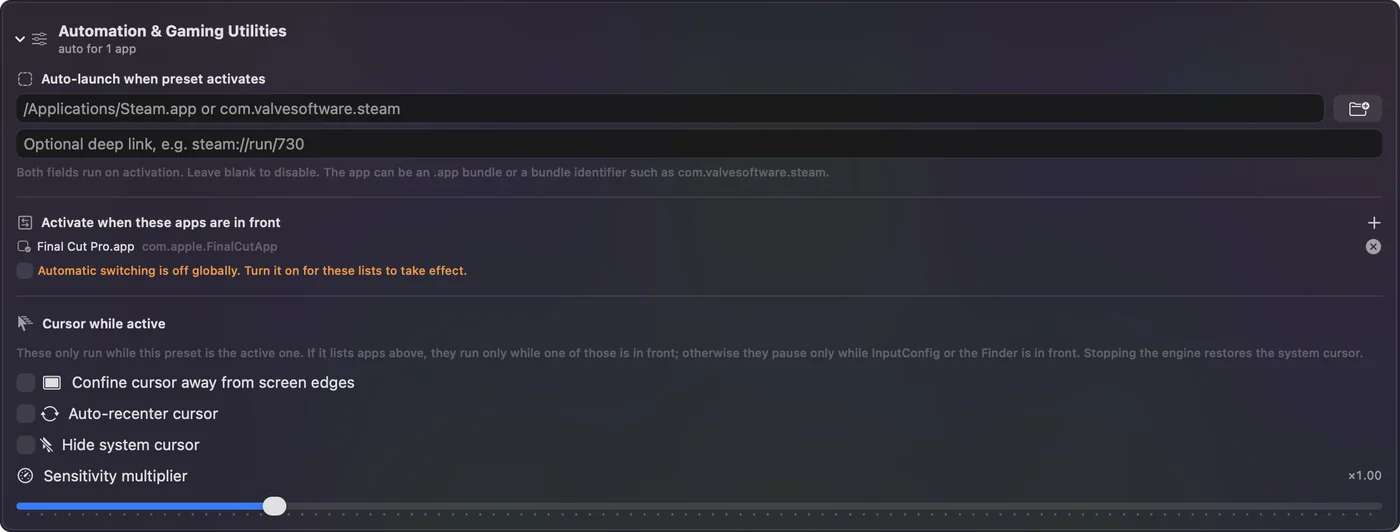
- Per app presets. Lists of apps make the layout follow the front app.
Ideas for gaming mouse users
Start with the buttons your thumb already rests on, and leave the rest for later. A mouse with two side buttons needs only Back and Forward. A mouse with twelve needs a plan, which is why the MMO mouse page exists. I have not tested every brand named on this page, so the Scan step is the honest answer to what any one mouse sends.
- Shooters. Leave a game's own bindings alone and use a preset only for the browser and chat.
- MMO and strategy. Use a thumb grid for hotbars. See the MMO mouse page.
- Work. The same mouse can run editing and Mac control shortcuts.
- Accessibility. A mouse with many buttons can give one hand every shortcut.
If a button does nothing
Climb this ladder, smallest step first:
- Scan it. If it is not named, the mouse is not sending it.
- Check the mode switch. Wireless mice often have a switch between modes.
- Check the profile. Onboard profiles can differ.
- Check Accessibility. System Settings, Privacy and Security, Accessibility must list InputConfig.
- Use the emergency stop. Control Option Command period.
- Look for a hidden mode button. Some mice have a small button that switches the side buttons to media keys or another stored layer, so a button can seem dead when the mouse is in a different mode. Press it once and Scan again.
- Check what macOS receives. The mouse tester shows every button the Mac gets, in a browser, before any app is involved.
What it cannot do
- Change DPI, polling rate or lighting. The maker's app does, or the mouse.
- Read buttons that send nothing. A DPI or profile button may be invisible to macOS.
- Block a typed key. Set it to F13 to F20 instead.
- Give two mice different jobs. Every mouse counts as one.
It needs the Accessibility permission and macOS 14 or later.
The short version
- Works. Any gaming mouse is a mouse on a Mac.
- Software. It depends on the maker.
- Buttons. InputConfig binds what reaches the Mac.
Set DPI in the mouse, bind the buttons on the Mac, and keep them separate.
Questions
Do gaming mice work on Mac?
Yes. The pointer, buttons and wheel work with no software, and software only matters for DPI, lighting and stored profiles.
Which gaming mouse software works on Mac?
Razer Synapse, Corsair iCUE, Logitech G HUB and Glorious CORE have Mac versions with limits. HyperX NGENUITY is Windows only, and Zowie needs none.
Can I change DPI on a gaming mouse on a Mac?
Use the DPI button on the mouse or the maker's app. InputConfig does not change DPI.
How do I remap gaming mouse buttons on a Mac?
Press Scan in InputConfig, press the button and choose what it does. Buttons that send keys are best set to F13 to F20 first.
Why are my gaming mouse side buttons not working on a Mac?
macOS passes them to the app in front as Button 4 and Button 5, and many apps ignore them. Bind them in a mapper, and check the mouse is not in a media or profile mode.
Do I need drivers for a gaming mouse on a Mac?
No driver is needed for the pointer, clicks and wheel. Software only matters for DPI, lighting, polling rate and stored profiles.
Related
This page in other languages: العربية, Čeština, Dansk, Deutsch, Español, Suomi, Français, עברית, Magyar, Bahasa Indonesia, Italiano, 日本語, 한국어, Norsk, Nederlands, Polski, Português, ไทย, 繁體中文, 简体中文
Completely free. You don't have to make an account, there are no subscriptions, and nothing is locked. Optimized for Apple silicon. Open source on GitHub.
Updated