Do Pulsar, Lamzu and Finalmouse mice work on a Mac?
 InputConfig is completely free on the Mac App Store. You don't have to make an account, there are no subscriptions, and nothing is locked. Optimized for Apple silicon.
Yes, as mice: Pulsar, Lamzu and Finalmouse mice move the pointer and click on a Mac with nothing installed. Their settings are a different story, because all three makers lean on web or app configurators that run in a browser, and a Mac needs a Chromium browser such as Chrome or Edge to talk to them. Pulsar's Windows program has no Mac version, Lamzu has a web driver, and Finalmouse has a web app called XPanel.
What a Mac needs on top is something to give the side buttons a job, and that is InputConfig, the free Mac app I make. I have not tested a Pulsar, Lamzu or Finalmouse mouse myself. What follows comes from the makers' pages and reviews that I read on October 21, 2026, and I say where I could not confirm a detail.
On this page: 12 sections
- Steps
- See which configurator your mouse uses
- Use the web configurator on a Mac
- Find out what each button sends
- Bind the side buttons
- Run longer jobs on a light mouse
- Add hold, double click and per-app layouts
- Ideas for lightweight mouse owners
- If something does not work
- What it cannot do
- The short version
- Questions
Steps
- Plug in or pair the mouse. The pointer, clicks and wheel work on a Mac with nothing installed.
- Open the maker's web configurator in Chrome or Edge to set DPI and buttons, since Safari does not support WebHID.
- If your model is not supported on the web, set it up once on a Windows PC. Settings are stored in the mouse.
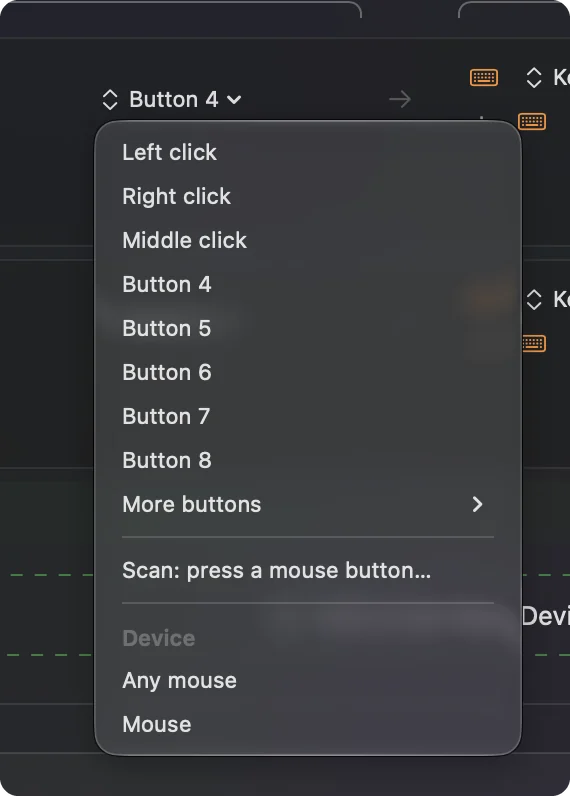
- In InputConfig, add a row, press Scan and click a side button to see what arrives.
- Bind the button, save and activate the preset.
See which configurator your mouse uses
These are enthusiast mice, light and with few buttons, and the software story differs by brand:
| Brand | Configurator | On a Mac |
|---|---|---|
| Pulsar | A Windows program, and a web app at bbb.pulsar.gg for newer models | The Windows program has no Mac version. The web app needs a supported model and a Chromium browser |
| Lamzu | A web driver linked from lamzu.com, and downloadable software for some models | Maya X uses a web driver on Chromium browsers per a TechPowerUp review. Check your model on the Lamzu page |
| Finalmouse | XPanel, a web app at xpanel.finalmouse.com | Runs in a browser. Reviews say it changes DPI and cannot remap buttons |
Pulsar's own support article on Apple compatibility says the settings you save live in the mouse, so a Windows PC once is enough if your model is not on the web app. I saw it in a search result on October 21, 2026 and could not open the page itself, so read it yourself. The Lamzu line comes from the Lamzu site, where I saw a web driver link. None of these three has a native Mac app that I could find, so the browser is the Mac route.
Use the web configurator on a Mac
WebHID, the browser feature these tools use, works in Chrome and Edge from version 89 and not in Safari or Firefox, according to Chrome's developer documentation. On a Mac that means:
- Use Chrome or Edge. Open the maker's page, then pick the mouse in the browser's device prompt.
- Use the cable or dongle. A web app can only talk to a mouse it can see, and a Finalmouse review says XPanel will not launch with the UltralightX plugged in by cable, so use its wireless link.
- Save to the mouse. Settings are written into onboard memory, so the browser can be closed afterward.
- Do it once. Set DPI, polling rate and lift off distance, then forget the page.
The browser is only needed to change settings, never to use the mouse.
Find out what each button sends
These mice usually have five or six buttons: left, right, wheel click and two side buttons, sometimes a DPI button on the top. Open InputConfig, add a row, press Scan and click each one.
| Button | How it should report | What to do |
|---|---|---|
| Left and right | Left click and Right click | Leave alone |
| Wheel click | Middle click | Bind it, and block its own action if an app clashes |
| Two side buttons | Button 4 and Button 5 | The main prize, so give them real jobs |
| DPI or top button | Often handled inside the mouse | Scan to see. If nothing arrives, it is not available to a Mac app |
I have not scanned these exact models, so treat the table as an expectation. Scan first, because a button that sends nothing cannot be bound.
Bind the side buttons
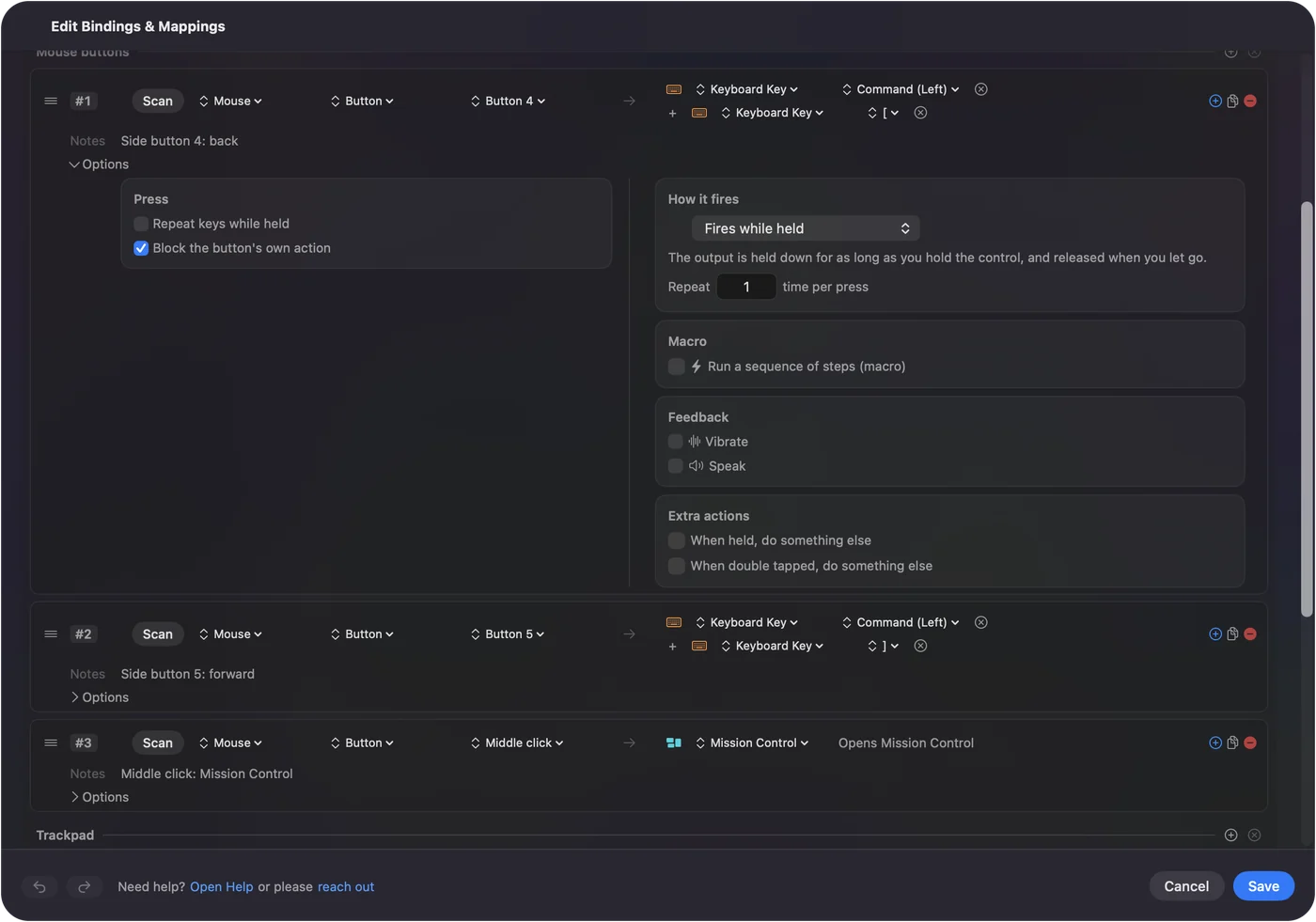
- You: Add a row, choose Mouse, press Scan and click a side button. Choose Keyboard Key, pick Command, then the left bracket for Back, or the right bracket for Forward.
- InputConfig: Presses those keys each time you press the button.
- Check: Save and Activate, open a few pages in Safari, and press the button to go back.
That pair of keys works in more apps than a raw side button does. If an app already reacts to Button 4, tick Block the button's own action on the row so it does not go back twice. Mouse side buttons on a Mac walks through the rest.
Run longer jobs on a light mouse
With so few buttons, each one should earn its place. Open a row's Options and tick Run a sequence of steps (macro):
- Copy, wait and paste. Command C, a 300 millisecond wait, then Command V on one side button.
- Open an app. System Function, Open App, such as your editor, on a hold.
- Push to talk. A hold on a side button sends a key down and releases it on letting go, which suits a call or a game that reads the keyboard.
Steps are described in mouse macros on a Mac.
Add hold, double click and per-app layouts
- Hold. A hold action on a row turns two side buttons into four jobs.
- Double tap. Each row also takes a double tap action.
- Second control. While also holding makes a combo, such as a side button with the wheel click.
- Per app. A preset can list apps under Automation & Gaming Utilities, and with Switch presets when the front app changes turned on in Settings, Advanced, the layout follows the app in front.
Only one preset runs at a time, and Control Option Command period stops it. Give a game its own preset so your editing keys stay out of it.
Ideas for lightweight mouse owners
- A claw grip gamer. Leave the main buttons alone and put a quick-save or push to talk on the side buttons, only in the apps that need them.
- A designer on a Finalmouse. Undo and redo on the thumb buttons, so the hand stays on the mouse.
- A Pulsar owner on a MacBook. Settings made once on Windows or the web app stay in the mouse, so a Mac only needs button jobs.
- A Lamzu with a dongle. A hold on a side button opens Mission Control, a double tap shows the desktop.
A mouse this light has no room for extra buttons, so put the jobs on holds and double taps.
If something does not work
Climb this ladder, smallest step first:
- Use Chrome or Edge. A configurator page that cannot find the mouse in Safari is normal.
- Switch to the dongle or cable. A web app may not see a mouse connected over Bluetooth.
- Press Scan. If it records Button 4, the Mac receives it and a preset can bind it.
- Activate and check Accessibility. Rows only run while a preset is active, and System Settings, Privacy & Security, Accessibility must list InputConfig.
- Borrow a Windows PC. For a model the web app does not support, a one-time Windows setup is the maker's own advice.
If Scan sees nothing, the button belongs to the maker's software.
What it cannot do
InputConfig does not change DPI, polling rate, lift off distance, lighting or scroll feel, so the maker's web page still does that. It cannot read a button that sends nothing to macOS, and it cannot give two mice different jobs for the same button. Use the web configurator for how the mouse tracks, and InputConfig for what the buttons do.
The short version
- Works. Pointer, clicks and wheel.
- Settings. Pulsar and Lamzu have web tools and Finalmouse has XPanel, all in a Chromium browser.
- Buttons. Scan the side buttons and bind them.
Set the mouse once in a browser, and then forget the page.
Questions
Does Pulsar software work on a Mac?
The Windows program does not. Pulsar offers a web app at bbb.pulsar.gg for newer models, and settings you save stay in the mouse.
Is there a Lamzu driver for Mac?
Lamzu links a web driver from its site, and a TechPowerUp review says the Maya X driver runs on Chromium browsers. Check your model on Lamzu's page.
Does Finalmouse XPanel work on a Mac?
It is a web app, so it runs in a browser. Reviews say it changes DPI and does not remap buttons by itself.
Can I remap Finalmouse buttons on a Mac?
Reviews say XPanel cannot remap buttons. InputConfig can give the side buttons new jobs on a Mac.
Why can the Lamzu or Pulsar web app not find my mouse on a Mac?
Use Chrome or Edge, since Safari lacks WebHID, and try the dongle or cable.
Related
This page in other languages: العربية, Čeština, Dansk, Deutsch, Español, Suomi, Français, עברית, Magyar, Bahasa Indonesia, Italiano, 日本語, 한국어, Norsk, Nederlands, Polski, Português, ไทย, 繁體中文, 简体中文
Completely free. You don't have to make an account, there are no subscriptions, and nothing is locked. Optimized for Apple silicon. Open source on GitHub.
Updated