Does the Razer Viper work on a Mac?
 InputConfig is completely free on the Mac App Store. You don't have to make an account, there are no subscriptions, and nothing is locked. Optimized for Apple silicon.
Yes, as a mouse: the pointer, the clicks and the wheel work on any Mac with nothing installed. The Viper line is built for esports, so it has few controls and they are mostly side buttons, which reach a Mac as mouse buttons that an app has to give a job. The ambidextrous Vipers with a pair of buttons on each side have the most to gain, because four side buttons are four jobs.
I make InputConfig, a free Mac app that reads any mouse button and gives it a job. I have checked it with a Razer mouse. Which Vipers Razer Synapse for Mac supports is on Razer mouse on a Mac, and this page is about the buttons.
On this page: 11 sections
Steps
- Plug in the Viper, or its dongle, and use it as a normal mouse.
- Open InputConfig, add a Mouse row, press Scan and press each side button in turn.
- Note which button names arrive, then give each one a job.
- Block the button's own action where an app already uses it, then Save and Activate.
- Leave DPI, polling rate and lighting to Razer Synapse.
What each Viper does on a Mac
A Viper is a standard mouse to a Mac. I read Razer's pages for the Viper V3 Pro, Viper V3 HyperSpeed and Viper Mini on October 21, 2026.
| Model | Programmable controls | Shape and connection | Synapse for Mac list I read |
|---|---|---|---|
| Viper V3 Pro | Eight, the bottom button too | Right-handed symmetrical shape, HyperSpeed wireless, one onboard profile | Yes, with the V3 Pro SE and V4 Pro |
| Viper V3 HyperSpeed | Eight, six of them for macros and shortcuts | Right-handed symmetrical shape, HyperSpeed wireless, one onboard profile | No |
| Viper Mini | Six, two side buttons on the left and one beside the wheel | Ambidextrous, wired, onboard memory | No |
| Viper and Viper Ultimate | Eight, according to retailer listings | Ambidextrous, two side buttons on each side | No |
I did not find Razer's own page for the original Viper or the Viper Ultimate, so that last row comes from retailer and review listings and I would call it likely, not confirmed. The last column is the Synapse for Mac list quoted on the Razer mouse page linked above. Only the shape of the mouse decides how many side buttons you can use, and the Mac does not care which model it is.
Find out what the side buttons send
A Mac numbers extra mouse buttons in order, but I do not know in which order a four-button ambidextrous Viper sends its left and right pairs, so do not count on one.
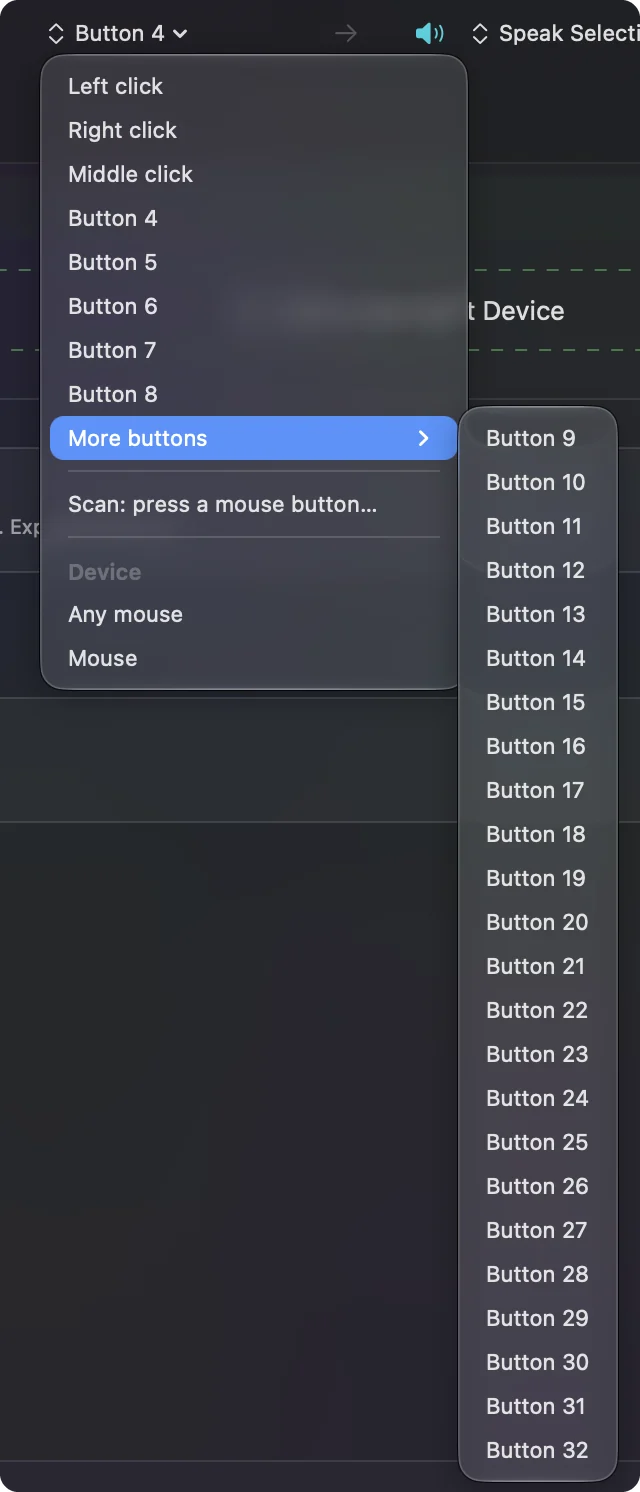
- You: In InputConfig, add a Mouse row, press Scan, and press the first side button. Make a note of the name, then do the next button, until you have pressed all of them.
- InputConfig: Names each button, for example Button 4, Button 5, Button 6 and so on.
- Check: Four different names on four buttons means you can give each its own job. The Viper Mini should give you its two left side buttons, and the one beside the wheel may be a DPI button the mouse keeps to itself.
| Control | How it should report | What to do |
|---|---|---|
| Side buttons | Mouse buttons, Button 4 upward | Bind each, press Scan to confirm the order |
| Wheel click | Middle click | Bind it, and block its own action if you like |
| Button under the mouse (V3 models) | Razer says Synapse can program it, it may stay private | Scan it once |
| DPI button | Often nothing arrives | Use it on the mouse or in Synapse |
Bind the buttons
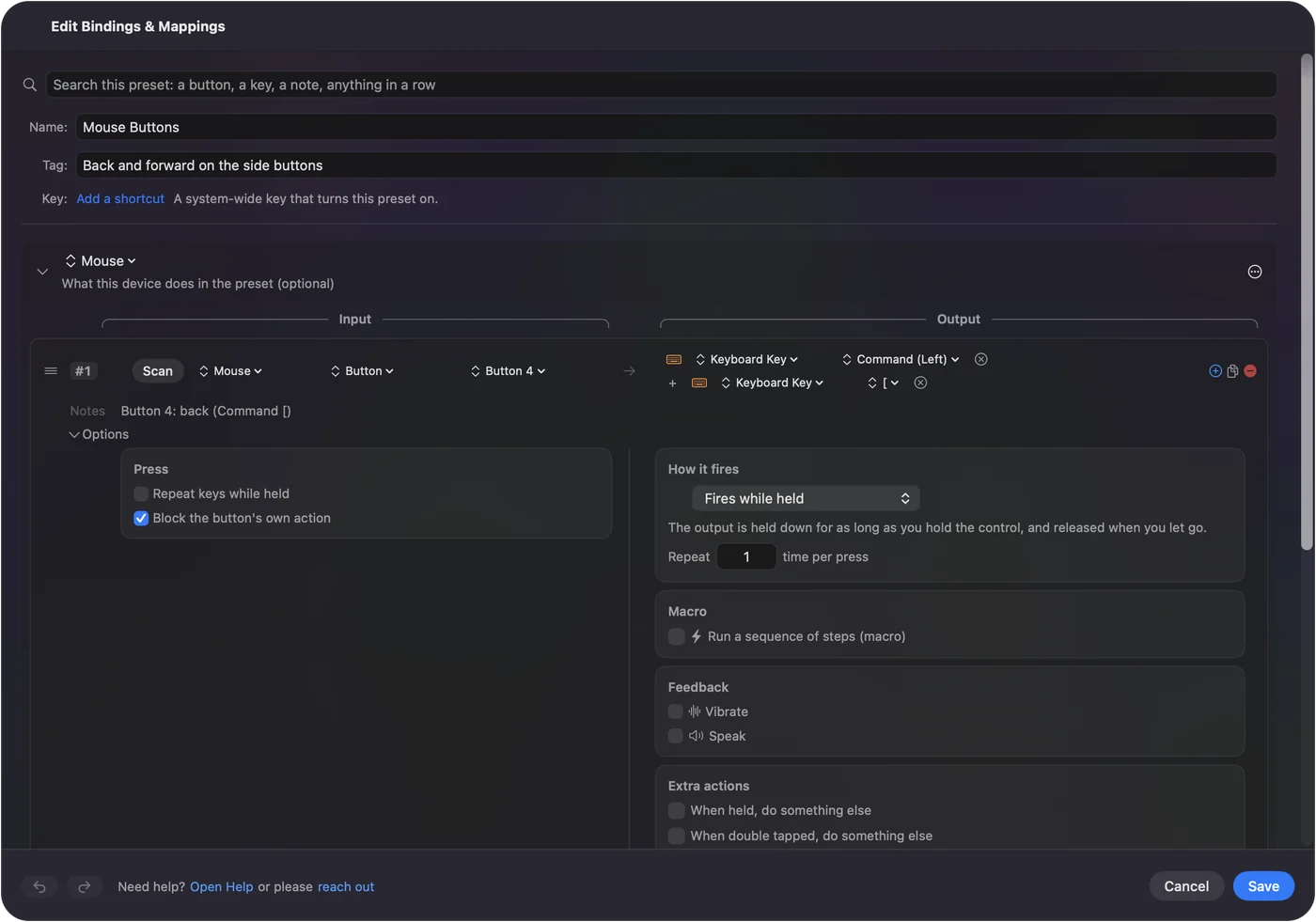
- You: Make a preset, add This Mac's mouse or trackpad as an input device, add a row for each side button, press Scan and press it, then choose what it sends.
- InputConfig: Runs each row when its button is pressed, in every app.
- Check: Press each one and check the result, then Save and Activate.
- Four buttons, four jobs. Back and forward on the two nearest the front, and Mission Control and Start Dictation on the other two.
- Handedness. Because the mouse is symmetrical, you can pick which side your thumb sits on and give only those buttons jobs.
- Whole shortcuts. A Keyboard Key output with Command, Option or Shift held, or several keys at once, added with the plus button.
The easiest setup is the built-in Trackpad & Mouse preset for back and forward, and then a row or two of your own. Mouse side buttons on a Mac has the long version.
Macros and combos on a small mouse
A Viper has few buttons, so one button should do more than one job. A row's Options hold a second output for when you hold the button, and a third for a double tap. Tick Run a sequence of steps (macro) for a timed sequence of keys, shortcuts and clicks, with a wait and a hold on each step. How to make a macro on a Mac has an example.
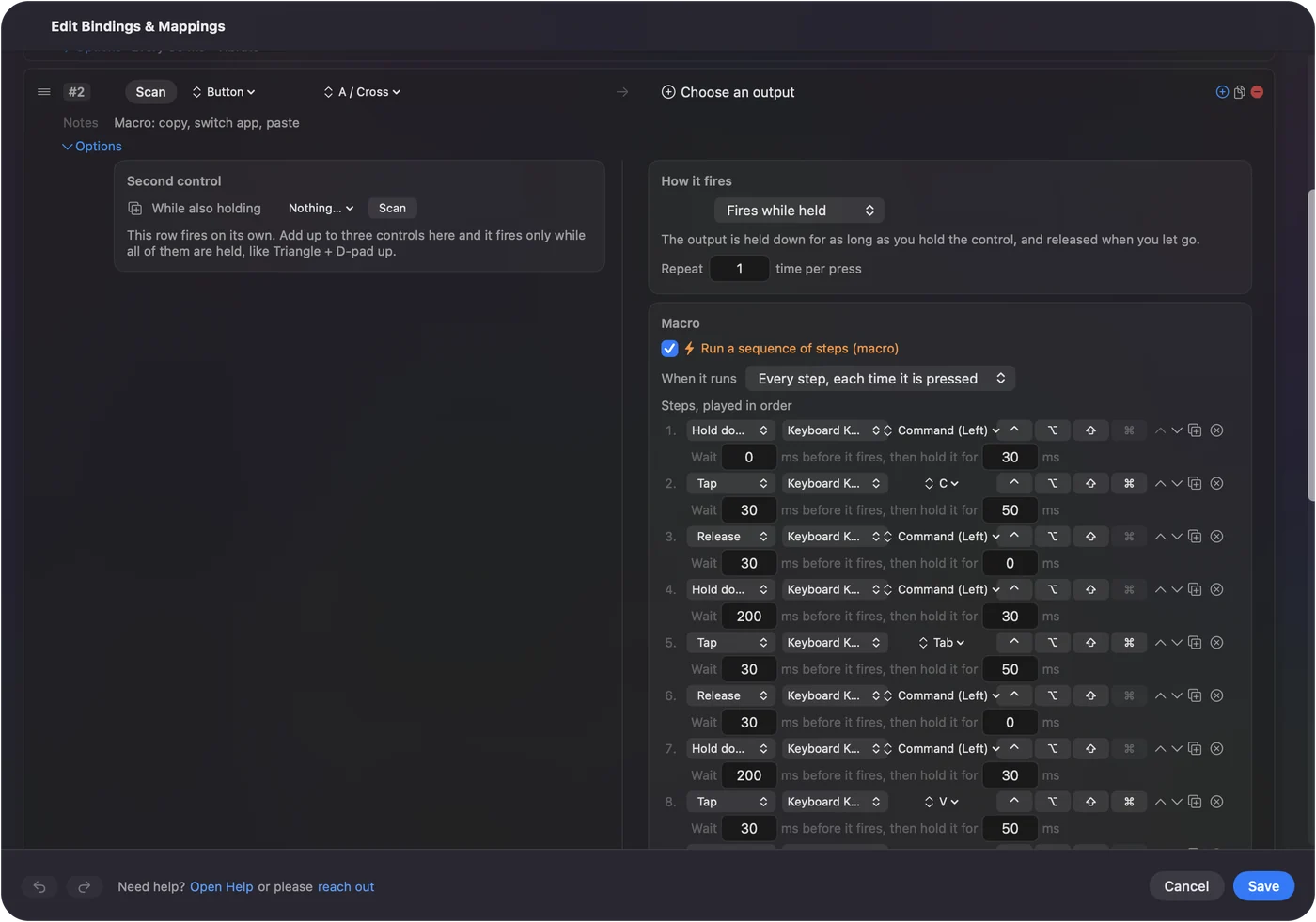
A second control in a row, While also holding, makes a combo, so one button plus a held key gives you a new job. Pressing a side button while holding Option, say, can open an app. On a mouse with four side buttons a combo layer gives you eight jobs without touching the hardware.
Options that make it better
- Block the original. For the middle button and the side buttons, Block the button's own action in the Press box stops apps from also using the button.
- Repeat while held. A row can repeat while you hold the button, useful for scrolling or for paging.
- Per app. List apps under Automation & Gaming Utilities and turn on Switch presets when the front app changes.
- Emergency stop. Control Option Command period stops everything if a layout ever misbehaves.
Ideas for people who use a Viper
- Left-handed players. An ambidextrous Viper has the same buttons on both sides, so a left-handed user gets a working side pair.
- Claw and fingertip grips. Razer designs these mice for light grips, so a thumb button you rarely press by accident is good.
- Small hands. The Viper Mini is smaller, and Razer suggests it for small to medium hands.
- Players on a Mac. Gaming is the point of this mouse, so keep game buttons in the game and put the Mac jobs, such as Mission Control and dictation, on spare buttons.
If a Viper button does nothing
Climb this ladder, smallest step first:
- Scan it. If nothing scans, the mouse keeps that button to itself.
- Check the connection. A wireless Viper uses its dongle, and the dongle also shares with some Razer keyboards.
- Activate the preset. Rows only fire while their preset runs.
- Allow Accessibility. System Settings, Privacy & Security, Accessibility.
- Check Synapse. If Razer's software gave a button another job, change it back.
The Mouse map in the Live Visualizer lights every button the Mac receives.
What it cannot do
- DPI and polling. It does not change DPI, polling rate, lighting or lift-off distance. Razer Synapse does.
- Private buttons. DPI and profile buttons send nothing the Mac can read.
- Two mice apart. Every mouse counts as one.
- Razer hardware control. Free apps such as MacRazer and Razer Viper Control say they control some Razer mice on a Mac without Synapse, with their own permissions. I have not tried them, and they are separate from InputConfig.
- Pointer feel. Tools such as LinearMouse, Mac Mouse Fix and SteerMouse handle that and run alongside InputConfig.
The short version
- Works. Every Viper is a normal Mac mouse.
- Scan. The side buttons arrive as mouse buttons.
- Four buttons. The ambidextrous models give four jobs, or eight with a combo.
Press Scan on each button before you plan the layout, and let the Viper tell you what it sends.
Questions
Does the Razer Viper work on a Mac?
Yes, as a mouse. Razer's Synapse for Mac list I read includes the Viper V3 Pro, V3 Pro SE and V4 Pro, and other Vipers still work for pointing and clicking.
How do I use Razer Viper side buttons on a Mac?
Press Scan on a row in InputConfig, press the side button, and choose what it sends. Each side button reaches the Mac as a mouse button.
Does the Viper Ultimate work on a Mac?
Yes as a mouse. I did not find it on the Synapse for Mac list I read, so settings beyond the mouse's own memory may need Razer software on a Windows PC.
Can I use the four side buttons of an ambidextrous Viper?
Probably, as retailers describe two buttons on each side. Press Scan on each one to see the names the Mac receives.
Can I remap Viper buttons on a Mac without Synapse?
Yes. The side buttons reach the Mac as mouse buttons, so InputConfig can give each one a job, and it needs the Accessibility permission.
Is the Viper Mini ambidextrous?
Its shape is, by Razer's description, but its two side buttons are on the left only, so a left-handed user reaches them with the little finger. Razer lists six programmable buttons in all.
Related
This page in other languages: العربية, Čeština, Dansk, Deutsch, Español, Suomi, Français, Magyar, Bahasa Indonesia, Italiano, 日本語, 한국어, Norsk, Nederlands, Polski, Português, 繁體中文, 简体中文
Completely free. You don't have to make an account, there are no subscriptions, and nothing is locked. Optimized for Apple silicon. Open source on GitHub.
Updated