Do the Razer Orochi and Cobra work on a Mac?
 InputConfig is completely free on the Mac App Store. You don't have to make an account, there are no subscriptions, and nothing is locked. Optimized for Apple silicon.
Yes, as mice: the Orochi V2, the Cobra and the Cobra Pro all work on a Mac with nothing installed, and the Orochi V2 and Cobra Pro pair over Bluetooth, which suits a laptop. They are small and light, so they are travel mice first, and a MacBook user gets the most from the few buttons they have by giving each one a Mac job.
I make InputConfig, a free Mac app that reads a mouse's extra buttons and gives each one a job, and I have checked it with a Razer mouse. Only the Cobra Pro is on the Razer Synapse for Mac list quoted on Razer mouse on a Mac, and the Orochi V2 and wired Cobra are not, so this page is about what works without Synapse.
On this page: 11 sections
Steps
- Pair the mouse over Bluetooth in System Settings, Bluetooth, or plug in the dongle or the Cobra cable.
- Open InputConfig, add a Mouse row, press Scan and press each button you want to use.
- Bind the side buttons to back and forward, Mission Control or Start Dictation.
- Save and Activate the preset, and check each button in a browser.
- Make a second preset for the laptop's trackpad habits if you use both.
What each travel mouse does on a Mac
I read Razer's pages for the Orochi V2, the Cobra and the Cobra Pro on October 21, 2026.
| Model | Buttons | Connection | Power | Synapse for Mac list I read |
|---|---|---|---|---|
| Orochi V2 | Six programmable | Bluetooth and HyperSpeed 2.4 GHz, dongle stored under the top cover | One AA or AAA battery | No |
| Cobra | Not stated on the page | Wired | Cable | No |
| Cobra Pro | Ten customizable controls | HyperSpeed, Bluetooth and wired | Rechargeable, USB-C or optional wireless charging | Yes |
Razer says the Orochi V2 keeps one profile in the mouse, the Cobra one profile and the Cobra Pro five. The last column is the Synapse for Mac list quoted on the Razer mouse page linked above. Every one of these mice works as a normal mouse on a Mac, and only the Cobra Pro also gets Razer's own settings screen there.
Pair it and keep the right mode
- You: For Bluetooth, put the mouse in pairing mode and choose it in System Settings, Bluetooth. For the dongle, plug it in. A wired Cobra just needs its cable.
- InputConfig: Nothing yet, because InputConfig reads the mouse once the Mac has it.
- Check: The pointer moves and the clicks work.
- Pairing mode. Razer's Orochi V2 master guide is the place to confirm the button combination for Bluetooth pairing, which Mac users on Apple's forums report is a three second hold of the side buttons and DPI button after switching to Bluetooth. I could not open the guide to check it myself.
- Mode. The Orochi V2 and Cobra Pro use a mode, Bluetooth or the dongle, and the mouse talks only to the one it is set to.
- Battery. The Orochi V2 uses a single AA or AAA battery, and Razer says its top button blinks red twice when charge falls below five percent.
- Dongle. The Orochi V2 stores it inside the mouse, and the Cobra Pro uses its own wireless dongle, so a travel bag does not need extra bits.
- Sleep. A wireless mouse that sleeps may need a click to wake.
Find out what each button sends
- You: In InputConfig, add a Mouse row, press Scan, and press each side button and any extra button.
- InputConfig: Names each button, such as Button 4 and Button 5.
- Check: A button name means it is yours to bind. If one does not scan, it is private to the mouse.
| Control | How it should report | What to do |
|---|---|---|
| Side buttons | Mouse buttons, Button 4 upward | Press Scan to confirm and bind them |
| Wheel click | Middle click | Bind it, and block its own action if you like |
| DPI button | Often nothing arrives | Use it on the mouse |
| Power or mode button | Handled by the mouse | Leave it |
The Cobra Pro has ten controls, so it may send more buttons than the Orochi V2 and the Cobra. A button count from a spec sheet is a promise, and Scan is the proof.
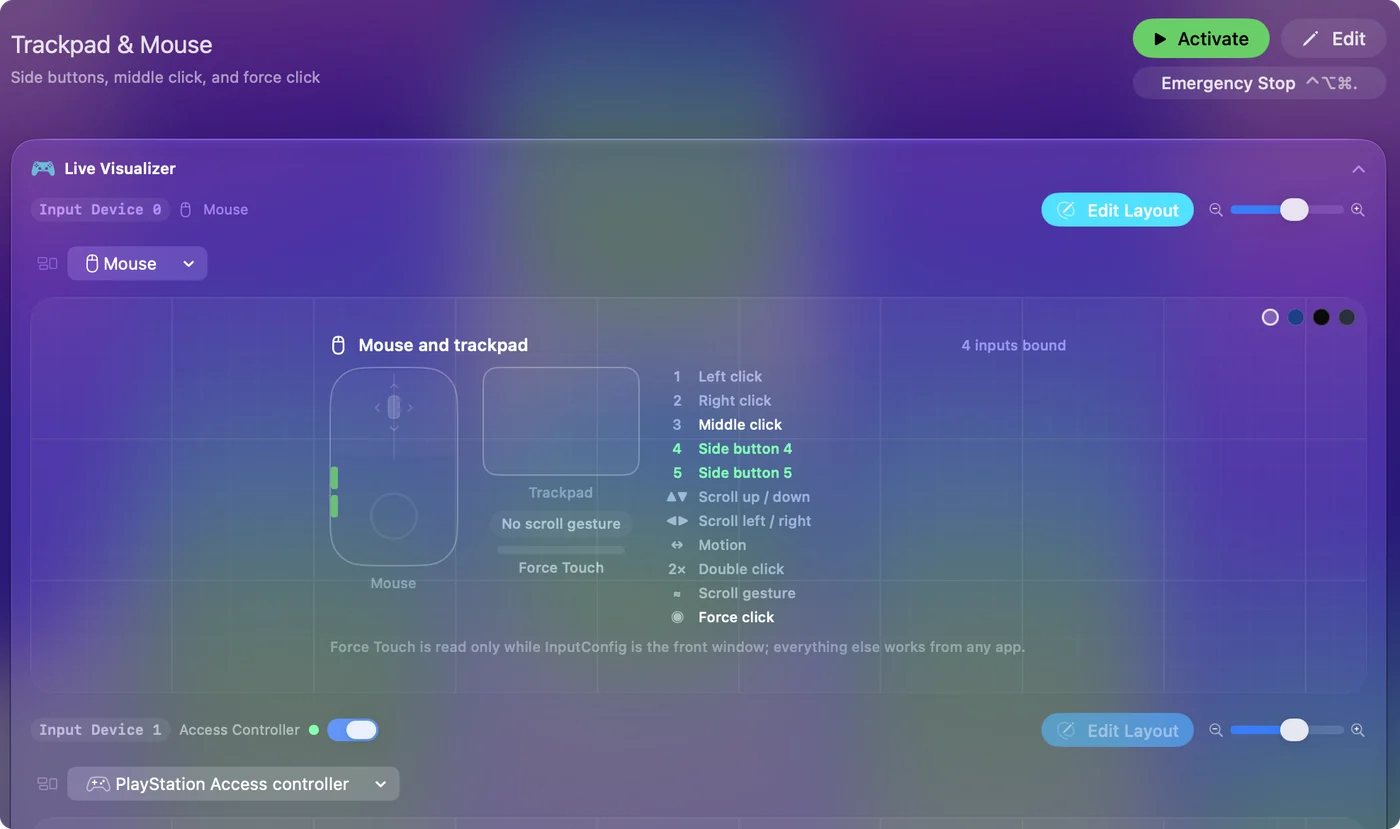
Bind the buttons for a laptop
- You: Make a preset, add This Mac's mouse or trackpad as an input device, add a row for each button, press Scan and press it, then choose what it sends.
- InputConfig: Runs the row when the button is pressed, in every app.
- Check: Press each button, then Save and Activate.
- Back and forward. Command [ and Command ] on the side buttons.
- Mission Control. The system function, so one press shows every window.
- Spaces. Control Left Arrow and Control Right Arrow to move between desktops.
- Start Dictation. For notes on a train, no keyboard needed.
- Lock Screen. A system function, so you can walk away from a laptop in a cafe.
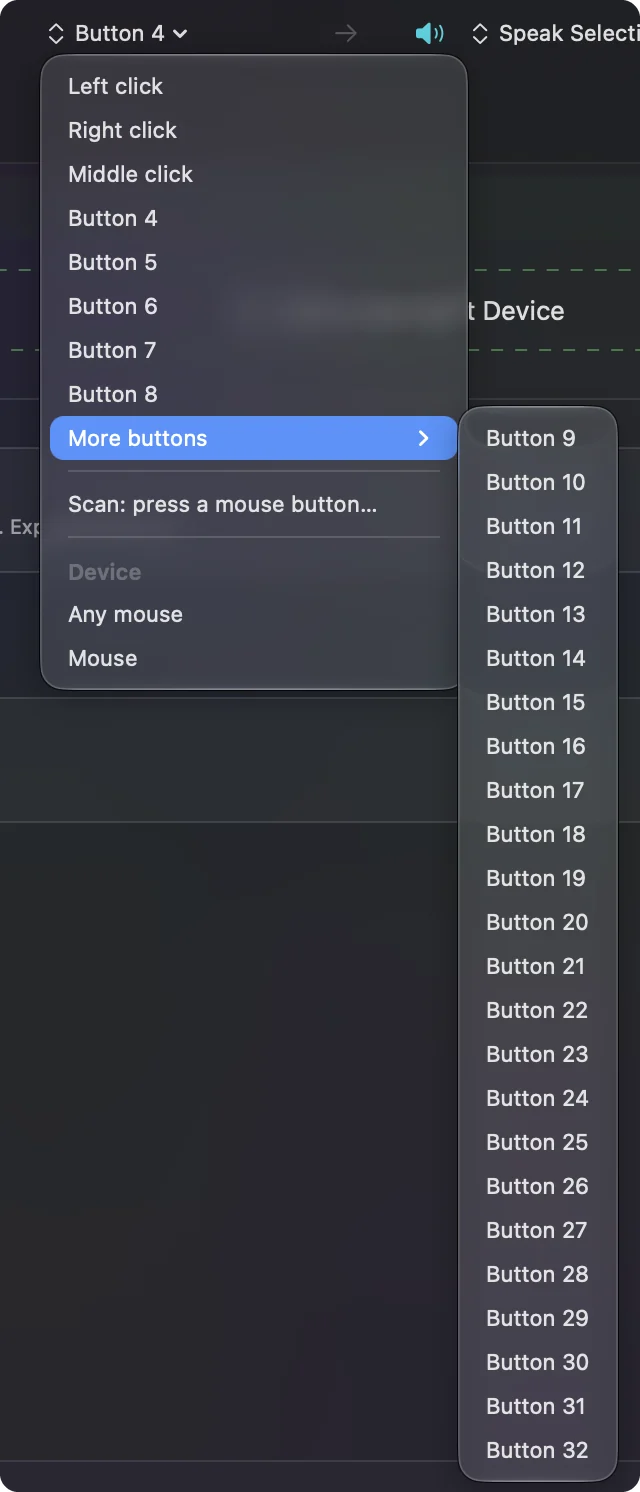
Macros and options for a small mouse
- Hold and double tap. A row can have a hold action and a double tap action, so two side buttons can do six jobs.
- Macros. Tick Run a sequence of steps (macro) for a timed sequence of keys. How to make a macro has an example.
- Block the original. For the middle and side buttons, Block the button's own action stops an app from also using it.
- Per app. List apps under Automation & Gaming Utilities and turn on Switch presets when the front app changes.
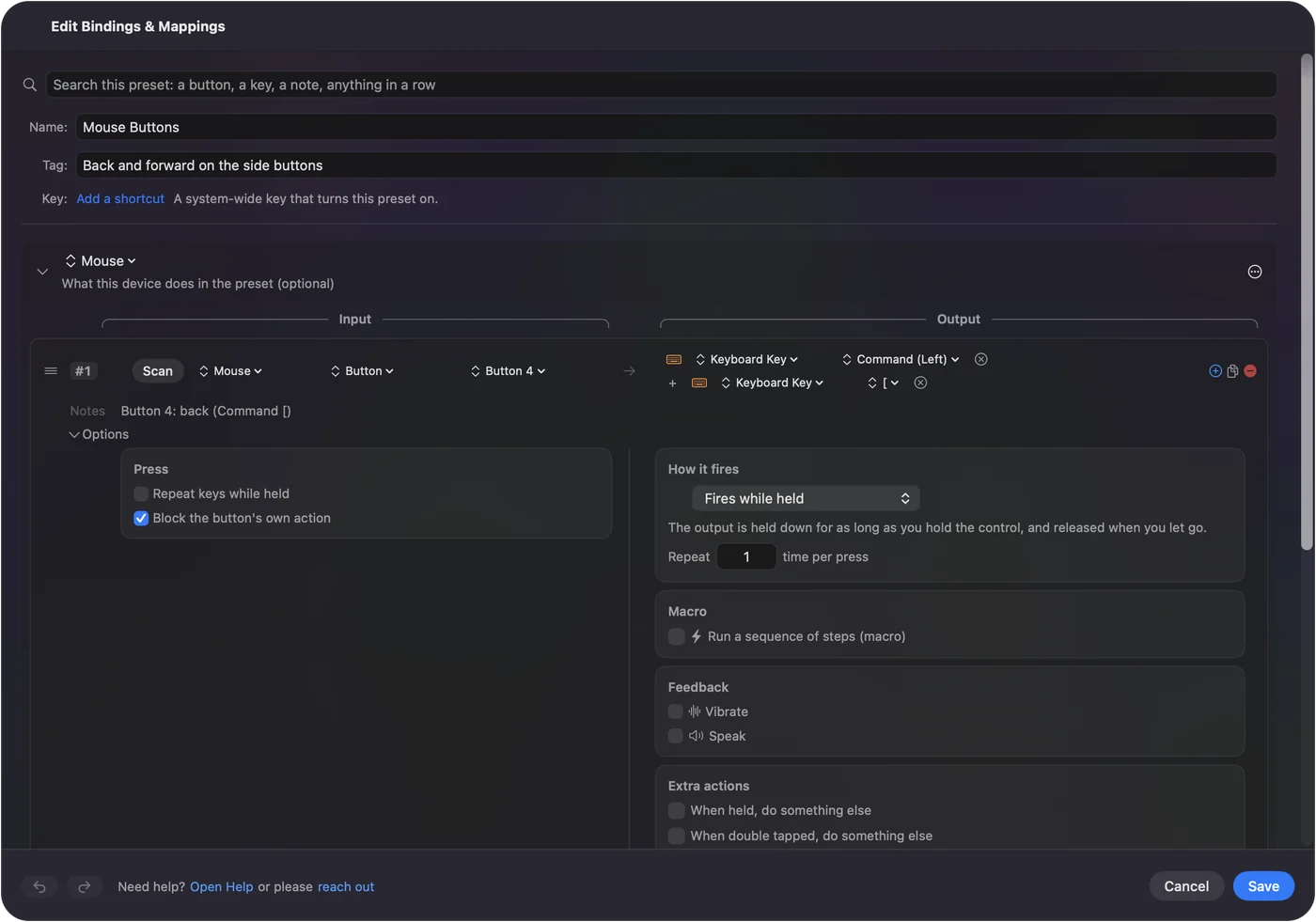
Ideas for people who travel with a mouse
- MacBook users. A mouse in the bag gives you Button 4 and Button 5, which a trackpad does not have, and they can be back and forward.
- Presenters. Next and previous slide on the side buttons, with the mouse as a clicker.
- Coffee shop workers. Lock Screen on a button, so one press protects the screen.
- Hot-desking. The Orochi V2 runs on one battery you can buy anywhere, and the Cobra Pro pairs over Bluetooth, so neither needs a dock.
If a button or the mouse does not respond
Climb this ladder, smallest step first:
- Check the mode. The mouse talks to one connection at a time.
- Charge or replace the battery. A flat battery looks like a dead mouse.
- Scan the button. Nothing scanning means the mouse keeps it.
- Re-pair it. Remove it in System Settings, Bluetooth and pair it again.
- Allow Accessibility and Activate. InputConfig needs the permission, and rows only fire while their preset runs.
If the pointer moves, the mouse is fine and the rest is a setting. The mouse tester shows each button the Mac receives.
What it cannot do
- Hardware settings. It does not change DPI, polling rate or lighting. Razer Synapse does, and it supports only the Cobra Pro of these three on a Mac.
- Private buttons. DPI and mode buttons send nothing the Mac can read.
- Two mice apart. Every mouse counts as one.
- Pointer feel. Apps such as LinearMouse and Mac Mouse Fix change acceleration and run alongside InputConfig.
The short version
- Works. The Orochi V2, Cobra and Cobra Pro are normal Mac mice.
- Bluetooth. The Orochi V2 and Cobra Pro pair with a Mac.
- Buttons. Scan, then give each a Mac job.
Two side buttons with a tap and a hold each are enough on a MacBook.
Questions
Does the Razer Orochi V2 work on a Mac?
Yes, as a mouse, over Bluetooth or its dongle. It is not on the Synapse for Mac list I read, but its buttons can still be bound in InputConfig.
Does the Razer Cobra work on a Mac?
Yes, as a wired mouse with nothing to install. The Cobra is not on the Synapse for Mac list I read.
Does the Razer Cobra Pro work on a Mac?
Yes. It is on the Synapse for Mac list I read, and it connects over HyperSpeed, Bluetooth or a cable.
Can I use the Razer Orochi V2 over Bluetooth on a Mac?
Razer says it switches between Bluetooth and 2.4 GHz HyperSpeed. Pair it in System Settings, Bluetooth.
Why will my Razer Orochi V2 not connect to my MacBook?
Check the mode switch is on Bluetooth, remove the old pairing in System Settings, Bluetooth and put the mouse back in pairing mode. Mac users on Apple's forums report mixed results after macOS updates.
How do I use the Cobra side buttons on a Mac?
Press Scan in InputConfig and press the button. Buttons that scan can be given any job, in every app.
Related
This page in other languages: العربية, Čeština, Dansk, Deutsch, Español, Suomi, Français, Magyar, Bahasa Indonesia, Italiano, 日本語, 한국어, Norsk, Nederlands, Polski, Português, 繁體中文, 简体中文
Completely free. You don't have to make an account, there are no subscriptions, and nothing is locked. Optimized for Apple silicon. Open source on GitHub.
Updated