Does a Keychron mouse work on a Mac?
 InputConfig is completely free on the Mac App Store. You don't have to make an account, there are no subscriptions, and nothing is locked. Optimized for Apple silicon.
Yes, a Keychron mouse works on a Mac as a mouse, and Keychron's own setup tool is a web page, so there is nothing to install. The Keychron Launcher web app sets DPI, polling rate and buttons in Chrome, Edge or Opera, on a Mac as on any computer, and Safari is not on Keychron's list. The one thing I could not confirm for you is exactly which buttons each M model lets you change, so check your model in the Launcher.
For what the buttons do on a Mac, I make InputConfig, a free Mac app that reads a mouse's extra buttons and gives each one a job. I have not tested a Keychron mouse myself. I read Keychron's M series page and a Launcher guide on October 21, 2026.
On this page: 12 sections
- Steps
- See what the Launcher does and what a Mac still needs
- Use the Keychron Launcher on a Mac
- Find out what each button sends
- Bind the buttons
- Run longer jobs from one button
- Add hold, double click and per-app layouts
- Ideas for Keychron mouse owners
- If a button or the Launcher does not respond
- What it cannot do
- The short version
- Questions
Steps
- Connect the mouse over Bluetooth, the 2.4 GHz receiver or the cable. The pointer and clicks work at once.
- Open Keychron Launcher in Chrome, Edge or Opera and choose the mouse to set DPI, polling rate and buttons.
- Save the changes in the Launcher so they stay in the mouse.
- In InputConfig, add a row, press Scan and click a side button or thumb wheel to see what arrives.
- Bind the button, then save and activate the preset.
See what the Launcher does and what a Mac still needs
Keychron's M series page, which I read on October 21, 2026, lists the M2, M3, M3 mini, M4, M5, M6 and M7, with polling rates up to 8K on most models, and tags them as 2.4 GHz wireless. Keychron's guide to the Launcher says to use the latest Chrome, Opera or Edge. A search summary of Keychron's own wording says the M series supports the Launcher web app for buttons, DPI and macros. I could not open the product pages themselves, so button counts here come from reviews.
| Model | What I found | Launcher |
|---|---|---|
| Keychron M3 | 8K, 4K and 1K polling, wireless | Per Keychron material, set in the Launcher web app |
| Keychron M6 | Over ten customizable buttons, a notched or infinite top wheel with left and right tilt, and a thumb wheel on the side, per Keychron and RTINGS | Same web app, and 2.4 GHz, Bluetooth and cable are all listed |
For the full spec of your model, open its page on Keychron. The Launcher is a web page, so a Mac does not need a driver, only a Chromium browser.
Use the Keychron Launcher on a Mac
- Chrome, Edge or Opera. The Launcher uses WebHID, which Chrome and Edge support from version 89 and Safari does not.
- Use the receiver or cable. If the Launcher does not list the mouse over Bluetooth, switch to the 2.4 GHz receiver or plug in the cable. I could not confirm which link each model needs.
- Save to the mouse. Settings are written into the mouse, so the page does not need to stay open.
- Check VoiceOver. One AppleVis thread about Keychron's keyboard Launcher said VoiceOver reads most of the page but the layout is hard for screen reader users. I did not find a mouse-specific report.
Make your DPI and polling choices in the Launcher once, and everything else can happen on the Mac side.
Find out what each button sends
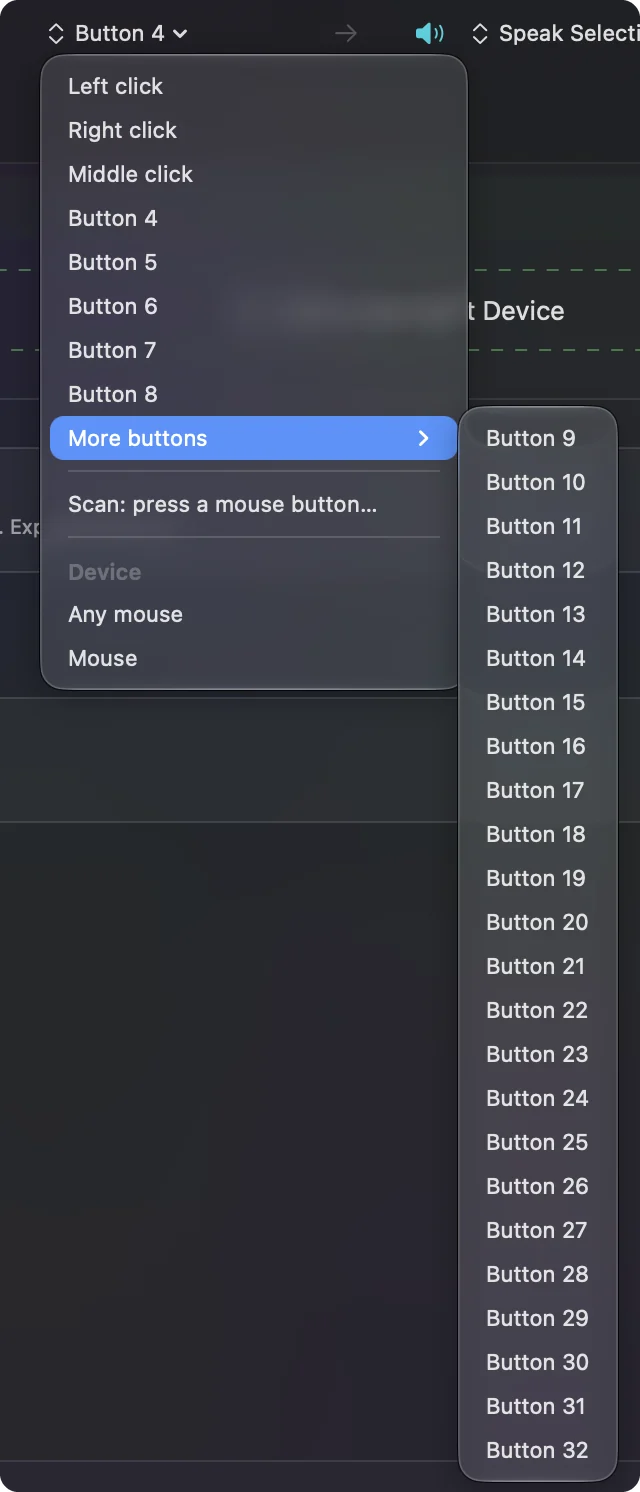
A Keychron M6 has more controls than most mice, so scanning is worth the minute. Open InputConfig, add a row, press Scan and use each control.
| Control | What I would expect | Notes |
|---|---|---|
| Left, right and wheel click | Left click, Right click, Middle click | Bind the wheel click if you want, with Block the button's own action |
| Side thumb buttons | Button 4 and up | Scan each, since an M6 has several |
| Top wheel tilt | Sideways scroll | Scan to confirm. A tilt can be read as an input of its own |
| Thumb wheel on the side | Probably scrolling | Press Scan and turn it to see how it reports |
| Scroll mode button | Inside the mouse, probably | Press Scan to see |
This is an expectation, not a test, since I have not scanned a Keychron mouse. Let Scan, not the box, tell you what arrives.
Bind the buttons
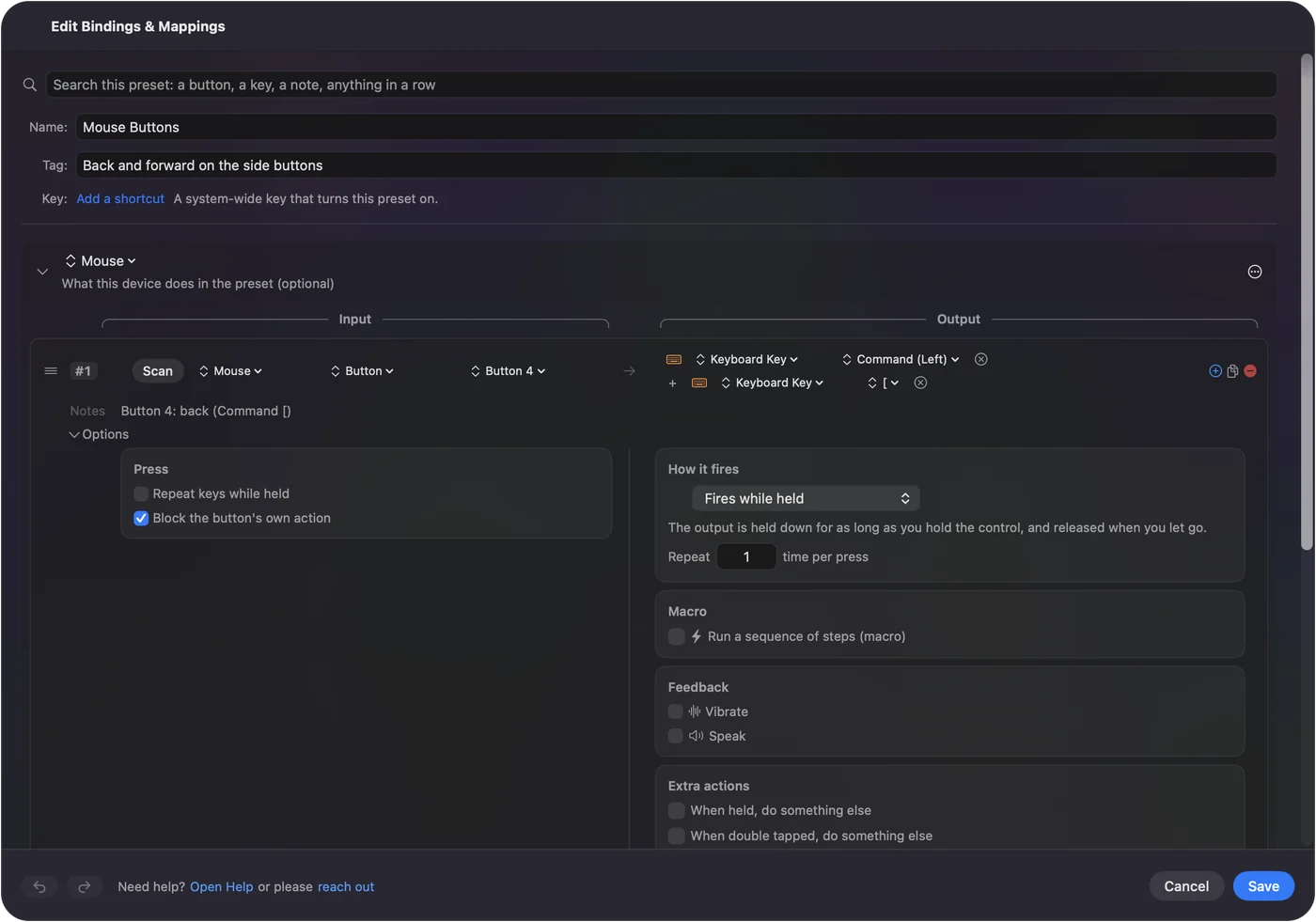
- You: Add a row, choose Mouse, press Scan and click a side button. Pick an output such as Keyboard Key with Command and a bracket, a System Function or a macro.
- InputConfig: Names the button and runs the output on each press.
- Check: Save and Activate, then press the button in Safari or Finder.
For a mouse with several thumb buttons, a sensible split is Back and Forward on the pair under the thumb and window or Space jobs on the rest. For a tilt wheel, the tilt wheel page shows how to read each tilt. Ticking Block the button's own action on a side button keeps an app from seeing it twice.
Run longer jobs from one button
A mouse with ten buttons can run ten jobs, and a macro makes each job bigger:
- Copy, wait, paste. Command C, a 300 millisecond wait, then Command V.
- A screenshot and a reply. A System Function screenshot, then Type Text with a short note.
- Open a project. Open App, then Open URL, with a wait between them.
- Window shuffle. Control Up for Mission Control, then a short wait and a click.
Macros are covered in mouse macros on a Mac. Keep the wait between steps long enough for the app, and lengthen it if one is missed.
Add hold, double click and per-app layouts
- Hold. Each row can have a hold action, so a tap sends Back and a hold shows the desktop.
- Double tap. Each row has a double tap action too.
- Repeat while held. Keeps stepping tabs or frames while you hold.
- Per app. A preset can list apps under Automation & Gaming Utilities, and Switch presets when the front app changes follows the app in front.
The steps are in hold and double click actions. Only one preset runs at a time, and Control Option Command period is the emergency stop.
Ideas for Keychron mouse owners
- A Keychron keyboard owner. If you already use Launcher for the keyboard, the same page sets the mouse, and InputConfig can match key jobs to button jobs.
- An M6 user in a spreadsheet. Tilt left and right can move tabs, and the thumb wheel can scroll sheets.
- A designer. Undo and redo on thumb buttons, a brush key on a third.
- A coder on an M3. Back and Forward in the browser, with a hold on one for Mission Control.
With this many buttons, a per-app preset saves more time than any single macro.
If a button or the Launcher does not respond
Climb this ladder, smallest step first:
- Use Chrome or Edge. The Launcher does not run in Safari.
- Try the receiver or the cable. A web app may not see Bluetooth.
- Press Scan. If a Button number is recorded, the Mac receives it.
- Activate the preset. Rows do nothing until the preset runs, and Accessibility must list InputConfig.
- Quit other mouse tools. LinearMouse or SteerMouse may already take that button.
If Scan sees nothing, the button is private to the mouse.
What it cannot do
InputConfig does not change DPI, polling rate, lighting or scroll feel, and it cannot read a button that sends nothing to macOS. It cannot give two mice different jobs for the same button, and it does not replace the Launcher. Use the Launcher for the mouse and InputConfig for the Mac.
The short version
- Works. Pointer, clicks and wheel.
- Launcher. A web page, so Chrome, Edge or Opera on a Mac, with no install.
- Buttons. Scan each, and bind Back, Forward and macros.
Do the DPI once in the Launcher, then give every button a Mac job.
Questions
Does the Keychron Launcher work on a Mac?
Yes, in Chrome, Edge or Opera, which Keychron lists for the Launcher. Safari is not on its list.
Does the Keychron M6 work on a Mac?
As a mouse, yes, over 2.4 GHz, Bluetooth or cable. Its extra buttons can be given jobs with an app such as InputConfig.
How do I remap Keychron mouse buttons on a Mac?
Use Keychron Launcher in Chrome for the mouse itself, or press Scan in InputConfig and bind each button on the Mac.
Does a Keychron mouse need software on a Mac?
No for basic use. Software only changes DPI, polling rate, buttons and macros.
Why does the Launcher not see my Keychron mouse?
Use Chrome or Edge and try the receiver or the cable instead of Bluetooth.
Related
This page in other languages: العربية, Čeština, Dansk, Deutsch, Español, Suomi, Français, עברית, Magyar, Bahasa Indonesia, Italiano, 日本語, 한국어, Norsk, Nederlands, Polski, Português, ไทย, 繁體中文, 简体中文
Completely free. You don't have to make an account, there are no subscriptions, and nothing is locked. Optimized for Apple silicon. Open source on GitHub.
Updated