How to use a vertical mouse on a Mac
 InputConfig is completely free on the Mac App Store. You don't have to make an account, there are no subscriptions, and nothing is locked. Optimized for Apple silicon.
Yes, a vertical mouse works on a Mac with nothing installed, because it is a normal mouse held on its edge, like a handshake. The pointer, the main buttons and the wheel work at once, and what differs between models is the extra buttons and whether the maker's software runs on a Mac. InputConfig, the free Mac app I make, gives those extra buttons jobs.
I am not a clinician, and a vertical mouse is not a treatment. This page covers what to expect from the popular ones, what I found about their Mac software, and how to bind their buttons.
On this page: 11 sections
Steps
- Connect the mouse by Bluetooth, receiver or cable, and check the pointer and wheel.
- Set Tracking speed and Natural scrolling for it in System Settings, Mouse.
- Install the maker's software only if your model has a Mac version and you want its settings.
- In InputConfig, add a row, press Scan, and press each thumb button to see what it sends.
- Give the buttons jobs such as Back, Forward, Mission Control or a shortcut.
- Use it in short sessions for a week before deciding if the shape suits you.
Know what works with nothing installed
The shape is what a vertical mouse changes, because the forearm turns from palm down to a handshake position. The Mac does not care. Here is what I found for four popular ones:
- Logitech Lift. It pairs over Bluetooth Low Energy or with a Logi Bolt receiver that is sold separately. Logitech says it has four customizable buttons set up in Logi Options+, a SmartWheel, a cursor speed switch and an Easy-Switch button for up to three devices. Logitech also sells a Lift for Mac, and I read its Getting Started page on October 21, 2026.
- Anker. The common Anker vertical mouse uses a 2.4 GHz receiver, has three DPI levels and five buttons, and Anker's own Canadian page says the previous and next thumb buttons are not recognized on Mac OS X.
- Microsoft. See Microsoft mice on a Mac, since its software is Windows only.
- Evoluent VerticalMouse. The long running ergonomic one, with thumb buttons and a speed button. Evoluent says on its page that it no longer provides software for customizing its Bluetooth and Mac models, and that the default mouse functions work in macOS without it.
Every vertical mouse here works as a mouse, and the software story is where they differ.
Find out what the thumb buttons send
A vertical mouse hands the thumb a button or two, usually Back and Forward. Press Scan and press them, because the answers differ.
| Mouse | Extra controls | What to check |
|---|---|---|
| Logitech Lift | Back and Forward buttons, SmartWheel click, cursor speed switch | Scan each one. The speed switch is handled inside the mouse. |
| Anker vertical | Previous and next thumb buttons, DPI button | Anker says its thumb buttons are not recognized on Mac OS X, so Scan may hear nothing. |
| Evoluent VerticalMouse | Thumb buttons and a pointer speed button | Scan each thumb button. A speed button is handled in the mouse. |
A button that reaches macOS gets a name like Button 4 or Button 5, and one that does not gets nothing. The Live Visualizer's Mouse template shows it live, and the mouse tester does the same in a browser. If Scan hears nothing, the button never reaches macOS, and I would not spend time fighting it.
Bind the extra buttons
- You: In InputConfig, make a preset, add a row, choose This Mac's mouse or trackpad as the input device, press Scan, and press a thumb button.
- InputConfig: Records it as Button 4, Button 5 or another number, and shows that name on the row.
- Check: Choose an output, Save and Activate, then press the button in an app to see it run.
A common first setup is Command Left Bracket on the back button and Command Right Bracket on the forward one, which is what the built-in Trackpad & Mouse preset does, and which many apps treat as back and forward. Turn on Block the button's own action in the row's Options so a browser that already reacts to the button does not also go back.
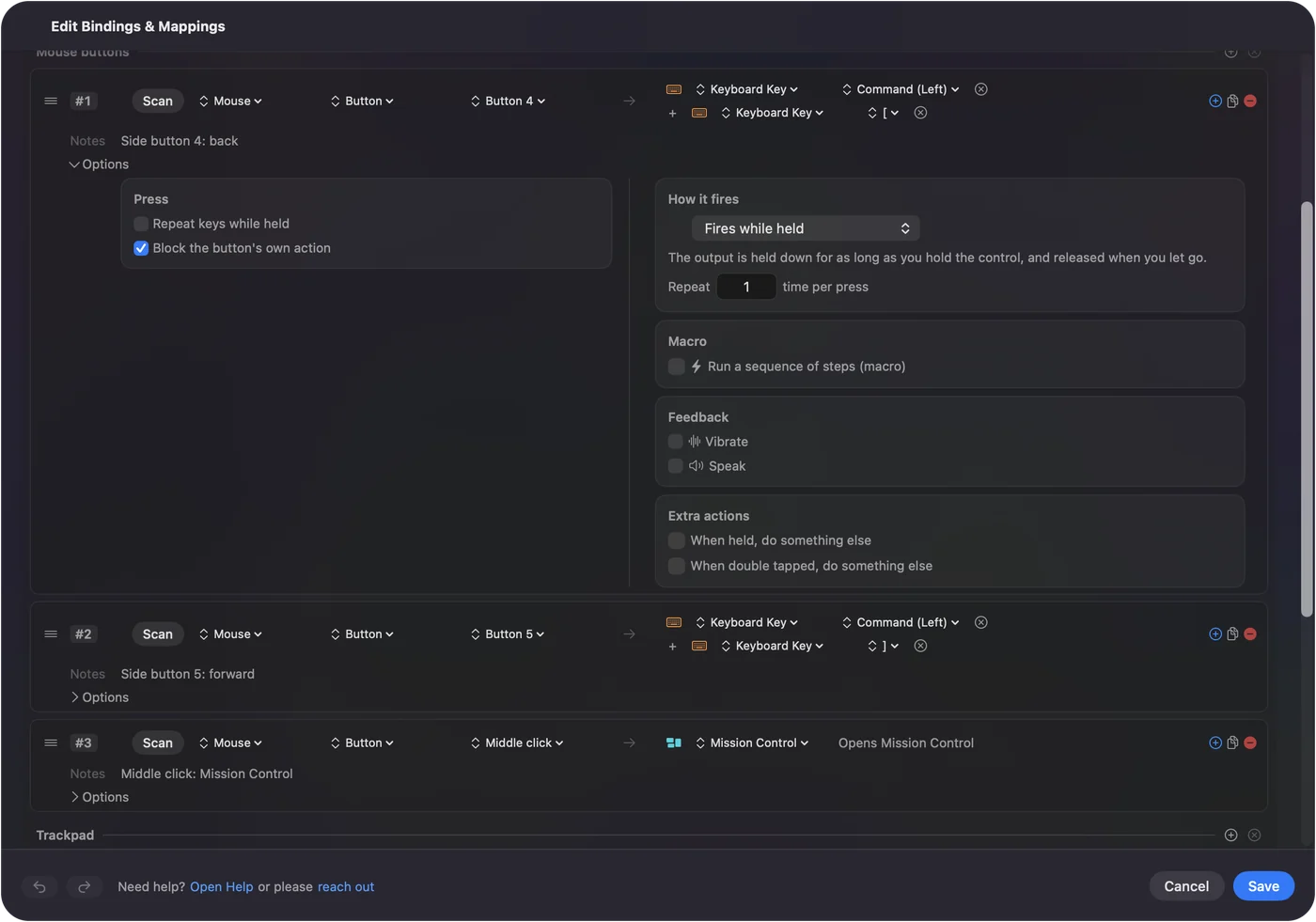
The full setup is in mouse side buttons on a Mac. Give the buttons your thumb already finds first, and move on from there.
Run macros from a thumb button
A vertical mouse has fewer buttons than a gaming mouse, so each one should do a lot. Open a row's Options and tick Run a sequence of steps (macro). Each step is a key, a shortcut or a click, with its own wait and hold time.
- Copy and paste. Command C, a short wait, then Command V.
- Save and close. Command S, a wait, then Command W.
- A reply you send often. Use Type Text instead of a macro for that.
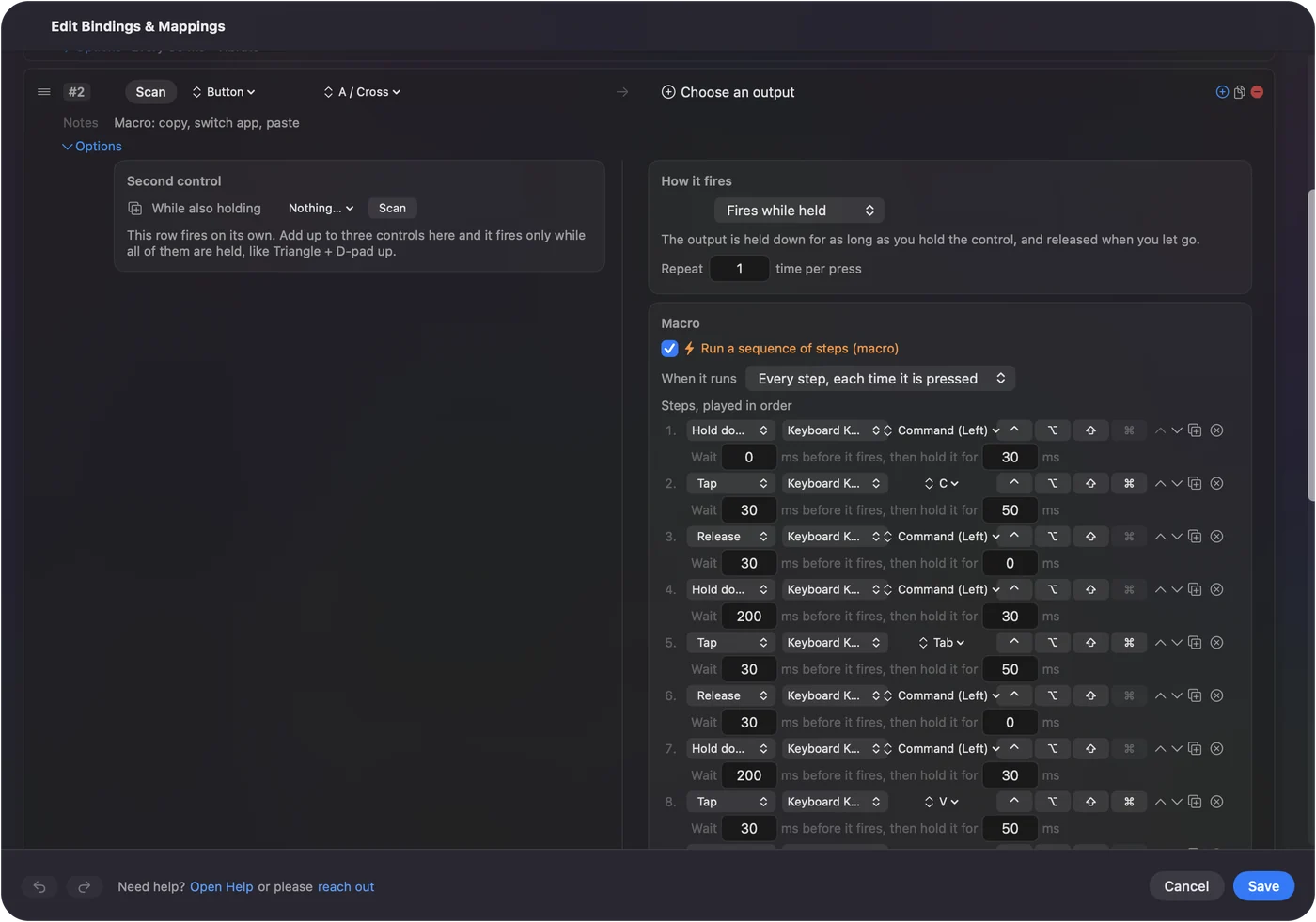
How to make a macro on a Mac shows every step. A macro on a thumb button is one less reach for the keyboard.
Use hold, double click and per app layouts
Two thumb buttons can do six jobs. A tap runs one job, a hold runs another, and a double click runs a third. A Mouse row of the kind Double click fires on the second click of a pair, so a single click keeps its own job. A second control in the row, While also holding, makes a combo.
- Back and Forward. A tap goes Back, and a hold closes the tab.
- Per app. A preset can list apps under Automation & Gaming Utilities, and with Switch presets when the front app changes on in Settings, Advanced, the thumb buttons become Undo and Redo in an editor and Back and Forward in a browser.
Only one preset runs at a time, and Control Option Command period is the emergency stop. The same two buttons can be right for each app you use.
Think about comfort and RSI honestly
A vertical mouse is a popular first step for people with wrist or forearm strain, because it takes the twist out of the forearm. I think it is worth a try, and I cannot promise it helps. Different muscles carry the work, and for some hands the new position is worse. If you have pain, a clinician can look at your hands and I cannot.
- Size. Sizes differ between models, and Evoluent lists a small VerticalMouse 4 for smaller hands.
- Hand. Logitech sells a left handed Lift, so check which hand a listing is for.
- Fewer clicks. Thumb button macros and double click shortcuts cut clicks, which is a different way to lower strain.
- A break. A new mouse does not replace one.
Other options are in mouse alternatives for carpal tunnel and RSI and the trackball guide. Spread the work across different muscles, and take the breaks.
If a button or the pointer misbehaves
Climb this ladder, smallest step first:
- Check the connection. Pair it again in System Settings, Bluetooth, or move the receiver to a direct port.
- Check its channel. A mouse with Easy-Switch, like the Lift, only talks to the device on its current channel.
- Watch the button arrive. Press it with the Live Visualizer open.
- Try an F key. If a button sends nothing, a maker's app with a Mac version can give it F13 to F20, and then you can scan that key.
- Check the permission. InputConfig reads clicks through Accessibility.
A button that does not show in the visualizer is between you and the mouse, not between you and the Mac.
What it cannot do
- Change DPI, polling or lighting. InputConfig does not. The mouse and the maker's app do.
- Read a button that stays in the mouse. DPI and profile buttons send nothing to macOS.
- Give a vertical mouse and another mouse different jobs. Every mouse counts as one.
- Make Evoluent's software work. Its own page says it no longer provides Mac customization software.
I have not tested a vertical mouse with InputConfig myself. Scan tells you in a minute what your own mouse does.
The short version
- Works already. A vertical mouse is a normal mouse on a Mac.
- Software. The Lift has Logi Options+, Anker has no Mac customization for its thumb buttons, and Evoluent says it stopped providing Mac software.
- Buttons. Scan the thumb buttons in InputConfig and give them jobs.
Test the shape for a week before you buy a second one.
Questions
Does a vertical mouse work on a Mac?
Yes. A vertical mouse works as a normal mouse with no driver. The maker's software matters only for button settings, and not every model has a Mac version.
Does the Logitech Lift work on a Mac?
Yes. Logitech sells a Lift for Mac and its setup page tells you to add it in System Settings, Bluetooth. Logitech says its four buttons are customized in Logi Options+.
Does the Evoluent VerticalMouse work on a Mac?
Yes, with default mouse functions. Evoluent's page says it no longer provides software for customizing its Mac models, so InputConfig can give the thumb buttons jobs.
Do Anker vertical mouse buttons work on a Mac?
The pointer and main buttons do. Anker's Canadian page says its previous and next thumb buttons are not recognized on Mac OS X, so press Scan to see whether yours arrive.
How do I remap vertical mouse buttons on a Mac?
Use an app that reads the buttons macOS receives. InputConfig reads them with Scan, and apps such as Mac Mouse Fix or LinearMouse also remap mouse buttons and run alongside it.
Why is one of my vertical mouse buttons not recognized on a Mac?
Some buttons are handled inside the mouse, such as DPI or profile buttons, and send nothing to macOS. Press Scan in InputConfig or open the Live Visualizer to see whether the button arrives at all.
Related
This page in other languages: العربية, Čeština, Dansk, Deutsch, Español, Suomi, Français, עברית, Magyar, Bahasa Indonesia, Italiano, 日本語, 한국어, Norsk, Nederlands, Polski, Português, ไทย, 繁體中文, 简体中文
Completely free. You don't have to make an account, there are no subscriptions, and nothing is locked. Optimized for Apple silicon. Open source on GitHub.
Updated