Do Satechi and Anker mice work on a Mac?
 InputConfig is completely free on the Mac App Store. You don't have to make an account, there are no subscriptions, and nothing is locked. Optimized for Apple silicon.
Yes: Satechi and Anker mice both work on a Mac as mice, with no driver. The question is the buttons. The Satechi M1 has no side thumb buttons, which BetaNews called a likely deal breaker for some when it launched, so there is nothing to bind beyond the wheel click and the two main buttons. An Anker vertical mouse is a different story, because an Anker community reply said its back and forward buttons were not recognized on Mac OS X, which may be about an older model.
I make InputConfig, a free Mac app that reads a mouse's extra buttons and binds each one. I have not tested a Satechi or Anker mouse myself. What I describe comes from retailer listings, a launch article and one Anker forum thread that I read on October 21, 2026.
On this page: 11 sections
Steps
- Pair the mouse over Bluetooth in System Settings, or plug in its USB dongle with an adapter if it has one.
- Click, scroll and press every button to see which ones the Mac responds to.
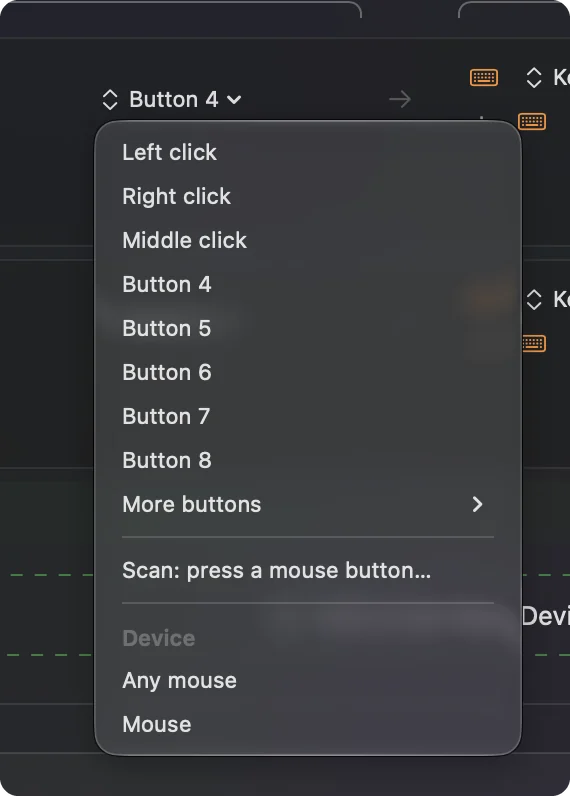
- Open InputConfig, add a row, press Scan and press a button to see whether it arrives.
- Bind the buttons that scan, such as the wheel click, Back or Forward.
- Save and activate the preset, then try it in Safari.
See what each mouse gives you
These mice are styled for Mac owners, and the buttons differ a lot:
| Mouse | What I found | On a Mac |
|---|---|---|
| Satechi M1 | Aluminum body, rechargeable over USB-C, Bluetooth, for both hands. No side thumb buttons per BetaNews. Retailers list it as supporting macOS | Pointer, two clicks and wheel. Press Scan on the wheel click |
| Anker vertical mouse | An ergonomic upright shape. An Anker community reply said its two thumb buttons were not recognized on Mac OS X | Press Scan to see if the thumb buttons arrive on your model |
Retailers disagree on the Satechi M1's button count and Bluetooth version, so I treat both as unconfirmed. The M1 is a pointer first, and a vertical Anker is the one to scan.
Find out what each button sends
Open InputConfig, add a row, press Scan and press every button. A Mac mouse with few buttons is quick to check.
| Control | What to expect | What to do |
|---|---|---|
| Left and right click | Left click and Right click | Leave alone |
| Wheel click | Middle click | Bind it, and block its own action if an app clashes |
| Anker thumb buttons (back and forward) | Possibly Button 4 and Button 5, or nothing on some models | Scan them. If rows appear, bind them |
| Satechi M1 side | Nothing, since there are no side buttons | Use a hold or a double tap on the wheel click instead |
| A DPI switch on the Anker | Likely inside the mouse | If Scan is blank, a Mac app cannot read it |
I say "expect" because I have not scanned either mouse. If Scan stays blank on a button, no Mac app can bind it, including this one.
Bind the buttons
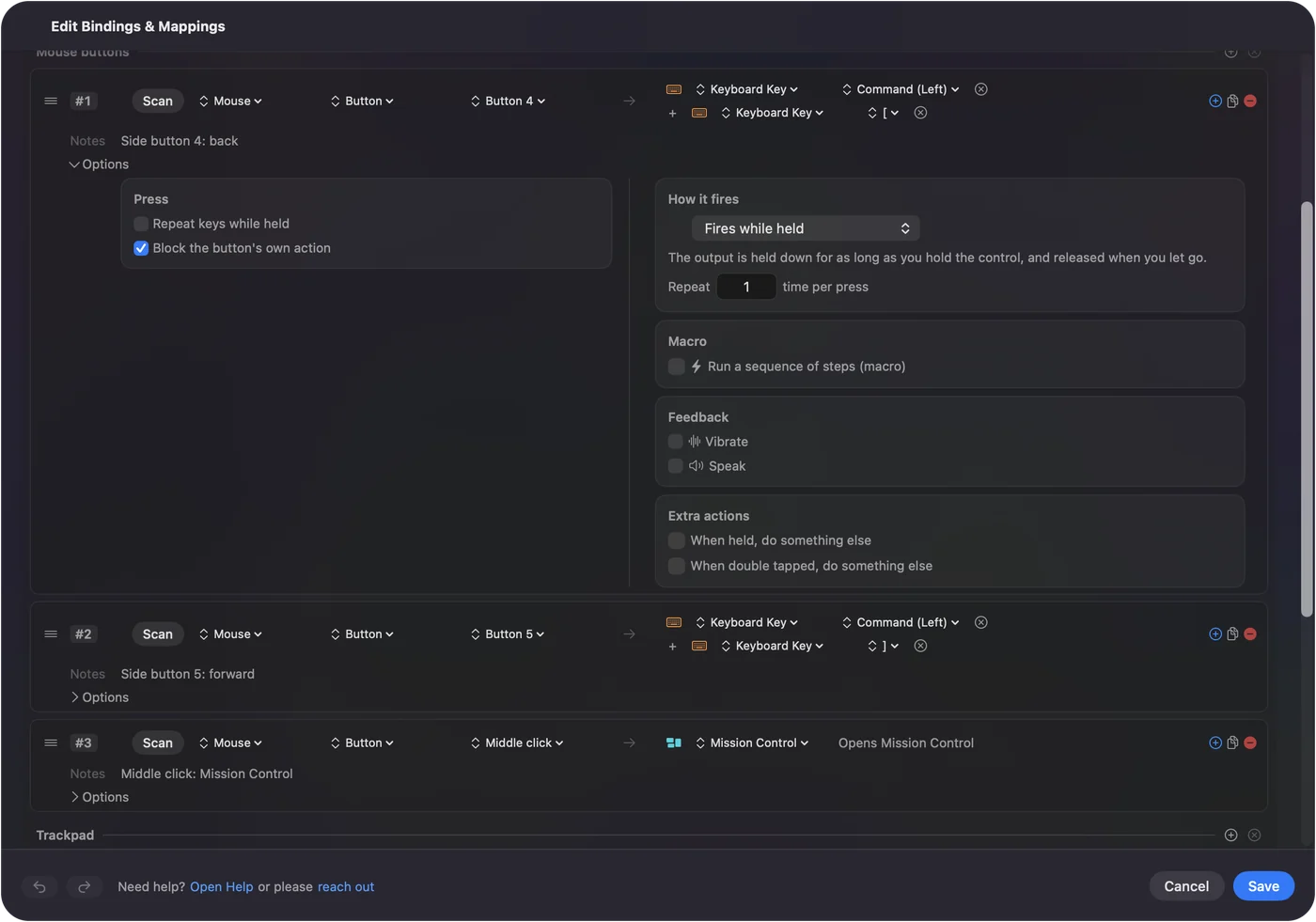
- You: Add a row, choose Mouse, press Scan and press the button. Pick an output, such as Keyboard Key with Command and a bracket for Back or Forward, or a System Function for Mission Control.
- InputConfig: Names the button and runs the output on each press.
- Check: Save and Activate, then press it in Safari or Finder.
The wheel click is the best button on a Satechi, because nothing else uses it on a Mac. Mission Control is a good pick. If an app already reacts to the raw button, tick Block the button's own action on that row. Mouse side buttons on a Mac has the full steps.
Get more from a mouse with few buttons
When a mouse has three controls, hold and double tap make more of them. In a row's Options, switch on When held, do something else and When double tapped, do something else.
- Wheel click. Tap for Mission Control, hold for Show Desktop, double tap for Launchpad.
- A thumb button on an Anker. Tap for Back, hold for a screenshot.
- A macro. Copy, wait and paste, with a wait between steps.
- Repeat while held. Keeps stepping while you hold a button.
Hold and double click actions and mouse macros cover them. One button with three jobs beats three buttons you cannot reach.
Add per-app layouts and block the original action
- Per app. A preset can list apps under Automation & Gaming Utilities and take over when one is in front.
- Switch automatically. With Switch presets when the front app changes turned on in Settings, Advanced, the layout follows the app in front.
- Block the original. Available for the middle button and side buttons, not for left or right click.
- One preset at a time. Control Option Command period is the emergency stop.
See different actions per app for the steps.
Ideas for Satechi and Anker owners
- A MacBook desk with a Satechi. The wheel click opens Mission Control and a double tap starts Dictation.
- An Anker vertical mouse for sore wrists. If the thumb buttons arrive, Back and Forward save reaching for a keyboard.
- A shared household Mac. Every connected mouse counts as one, so both mice get the same jobs.
- A Magic Trackpad user. Keep the trackpad for gestures and the mouse for precision. See trackpad and mouse together.
A pretty mouse with three controls can still be a useful one.
If a button does nothing
Climb this ladder, smallest step first:
- Press Scan on it. If a Button number arrives, the problem is the preset.
- Check Bluetooth. Remove the mouse in System Settings, Bluetooth, and pair it fresh.
- Activate and check Accessibility. System Settings, Privacy & Security, Accessibility must list InputConfig.
- Quit other mouse tools. They may already take the button.
- Check the model. An Anker support reply said some thumb buttons were not recognized on Mac OS X, so your model may simply not send them.
If Scan sees nothing, the button does not reach the Mac.
What it cannot do
InputConfig does not change DPI, polling rate, lighting, pointer acceleration or scroll feel, and it cannot read a button that sends nothing to macOS. It cannot give two mice different jobs for the same button. If a thumb button does not scan, a different mouse is the fix.
The short version
- Works. Pointer, clicks and wheel on both.
- Satechi M1. No side thumb buttons, so bind the wheel click.
- Anker vertical. Scan the thumb buttons and see if they arrive.
Scan first, then decide what the mouse can do.
Questions
Does the Satechi M1 mouse work on a Mac?
Yes. Retailers list it as supporting macOS, and it connects over Bluetooth. It has no side thumb buttons, according to BetaNews.
Do the Anker vertical mouse back and forward buttons work on a Mac?
An Anker community reply said they were not recognized on Mac OS X. Press Scan in InputConfig on your model to see whether they arrive.
How do I bind buttons on a Satechi or Anker mouse on a Mac?
Press Scan in InputConfig and press the button. If it records a name, give it any shortcut or macro.
Can I use a vertical Anker mouse with a Mac?
Yes as a mouse. Buttons beyond the main two depend on the model.
Why does my Bluetooth mouse keep disconnecting on a Mac?
Remove it in System Settings, Bluetooth and pair it fresh, and check its battery.
Related
This page in other languages: العربية, Čeština, Dansk, Deutsch, Español, Suomi, Français, עברית, Magyar, Bahasa Indonesia, Italiano, 日本語, 한국어, Norsk, Nederlands, Polski, Português, ไทย, 繁體中文, 简体中文
Completely free. You don't have to make an account, there are no subscriptions, and nothing is locked. Optimized for Apple silicon. Open source on GitHub.
Updated