Does a Redragon mouse work on a Mac?
 InputConfig is completely free on the Mac App Store. You don't have to make an account, there are no subscriptions, and nothing is locked. Optimized for Apple silicon.
Yes, as a mouse: a Redragon mouse moves the pointer and clicks on a Mac with nothing installed. The software is where it stops. Redragon's download page for the M711 Cobra lists only a Windows version, retailers describe Mac use as "normal" or "basic" use, and RTINGS says the M908 Impact software has no macOS version and that some of its side buttons work on a Mac while others do not. So on a Mac you live with the mouse's onboard modes, plus whatever a mapper can add to the buttons that do arrive.
That mapper can be InputConfig, a free Mac app I make that reads a mouse's extra buttons and gives each one a job. I have not tested a Redragon mouse myself, and I could not find anything on the M686 Vampire, so press Scan to see what yours sends.
On this page: 12 sections
Steps
- Plug in the mouse. The pointer, clicks and wheel work at once.
- Press the DPI and mode buttons to cycle the settings stored inside the mouse.
- If a button needs custom settings, borrow a Windows PC once, because Redragon's software is Windows only.
- In InputConfig, add a row, press Scan and press a side button to see what arrives.
- Bind the buttons that scan, and save and activate the preset.
Know what a Redragon mouse does on a Mac
These mice are cheap and popular, and the same few facts apply to all of them:
| Model | What I found | On a Mac |
|---|---|---|
| M908 Impact | An MMO mouse with a grid of side buttons, and five onboard profiles per RTINGS | Software has no macOS version. Some side buttons work on a Mac and some do not |
| M711 Cobra | A wired gaming mouse with a DPI button | Redragon's download page lists Windows only. Retailers say Mac OS for normal use |
| M686 Vampire | I found nothing about Mac use | Press Scan to see what it sends |
The M908 notes come from RTINGS and an iFixit wiki, and the M711 line from Redragon's software page and retailer listings, which I read through search results on October 21, 2026. I did not confirm any of this with Redragon. A Redragon mouse is a fine Mac mouse for pointing, and its extras are a case by case question.
Use the onboard modes
Without the Windows software, the controls on the mouse itself are what you have:
- The DPI button. It steps through DPI levels stored in the mouse, and the Mac never sees it, so a Mac app cannot read it.
- The mode or lighting button. Many Redragon mice cycle a lighting effect with a button, and again only the mouse sees it.
- Profiles. The M908 stores up to five profiles, per RTINGS, so set it up once on Windows and it keeps them on a Mac.
- Tracking speed. System Settings, Mouse sets the Mac's own tracking speed on top of the DPI step.
If you can borrow a Windows PC for ten minutes, one visit gives the mouse settings for good.
Find out what each button sends
This is the step that matters most on a Redragon mouse, because RTINGS found that some side buttons arrive and others do not. Press Scan on a row and press each one.
| Button | What may happen | What to do |
|---|---|---|
| Left, right and wheel click | Left click, Right click, Middle click | Leave alone, or bind the wheel click |
| Back and forward side buttons | Button 4 and Button 5 | Bind them |
| An M908 side grid | Some buttons give Button numbers, some may type keys, some nothing | Scan each one and note which ones arrive |
| DPI button | Handled in the mouse | If Scan is blank, it is not for a Mac app |
A button that types a key still types it, because InputConfig listens to the keyboard alongside macOS and does not block the key. Scan each button and write down which ones arrive.
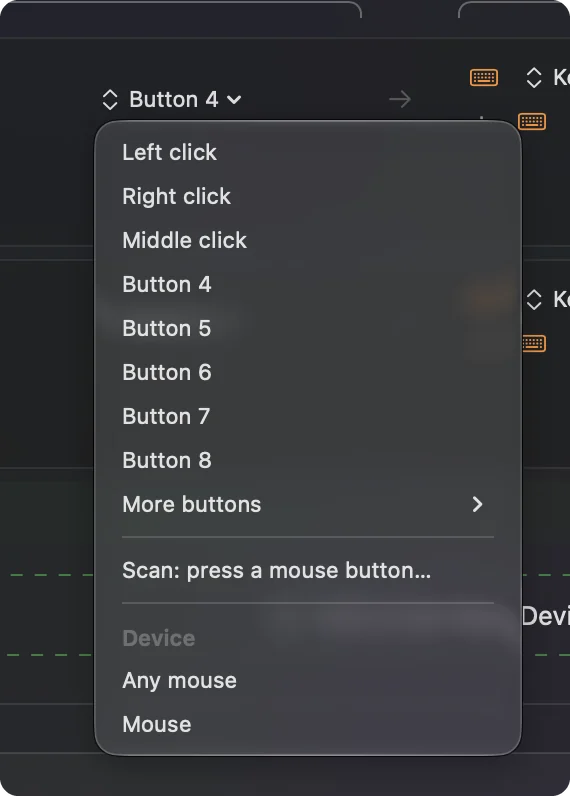
Bind the buttons that arrive
- You: Add a row, choose Mouse, press Scan and press a side button. Pick an output, such as Keyboard Key with Command and a bracket for Back and Forward.
- InputConfig: Names the button and runs the output on every press.
- Check: Save and Activate, then press the button in Safari and watch the page go back.
Buttons that scan as Button 9 and up live under More buttons in the menu, which holds Button 9 to Button 32, so an MMO grid fits. If an app also reacts to the raw button, tick Block the button's own action on that row.
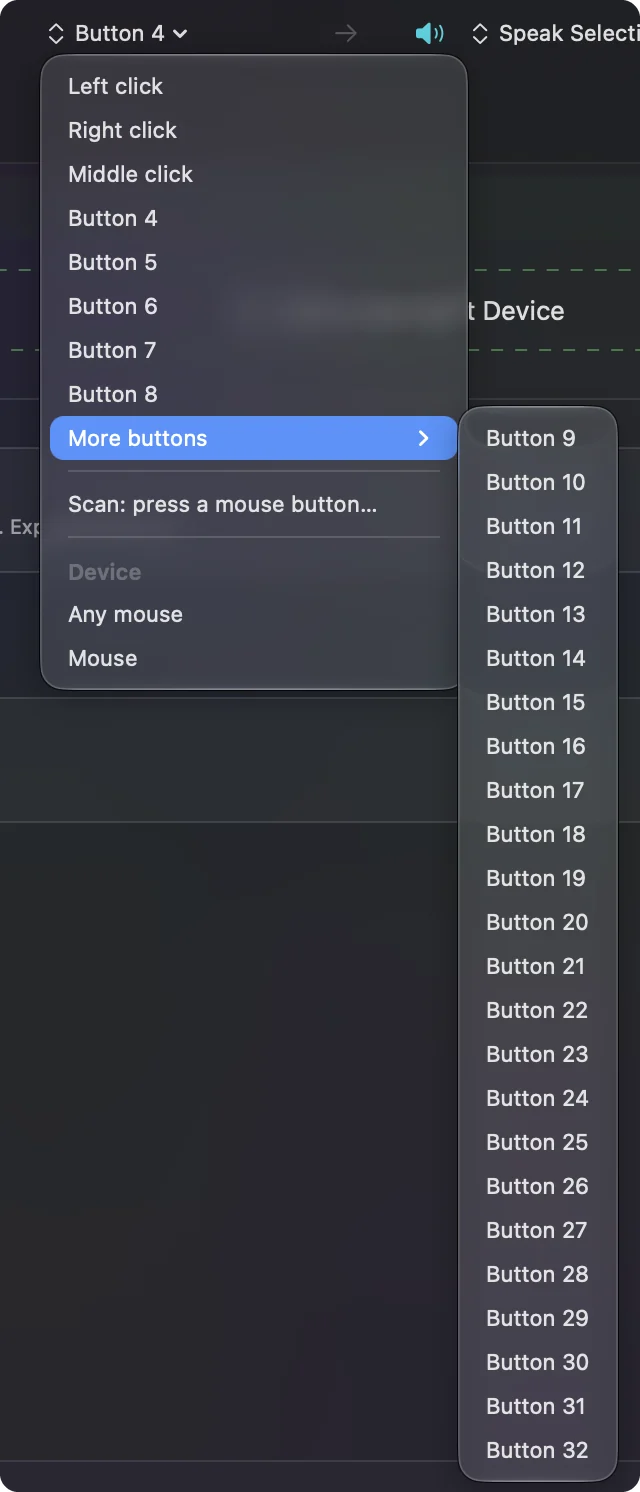
Make a grid or side button do more
A grid is where macros shine. In a row's Options, tick Run a sequence of steps (macro) and add key, shortcut and click steps, each with a wait and a hold time.
- Editing. Undo, redo, cut, copy and paste across the grid.
- Typing. A Type Text output for your email address or a reply you send daily.
- An MMO. Hotbar keys one to twelve, on a game that reads the keyboard.
- Windows. Mission Control, Show Desktop and a Space change.
MMO mouse on a Mac and mouse macros on a Mac go deeper. Give the grid jobs you repeat all day.
Add hold, double click and per-app layouts
- Hold. A hold action on a row doubles each button.
- Double tap. Each row has a double tap action as well.
- Block the original. For side buttons and the wheel click, so an app stops seeing the raw button.
- Per app. A preset can list apps under Automation & Gaming Utilities and take over when one is in front.
Only one preset runs at a time, and Control Option Command period is the emergency stop.
Ideas for Redragon owners
- A first gaming mouse. Leave the main buttons alone and bind Back and Forward on the side.
- An M908 on an editing Mac. The grid becomes an editing keypad that sits under your thumb.
- A budget MMO player. Hotbar keys on the grid, with a hold for a second bar.
- A shared Mac. Every connected mouse counts as one, so a second mouse gets the same jobs.
A cheap mouse with a lot of buttons is an inexpensive macro pad.
If a button does nothing
Climb this ladder, smallest step first:
- Press Scan on it. If a Button number arrives, the problem is the preset.
- Check for a key. If it types a character, it sends a key. Set it to F13 to F20 on Windows if you can, then bind that.
- Activate and check Accessibility. Rows only run while the preset is active, and System Settings, Privacy & Security, Accessibility must list InputConfig.
- Try another mouse tool alone. SteerMouse or LinearMouse may already take the button.
- Use a Windows PC once. The Redragon software can change what a button sends.
If Scan sees nothing, that button is handled inside the mouse.
What it cannot do
InputConfig does not change DPI, polling rate, lighting or scroll feel, and it cannot reach the Redragon software's profiles. It cannot read a button that sends nothing to macOS, and it cannot block a key a button sends. Redragon's Windows software changes the mouse, and InputConfig changes what the buttons do on the Mac.
The short version
- Works. Pointer, clicks and wheel.
- Software. Windows only, so use onboard modes on a Mac.
- Buttons. Scan every one, because some arrive and some do not.
Scan first and bind what arrives.
Questions
Does Redragon software work on a Mac?
No. Redragon's download page for the M711 Cobra lists Windows only, and RTINGS says the M908 software has no macOS version.
Does the Redragon M908 Impact work on a Mac?
As a mouse, yes. RTINGS found that some side buttons work on a Mac and some do not.
How do I remap Redragon buttons on a Mac?
Press Scan in InputConfig and press each button. The ones that arrive can be bound to any shortcut.
Can I set up a Redragon mouse on Windows and use it on a Mac?
Yes for mice that keep profiles onboard, such as the M908, per RTINGS. Check one setting on the Mac afterward.
Why does my Redragon DPI button do nothing in InputConfig?
The DPI button is handled inside the mouse and sends nothing to macOS, so no Mac app can read it.
Related
This page in other languages: العربية, Čeština, Dansk, Deutsch, Español, Suomi, Français, עברית, Magyar, Bahasa Indonesia, Italiano, 日本語, 한국어, Norsk, Nederlands, Polski, Português, ไทย, 繁體中文, 简体中文
Completely free. You don't have to make an account, there are no subscriptions, and nothing is locked. Optimized for Apple silicon. Open source on GitHub.
Updated