Does the Corsair Scimitar work on a Mac?
 InputConfig is completely free on the Mac App Store. You don't have to make an account, there are no subscriptions, and nothing is locked. Optimized for Apple silicon.
Yes, as a mouse. The pointer, clicks and wheel work on a Mac with nothing installed, and the 12 key side panel is a grid of programmable buttons that need setting up before they do anything. Corsair's iCUE has a macOS version, and the Scimitar line is sold on a 12 button panel, so the plan is to give those keys jobs that type nothing and then bind them. The general Corsair story is on Corsair mouse on a Mac.
The Scimitar facts are from Corsair's product listing for the Scimitar Elite Wireless SE, which I read on October 21, 2026, together with retailer and review pages. I make InputConfig, a free Mac app that reads a mouse's extra buttons and gives each one a job.
On this page: 12 sections
Steps
- Plug in the mouse by cable or wireless receiver. The pointer, clicks and wheel work at once.
- Install iCUE for macOS from Corsair and check that it lists your Scimitar.
- In iCUE, assign each of the 12 side keys to F13 through F20, or to the keys you want, and save to the mouse.
- In InputConfig, add a Keyboard Key row for each key, press Scan and press the side key.
- Give each row a job such as a shortcut, an app, a macro or Type Text, then press Activate.
Know what the Scimitar is and what iCUE does on a Mac
| Model | What Corsair says | Source of my notes |
|---|---|---|
| Scimitar RGB Elite | A 12 button side grid, 17 programmable buttons in Corsair's launch material | Reviews and the launch story I read |
| Scimitar Elite Wireless | Wireless, with the same 12 button side panel | Corsair and retailer listings |
| Scimitar Elite Wireless SE | 16 programmable buttons, 12 on a Key Slider that moves forward or backward | Corsair's own listing |
iCUE needs a cable or the wireless receiver to see a Corsair mouse, and it does not see one over Bluetooth, which is the same rule as on the main Corsair page. Corsair's compatibility list says which mice iCUE supports on macOS. I could not open it, so check that page for your model before you rely on iCUE for the Scimitar.
The Scimitar works as a mouse no matter what, and iCUE is the tool that gives the side keys a job.
Understand keys versus buttons
This is the part that trips people. A Mac sees a mouse button as Button 4, Button 5 and so on. The 12 side keys on a Scimitar are different: reviews say they have no default behavior until iCUE assigns one, and what you assign decides how they report.
- A key assignment. If iCUE sets a side key to the number 1, the Mac sees the key 1 from a keyboard. It types a 1 in every text box.
- A mouse button assignment. If iCUE sets it to a mouse button, Scan names it as a Button.
- A macro or profile action. These run inside iCUE or inside the mouse, and the Mac sees what the macro presses.
InputConfig listens to the keyboard. It does not block or remap a key itself, and every keyboard counts as one. So a side key that sends 1 will still type 1.
Set the 12 keys to keys that type nothing, F13 to F20, and bind those. F21 to F24 are not passed to apps by macOS, so stay inside F13 to F20.
Plan the 12 keys
Eight function keys will not cover twelve, and that is fine. Use the rest as mouse buttons, or use hold and double tap in InputConfig to double up.
| Side key | Set in iCUE to | Job in InputConfig |
|---|---|---|
| 1 | F13 | Open App |
| 2 | F14 | Type Text |
| 3 | F15 | Mission Control |
| 4 | F16 | Copy macro |
| 5 | F17 | Paste macro |
| 6 | F18 | Undo |
| 7 to 12 | Mouse buttons, or F19 and F20, or left empty | Hold and double tap on the keys you use most |
The order is mine, not Corsair's. Choose what matches your thumb.
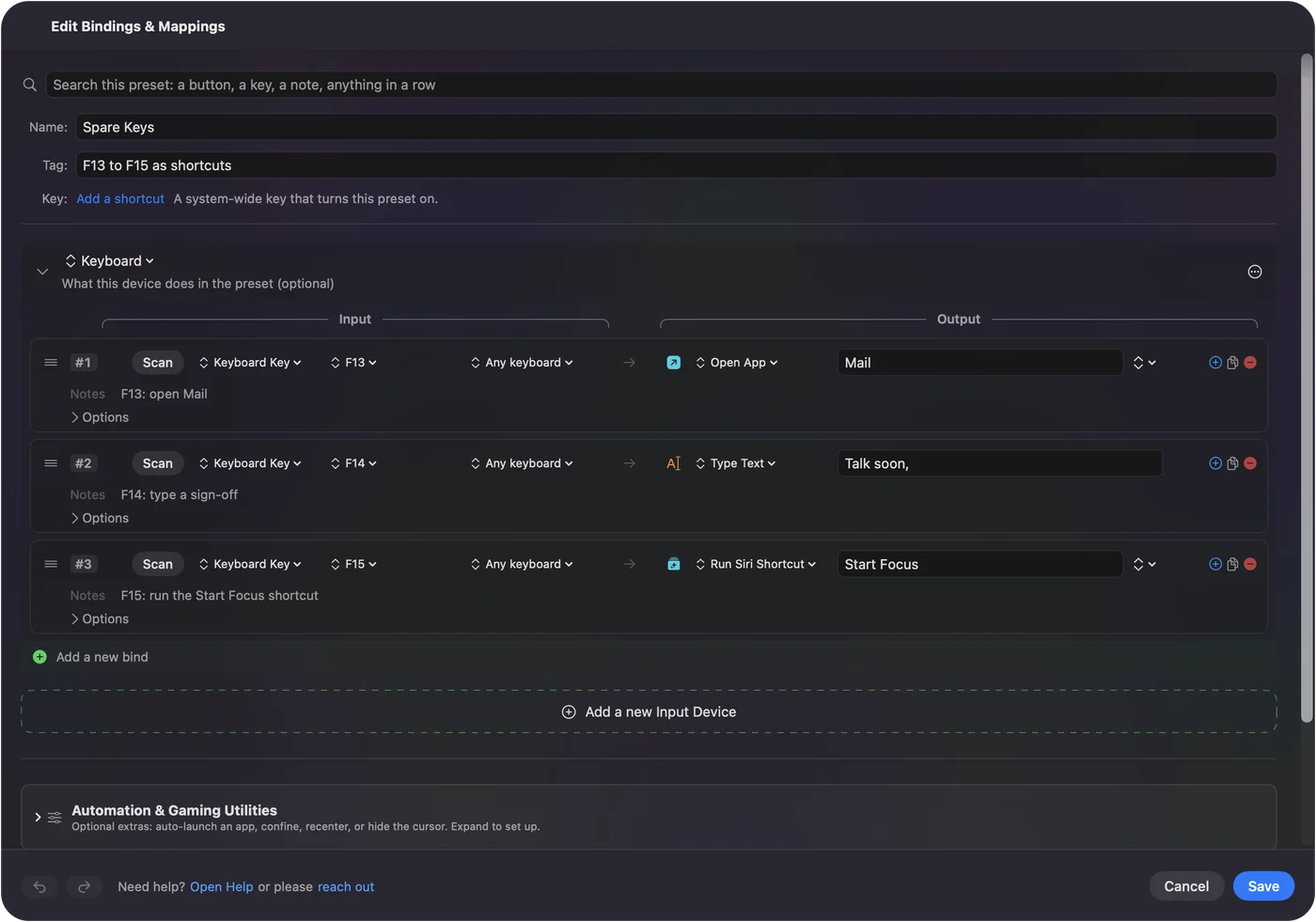
Find out what each side key sends
- You: Open InputConfig, add a row, set the kind to Keyboard Key, press Scan and press a side key.
- InputConfig: Names the key it sees, such as F13, and the Live Visualizer lights it.
- Check: If a side key reports a key you did not set, iCUE has not saved the change yet, so save to the mouse and Scan again.
Bind the keys
- You: Add a row per key with the input Keyboard Key and the key you set, such as F13, then pick an output.
- InputConfig: Runs that output when you press the side key.
- Check: Press the key in the app you care about. F13 to F20 type nothing, so nothing extra appears.
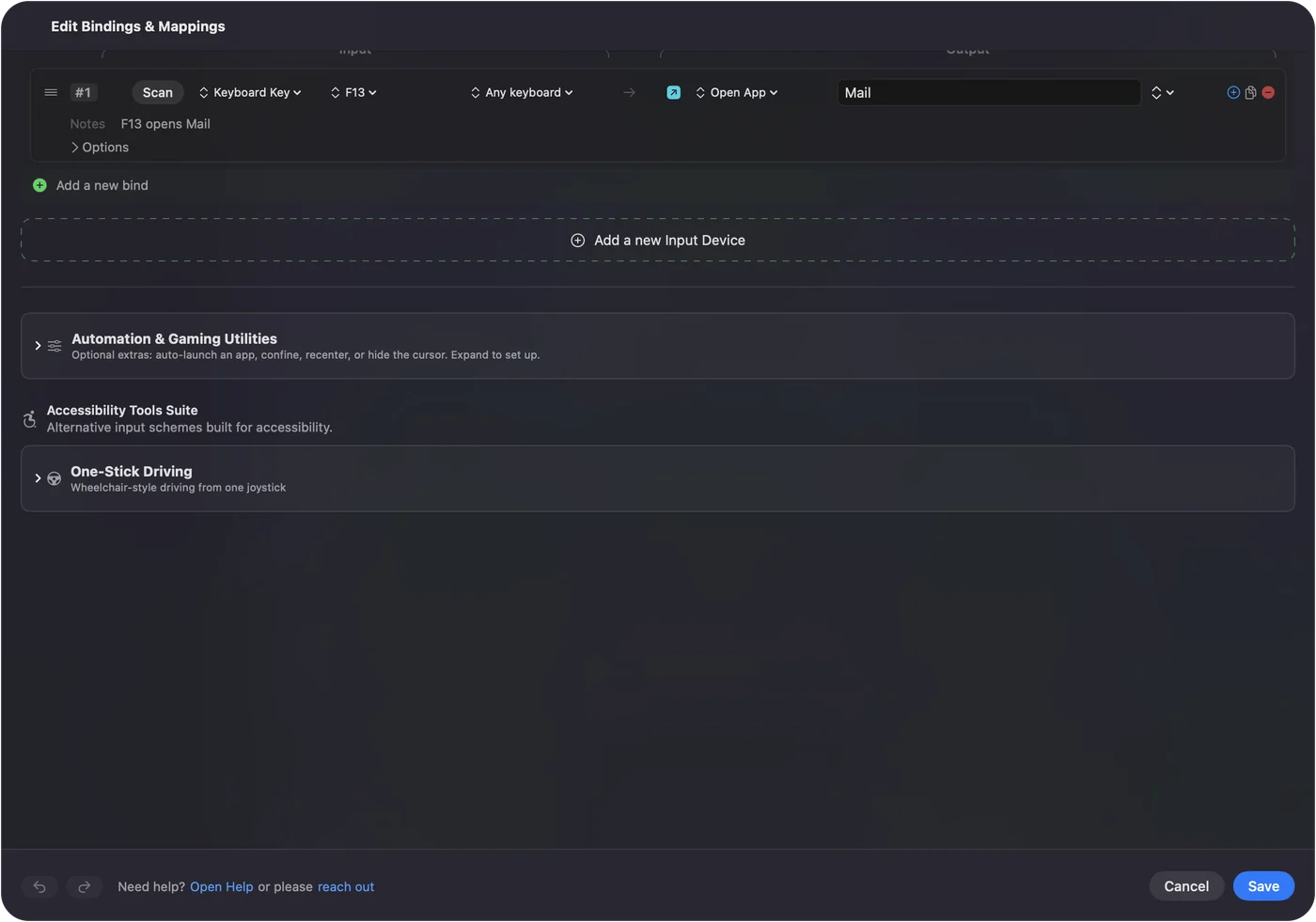
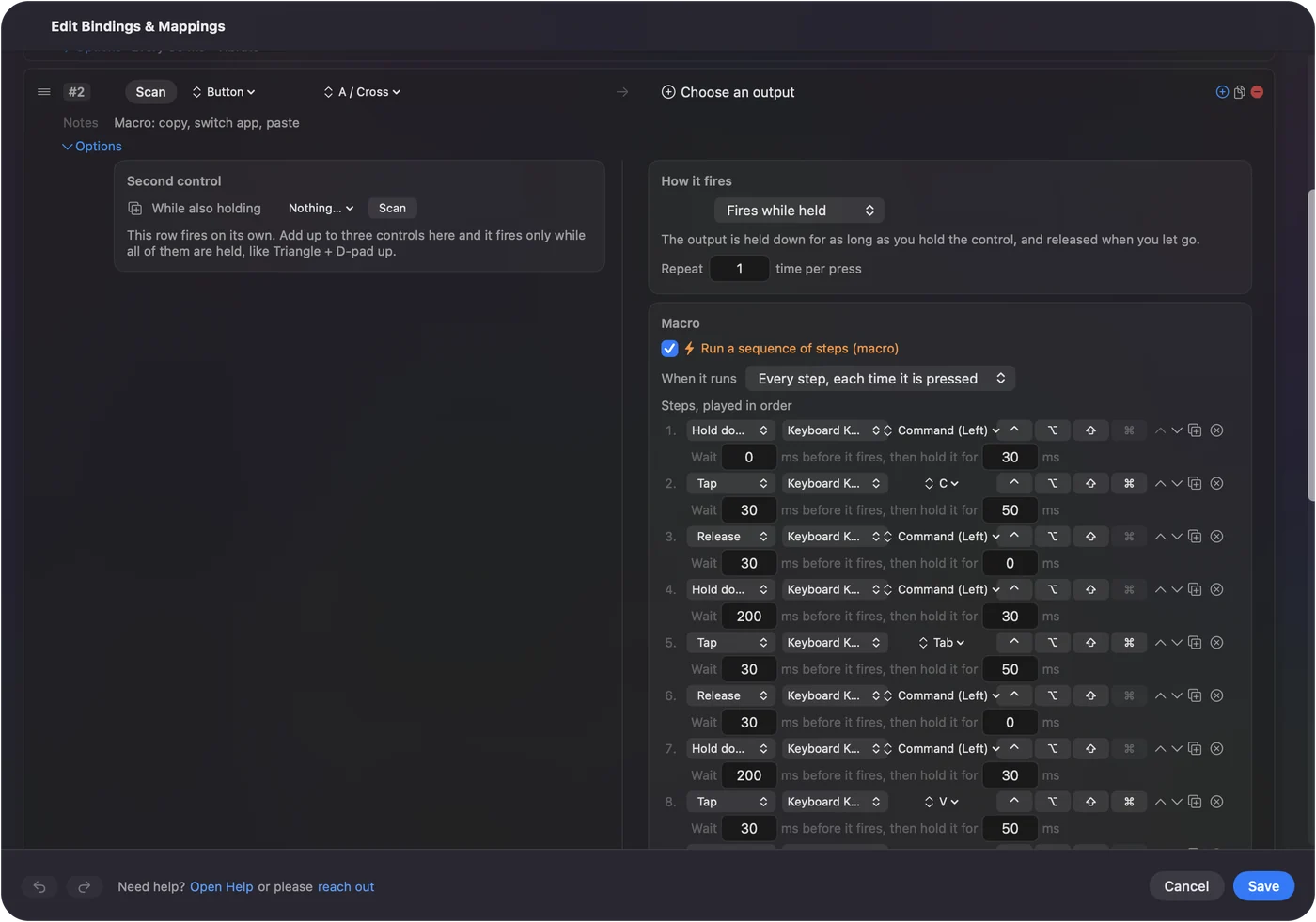
Build macros on the side panel
A Scimitar is a macro mouse, and a macro in InputConfig is a step list: keys, shortcuts and clicks, each with a wait and a hold time. iCUE has its own macro editor, and those macros run from the mouse. I prefer to put the macro in InputConfig because it can change with the front app, and iCUE cannot on a Mac the way InputConfig can.
Ideas for a Scimitar user
- Video and photo editing. Put cut, undo, redo, mark in and mark out on the side panel.
- Spreadsheets and text. A grid of keys for copy, paste, bold and fill down is the same as a numeric pad under your thumb.
- MMOs. The MMO mouse page has layouts for World of Warcraft and Final Fantasy XIV.
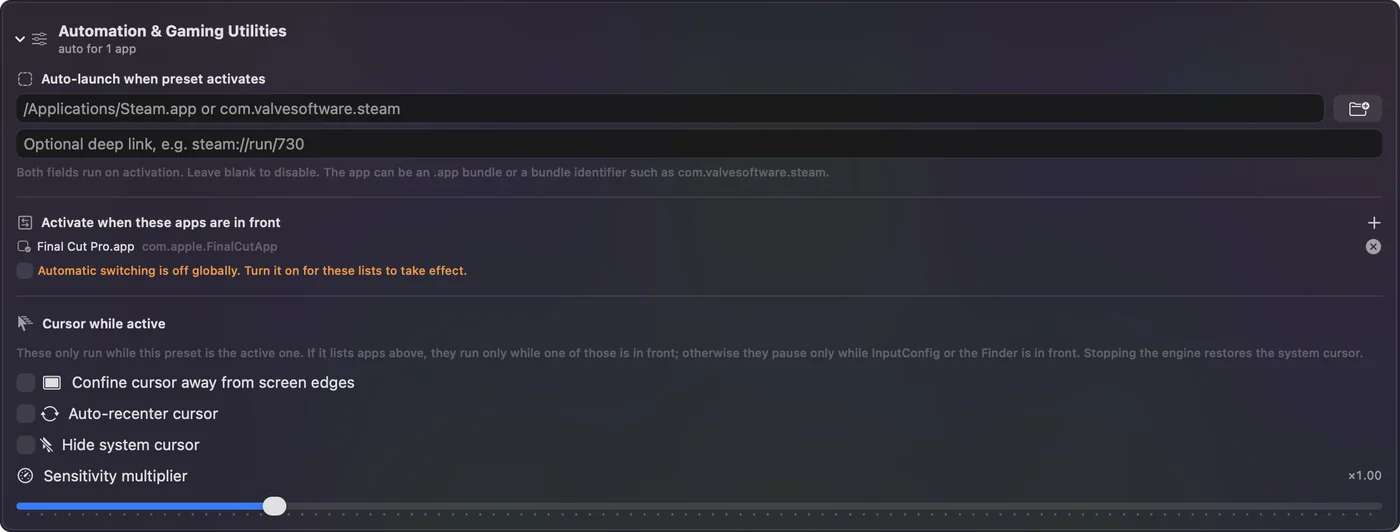
- Per app layouts. Under Automation and Gaming Utilities, list the app and the grid changes when you switch to it.
If a key does the wrong thing
Climb this ladder, smallest step first:
- Scan it. See what the key really sends.
- Check iCUE. The mouse must be on a cable or its receiver, and the change must be saved to the mouse.
- Check for two presets. Only one preset runs at a time.
- Check Accessibility. System Settings, Privacy and Security, Accessibility must list InputConfig.
- Set it to F13 to F20. A key that types 1 will still type 1 until iCUE changes it.
- Look for a hidden layer. A profile or layer button can swap what the side keys send. Scan after pressing it to see the change.
What it cannot do
- Block a keyboard key. If a side key sends 1, the Mac types it.
- Change DPI, polling rate or lighting. iCUE does that.
- Read iCUE only actions. A DPI or profile button may send nothing to macOS.
- Use F21 to F24. macOS does not pass them to apps.
The short version
- Works. A Scimitar is a mouse on a Mac, and iCUE for macOS sets the panel.
- Keys. Set the 12 side keys to F13 to F20 or to mouse buttons.
- Bind. InputConfig gives each key any job.
Give the side panel keys that type nothing, and every one is free.
Questions
Does the Corsair Scimitar work on a Mac?
As a mouse, yes. The 12 side keys need iCUE to assign them, and iCUE for macOS exists, so check Corsair's list for your model.
Can I use the Corsair Scimitar side buttons on a Mac?
Yes. Set them in iCUE to F13 to F20 or to mouse buttons, then bind them in InputConfig.
Does iCUE work on Mac with the Scimitar?
Corsair publishes iCUE for macOS. It detects a mouse on a cable or wireless receiver, not Bluetooth, and Corsair's compatibility page says which devices are supported.
Why do my Scimitar side buttons type numbers on a Mac?
They are set to number keys, so the Mac sees a keyboard. Change them to F13 to F20 in iCUE.
Is there a Mac alternative to iCUE for the Scimitar?
InputConfig can bind what the side keys send, but it does not set DPI or lighting, so iCUE is still the tool for the keys themselves.
Can I use the Scimitar thumb buttons for macros on a Mac?
Yes. Set the keys to F13 to F20 in iCUE, then give each one a macro in InputConfig, with a wait and hold time per step.
Related
This page in other languages: العربية, Čeština, Dansk, Deutsch, Español, Suomi, Français, עברית, Magyar, Bahasa Indonesia, Italiano, 日本語, 한국어, Norsk, Nederlands, Polski, Português, ไทย, 繁體中文, 简体中文
Completely free. You don't have to make an account, there are no subscriptions, and nothing is locked. Optimized for Apple silicon. Open source on GitHub.
Updated