How do I use my mouse side buttons in World of Warcraft on a Mac?
 InputConfig is completely free on the Mac App Store. You don't have to make an account, there are no subscriptions, and nothing is locked. Optimized for Apple silicon.
Open Key Bindings in World of Warcraft, click an action, and press the side button. If the game takes it, you are done, because World of Warcraft runs natively on the Mac and binds mouse buttons itself. If the button types a number instead, your mouse is sending keys and not mouse buttons, which is how most MMO thumb grids behave. For that, InputConfig, the free Mac app I make, reads the button and gives it any job, per app, with hold and double tap on top.
Blizzard's forum threads for Mac players, which I read on October 21, 2026, describe exactly this: a Razer Naga Pro whose side buttons and number keys landed on the same binding, and a 12 button mouse that showed up as a second keyboard. This page is the fix for both.
On this page: 12 sections
Steps
- Plug in the mouse, open World of Warcraft, and press Escape to reach Options and Key Bindings.
- Click an action, press a side button, and see whether the game shows a mouse button or a number.
- If it shows a number, set the buttons to F14 through F20 in the maker's software and save them to the mouse.
- In InputConfig, add a row, press Scan, press the button, and choose the key your action bar already uses.
- Add World of Warcraft to the preset's app list, press Activate, and test it on a target dummy.
What works with nothing installed
World of Warcraft has a native Mac client, and the Warcraft Wiki says it has been native on Apple silicon since patch 9.0.2. The wiki page is marked outdated, so I would trust the install and not the patch number. Its Key Bindings window is where mouse buttons get assigned, and it already uses Button 3, the wheel press, for Move and Steer on the page about Macs that I read.
Whether a side button reaches that window depends on what the mouse sends. A mouse that reports real mouse buttons works as soon as you click an action and press it. A mouse whose side panel sends number keys cannot, because the Mac sees a keyboard. Forum answers for this on Mac are SteerMouse, which is paid, Karabiner-Elements, which is free, or the maker's own software. The mouse decides, not the game, so test the button before you plan anything.
One Blizzard forum answer suggests a Terminal setting for WoW. Replies say it worked on M1 Macs, one says it left Shift or Alt feeling stuck for a while, and I have not tested it, so I leave the command out.
Find out what each button sends
The quickest check is in the game: Key Bindings, click an action, press the button. A number on screen means a key. A mouse button name means a mouse button. InputConfig gives a second opinion that does not depend on the game.
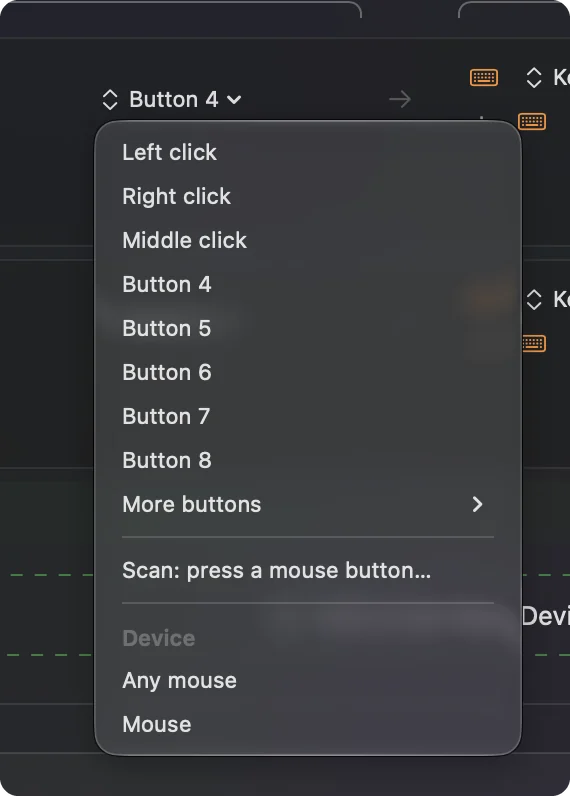
- You: Open InputConfig and add a row. Use a Mouse row with This Mac's mouse or trackpad for a side button, or a Keyboard Key row for a grid. Press Scan and press the button.
- InputConfig: Names what arrived, such as Button 4, or Keyboard Key 1 for a grid that types.
- Check: A grid button that scans as a number is a keyboard key. A side button that scans as Button 4 or 5 is a mouse button.
The table shows how the usual buttons report. Where I am not sure, the answer is to press Scan and see what your model sends.
| Button | How it usually reports | What to do |
|---|---|---|
| Left and right click | Mouse buttons | World of Warcraft uses them for target and camera. InputConfig cannot block them. |
| Wheel press | Middle click, Button 3 in WoW | Leave it for Move and Steer or give it a job in the game. |
| Two side buttons | Button 4 and Button 5 on most mice | Bind in the game, or send keys with InputConfig. |
| Thumb grid of 12 | Number row, minus and equals on most MMO mice | Set to F14 through F20 and save to the mouse. |
| DPI and profile buttons | Often nothing, they talk to the mouse's software | Nothing scans and no app can read them. |
Keep the grid on keys that type nothing
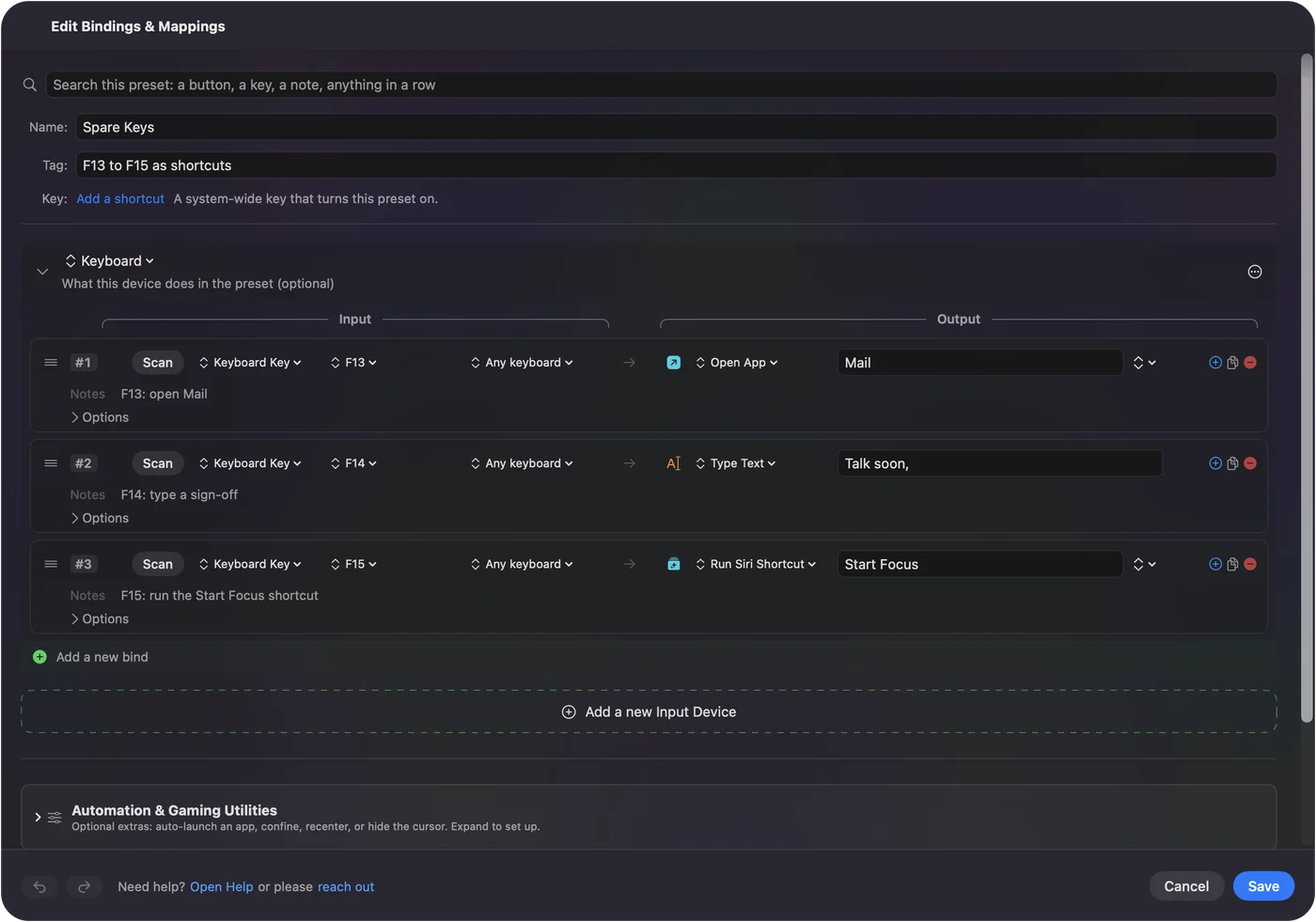
A thumb grid that sends 1 to 0 will type numbers in chat and fight your bars. Set it to F14 through F20 instead, in the maker's software or the mouse's onboard memory. F21 to F24 are not passed to apps by macOS. I skip F13 for a reason specific to this game: the Warcraft Wiki says F13 is World of Warcraft's screenshot key by default, so a grid button on F13 would take a screenshot every time you press it. If you want it anyway, unbind Screenshot in Key Bindings first.
The Razer Naga, Logitech G600 and Corsair Scimitar all work this way, and the MMO mouse on a Mac page walks through them. Once the grid sends F14 and up, World of Warcraft may take those keys straight in its Key Bindings window, which is the simplest route. InputConfig is for what the game cannot do, such as a second job on a hold.
Bind a button with InputConfig
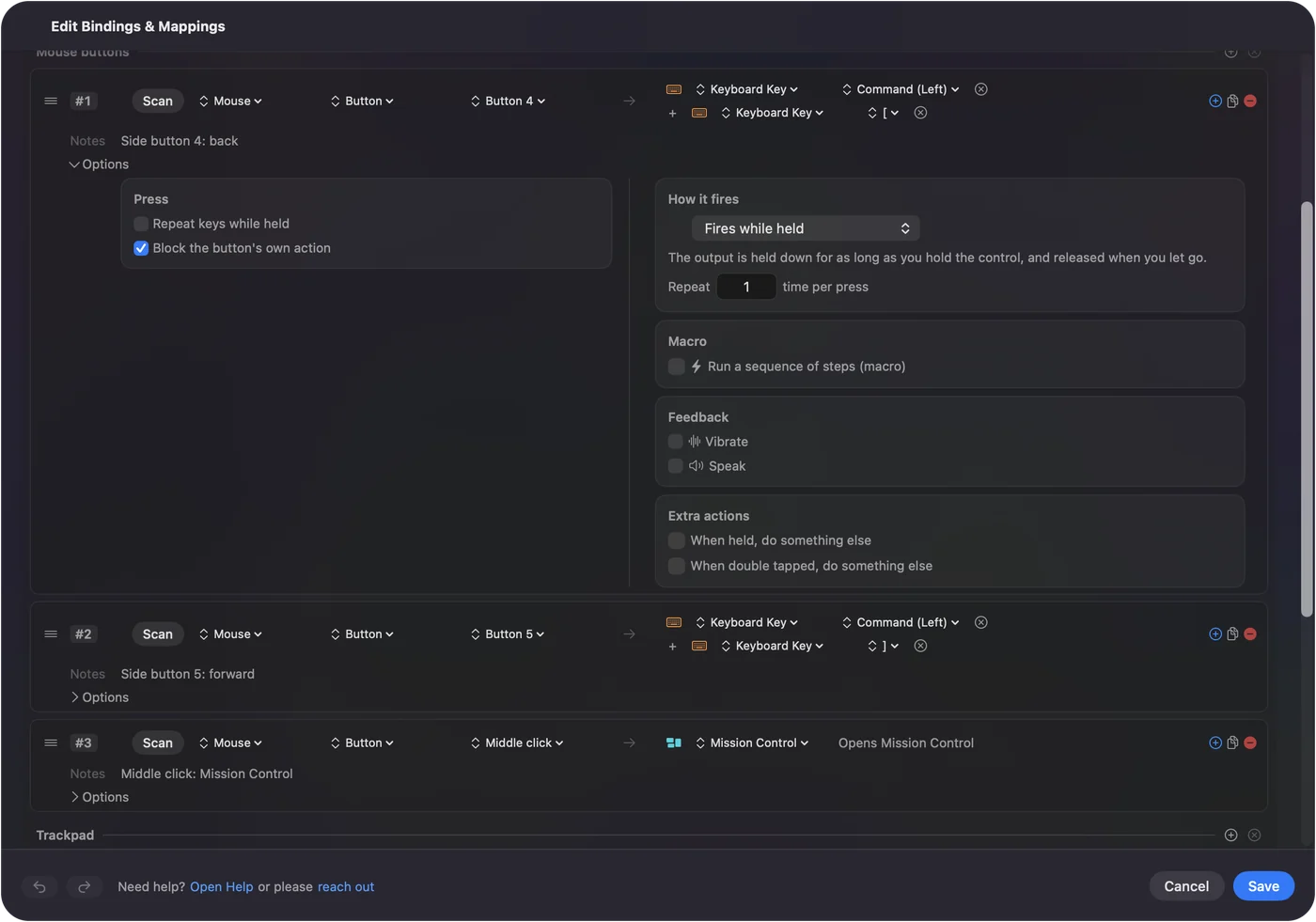
- You: Add a Mouse row, press Scan, press the side button, and choose Keyboard Key as the output. Pick the key your action bar already uses, with a modifier if you like, and add a second output with the plus button when one press should send two keys.
- InputConfig: Runs that output each time you press the button, and presses several outputs together when you add them.
- Check: Click Activate, then press the button on a target dummy. The spell fires and no number appears in chat.
InputConfig needs the Accessibility permission, in System Settings, Privacy & Security, Accessibility. The emergency stop is Control Option Command period, which turns the preset off if a key ever feels stuck.
Macros and extra jobs on one button
Each row can run a macro from its Options, with key, shortcut and click steps, each with a wait and a hold time. For this game I would keep macros short and ordinary, such as opening the map and then your bags, or a target then a mount. Games have their own rules about automation and one press doing many actions, and I have not checked Blizzard's current rules, so read them before you build anything long. One press for one action is the safe pattern.
- A tap and a hold. A row has a hold action and a double tap action, each a full second output. Tap sends your main spell and a hold sends the Shift version.
- Layers. Hold one thumb button as the second control, using While also holding, and the grid becomes a second grid for as long as you hold it.
- Repeat while held. Useful for a key you press over and over, such as a jump while exploring.
Make the layout follow the game
List World of Warcraft under Automation & Gaming Utilities, in Activate when these apps are in front, and turn on Switch presets when the front app changes in Settings, Advanced. Only one preset runs at a time, so the grid is your hotbar in the game and something else in a browser.
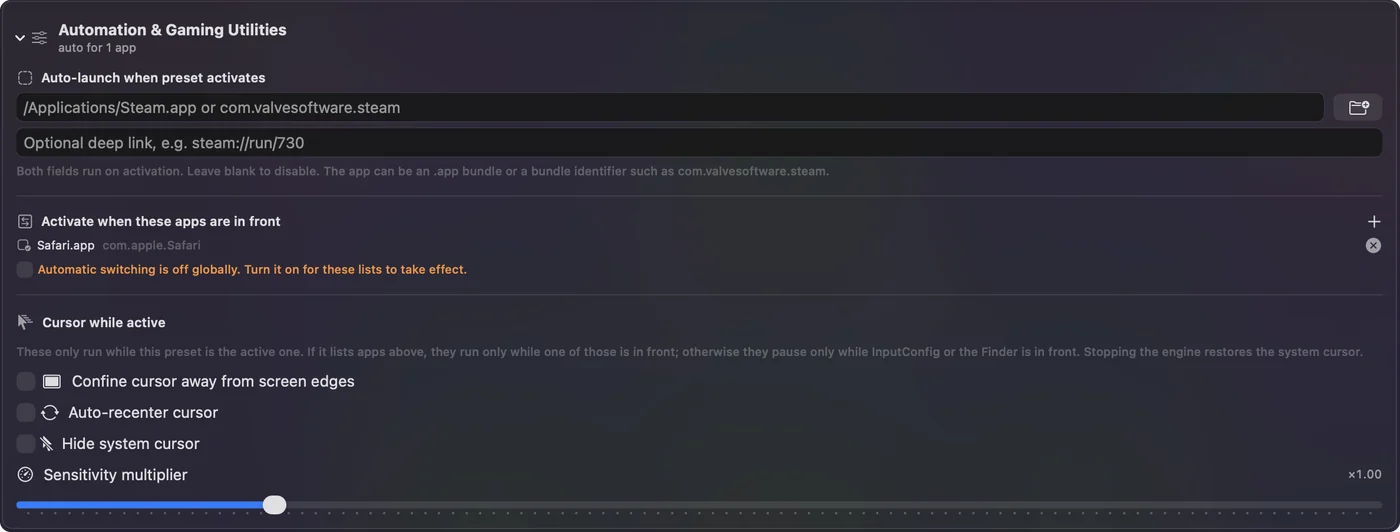
Block the button's own action, in the row's Press box, for side buttons you send as keys. Then the game gets one input from the button and not two.
Layouts for real players
- Raiders and healers. Put your main bar on the grid, a modifier layer on a held thumb button, and keep the third layer for targeting and mounts.
- Players with tired hands. A grid saves reaching for the number row, and a hold turns twelve buttons into thirty six jobs. I made InputConfig because my own hands are hard to use, so this is the kind of thing I care about.
- Editors in the evening. A second preset for the same mouse, listed for your editor, turns the grid into copy, paste, undo and save. See different mouse button actions per app.
If a button does not work
Climb this ladder, smallest step first:
- Press Scan. See what the button really sends. A number means the mouse needs setting to F14 and up.
- Test in Key Bindings. Click an action and press the button. If the game shows the wrong thing, the mouse is sending a key.
- Check the profile. Mice with onboard profiles can hold the wrong one. See the maker's page, such as Razer Naga on a Mac or the Corsair Scimitar.
- Check Accessibility. InputConfig must be listed and switched on.
- Look for a screenshot. A grid on F13 takes a screenshot in the game. Unbind it or move the grid.
- Stop the preset. Control Option Command period turns it off, and the game then sees only the mouse.
What it cannot do
- Block a key. InputConfig listens to the keyboard alongside macOS and does not block or remap a key itself. A grid that sends 1 still types 1 until you change it in the mouse's software.
- Read profile buttons. DPI and profile switches stay inside the mouse.
- Change DPI or polling. The maker's app, or a tool such as LinearMouse, Mac Mouse Fix or SteerMouse, does that, and it runs alongside InputConfig.
- Promise your setup. I have not tested World of Warcraft on every mouse and every macOS version, so a Scan on your own mouse is the real answer.
The short version
- Test. Click an action in Key Bindings and press the button.
- Fix the grid. Set it to F14 through F20 and keep F13 for screenshots.
- Add layers. InputConfig gives each button a hold, a double tap and a per app layout.
The mouse decides what the game receives, and InputConfig decides what that becomes.
Questions
Do MMO mice work in World of Warcraft on a Mac?
As mice, yes, and the game runs natively. The thumb grid usually types the number row until you set it to F14 and up in the mouse's software, and then you can bind those keys in the game or with InputConfig.
Why do my mouse side buttons act like number keys in WoW on Mac?
Many MMO mice send the grid as keyboard keys, so the Mac and the game treat the buttons and the number row as the same input. Blizzard forum threads describe a Razer Naga Pro and a 12 button mouse doing this.
Can I use Shift with a mouse side button in World of Warcraft on a Mac?
One Blizzard thread reports that a mouse button plus Shift registered as the plain button. Sending a key from the button with InputConfig, with the modifier on the same row, avoids relying on that.
Do I need SteerMouse for WoW on a Mac?
No. Blizzard forum replies name SteerMouse, a paid utility, and Karabiner-Elements, which is free, and InputConfig is another free route that reads the button and sends a key.
Is F13 safe to use for a WoW thumb grid?
The Warcraft Wiki says F13 is the screenshot key by default, so use F14 to F20 or unbind Screenshot first.
Related
This page in other languages: العربية, Čeština, Dansk, Deutsch, Español, Suomi, Français, עברית, Magyar, Bahasa Indonesia, Italiano, 日本語, 한국어, Norsk, Nederlands, Polski, Português, Русский, Slovenčina, Svenska, ไทย, Türkçe, Українська, Tiếng Việt, 繁體中文, 简体中文
Completely free. You don't have to make an account, there are no subscriptions, and nothing is locked. Optimized for Apple silicon. Open source on GitHub.
Updated