How do I bind mouse side buttons in League of Legends on a Mac?
 InputConfig is completely free on the Mac App Store. You don't have to make an account, there are no subscriptions, and nothing is locked. Optimized for Apple silicon.
In League of Legends, press Escape, open Options and Keybindings, click an action and press the side button. Riot's hotkey support page says the game takes Mouse 1, 2, 3, 4 and 5, and that buttons beyond Mouse 5 are not detected and cannot be bound in the in game options. That covers a normal two side button mouse. A thumb grid, a button the game ignores or a second job per button is where InputConfig, the free Mac app I make, comes in.
I read Riot's pages on October 21, 2026. They still carry a Mac section for the mouse cursor, so the Mac client is supported. Sources disagreed about whether it runs natively on Apple silicon or through Rosetta, so I do not claim either.
On this page: 11 sections
Steps
- Press Escape in a game, open Options, and choose Keybindings.
- Click an action, press a side button, and see whether the game shows Mouse 4 or Mouse 5.
- If your mouse sends keys, set the buttons to F14 through F20 in its software and save them.
- In InputConfig, add a Mouse row, press Scan, and press the button, then choose the key the action uses.
- Add League of Legends to the preset's app list, press Activate, and test in a practice tool game.
What works with nothing installed
Rebinding is built in. In a game, press Escape, open Options, and choose Keybindings. In the League client, click the cog at the top right and choose Hotkeys. Some keys can only be bound in the client. Riot's page says Restore Defaults in the client's Hotkeys settings puts everything back.
Three rules from the page are worth knowing before you plan a layout. Shift, Control, Alternate, Command and Function cannot be bound on their own. A Command plus a key can be bound, but only in the client, and it collides with existing macOS shortcuts. Escape, Caps Lock, F9, F12 and Enter are reserved for the game or the client, so skip them. A Mac can bind a side button directly, but it cannot bind Command, so plan around plain keys and F13 to F20.
The League wiki lists the defaults that matter for side buttons: Q, W, E and R for abilities, and the items on 5, 6 and 7 with the trinket on 4, because the vision item was given the 4 key. It gives Y for the camera lock and F1 for select self, with F2 to F5 for allies. I did not find a default for attack move on a current page, so check yours in Keybindings.
Find out what each button sends
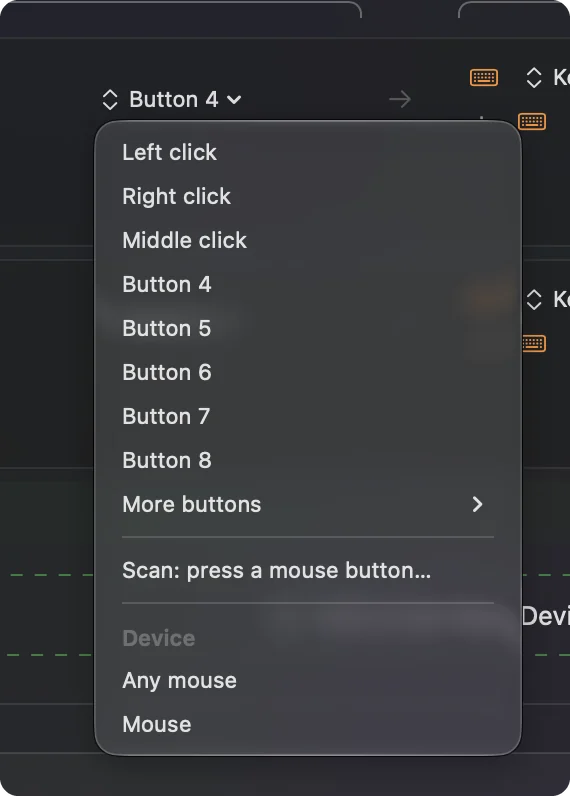
A two side button mouse usually sends Button 4 and Button 5, and League takes those as Mouse 4 and Mouse 5. An MMO mouse often types numbers from its thumb grid, and a number key in League is an item slot, so a grid can fire items on its own with no setup. Scan shows the truth.
- You: Open InputConfig, add a Mouse row, choose This Mac's mouse or trackpad, press Scan, and press the button.
- InputConfig: Names it, for example Button 5.
- Check: A button that scans as Button 4 or 5 can go straight into Keybindings. One that scans as a key is a keyboard key.
| Button | What Riot's page says | What I would do |
|---|---|---|
| Mouse 1 and 2 | Bindable, but the game uses them for select and move | Leave them. |
| Mouse 3 | Bindable | The wheel press. Good for a ping or the shop. |
| Mouse 4 and 5 | Bindable | Bind in the game, or send keys. |
| Mouse 6 and up | Not detected, cannot be bound | Send keys with InputConfig instead. |
Bind a side button to an item or a spell
Decide in the game which key you want, then make the button send it. A side button that sends the key of your first item, on 5, saves a stretch of the left hand in a fight.
- You: Add a Mouse row for Button 4, press Scan, press the button, choose Keyboard Key, and pick the item or spell key. Tick Block the button's own action so the game sees one input.
- InputConfig: Presses that key each time you press the button.
- Check: In a practice game, press the button. The item or spell fires.
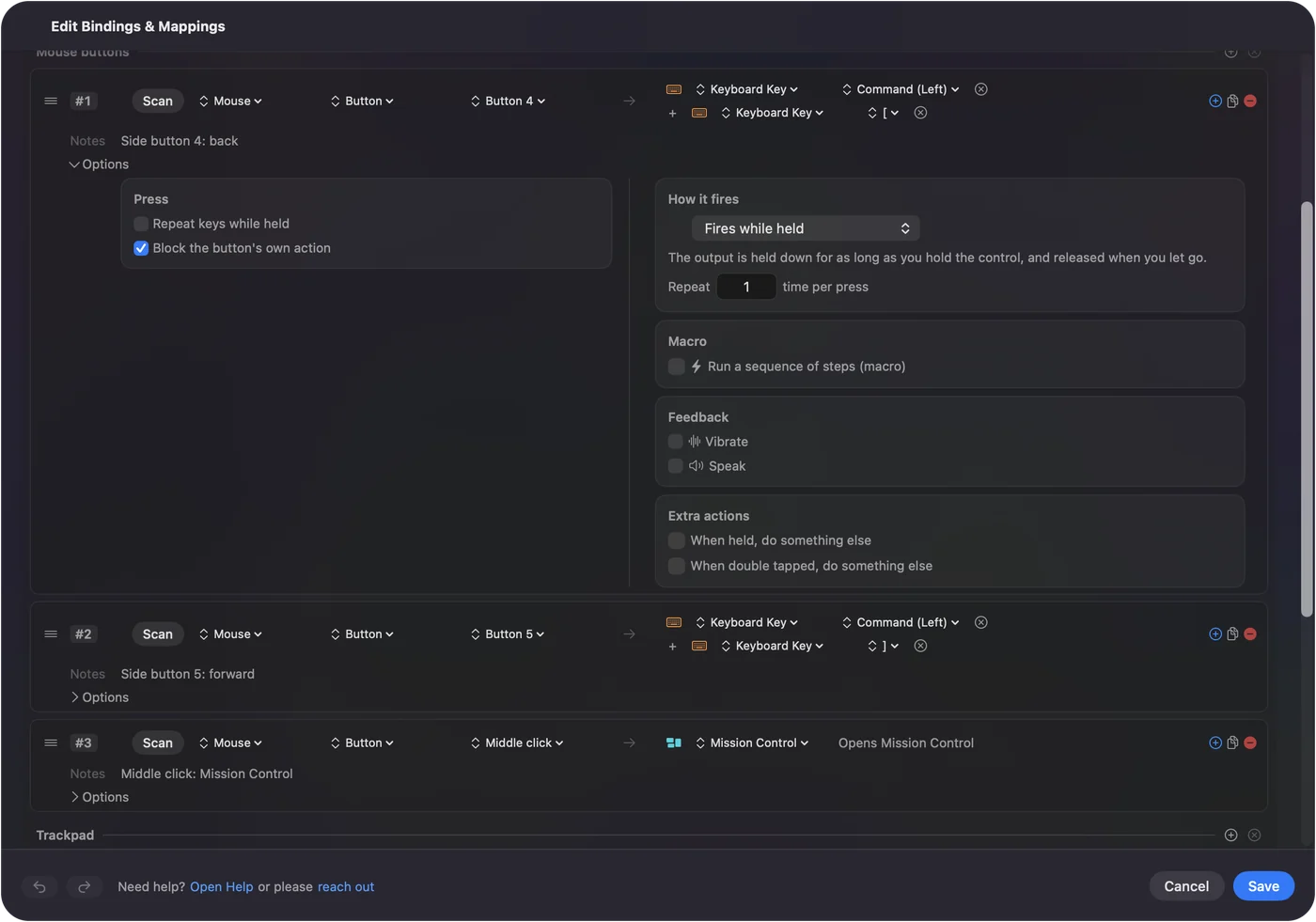
Skip Command based outputs for League. Riot's page says a Command key combination collides with macOS shortcuts, so a plain key is the safer output.
Macros, holds and double taps
A row's Options can run a macro, and each row can hold a second output for a hold and another for a double tap. For League I would keep it to convenience: one side button that sends a ping key on a tap and a different ping on a double tap, or a button that opens the shop and then the item you buy most. Games have rules about scripts and one press doing many things. I have not checked Riot's current rules, so one press for one action is the pattern I trust, and a long combo is something I would read their rules on first.
Make the layout follow the game
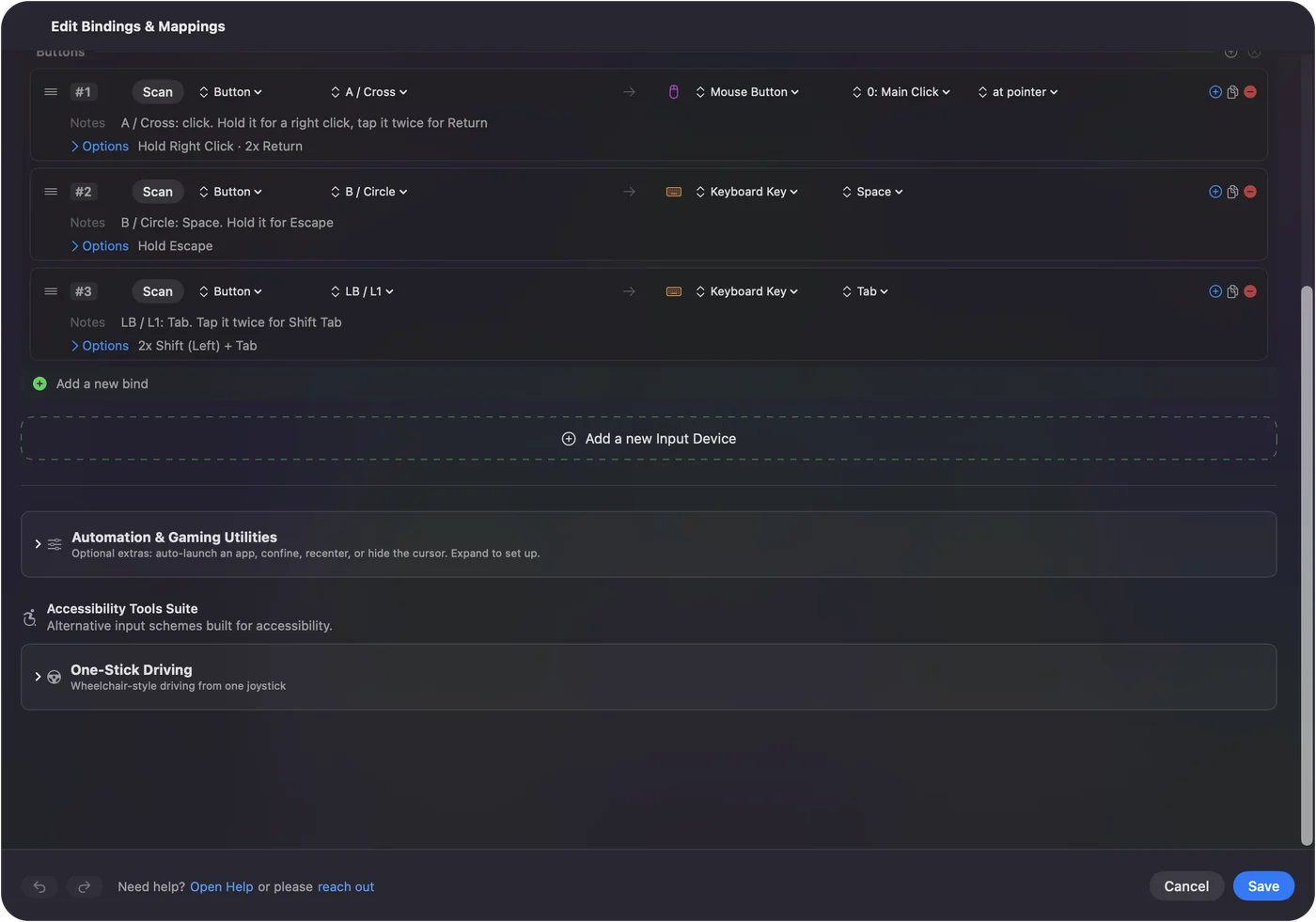
List League of Legends under Automation & Gaming Utilities, in Activate when these apps are in front, and turn on Switch presets when the front app changes in Settings, Advanced. Only one preset runs at a time, so the same two side buttons are Back and Forward in a browser and items in the game. Riot's own troubleshooting page also says to uninstall third party peripheral software if keys act up, which is one more reason to keep the mouse's profile simple.
Ideas for real players
- Mid and ADC mains. Put items and your trinket on the thumb, and keep ability keys under the fingers.
- Players on a trackpad or a small mouse. Mouse 4 and 5 are two more inputs without leaving the home row.
- Players with tired hands. I made InputConfig for my own hands, so a thumb button that replaces a two key reach is the first thing I would try.
- MMO mouse owners. A grid that types numbers already fires items. Use the rest for pings and camera lock. See MMO mouse on a Mac.
- Controller players. Riot has an accessibility controller mode for WASD, and I could not confirm it on Mac. See MMOs, MOBAs and strategy games with a controller.
If a button does nothing in League
Climb this ladder, smallest step first:
- Press Scan. See whether it is a mouse button, a key, or nothing.
- Try Keybindings. Click an action and press the button. Mouse 6 and up will not register.
- Avoid reserved keys. Escape, Caps Lock, F9, F12 and Enter have jobs already.
- Check cursor mode. Riot says Software Mouse removes acceleration and OS X Native uses the Mac's, so a cursor that feels wrong is a separate setting under Options, Game.
- Reset the input file. Riot says a corrupted input config can stop keys responding, and gives steps to delete input.ini in a custom game. Follow its page.
- Stop the preset. Control Option Command period turns it off.
What it cannot do
- Bind Command. Riot says Command on its own cannot be bound, and Command with a key is limited to the client.
- Block a typed key. InputConfig listens to the keyboard and does not block it.
- Read profile buttons. DPI and profile buttons talk only to the maker's software.
- Change DPI or polling. The maker's app or a tool such as LinearMouse, Mac Mouse Fix or SteerMouse does that.
- Promise anti cheat behavior. I have not tested League on every Mac, and I cannot speak for the anti cheat.
The short version
- Direct first. Mouse 4 and 5 bind in Keybindings.
- Keys for the rest. InputConfig sends keys for anything above Mouse 5.
- Plain keys. Avoid Command, and keep off F9, F12 and Enter.
Riot reads five mouse buttons, and InputConfig covers everything past them.
Questions
Can I bind mouse side buttons in League of Legends on a Mac?
Yes for Mouse 4 and Mouse 5. Riot's hotkey page lists Mouse 1 to 5 as bindable and says buttons beyond Mouse 5 are not detected.
What are the default League of Legends item keys?
The League wiki lists the vision item or trinket on 4 and the item slots on 5, 6 and 7, with Q, W, E and R for abilities. Check Keybindings for your own slots.
Can I use Command in League of Legends keybinds on a Mac?
Only as Command plus another key, and only in the client's Hotkeys screen. Riot warns it collides with existing macOS shortcuts.
Why does my mouse cursor feel different in League on a Mac?
Riot offers two settings, OS X Native, which uses the Mac's acceleration, and Software Mouse, which uses none. Switch under Options, Game, and avoid Software Mouse at low frame rates.
Does InputConfig work with League of Legends?
It sends the keys you choose when a side button is pressed, and it needs the Accessibility permission. I have not tested every Mac, and I have not checked Riot's rules on macros, so I keep to one press for one action.
Related
This page in other languages: العربية, Čeština, Dansk, Deutsch, Español, Suomi, Français, עברית, Magyar, Bahasa Indonesia, Italiano, 日本語, 한국어, Norsk, Nederlands, Polski, Português, Русский, Slovenčina, Svenska, ไทย, Türkçe, Українська, Tiếng Việt, 繁體中文, 简体中文
Completely free. You don't have to make an account, there are no subscriptions, and nothing is locked. Optimized for Apple silicon. Open source on GitHub.
Updated