How do I use a Logitech G600 on a Mac?
 InputConfig is completely free on the Mac App Store. You don't have to make an account, there are no subscriptions, and nothing is locked. Optimized for Apple silicon.
The G600 works as a mouse on a Mac, but its twelve thumb buttons are the part to plan for. Logitech's own page describes 20 buttons, with three primary buttons, twelve thumb buttons in two sets of six, a tilting clickable wheel and a G-Shift button. By default the thumb grid types keys, so it acts like a keyboard on a Mac. The fix is to set those buttons to F13 to F20 in the mouse's memory, then bind them in InputConfig, the free Mac app I make.
The hard part is the software. Logitech's G600 page says onboard profiles work without software and advanced features need optional software, and the retailer listings I read name only Windows. I could not find an official statement that the current G HUB or Logitech Gaming Software runs on a Mac for this mouse. Logitech's G HUB support page, read on October 21, 2026, also says Logitech Gaming Software installers and documentation will be removed from the site on October 31, 2026. Download whatever you need before that date.
On this page: 11 sections
Steps
- Check how the thumb buttons report first: open a text field and press them.
- Use another computer, or any software that supports the G600, to set the thumb buttons to F13 to F20 and save to the mouse.
- Back on the Mac, open InputConfig, add a row and press Scan, then press a thumb button.
- Give each button an output, and use While also holding for a G-Shift layer.
- Save and Activate, and make a preset per app.
Know what the G600 does on a Mac
The pointer, both main buttons and the wheel work with nothing installed. The twelve thumb buttons are different. One reviewer I read says the unshifted set maps by default to the number row keys and the shifted set to Control plus those keys, ending at Control and equals. That means each thumb press types a digit in any Mac text field.
- Buttons or keys. A key in disguise types on a Mac and cannot be told apart from the number row.
- G-Shift. Logitech describes it as a modifier that switches the thumb buttons to a second set, effectively doubling the programmable inputs.
- Software. Onboard profiles work without it. Changing them needs Logitech's software, and I could not confirm a Mac version.
If your G600 types numbers when you press the thumb buttons, that is not broken, it is how Logitech shipped it. Because the page on mapping extra mouse buttons deals with this problem for any gaming mouse, I only cover what is specific to the G600 here.
One forum user reports the G600 working well on a Mac with an up to date G HUB, using it for Logic and Final Cut. That is one person's report, not Logitech's statement. A buyer also says Logitech no longer makes the G600 available in the U.S., so many are used. The older Logitech Gaming Software guides, which open a Buttons tab and click a button in the picture, are written for Windows, so menu names may differ.
Find out what each button sends
Open TextEdit and press each thumb button. If a digit appears, that button sends a key. Then press Scan in InputConfig for each control, to see what it names.
| Control | How it reports | What to do |
|---|---|---|
| Left, right, wheel click | Standard mouse buttons | Leave left and right alone |
| Tilting wheel, left and right | Probably sideways scroll | Scan it, it may scan as Scroll X |
| 12 thumb buttons | Keys, by default | Change to F13 to F20 in the mouse, then bind |
| G-Shift | Changes the set inside the mouse | Does not scan as a button, it swaps what the others send |
InputConfig listens to the keyboard but does not block or remap a key, so a thumb button that types 1 still types 1 under a running preset. Change the key in the mouse and the typing problem is gone. Use the mouse tester to see which buttons are mouse buttons.
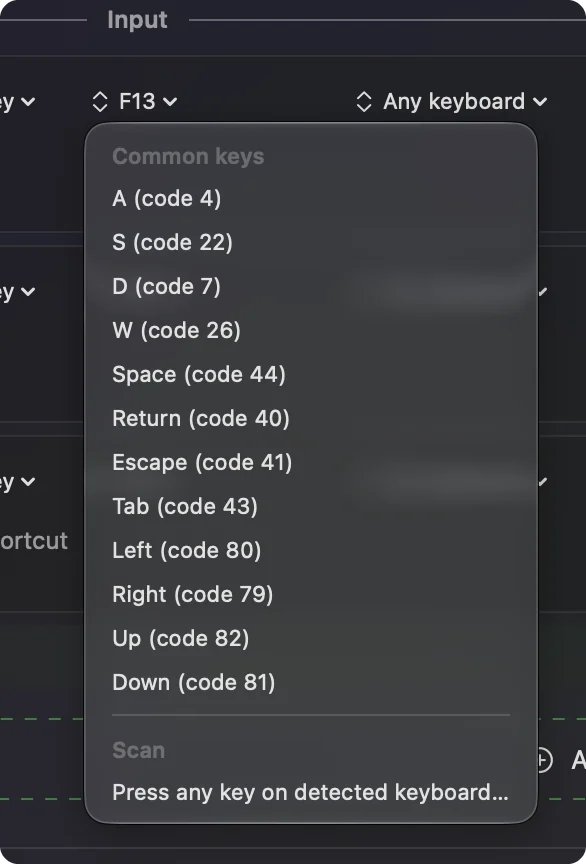
Move the thumb buttons to F13 to F20
This is the step that makes the grid useful. In the mouse's memory, give each thumb button a key nothing on a Mac uses. F13 to F20 work, and F21 to F24 do not, because macOS does not pass them to apps. That gives you eight keys, and the grid has twelve buttons, so four need another answer. One idea is a modifier with an F key in the mouse's profile. I have not tested that on a G600, and what the software allows depends on its version.
- You: Using the mouse's software on any computer that runs it, set thumb buttons 1 to 8 to F13 to F20 and save the profile to the mouse.
- InputConfig: Nothing yet. The mouse now sends F keys, which macOS and apps ignore.
- Check: Open TextEdit on the Mac and press the thumb buttons. Nothing types.
The G600 stores its profile in onboard memory, per Logitech's page, so you can set it once on a computer with working software and carry the mouse to the Mac. F13 to F19 on a Mac explains what those keys are for.
Bind the thumb grid
- You: Add a row, press Scan, and press a thumb button.
- InputConfig: Names it as F13, F14 and so on.
- Check: Pick an output, such as Open App, Save, Activate and press the button. The app opens.
Twelve buttons make a tidy layout. A row of apps along the top, edit commands in the middle, and window and desktop control at the bottom. The grid of F keys can open apps, type snippets with Type Text, or run a Siri Shortcut. Group the buttons by job, because you will find them by feel, not by sight.
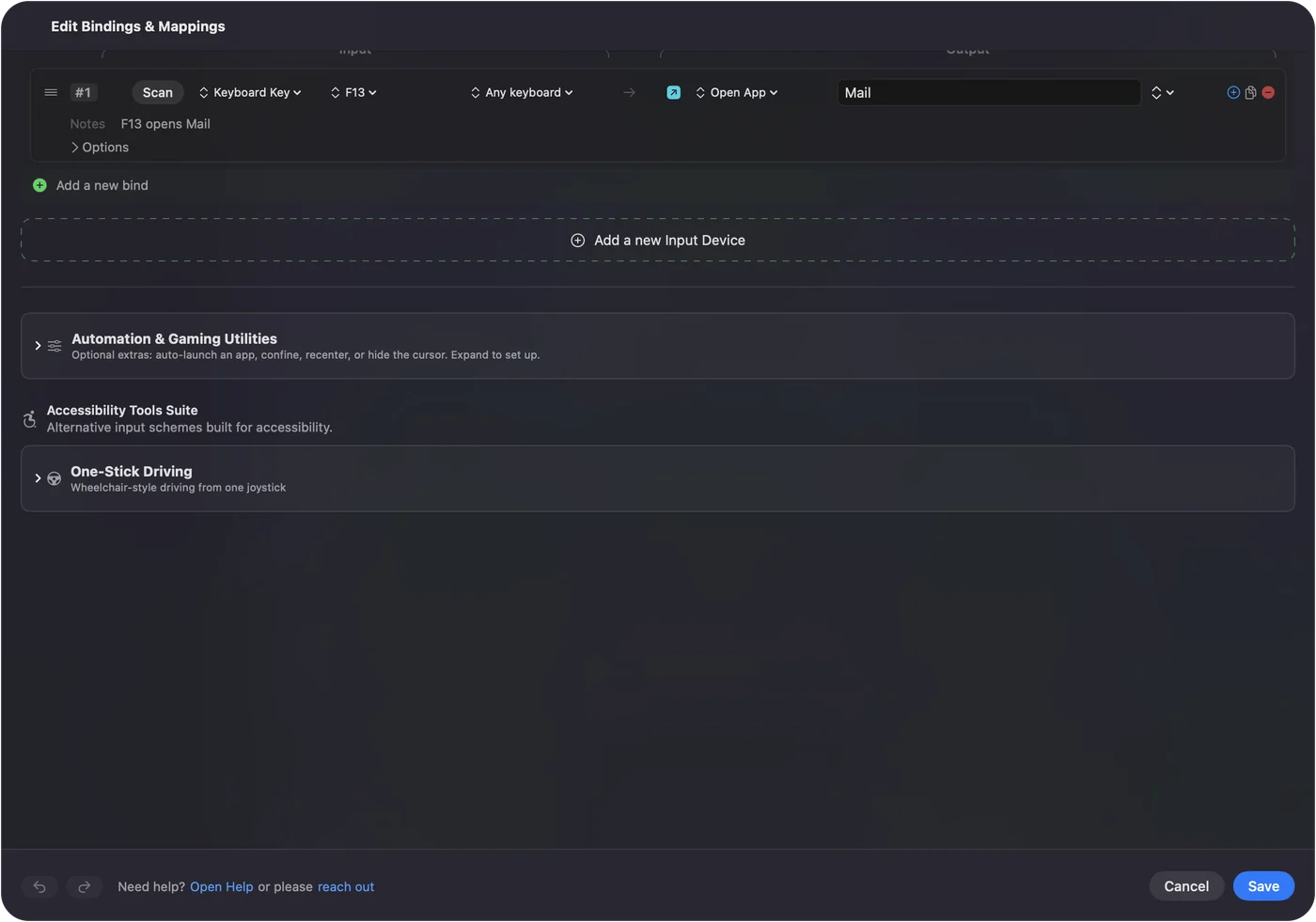
Use G-Shift as a second layer and add macros
G-Shift lives inside the mouse. If the profile makes the shifted set send different keys, then Scan sees those different keys, and each becomes a separate row. The thumb buttons effectively give you two layers with no extra work on the Mac. If you want a layer that InputConfig controls, use a second control: a row's While also holding option makes a combo, so a held button plus a thumb key runs a different output. That works with any held key or button the Mac can see.
Careful with one thing a reviewer noticed. Holding G-Shift may briefly interrupt the other mouse buttons. If that happens, give G-Shift a quiet job and keep important clicks off the shifted layer. Keys and mouse buttons as inputs covers combos.
An MMO mouse suits macros. Open a row's Options, tick Run a sequence of steps (macro), and add key, shortcut and click steps with waits. A common job is a copy, wait and paste. Make one preset per app, list the app under Automation & Gaming Utilities and turn on Switch presets when the front app changes. The same twelve buttons are editing commands in Final Cut Pro, spells in a game, and window management in Finder. Only one preset runs at a time. Control Option Command period stops everything.
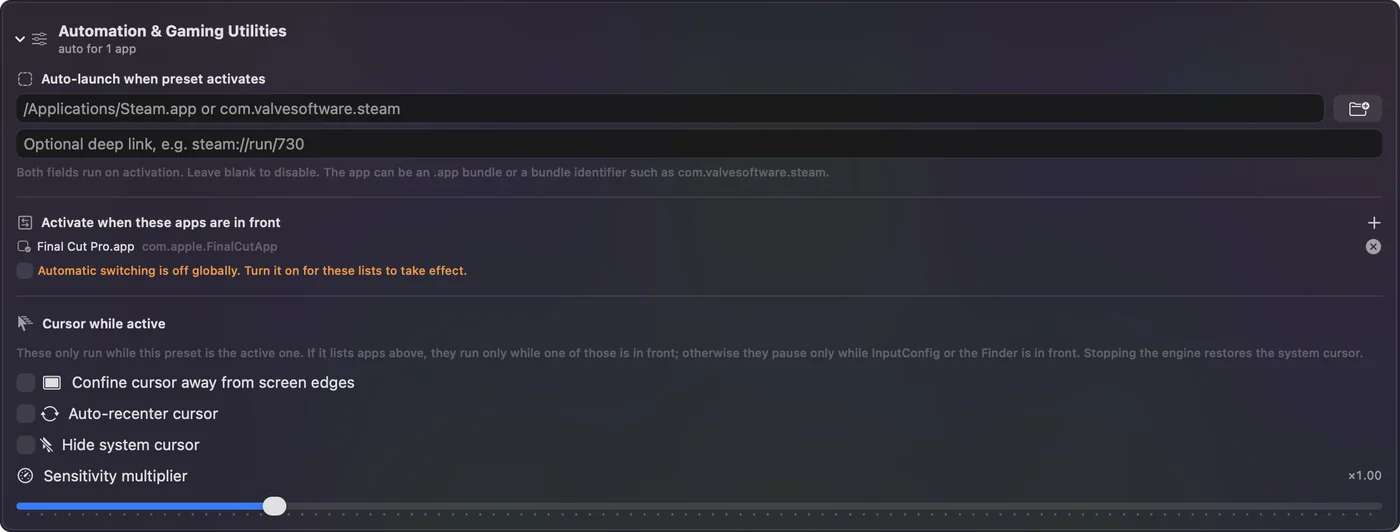
Ideas for G600 owners
- Video and photo editing. Cut, ripple delete, mark in and out, or brush size and undo, one per thumb button.
- Spreadsheets and coding. Common shortcuts and snippets with Type Text.
- MMO and strategy games. Many games read keys, so the F keys can be remapped inside the game, but check that the game sees them.
- Accessibility. A thumb grid can replace hard keyboard chords with single presses.
If the thumb buttons still type
Climb this ladder, smallest step first:
- Open TextEdit. Press each button to see if it types.
- Check the profile is on the mouse. Onboard memory only holds what was saved to it.
- Try another computer. If the software does not run on your Mac, set it up on a PC and carry the mouse back.
- Scan again. A button that shows F13 to F20 is ready to bind.
- Check Accessibility and Activate. InputConfig needs both.
What it cannot do
- Block a key. A thumb key that types a digit keeps typing it.
- Replace the mouse's software. DPI, lighting and profiles are set there.
- Treat two mice apart. Every mouse counts as one.
The short version
- The grid types. By default it sends number row keys.
- Fix. F13 to F20 in the mouse, then bind.
- Software. Not confirmed on a Mac, and Logitech Gaming Software leaves its site on October 31, 2026.
Change the keys once, save them to the mouse, and the G600 becomes a twelve button macro pad on your Mac.
Questions
Does the Logitech G600 work on a Mac?
As a mouse, yes. Its thumb buttons type number row keys by default, and I could not confirm that Logitech's software runs on a Mac for it.
Why do my G600 thumb buttons type numbers on my Mac?
By default they send number row keys. Set them to F13 to F20 in the mouse's memory and bind those keys in InputConfig.
Does G-Shift work on a Mac?
G-Shift lives inside the mouse, so a profile saved to onboard memory keeps it. Setting it up needs the mouse's software.
Is Logitech Gaming Software available for the G600?
Logitech's G HUB page says LGS installers and documentation will be removed from its site on October 31, 2026, so download it before then if you need it.
How many buttons does the G600 have?
Logitech's page says 20, including three primary buttons, twelve thumb buttons, a tilting wheel and a G-Shift button.
Does G HUB support the G600 on a Mac?
One user reports it does, and a third party guide lists it, but I found no Logitech statement. Check that G HUB shows the mouse when it runs on your Mac.
Related
This page in other languages: العربية, Čeština, Dansk, Deutsch, Español, Suomi, Français, עברית, Magyar, Bahasa Indonesia, Italiano, 日本語, 한국어, Norsk, Nederlands, Polski, Português, ไทย, 繁體中文, 简体中文
Completely free. You don't have to make an account, there are no subscriptions, and nothing is locked. Optimized for Apple silicon. Open source on GitHub.
Updated