Do the macro keys on a gaming keyboard work on a Mac?
 InputConfig is completely free on the Mac App Store. You don't have to make an account, there are no subscriptions, and nothing is locked. Optimized for Apple silicon.
Sometimes, and it depends on what each key sends. The ordinary keys of a Logitech, Corsair or Razer gaming keyboard work on a Mac with nothing installed. The extra G keys and M keys are different, because many of them send a key only when the maker's software tells them what to send, and a few send nothing at all. The way through is the F13 to F20 plan: set each macro key to one of those keys in the maker's software or in the keyboard's memory, then give that key its job in InputConfig, the free Mac app I make.
The facts are from Logitech's G815 and G915 documents, Corsair's page on installing iCUE for macOS and its compatibility list, and two Keyboard Maestro forum threads about a Corsair K95 and a Razer keyboard, which I read or found on October 21, 2026. I have not tested a gaming keyboard on a Mac myself. Press Scan to see what yours sends.
On this page: 13 sections
- Steps
- Know what the macro keys are and what reaches macOS
- Know what the maker's software does on a Mac
- Find out what each macro key sends
- Send F13 to F20 from the macro keys
- Bind the keys
- Macros and multi-step jobs on macro keys
- Holds, double taps and a layout for each app
- Ideas for who uses one
- If a macro key does nothing
- What it cannot do
- The short version
- Questions
Steps
- Plug in the keyboard and test every macro key in a text field to see whether it types anything.
- Install the maker's Mac software, such as Logitech G HUB or Corsair iCUE, and set each macro key to a key of F13 to F20.
- In InputConfig, add a keyboard row, press Scan, and press a macro key.
- Choose the output, then press Save and Activate.
- If a key sends nothing, it belongs to the maker's software, and no Mac app can read it.
Know what the macro keys are and what reaches macOS
Gaming keyboards add keys that a normal keyboard does not have. Logitech's G815 and G915 have G keys down the left side and M keys for profiles. Corsair's K95 line has G keys too, and a thread I read describes a K95 with six of them. Razer calls its extra keys M keys. What matters on a Mac is which of three things each key does:
- It sends a normal key. Software or the keyboard's own memory tells it to type something, often a letter or a recorded shortcut. macOS and InputConfig both see that key.
- It plays a macro. A recorded macro runs from the keyboard's memory or from the software and presses a sequence of keys. The Mac sees the keys, not the macro.
- It talks only to the software. Profile switches, a game mode toggle and lighting keys often send nothing to macOS, so nothing scans and no app can read them.
A macro key that sends a key can carry a job, and a macro key that sends nothing cannot, and Scan tells you which you have.
Know what the maker's software does on a Mac
- Logitech G HUB. Logitech's release notes that I found list macOS 12 to 15, with a late 2024 build that added macOS Sequoia, and the G815 product page lists macOS 10.11 or later with G HUB optional. The same page says advanced features need G HUB. The G915 manual says its three onboard profiles, M1 to M3, are used when G HUB is off or not installed, and that you record a macro with the MR key and a G key.
- Corsair iCUE. Corsair's install page says iCUE for macOS detects only devices connected by USB, by cable or by a wireless receiver, and a Bluetooth connection is not detected. The iCUE 4 compatibility list I found says that on macOS it supports HID and audio products, with the K95 RGB Platinum line among the keyboards. A 2019 press release says supported keyboards and mice are programmable with macros or key remaps.
- Razer. The threads I found are old. One says a BlackWidow Chroma V2's M keys did not show up in Keyboard Maestro at all, and another says the M keys on an older Razer keyboard reported F15 to F19. I would check Razer's page for your model before you buy a Razer keyboard for a Mac.
None of the three pages says that a macro key can be set to F13. Check the key list in the software for your model.
Find out what each macro key sends
- You: Open InputConfig, add a row, set the input to Keyboard Key, press Scan, and press a G key, an M key or a Game mode key.
- InputConfig: Names the key that arrived.
- Check: If a name appears, the key is readable. If nothing appears, the key is for the software, or the software owns the keyboard in a way that hides it. I have not tested your model.
| Key | What to expect | How to check |
|---|---|---|
| G keys, in G HUB or iCUE | Whatever the software sets, often a key or a recorded macro | Scan the key |
| G keys, in onboard memory | The key or macro stored in the keyboard, with no software running | Scan the key |
| M1 to M3 profile keys | Usually nothing, because the keyboard keeps them | Probably not readable |
| MR, the record key | Nothing to a Mac | Not readable |
| Game mode and lighting keys | Nothing, they change the keyboard's own state | Not readable |
| Volume wheel and media keys | Media keys, like any keyboard | Scan the key |
Send F13 to F20 from the macro keys
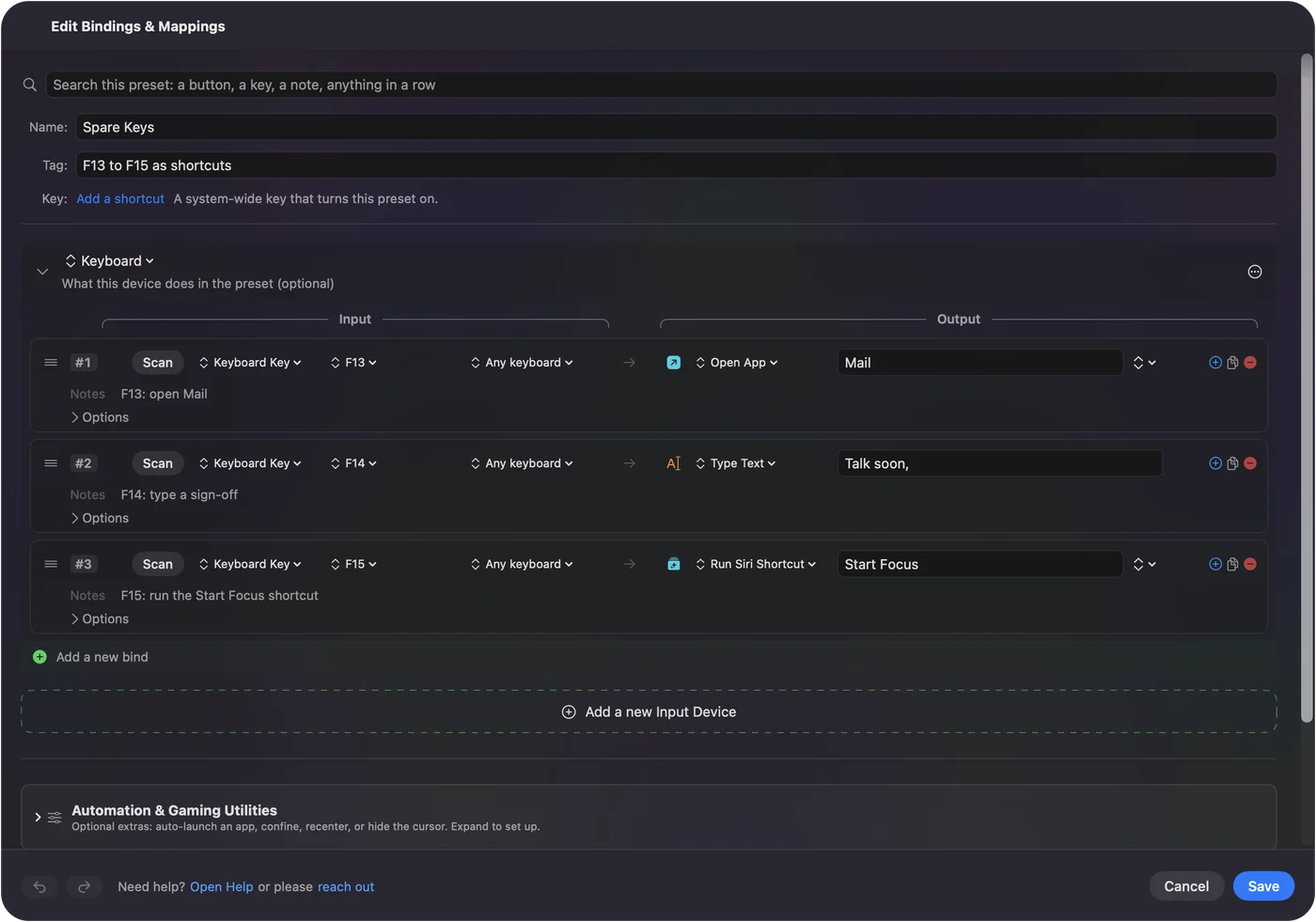
InputConfig listens to the keyboard alongside macOS and does not block a key. A G key that types a 1 still types it, and a G key that sends Command C still copies. The fix I use for any device that sends keys is to set the key to one that does nothing. F13 to F20 work, because macOS passes them to apps and gives them no job. F21 to F24 are not passed on, so skip them.
Gaming keyboards rarely have an F13 key, so you cannot record one by pressing it. Look in the software for a key list that offers F13 to F20 on a Mac. The keyboard itself may help, because on a full size PC keyboard I would press Scan on Print Screen, Scroll Lock and Pause. macOS often treats them as F13, F14 and F15, but I have not tested your keyboard, so scan them to see.
- You: Open the maker's software, choose a G key, and set its action to a keystroke of F13.
- InputConfig: Nothing yet, this is the software's job.
- Check: Press the key in a text field. If nothing types, the key is sending a key that does nothing.
The K95 thread is the cautionary tale. The poster says iCUE records actual keystrokes, and that Karabiner and Keyboard Maestro did not see the G keys on Big Sur. The workaround was to map each G key to an ordinary key sequence that nothing else uses. If you cannot reach F13, pick a chord that no app of yours uses and Scan it. The F13 to F19 page has the details.
Bind the keys
- You: Add a new bind, set the input to Keyboard Key, press Scan and press the macro key, then choose what it does.
- InputConfig: Shows the row as F13 on Any keyboard.
- Check: Press Save, then Activate, and press the key.
Every keyboard counts as one device in InputConfig, so a G key set to F13 and F13 on another keyboard are the same input. That is fine in practice, because nobody presses F13 by accident.
Macros and multi-step jobs on macro keys
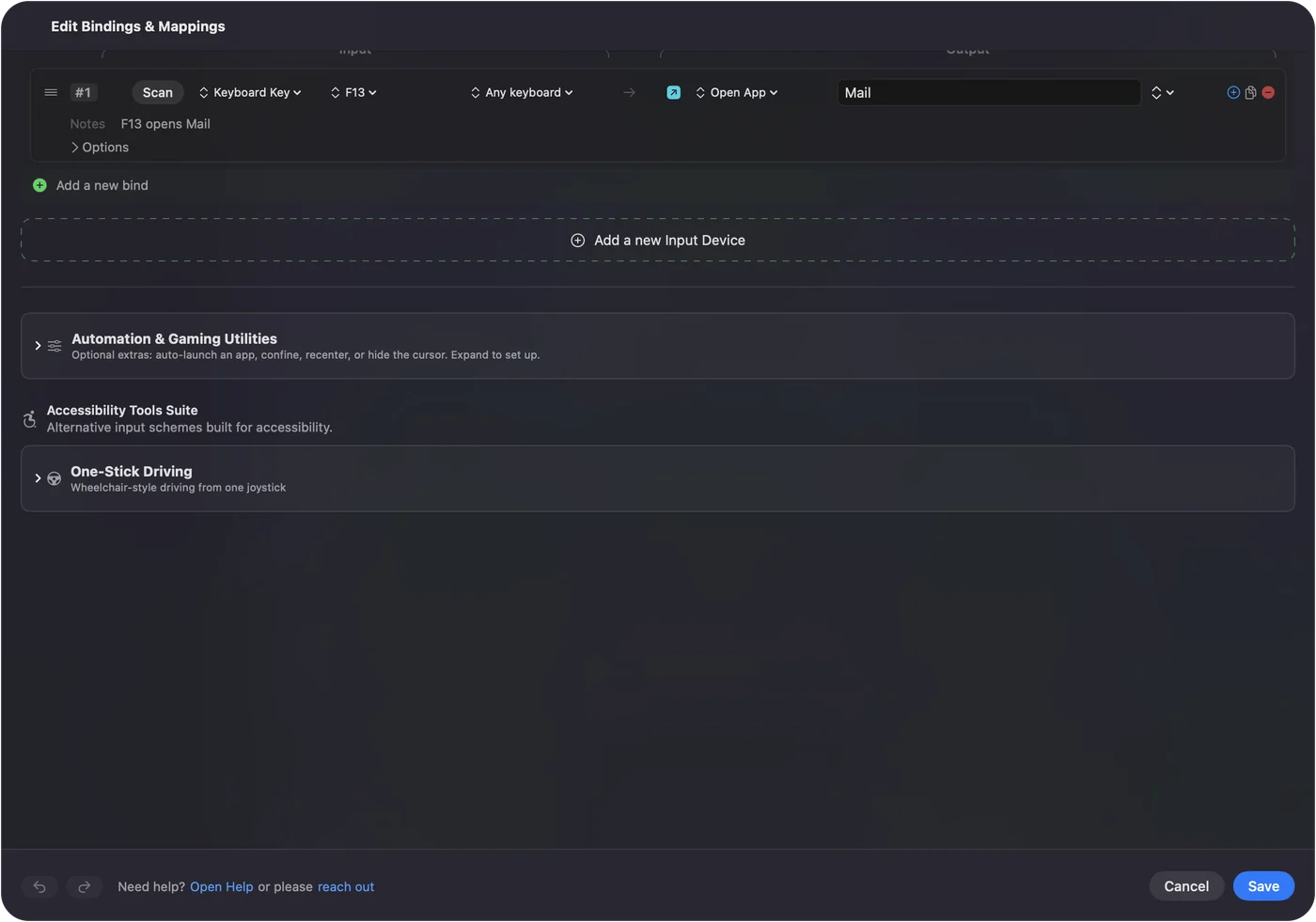
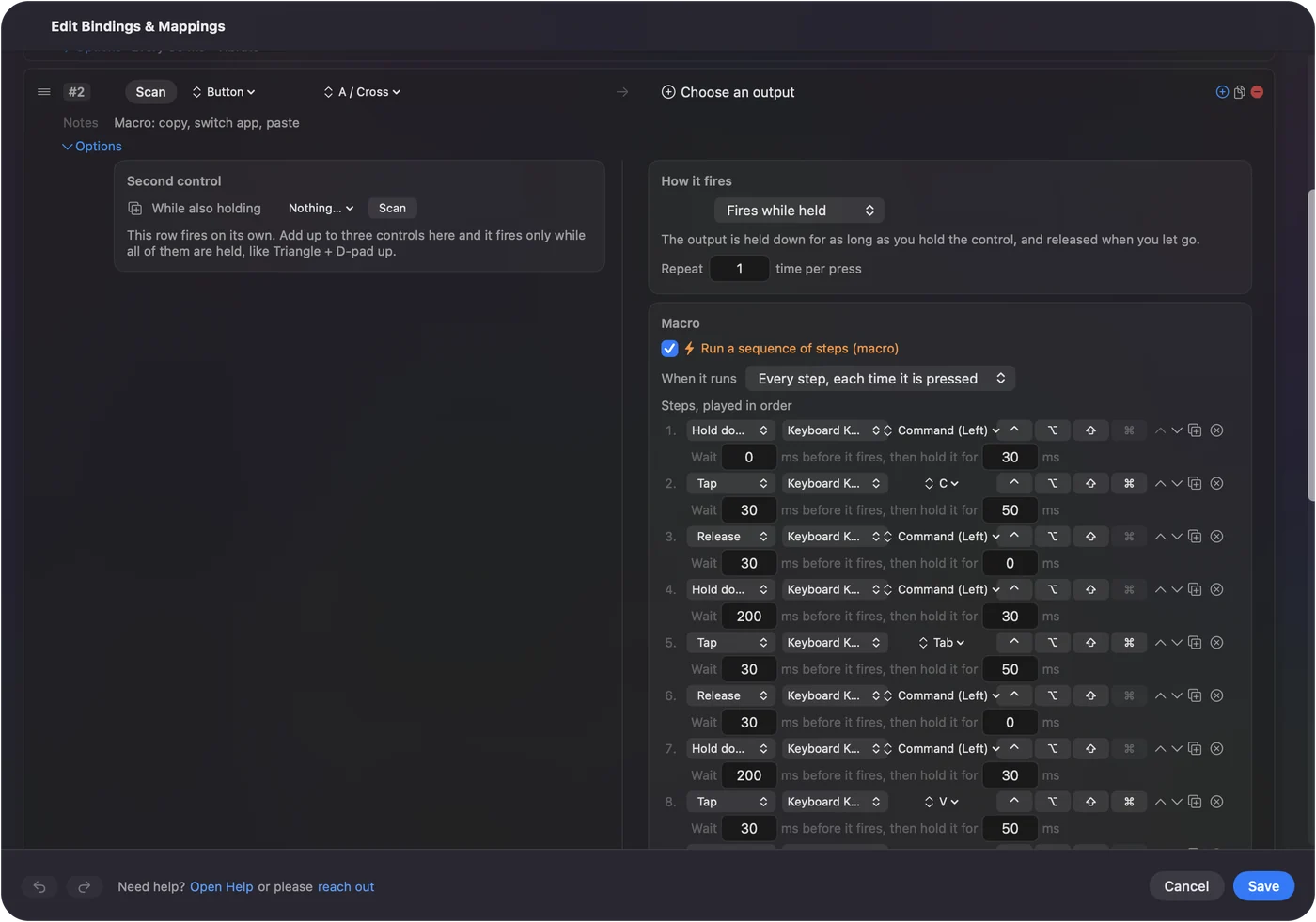
Most gaming keyboards store a macro as a recording, and the recording is the part that gives trouble on a Mac. In InputConfig a row can run a macro too, set in the row's Options with Run a sequence of steps (macro). Each step is a key, shortcut or click, with a wait before it and a hold time. That is a good place for jobs outside games: copy, switch app, paste, or a login sequence typed with Type Text. How to make a macro on a Mac has the steps.
Holds, double taps and a layout for each app
Each row has a hold action and a double tap action, each a full second output. A G key with a tap, a hold and a double tap carries three jobs, so a keyboard with six G keys has eighteen. A preset can list the apps it belongs to, and with Settings, Advanced, Switch presets when the front app changes, the layout follows the app in front. One preset for your editor, one for a game and one for the browser means the same G key does the right thing in each. Only one preset runs at a time, and Control Option Command period is the emergency stop.
Ideas for who uses one
- Game players. A G key for a push to talk shortcut, or a macro that holds a key for a crafting action. Keep game macros to what the game allows.
- Video and photo editors. Six G keys as the shortcut keys you reach for most in your editor.
- Programmers. A G key that types a snippet with Type Text, or opens a terminal with Open App.
- Streamers. A key for the screenshot function and Start Dictation.
- Anyone with a one handed setup. The G keys sit under the left hand, which suits a small second keypad. The one handed gaming keypad page covers the Mac side of that.
If a macro key does nothing
Climb this ladder, smallest step first:
- Test it in a text field. If it types something, it is sending a key. If it types nothing, it may be sending F13 or nothing at all.
- Check the connection. iCUE does not detect a Bluetooth keyboard, so use the cable or the receiver.
- Check the software. Is G HUB or iCUE running, and does it see the keyboard? A K95 Platinum owner on an M1 Mac says iCUE crashed while loading onboard profiles and the keyboard was not detected until it was connected through a USB-C hub.
- Try onboard memory. Save the key to the keyboard's memory, such as Logitech's M1 profile, so it does not depend on the software.
- Press Scan. If a name appears, the key is readable.
- Check InputConfig. Accessibility permission, the preset active, and the emergency stop.
What it cannot do
- Read a key that talks only to the software. Profile switches and mode keys send nothing to the Mac.
- Program the keyboard. That is G HUB, iCUE or the maker's own tool.
- Block a key. A G key left on a letter still types that letter.
- Tell two keyboards apart. Every keyboard counts as one device.
- Change lighting. That belongs to the maker's software.
The short version
- Scan every macro key. Some send keys, some send nothing.
- Software to F13 to F20. Set the keys you want in G HUB, iCUE or the keyboard's memory.
- InputConfig for the job. Macros, text, apps, holds, double taps and a layout per app.
A macro key that types an F key you cannot find on any keyboard is the best macro key on a Mac.
Questions
Do G keys work on a Mac?
A G key works when it sends a key. Logitech's G HUB and Corsair's iCUE both run on macOS, and onboard memory can store a key without the software. Press Scan to see what yours sends.
Does Logitech G HUB work on a Mac?
Yes, Logitech's release notes list recent macOS versions, with a late 2024 build adding macOS Sequoia. Check Logitech's page for your keyboard.
Does Corsair iCUE work on a Mac?
Yes, iCUE for macOS exists, and it detects only devices connected by USB or a wireless receiver, not by Bluetooth.
How do I use the macro keys on my gaming keyboard on a Mac?
Set each to a key of F13 to F20 in the maker's software, then bind those keys in InputConfig. If a key sends nothing, no Mac app can read it.
Why do my gaming keyboard macro keys type letters on a Mac?
They are still on a stored map. Set them to F13 to F20 so nothing is typed, then bind them in InputConfig.
Related
This page in other languages: العربية, Čeština, Dansk, Deutsch, Español, Suomi, Français, עברית, Magyar, Bahasa Indonesia, Italiano, 日本語, 한국어, Norsk, Nederlands, Polski, Português, Русский, Slovenčina, Svenska, ไทย, Türkçe, Українська, Tiếng Việt, 繁體中文, 简体中文
Completely free. You don't have to make an account, there are no subscriptions, and nothing is locked. Optimized for Apple silicon. Open source on GitHub.
Updated