Questions
How to auto right click on a Mac
Yes, a Mac can right click automatically. In the built-in Auto Clicker preset in InputConfig, pull a controller's left trigger once, or press fn F7, and the Mac right clicks 5 times a second where the pointer is, until you press it again. Any other click row can right click or middle click too; it is one menu on the row.
Some jobs want the right button held down rather than clicked over and over, such as aiming or using an item in a game. That is a different press mode, Toggles on and off, covered below.
On this page: 9 sections
Steps
- Install InputConfig from the Mac App Store and allow Accessibility access.
- In the sidebar, open Desktop & Productivity, click Auto Clicker and press Activate.
- Pull the left trigger, or press fn F7, to start right clicks 5 times a second.
- Press the same control again to stop.
- For your own row, choose 1: Secondary or 2: Middle in its Mouse Button menu and set How it fires to Repeats until pressed again.
Start right clicks from the preset
Two rows in the Auto Clicker preset right click on their own:
- The left trigger. LT on an Xbox pad, L2 on a PlayStation pad, ZL on a Switch pad. One pull starts right clicks 5 times a second and the next pull stops them. Pads that vibrate buzz when a run starts.
- fn F7. The same thing from the keyboard. On a MacBook, F7 without fn is the rewind key, so hold fn. See why the hotkeys need fn.
- You: Point at a place where a right click is harmless, such as open ground in a game, and pull the left trigger once.
- InputConfig: Sends a right click every 200 ms, each one a real right button press, not a Control click.
- Check: Pull the trigger again and the right clicks stop. To change the pace, press Edit and set Every on the row whose note reads Auto right click 5 a second.
On the desktop, every right click opens a menu, so try it where right clicks do something useful.
 InputConfig is free on the Mac App Store. macOS 14 or later, no account, no tracking, open source.
Turn any click row into a right or middle click
- You: On a row with a Mouse Button output, open the button menu, which reads 0: Main Click for a left click, and choose 1: Secondary for a right click or 2: Middle for a middle click.
- InputConfig: Sends that button instead, at the same pace, with the same Vary by up to and Stop after.
- Check: The row now names the button. Close the editor and start the row with its control.
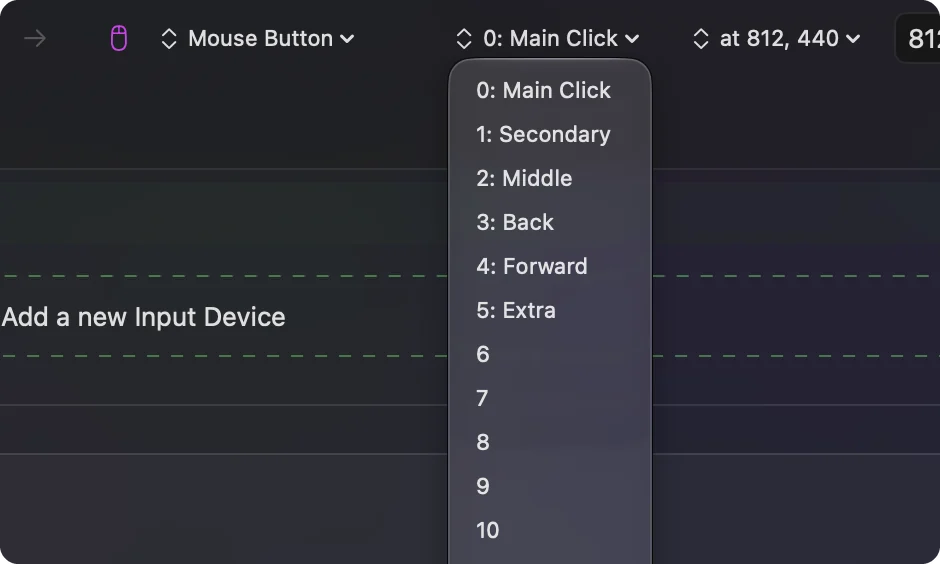
- Middle click. In a browser it opens a link in a new tab, so an auto middle click over a link opens tab after tab. Point it somewhere else.
- Extra buttons. The same menu goes on to 3: Back, 4: Forward, 5: Extra and numbered buttons up to 31, for an app or game that binds an extra mouse button.
- One spot every time. The menu beside the button can pin the click to a fixed point. See clicking the same spot.
The button is one menu; everything else about the row stays the same.
Hold the right button down instead
Plenty of right-click jobs are holds, not clicks: aiming, blocking, eating or using an item in a game, or dragging with the right button. For those, a held button beats a stream of clicks.
- You: On a row whose button is 1: Secondary, set How it fires to Toggles on and off.
- InputConfig: The first press holds the right button down and leaves it down. The next press lets it go.
- Check: Press once and the game acts as if you were holding the button. Move the pointer while it is held and it drags, as a real right button would.
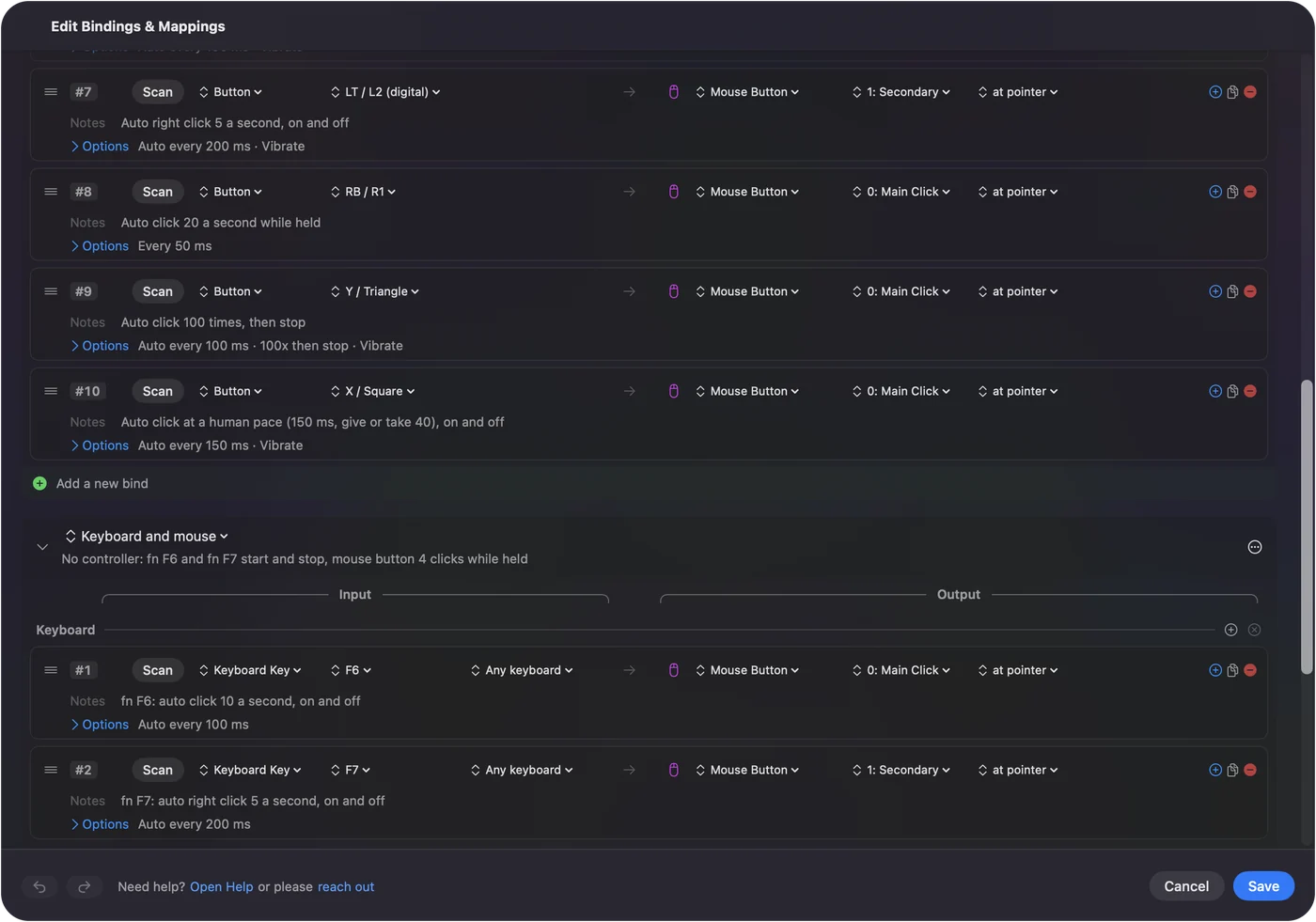
The built-in Toggle Mode preset shows the idea on other buttons, and holding a key with a controller covers keys. If the game wants the button held, toggle it; if it wants presses, repeat it.
Pick a pace for right clicks
The preset's 5 a second is my choice for right clicks, slower than its 10 a second for left clicks, because a right click usually opens or uses something and the app needs a moment to react. That is caution, not something I measured.
- Context menus. In most Mac apps a right click opens a menu, and the next one closes it or opens another. There is rarely a reason to auto right click on the desktop.
- Games. A right click often places, uses or interacts. Start slow, and speed up only if the game keeps up.
- Rules. Some online games forbid auto clickers in their rules and some detect them, right button or left. Check before you use it there.
If right clicks do nothing, or the wrong thing
Climb this ladder, smallest step first:
- Check the control. In the preset, right clicks are on the left trigger and fn F7. The right trigger and fn F6 are left clicks.
- Hold fn. On a MacBook, F7 alone is the rewind key and never reaches the row.
- Close the editor. Opening it ends any run, and while it is open InputConfig holds most outputs back.
- Check the permission. An orange menu bar icon means the running preset needs Accessibility. See the Accessibility permission.
- Hold instead of click. If the game seems to ignore quick right clicks, it may act only on a held button. Switch the row to Toggles on and off.
Most right-click trouble is the wrong control or a missing fn.
What it cannot do
- Decide what a right click means. The app does that; InputConfig only presses the button.
- Press a game controller's trigger. InputConfig sends mouse and keyboard, not a virtual controller, so a game that only reads the pad never sees these clicks as a trigger.
- Right click two spots in turn. One row clicks one spot; use two rows.
- Promise a game allows it. Check the game's rules first.
The short version
- Ready-made. The left trigger or fn F7 in the Auto Clicker preset, 5 right clicks a second.
- Any row. 1: Secondary or 2: Middle in the Mouse Button menu.
- A held button. Toggles on and off on a 1: Secondary row.
Choose clicks or a hold by what the app expects, then pick the button.
The auto clicker guide covers left, right and middle clicks from setup to stop.
Questions
How do I auto right click on a Mac?
Activate InputConfig's built-in Auto Clicker preset and pull a controller's left trigger, or press fn F7. It right clicks 5 times a second until you press it again.
Can it hold the right mouse button down?
Yes. Set a row whose Mouse Button is 1: Secondary to Toggles on and off: one press holds the right button, the next press lets it go.
Can it auto middle click?
Yes. Choose 2: Middle in the row's Mouse Button menu. In a browser a middle click opens links in new tabs, so aim it carefully.
Is it a real right click or a Control click?
A real right button press. Apps see it the same way they see the right button on a mouse.
Related
Free. macOS 14 or later. No account, nothing leaves your Mac. Open source on GitHub.