Why is right click not working on my Mac?
 InputConfig is completely free on the Mac App Store. You don't have to make an account, there are no subscriptions, and nothing is locked. Optimized for Apple silicon.
Most of the time the Secondary click setting is the cause: it is off, set to a corner of the trackpad you never click, or set to the left side of a Magic Mouse. Hold Control and click to get the menu in the meantime, because Control-click works whatever those settings say. If the menu appears with Control and not with the button, the Mac is fine and only the setting or the button is wrong.
The opposite problem, a Mac that right clicks everything, is almost always a Control key that is held, stuck or latched. This page goes through both, with a free test that shows whether the click reaches the Mac at all. If a button or your hands simply will not do a right click any more, InputConfig, the free Mac app I make, can put the right click on a key, a side button or a controller button.
On this page: 11 sections
- Steps
- Check Secondary click on the trackpad and the mouse
- Click the right side of a Magic Mouse with other fingers lifted
- Test whether the Mac receives the click
- Check a third-party mouse and its software
- Stop the Mac right clicking everything
- Fix right click in Finder only
- Put right click on another button or key
- What it cannot do
- The short version
- Questions
Steps
- Hold Control and click the item to get the menu while you fix the setting.
- Open System Settings, choose Trackpad or Mouse, and set Secondary click to the gesture you use.
- Open the right click test or InputConfig's Live Visualizer and press the button to see whether the Mac receives it.
- If the Mac right clicks everything, press and release both Control keys and turn off Sticky Keys.
- To right click from another button, add an InputConfig row whose output is Mouse Button, 1: Secondary.
Check Secondary click on the trackpad and the mouse
Apple's right-click guide, which I read on October 27, 2026, gives the path: open System Settings, click Mouse or Trackpad in the sidebar, open the Secondary click menu and choose an option. What each choice means:
- Trackpad, Click or Tap with Two Fingers. Two fingers have to touch the pad when you click. A light second finger that lands a moment late gives an ordinary click instead.
- Trackpad, a bottom corner. Only that corner right clicks. If someone set Click in Bottom Right Corner, two fingers do nothing special any more.
- Magic Mouse, Click Right Side or Click Left Side. The left-handed choice moves the menu to the left half, which makes it look as if right click broke.
- Off. The trackpad and the Magic Mouse both offer it, and then only Control-click opens menus.
A mouse with a real right button needs no setting. Apple's guide also notes that the Magic Keyboard with Touch ID and Numeric Keypad, the USB-C one, has a contextual menu key below F13. If Control-click opens the menu, nothing is broken, and the fix is in System Settings. The Apple guide to right-clicking has the same steps with pictures, and how to right click on a Mac covers every device.
Click the right side of a Magic Mouse with other fingers lifted
A Magic Mouse has no buttons. The whole shell clicks, and the touch surface decides which side you meant. If a finger rests on the left half while you press the right, the mouse reads a left click, and that is the usual reason a Magic Mouse seems to lose its right click. Lift every finger but one and press near the right edge.
- Check the battery. A low Magic Mouse can still move the pointer while clicks turn unreliable. Its level is in System Settings, Bluetooth.
- Reconnect it. Turn the mouse off and on, or plug in its cable for a moment, so the Mac sets it up again.
On a Magic Mouse, a right click is a right side touch with nothing on the left. Magic Mouse buttons explains what else the shell can and cannot report.
Test whether the Mac receives the click
Before you change more settings, find out where the click is lost. Two free ways show it:
- You: Open the right click test in a browser and right click inside the box, or open InputConfig, pick the Mouse template in the Live Visualizer and press the button.
- InputConfig: Draws the mouse and the trackpad and lights Right click, Left click, the side buttons, scrolling and double clicks as they arrive. It works with no preset running.
- Check: Right click lights, so the Mac receives it. Left click lights, so the button or the setting is sending the wrong one. Nothing lights, so the button sends nothing.
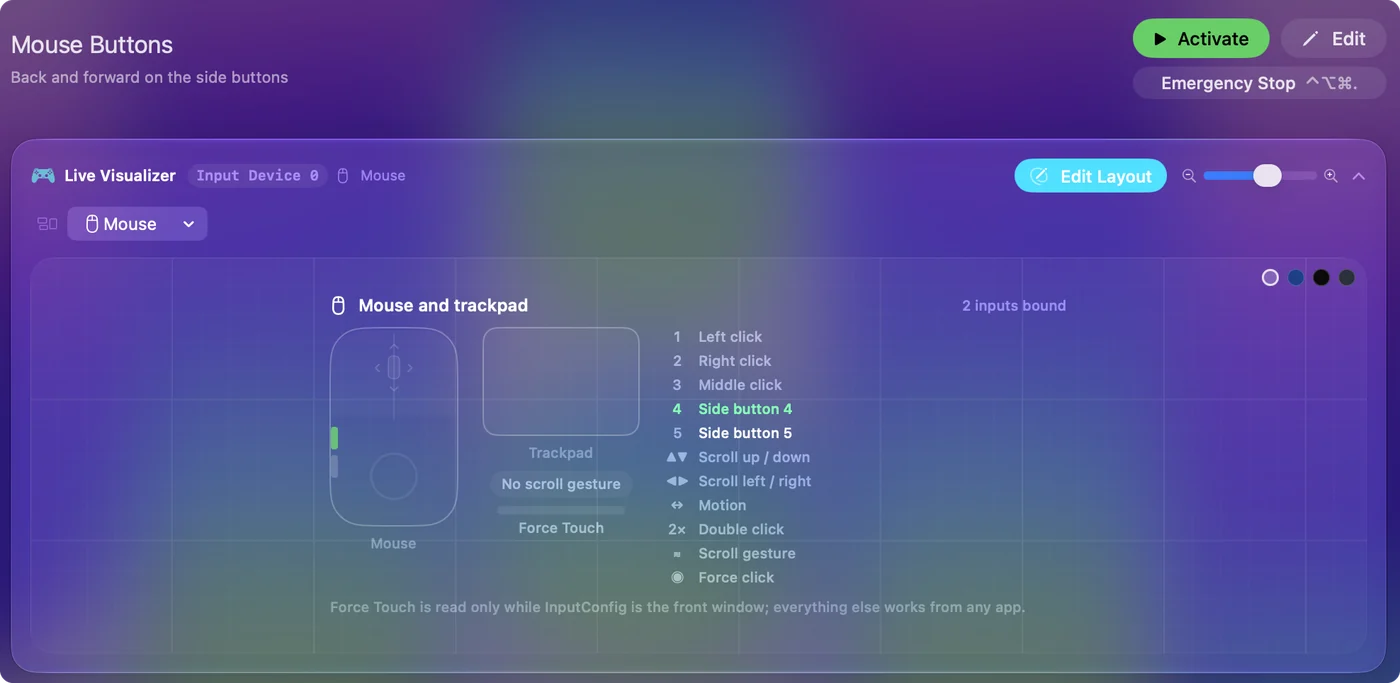
If the test sees a right click and an app does not, the app is the problem, not the mouse.
Check a third-party mouse and its software
A Logitech, Razer or other gaming mouse can have its right button reassigned in the maker's software, and the mouse often keeps that in its own memory. So the button can send something else on this Mac even after the app is gone. Climb this ladder, smallest step first:
- Look in the maker's app. In Logi Options+, G HUB, Razer Synapse or similar, check what the right button is set to, and reset it to its default.
- Quit other remappers. Another mapper or a mouse utility can also take the button. Quit them one at a time and test again.
- Check the primary button. A swap to left-handed in System Settings or in the maker's app turns the right button into the main click. See a left-handed mouse on a Mac.
- Try another port or connection. Plug the receiver straight into the Mac, or try the cable, then test.
- Try another mouse. If a second mouse right clicks and this one never does, the switch is worn.
If InputConfig is running a preset, deactivate it while you test. It cannot block a left or right click, so it never swallows the button, but a row on Right click adds its own output to every press. Test with every mouse app quit, and add them back one by one.
Stop the Mac right clicking everything
When every click opens a menu, the Mac thinks Control is down, or a setting has made the main click secondary. Climb this ladder, smallest step first:
- Press and release both Control keys. A key can stay down after a shortcut, a remote desktop session or a game that lost focus. One press on each side clears it.
- Turn off Sticky Keys. In System Settings, Accessibility, Keyboard, Sticky Keys latches a modifier after one press, so a tap of Control turns the next click into a right click.
- Check the Secondary click choice. Click Left Side on a Magic Mouse, or a bottom left corner on a trackpad, makes ordinary clicks open menus.
- Lift your thumb off the trackpad. With two-finger secondary click, a resting thumb plus one clicking finger counts as two fingers.
- Unplug other keyboards. A spare keyboard, a keypad or a pedal with a stuck key holds Control for the whole Mac.
A Mac that right clicks everything is almost always a Control key it believes is held.
Fix right click in Finder only
If right click works in Safari and other apps but the Finder shows no menu, or the menu takes seconds, the Finder itself is stuck.
- Relaunch the Finder. Choose Force Quit from the Apple menu, select Finder and click Relaunch. Windows reopen where they were.
- Turn off Finder extensions you do not use. Cloud storage and file tools add items to the Finder's menu. Their switches are in System Settings, General, Login Items & Extensions.
- Restart the Mac. It also clears a held Control key that the steps above missed.
When only one app fails, fix that app before you blame the mouse.
Put right click on another button or key
If the button is worn, or two-finger clicks are hard for your hands, give the right click to something else. In InputConfig any input can send a real right button press, the same one a mouse sends, not a Control-click.
- You: In a preset, click Add a new bind, press Scan and press the key or button you want, such as F14, a mouse side button or a controller trigger. Set the output to Mouse Button and choose 1: Secondary.
- InputConfig: Sends a right click at the pointer each time you press it. With How it fires left at Fires while held, the button stays down while you hold, so right drags work too.
- Check: Click Save and Activate, point at a file in the Finder and press the input. Its menu opens.
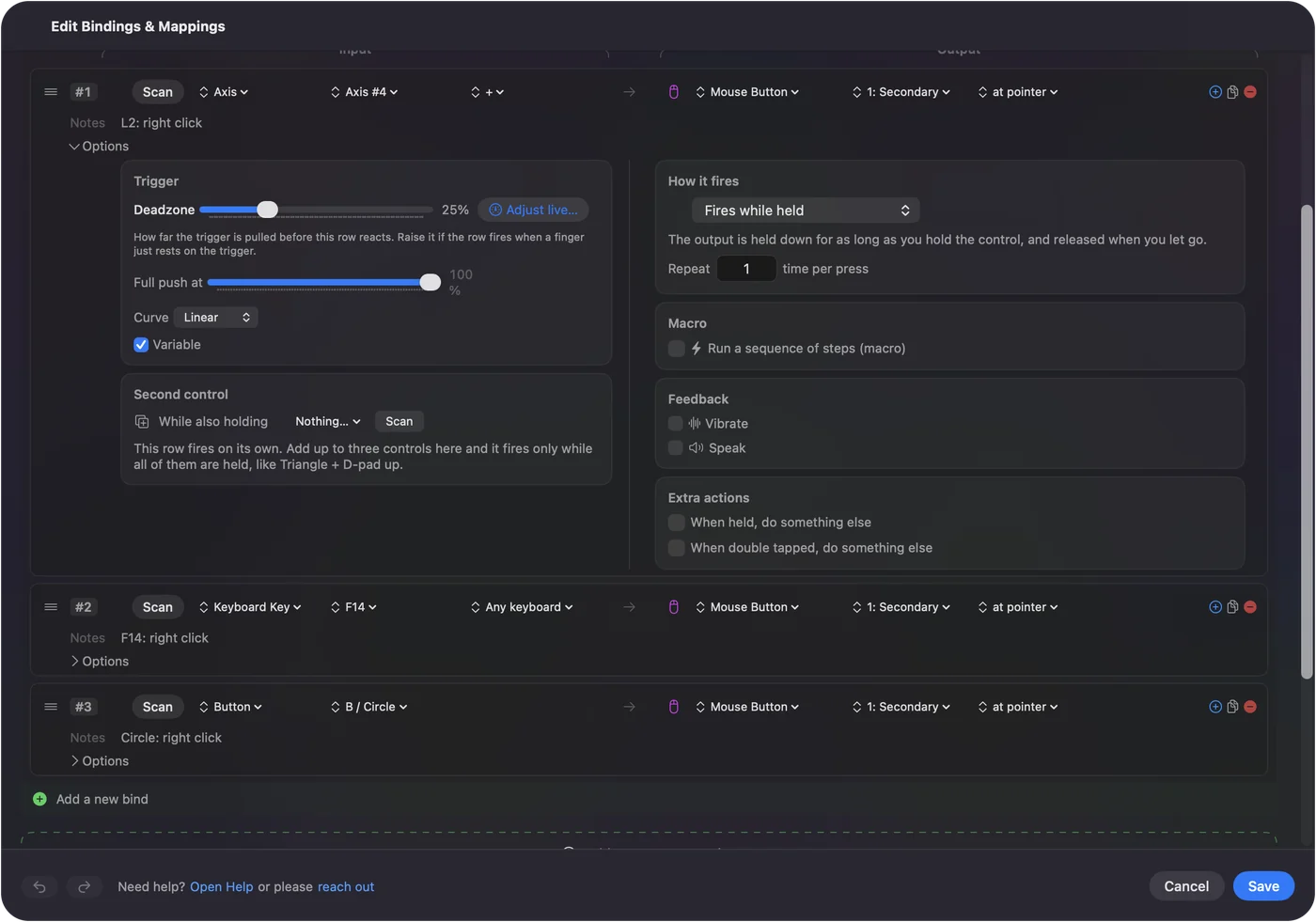
- A side button. Button 4 or Button 5 makes a comfortable right click. Turn on Block the button's own action in the row's Options so a browser does not also go back.
- A spare key. A key still types, because InputConfig listens alongside macOS, so choose F13 to F19 or another key that types nothing.
- A controller. In the built-in Desktop Navigation preset the right trigger is left click and the left trigger is right click.
A key that types nothing makes the best right click. Auto right click covers repeating and held right clicks.
What it cannot do
- Repair a dead switch. If no test sees the button, the mouse needs cleaning, a repair or a replacement.
- Change Secondary click for you. That setting belongs to macOS, in System Settings.
- Block a left or right click. InputConfig can hold back the middle button and the side buttons, not the two main ones.
- Tell two mice apart. Every mouse connected counts as one, so a row on Right click fires for all of them.
- Fix the Finder. A stuck Finder needs the relaunch above.
The short version
- Control-click first. It always works, so use it while you fix the setting.
- Secondary click next. System Settings, Trackpad or Mouse, and pick the gesture you really use.
- Test the button. The right click test or the Live Visualizer shows whether the Mac gets it.
- Right clicks everywhere. Release both Control keys and turn off Sticky Keys.
If the hardware is the problem, move the right click to a key or button that still works.
Questions
Why did right click stop working on my Mac?
Usually Secondary click is off or set to a gesture you are not using, such as a trackpad corner or the left side of a Magic Mouse. Check System Settings, Trackpad or Mouse, and use Control-click in the meantime.
Why does my Mac right click everything?
The Mac thinks Control is held. Press and release both Control keys, turn off Sticky Keys in System Settings, Accessibility, Keyboard, and check that Secondary click is not set to the left side or a left corner.
Why does right click work on the trackpad but not the mouse?
The trackpad and the mouse each have their own Secondary click setting, and a Magic Mouse needs it set to Click Right Side with your other fingers lifted. A third-party mouse may have its right button reassigned in the maker's software.
Can another button send a right click?
Yes. In InputConfig, a free Mac app, bind a key, a side button or a controller button to a Mouse Button output set to 1: Secondary. It sends a real right click wherever the pointer is.
Does Control-click still work when right click fails?
Yes. Holding Control while you click opens the same menu whatever the Secondary click setting says, so you can always reach the settings to fix it.
Related
This page in other languages: Deutsch, Español, Français, Italiano, 日本語, 한국어, Polski, Português, Русский, ไทย, 繁體中文, 简体中文
Completely free. You don't have to make an account, there are no subscriptions, and nothing is locked. Optimized for Apple silicon. Open source on GitHub.
Updated