How to set up a left-handed mouse on a Mac
 InputConfig is completely free on the Mac App Store. You don't have to make an account, there are no subscriptions, and nothing is locked. Optimized for Apple silicon.
To make a mouse left-handed on a Mac, open System Settings, choose Mouse, and change Secondary click so the left side is the one that opens the context menu. Apple's guide to secondary click, which I read on October 21, 2026, gives that path. Side buttons, thumb grids and wheel jobs are a separate matter, and for those InputConfig, the free Mac app I make, lets you place any job on whichever button your thumb finds.
This page covers three layers: the swap macOS does, which mice are made for the left hand, and a mirrored layout of the other buttons.
On this page: 10 sections
The swap macOS does on its own
Apple's page on secondary click says to open System Settings, click Mouse in the sidebar, and use the Secondary click pop-up menu to choose the side of the mouse that is more comfortable. AbilityNet's guides for macOS 13, 14 and 15 describe the same steps and name the choice Click left side. The menu looks different for a Magic Mouse and for other mice, so read what yours offers. On an older macOS, other brands of mouse had a Primary mouse button setting where Right meant a left-handed mouse. If the setting is grayed out, the Mac may be managed by an organization.
The swap belongs to macOS, and it changes every app at once, so make it first and build the rest around it.
A Magic Mouse is already symmetrical
The Magic Mouse has a touch surface and no physical buttons, and the click you feel is the whole surface moving. With Click left side set, a press on the left half of the surface becomes the secondary click. A guide I found warns about resting a second finger on the secondary side while you click, because that can trigger the secondary click. A left-handed user may find the resting finger is the thumb, so I would test it before you commit. A Magic Mouse has no side buttons, so there is nothing for InputConfig to bind there. See the Magic Mouse page.
Choose a mouse made for the left hand
A right-handed mouse has its thumb buttons on the left edge, where a left hand rests its ring finger. Three kinds of mouse help, and I have not checked every model, so look at the maker's page for yours:
- A left-handed edition. Logitech sells a left-handed Lift vertical mouse, and Razer has listed left-handed editions such as the DeathAdder Essential and the Naga. See the Logitech Lift page.
- An ambidextrous shape. Some mice are symmetrical, and a few have side buttons on both edges or swappable side panels, as Logitech's G PRO 2 is described. You turn the buttons you do not use off in the maker's software.
- A trackball. A trackball sits under either hand, and most have buttons on both sides of the ball. See trackballs on a Mac.
The maker's software, such as Logi Options+, can usually switch the primary button for a symmetrical mouse, so the two layers work together. If you use it, quit it before you test a binding in InputConfig.
Find out what each button sends
Press Scan on a row, then click the button. A mirrored mouse can number its side buttons in an order you do not expect, so scanning beats guessing. This is the table I would fill in:
| Button | Where your left thumb meets it | Job |
|---|---|---|
| Button 4 and Button 5 | The side buttons on the thumb edge | Back and forward, or copy and paste |
| Button 6 and higher | A thumb grid, if the mouse has one | Desktops, screenshots, volume |
| Middle click | The wheel press | Mission Control or play and pause |
| Left and right click | The main buttons | Leave alone. macOS swaps them for you. |
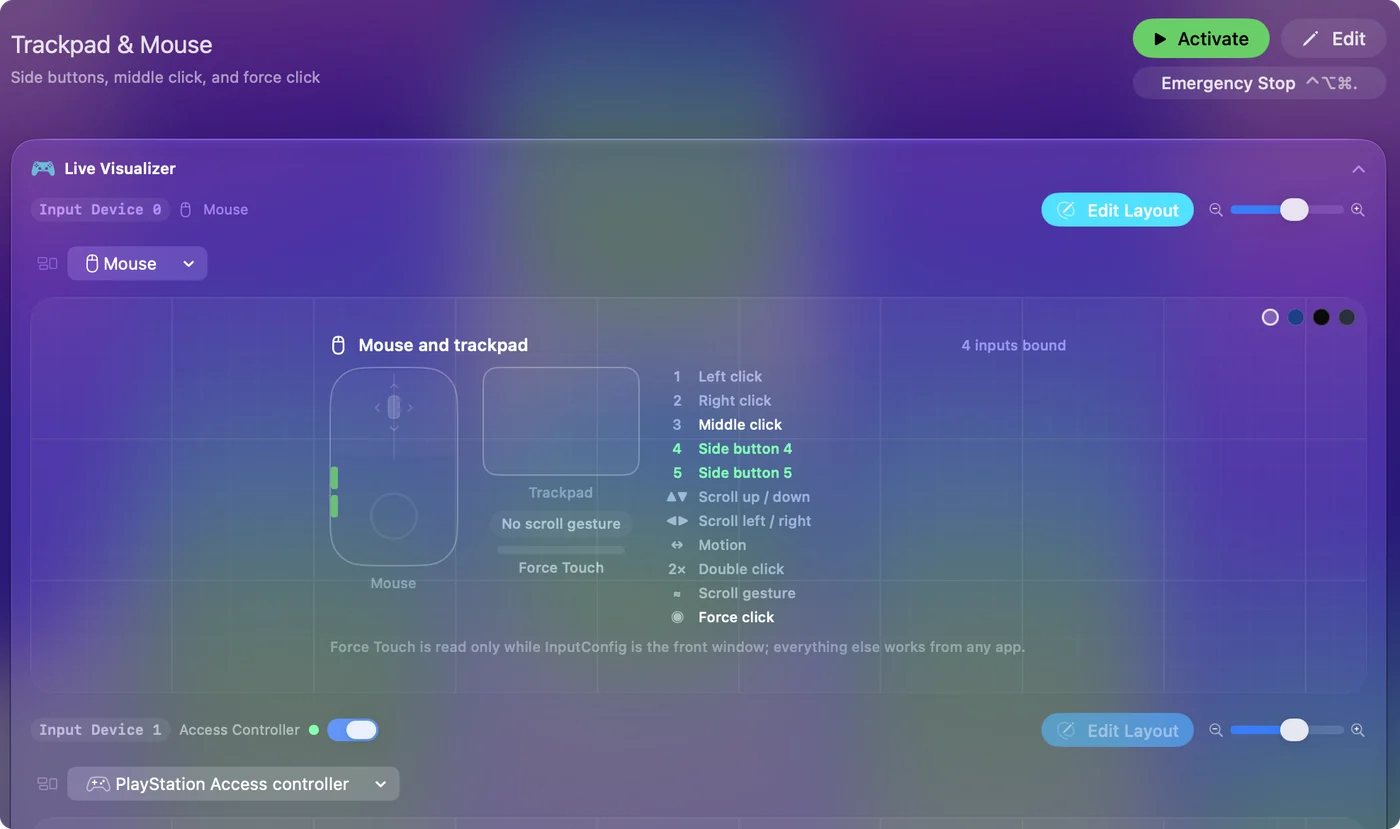
Left and right click cannot be blocked in InputConfig. I have not checked whether the Left click entry follows the physical left button or the swapped one, so scan a click and see what the row names. If a button never scans, it probably talks only to the maker's software.
Build a mirrored layout
Step 1: Scan your thumb buttons
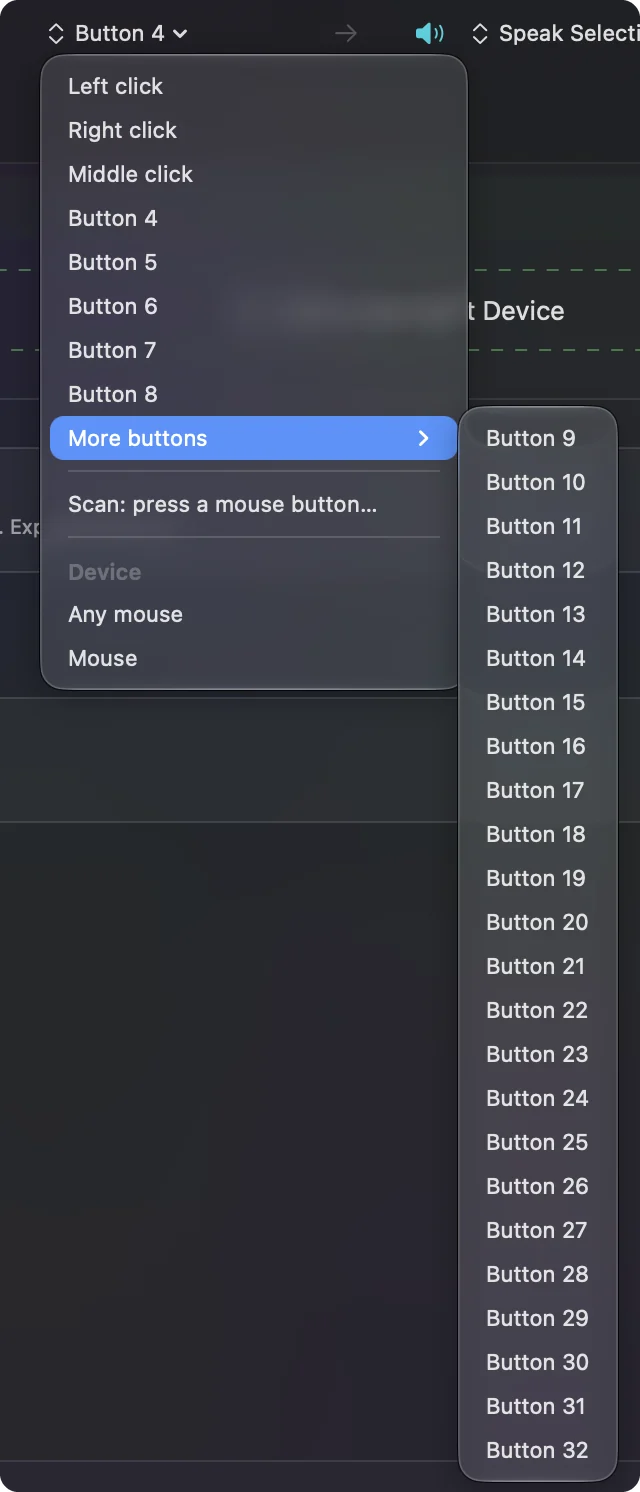
- You: Add a row, set the device to This Mac's mouse or trackpad and the input to Mouse, press Scan and click the thumb button. The button menu lists Left click, Right click, Middle click, Button 4 to Button 8, and More buttons for Button 9 to Button 32.
- InputConfig: Names the button for the row.
- Check: Each thumb button shows its own name.
Step 2: Give the buttons jobs
- You: Set each output, such as Command and left bracket for back, and tick Block the button's own action in Options where a button already does something.
- InputConfig: Runs the new job and hides the old one from apps while the preset runs.
- Check: Press each button in Safari. It does the new job once.
Ideas for left-handed users
- Shortcuts that took two hands. Copy and paste, undo and the screenshot chord become single presses on a thumb button. See copy and paste.
- Left-handed gamers. Mirror the grid so the most used keys sit under the thumb. See the MMO mouse page.
- Typists on a trackball. A hold action lets one button be both click and drag.
- Shared desks. A right-handed preset and a left-handed preset, switched by hand, since only one preset runs at a time.
If the buttons are wrong
Climb this ladder, smallest step first:
- Check the swap. System Settings, Mouse, Secondary click. A change on one account does not follow you to another.
- Scan again. The numbers on a mirrored mouse may not match the box.
- Check the preset is on. Rows do nothing until you click Activate, and InputConfig needs Accessibility.
- Quit the maker's app. It may swap or hide buttons before the Mac sees them, and then the Mac and InputConfig disagree.
- Test in a plain app. The Live Visualizer's Mouse map shows exactly what arrives.
What it cannot do
- Swap left and right click. macOS does it, and InputConfig cannot block those two buttons.
- Reshape the mouse. Only a left-handed or symmetrical mouse changes the fit.
- Tell two mice apart. A left-handed and a right-handed mouse plugged in together count as one.
- Read private buttons. A button handled in the maker's software never reaches the Mac.
The short version
- The swap. System Settings, Mouse, Secondary click.
- The mouse. A left-handed edition, a symmetrical shape or a trackball.
- The layout. Scan the thumb buttons and give them jobs.
Make the macOS swap first, then scan your thumb buttons and build around what arrives.
Questions
How do I make my mouse left-handed on a Mac?
Open System Settings, click Mouse, and change Secondary click to the left side. The menu differs a little between a Magic Mouse and other mice.
Is there a left-handed mouse that works on a Mac?
Yes. Logitech sells a left-handed Lift, and Razer has listed left-handed editions of some models. Symmetrical mice and trackballs also fit either hand, so check the maker's page.
Can I use side buttons on a left-handed mouse on a Mac?
Yes. Scan the buttons your thumb meets in InputConfig and give each a job. Tick Block the button's own action where one already does something.
Why is my left-handed setting not working?
The Mac may be managed by an organization, or a maker's app may be swapping the buttons as well. Check Mouse in System Settings and quit the maker's app to test.
Does the Magic Mouse work left-handed?
Yes, with Secondary click set to the left side. It has no side buttons, so only the macOS swap applies.
Related
This page in other languages: العربية, Čeština, Dansk, Deutsch, Español, Suomi, Français, עברית, Magyar, Bahasa Indonesia, Italiano, 日本語, 한국어, Norsk, Nederlands, Polski, Português, Русский, Slovenčina, ไทย, Türkçe, 繁體中文, 简体中文
Completely free. You don't have to make an account, there are no subscriptions, and nothing is locked. Optimized for Apple silicon. Open source on GitHub.
Updated