Controller input lag on a Mac
 InputConfig is completely free on the Mac App Store. You don't have to make an account, there are no subscriptions, and nothing is locked. Optimized for Apple silicon.
Four things fix most controller lag on a Mac, in this order. Play the game full screen, so Game Mode turns on: on an Apple silicon Mac with macOS Sonoma or later it doubles the Bluetooth sampling rate for controllers. Use a cable if your controller sends input over one. Clear the 2.4 GHz air around the Mac. And if the game runs through Steam, try it with Steam Input turned off for that game. Bluetooth on its own adds a small, steady delay. The lag people actually notice usually comes from interference, a stream, or a layer in between.
On this page
Steps
- Play the game full screen so Game Mode turns on.
- Plug the controller straight into the Mac if it sends input over a cable.
- Move the controller closer, keep USB 3 drives and hubs away, and put the Wi-Fi on 5 GHz.
- In Steam, set the game's Steam Input override to Disable Steam Input.
- On a MacBook on battery, raise On battery in InputConfig Settings, Polling rate.
Let Game Mode turn on
Apple's own fix for controller lag is Game Mode. When a game goes full screen on a Mac with Apple silicon and macOS Sonoma 14 or later, Game Mode turns on by itself. It gives the game first call on the CPU and GPU and, in Apple's words, doubles the Bluetooth sampling rate, which cuts input latency for wireless controllers and AirPods (Apple's Game Mode page).
Three things stop it working:
- A window. The game is in a window, not full screen.
- An Intel chip. Intel Macs have no Game Mode. A cable is the fix there.
- Turned off once. If Game Mode was turned off for that game, it stays off for that game, even after you quit and reopen it, until you turn it back on. On macOS Tahoe, click the Game icon in the menu bar (or press Command-Esc), then Settings. On Sonoma and Sequoia, use the Game menu in the menu bar.
Full screen is free and it is the first thing to try. More on Game Mode on a Mac.
Use a cable if your controller sends input over one
A cable is the lowest-latency, most consistent connection, and on a desktop Mac far from the couch it also cures the dropouts. Plug USB-C straight into the Mac, not a hub. For a laptop on the couch, Bluetooth is fine.
Not every controller sends input over a cable on a Mac: the Switch Pro Controller only charges that way, and wired Xbox pads depend on your macOS version.
Clear the 2.4 GHz air
Bluetooth shares 2.4 GHz with Wi-Fi and gets stepped on by USB 3 devices close to the Mac. Intermittent lag with occasional drops is nearly always this.
- Move the pad closer. Distance makes every other source of interference worse.
- Move the router further away. Or put the Wi-Fi on 5 GHz.
- Move USB 3 hubs and drives. Keep them away from the side of the Mac the controller talks to.
Try Steam Input off for Steam games
Steam can sit between the controller and the game and translate it. That layer is behind a lot of the Mac lag reports, with Switch Pro and Xbox pads especially, and the reported fix is to turn it off for that one game.
- You: In Steam, right-click the game, choose Properties, then Controller, and set the override to Disable Steam Input.
- Check: If the lag is gone, keep it off for that game. If the game stops seeing the controller at all, set it back: it needed Steam Input, and the lag is elsewhere.
If Steam's menus respond but the game does not, that is a different problem: see controller works in Steam but not in the game.
Know what a stream adds
GeForce NOW and Xbox Cloud Gaming add 40 to 100 milliseconds on a good connection and more on Wi-Fi. That is the stream, not the controller. Ethernet, a close server region and a lower resolution all help. A cable on the controller barely does.
The same holds for PS Remote Play and Steam Link from your own console or PC. Put the console or PC on Ethernet and the Mac on 5 GHz Wi-Fi or a cable before you blame the controller.
Know what a mapper adds
InputConfig reads the controller 120 times a second on the power adapter and 60 times a second on battery, out of the box. The wait that adds is shorter than anyone notices in play.
- You: Open InputConfig Settings, Polling rate. With Auto-switch on power source on, pick On power adapter and On battery: 60, 120, 180 or 240 Hz.
- InputConfig: Applies the new rate at once, with no restart, and shows the rate the engine is running at while a preset is active.
- Check: With a preset running, the line under the pickers shows the new rate. For aiming on a MacBook away from the charger, set On battery to 120 or 240.
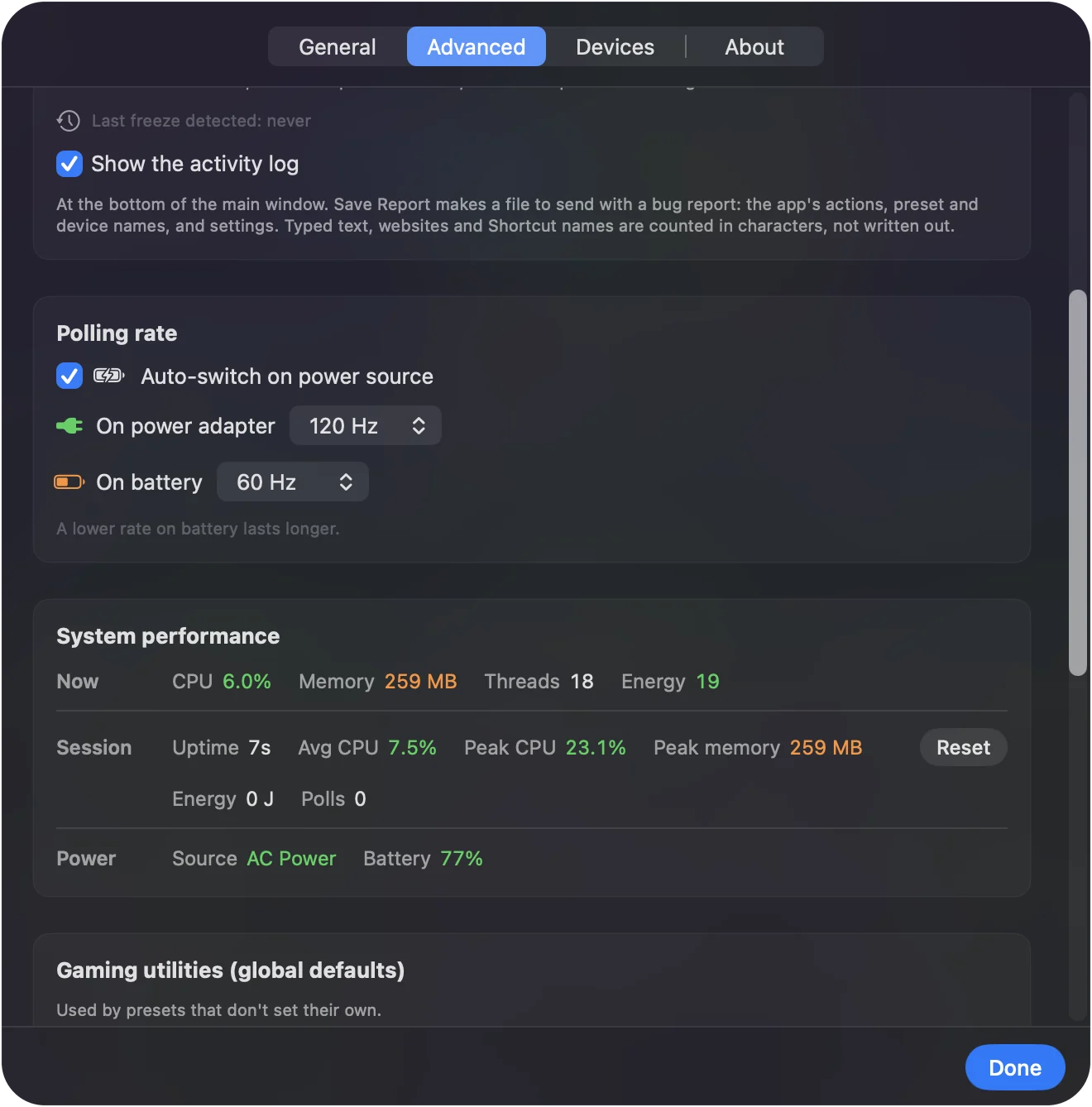
A lower rate on battery lasts longer, which is why it is the default.
If it still lags
Climb this ladder, smallest step first:
- Charge the controller. A low battery is a common cause of a pad that stutters.
- Check one game against another. If only one game lags, the delay is usually that game or its stream, not the controller.
- Check the response curve in a mapped game. If an InputConfig layout feels sluggish, look at the stick rows first: a smooth curve is slow near the center by design, and a linear one feels quicker.
- Test the pad on its own. If it drops out as well as lags, see a controller that keeps disconnecting. Most causes there apply to any pad.
To put numbers on a comparison, the controller polling rate test counts how many updates a second reach a browser on a cable and over Bluetooth, and the reaction time test compares a controller with a mouse or a key. Neither one measures latency itself, because a web page cannot time a press from the controller to the screen.
What no setting can fix
- Bluetooth itself. It adds a small, steady delay, below what most people feel.
- A cloud stream. The 40 to 100 milliseconds belong to the network, not the controller.
- An Intel Mac. It has no Game Mode, so the doubled Bluetooth sampling rate is not available.
The short version
- Full screen. Game Mode turns on and doubles the Bluetooth sampling rate.
- Cable or clear air. Use a cable straight into the Mac, or Bluetooth with no USB 3 clutter and Wi-Fi on 5 GHz.
- Steam Input off. For a Steam game that lags, try it off for that game.
The lag you can feel is almost always interference, a stream, or a layer in between, not Bluetooth itself.
Questions
Is Bluetooth lag noticeable on a Mac controller?
Rarely. The delay Bluetooth adds is small and steady, below what most people feel. Interference and streaming are what people actually notice.
Does a mapping app add input lag?
Very little. InputConfig polls at 120 Hz on the power adapter and 60 Hz on battery by default, and up to 240 Hz if you choose.
Why does my Switch Pro Controller lag on a Mac?
On a Mac the Pro Controller only sends input over Bluetooth. The USB-C cable just charges it, so the cable fix does not apply. Keep it close to the Mac, away from USB 3 hubs and drives, and put the Wi-Fi on 5 GHz. If it still lags in one game, the delay is usually the game or a stream.
Does Game Mode reduce controller lag on a Mac?
Yes, on a Mac with Apple silicon and macOS Sonoma or later. Apple says it doubles the Bluetooth sampling rate for controllers and AirPods. It turns on when the game goes full screen. A game in a window does not get it.
Why is my Xbox controller lagging on my Mac?
Usually interference or distance on Bluetooth, a low battery, or Steam Input in a Steam game. Play full screen so Game Mode turns on, move closer or clear USB 3 hubs away from the Mac, charge the pad, and try Steam Input off for that game.
Does a wired controller reduce input lag on a Mac?
A little, and it makes the delay steadier. The bigger win is that a cable ignores interference, which causes most lag you can feel. Not every controller sends input over a cable on a Mac: the Switch Pro Controller only charges that way, and wired Xbox pads depend on your macOS version.
How do I test controller input lag?
No web page can time the whole trip from a press to the picture changing. What a browser can show is how often new readings arrive: the controller polling rate test counts updates per second, so run it once over a cable and once over Bluetooth and compare the two numbers.
Related
This page in other languages: Français, Italiano, 日本語, 简体中文
Updated