Can you play Fortnite on a Mac with a controller?
 InputConfig is completely free on the Mac App Store. You don't have to make an account, there are no subscriptions, and nothing is locked. Optimized for Apple silicon.
Yes, but not by installing it. Fortnite has not been available on the Mac since 2020, and the way Mac players play it now is cloud streaming: Xbox Cloud Gaming or GeForce NOW in Safari or Chrome, or the GeForce NOW Mac app. A controller is the normal way to play it there, and PlayStation, Xbox and Switch pads all work.
On this page
Steps
- Pair the controller with the Mac.
- Open xbox.com/play in Safari, Chrome or Edge, or open the GeForce NOW app.
- Start Fortnite and press a button on the controller so the stream sees it.
- If GeForce NOW still ignores the pad, activate InputConfig's Fortnite preset and play with keys and mouse.
Pick a streaming service
- Xbox Cloud Gaming. Free for Fortnite with a Microsoft account, no Game Pass, in Safari, Chrome or Edge, with nothing to install. Fortnite there is played with a controller (or touch, which a Mac does not have), so bring a pad. Microsoft names the Xbox Wireless Controller and the DualShock 4 among the controllers it supports.
- GeForce NOW. NVIDIA's Mac app, or Safari 16.4 or later. It carries the Epic Games Store version, with a free tier that has shorter sessions and a queue, and paid tiers above it. For the Mac, NVIDIA lists Xbox controllers and the PS5 DualSense and PS4 DualShock 4. It runs the PC version, so a keyboard and mouse work too, which also means a pad it does not recognize can still play through a keyboard mapping.
- A gaming PC you already own. Streaming it to the Mac with Moonlight, Parsec or Steam Link costs no subscription and has no session limit. The same rule applies: the streaming app either passes the pad or it does not.
Safari, Chrome or Edge address bar: Xbox Cloud Gaming.
xbox.com/playWhat happens: Microsoft's cloud gaming page opens. Sign in with a Microsoft account and pick Fortnite.
My pick: Xbox Cloud Gaming if you have an Xbox or PlayStation pad and want free with no install, GeForce NOW if you want the choice of controller or keyboard.
Set it up
- You: Pair the controller with the Mac, open the streaming service, and start Fortnite.
- The browser: Passes the controller to the stream through the Gamepad API, and the game sees a normal pad with its own console layout.
- Check: Press a button once the stream has loaded. A browser only shows a controller to a page after a press.
Pick a controller
Pair it with the Mac first. A stream can only use what macOS already sees. Step by step: PS5, Xbox, PS4, Switch Pro.
- Xbox Series or Xbox One controller. Named by both Microsoft and NVIDIA. The safest pick for both services.
- PS5 DualSense or PS4 DualShock 4. NVIDIA lists both for the Mac. Microsoft names the DualShock 4.
- Everything else. The Switch Pro, Joy-Cons, the Steam Controller, 8BitDo pads in some modes, arcade sticks and generic USB pads are on neither list. Some show up in a browser and some do not. InputConfig reads all of these on the Mac side, so on GeForce NOW they can play Fortnite as keyboard and mouse even when the stream ignores them.
If the stream does not see the pad
Sometimes the browser hands the stream nothing, usually after a controller reconnects mid-session or with a pad the service does not list. Climb this ladder, smallest step first:
- Press a button. With the stream's tab in front.
- Reload the page. That fixes most of it. Press a button again once the stream has loaded.
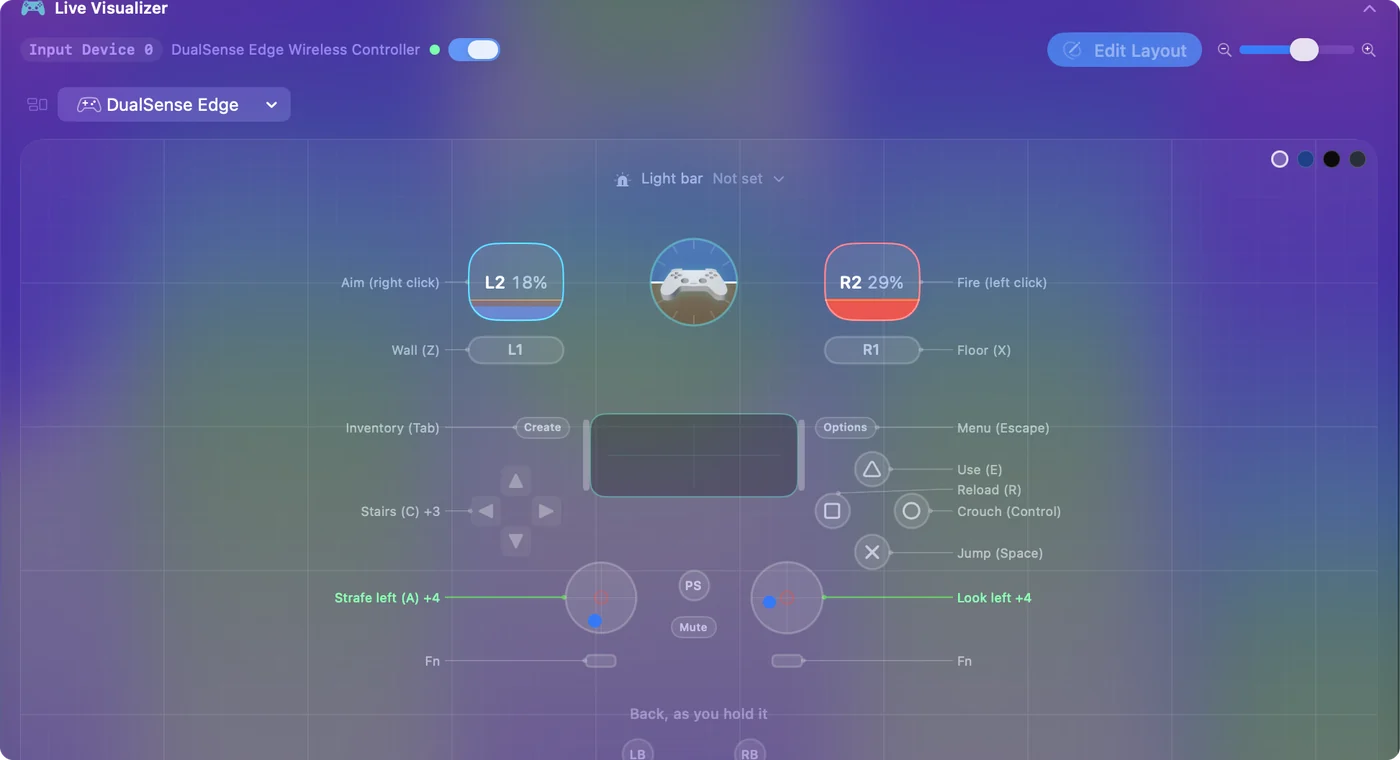
- On GeForce NOW, switch to keys. It streams the PC version, which takes a keyboard and mouse, so InputConfig's Fortnite preset maps the controller and the game sees a keyboard and mouse player: mouse look on the right stick, walls and floors on the bumpers, stairs, roof and trap on the D-pad, edit on the right stick click.
- On Xbox Cloud Gaming, fix the browser. Microsoft's Fortnite page offers controller and touch play, not keyboard and mouse, so there the fix is getting the browser to see the pad. Xbox Cloud Gaming on a Mac with a controller walks through it.
Know what to expect
Cloud Fortnite is playable on a good connection and frustrating on a poor one. A wired Mac beats Wi-Fi, and a nearby server region beats a far one. Building fast is harder on a stream than on a console. I would play Zero Build mode over a cloud stream.
Play without a controller, or with one hand
On GeForce NOW, the keyboard and mouse work as they would on a PC. On Xbox Cloud Gaming, Microsoft's page for Fortnite offers controller and touch, and a Mac has no touchscreen, so you need a pad there. InputConfig does not turn a keyboard into a controller. It goes the other way, controller to keyboard.
That other way is the reason I built InputConfig: my hands do not work well, and a game's own remapping can only move buttons around on a standard pad. On GeForce NOW the keyboard route opens that up. A PlayStation Access Controller, an Xbox Adaptive Controller or one half of a normal pad can send exactly the keys you choose. A macro sends a sequence from one button, toggle turns a held button into a tap, and turbo repeats a press for you. Start from the one-handed Mac guide, the Access Controller guide or the Xbox Adaptive Controller guide, and keep the stream's keyboard binds in mind when you pick keys.
The short version
- Stream it. Use Xbox Cloud Gaming or GeForce NOW, because there is no Mac install.
- Bring an Xbox or PlayStation pad. Both services name them as supported.
- Keys on GeForce NOW. If the stream ignores your pad there, the Fortnite preset plays it as keyboard and mouse.
Press a button, then reload: that fixes most streams that lose the pad.
Questions
Is Fortnite on the Mac App Store or Epic Games Launcher for Mac?
No. The Mac version was pulled in 2020 and has not returned. Cloud streaming is how it is played on a Mac.
Does a PS5 controller work with Fortnite on a Mac?
Yes, through Xbox Cloud Gaming or GeForce NOW in a browser. The stream sees it as a normal controller.
Can I play Fortnite on a Mac without a controller?
On GeForce NOW, yes, with the keyboard and mouse, because it streams the PC version. On Xbox Cloud Gaming, Microsoft's Fortnite page offers controller and touch only, so you need a pad there.
Related
This page in other languages: Dansk, Deutsch, Español, Français, Bahasa Indonesia, Italiano, 日本語, Polski, Русский, ไทย
Updated