PS5 controller not working on a Mac
 InputConfig is completely free on the Mac App Store. You don't have to make an account, there are no subscriptions, and nothing is locked. Optimized for Apple silicon.
Most of the time a PS5 controller that seems not to work on a Mac is working: the Mac sees the DualSense fine and the game does not read it. Check the pairing first, in System Settings, Game Controllers. Then find the app that is ignoring it below, smallest fix first.
On this page
- Steps
- Check that the Mac sees it
- Turn on PlayStation support in Steam
- Play Minecraft Java with a preset instead of a mod
- Map the Roblox experiences that ignore it
- Map any other game or app to keys
- If InputConfig sees it but nothing happens
- If it stopped working after a macOS update
- The short version
- Questions
Steps
- Confirm the controller in System Settings, Game Controllers.
- Enable PlayStation support in Steam and launch from Steam.
- For games without controller support, activate a matching InputConfig preset.
- Check Accessibility access if InputConfig sees presses but the app does not react.
Check that the Mac sees it
- You: Open System Settings, Game Controllers in the sidebar, and press buttons on the DualSense.
- macOS: Lists the controller and lights up each button in the diagram as you press it.
- Check: If it is listed and lights up, the Mac side is done and the problem is the app. If it is missing, forget it in Bluetooth, hold PS and Create until the light bar flashes, and pair again.
If it never shows up in Bluetooth at all, see PS5 controller will not connect to a Mac. If it connects and drops, see keeps disconnecting. This one check tells you whether to fix the pairing or the app.
Turn on PlayStation support in Steam
- You: In Steam, open Settings, Controller, and turn on PlayStation controller support. Launch the game from Steam so Steam Input is active.
- Check: The controller shows in Steam's list. If the game still ignores it, that game is not reading Steam Input on the Mac. Use a mapper so the game sees a keyboard instead.
Play Minecraft Java with a preset instead of a mod
Minecraft Java has no controller support at all. Either install a controller mod, or activate the Minecraft preset in InputConfig, which needs no mod: WASD and the mouse come from the sticks, and the triggers mine and place. Details on the Minecraft page.
Map the Roblox experiences that ignore it
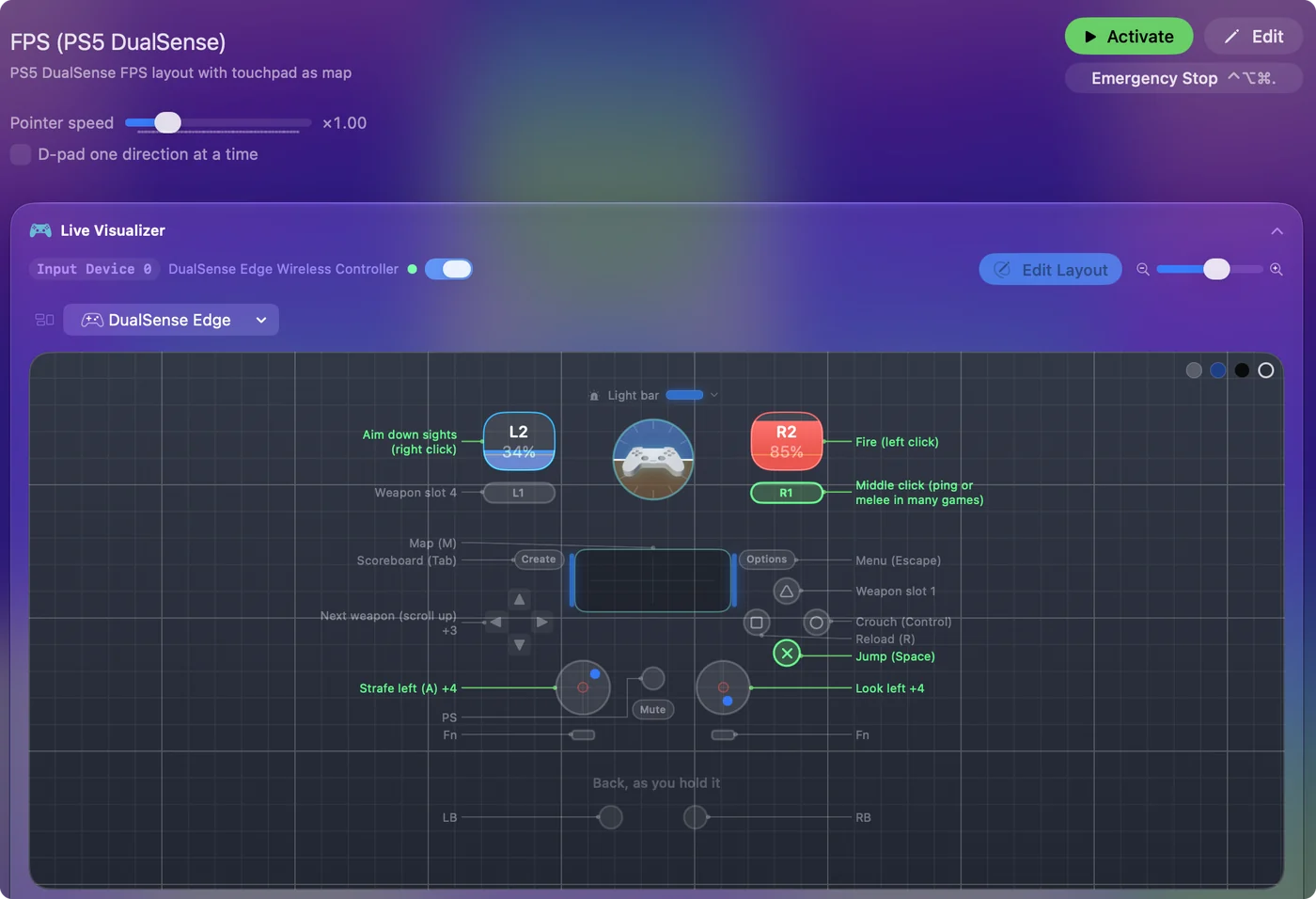
Roblox on the Mac reads a controller, but each experience decides whether to use it, and many only listen to the keyboard and mouse. The Roblox preset covers those, because the experience receives ordinary keyboard and mouse input: WASD on the left stick, the camera on the right, jump on Cross, tools 1 to 4 on the D-pad. See the Roblox page.
Map any other game or app to keys
If the Mac sees the controller and the app does not, the app was never written to read controllers. A mapper fixes that in every case, because the app receives the keyboard and mouse it already expects. Pick a ready layout from the preset library or build one in two minutes.
If InputConfig sees it but nothing happens
Climb this ladder, smallest step first:
- Check the preset is active. The menu bar icon shows a running preset.
- Watch the Live Visualizer. Press a button. It should light up.
- Check Accessibility. If it lights up and nothing reaches the app, switch InputConfig on in System Settings, Privacy & Security, Accessibility. That is the usual cause.
- Read the longer list. Connected but not working covers the rest.
If it stopped working after a macOS update
Climb this ladder, smallest step first:
- Test in System Settings. Press a button in Game Controllers. If it lights up, update the game or Steam and try Steam Input both ways.
- Pair again. If it is missing, forget it in Bluetooth and hold PS and Create to pair again.
- Shut down fully. Shut the Mac down, wait a few seconds, and start it again.
The short version
- Listed in Game Controllers. The Mac is fine. Fix the app: Steam support, a preset, or a mapper.
- Not listed. Forget it and pair again with PS and Create.
- Lit in InputConfig, ignored by the app. Check Accessibility.
Prove the Mac sees the pad first, and every other step gets shorter.
Questions
Why is my PS5 controller not working on my Mac?
Usually the Mac sees it and the game does not. Confirm it in System Settings, Game Controllers, then either enable it in the game or in Steam, or use a mapper such as InputConfig so the game receives keyboard and mouse input instead.
Does the PS5 controller work with Steam on Mac?
Yes, when PlayStation controller support is on in Steam's controller settings and the game is launched from Steam. Some games still ignore Steam Input on the Mac. A mapper covers those.
Does Minecraft on Mac support a PS5 controller?
Minecraft Java does not. Use a controller mod or the InputConfig Minecraft preset, which needs no mod.
My PS5 controller stopped working after a macOS update. What should I do?
Press a button in System Settings, Game Controllers. If it lights up, update the game or Steam and try Steam Input both ways. If it is missing, forget it in Bluetooth, hold PS and Create to pair again, and shut the Mac down fully.
Related
Updated