Does an 8BitDo adapter or dongle work on a Mac?
 InputConfig is completely free on the Mac App Store. You don't have to make an account, there are no subscriptions, and nothing is locked. Optimized for Apple silicon.
The USB Wireless Adapter 2 does. It has a Mac mode, and 8BitDo's manual says it does not switch to it automatically: pair the controller, then hold the controller's Select-type button and Right on the D-pad for three seconds. The 2.4G dongles that come in the box with the Ultimate controllers are a different story. 8BitDo's page for Apple devices says the Ultimate 2.4G is not supported through its dongle for the moment, and lists the Ultimate 2 Wireless for Apple over Bluetooth only. For those, leave the dongle in the box and pair over Bluetooth.
Every 8BitDo fact here comes from 8BitDo's own manual and support pages, which I read on October 22, 2026. I make InputConfig, a free Mac app that maps any controller the Mac can read to keys, clicks and macros. I have not tested an 8BitDo adapter myself.
On this page: 11 sections
- Steps
- Find out which dongle you have
- Pair a controller to the Adapter 2 and set Mac mode
- Know what the adapter drops on a Mac
- Connect an Ultimate without its dongle
- Update the firmware from a Mac
- If the Mac does not see the controller through the dongle
- Map it once the Mac sees it
- What it cannot do
- The short version
- Questions
Steps
- Plug the USB Wireless Adapter 2 into the Mac and press its pair button until the light blinks fast.
- Put the controller in pairing mode, such as Create and PS held for three seconds on a DualSense, and wait for the adapter light to stay solid.
- Hold the Mac mode combo for three seconds, such as View and Right on an Xbox controller, until the light blinks twice.
- Open System Settings, Game Controllers, and press a button to check it is live.
- For an Ultimate controller that came with a 2.4G dongle, pair it over Bluetooth instead.
Find out which dongle you have
| Dongle | What it is | On a Mac |
|---|---|---|
| USB Wireless Adapter 2, sold on its own | A Bluetooth receiver for Xbox, PlayStation, Switch and Wii controllers and 8BitDo Bluetooth pads | Yes, in Mac mode, macOS 10.10 or later by its manual |
| The first USB Wireless Adapter | The older model of the same idea | Its manual has macOS steps too |
| Ultimate 2.4G receiver | The USB-A dongle in the Ultimate 2.4G box | Not supported through the dongle, by 8BitDo's Apple page |
| Ultimate 2 Wireless adapter | The USB-C 2.4G dongle in the Ultimate 2 Wireless box | 8BitDo lists 2.4G for Windows and Bluetooth for Apple |
8BitDo's USB Wireless Adapter 2 page adds a limit that trips people up: it takes Bluetooth controllers only, and 2.4G controllers are not supported. So the adapter cannot stand in for an Ultimate 2.4G receiver. If the dongle came in a controller's box, it is a 2.4G receiver, and on a Mac Bluetooth is the way to connect that controller.
Pair a controller to the Adapter 2 and set Mac mode
The steps are from 8BitDo's USB Adapter 2 manual for macOS, the same for each controller apart from the button you hold.
Step 1: Pair the controller
- You: Plug the adapter into the Mac and press its pair button, so its light blinks fast. Put the controller in pairing mode: on a DualSense hold Create and PS for three seconds, on a DualShock 4 Share and PS, on a Switch Pro Controller the Sync button. On an Xbox controller press Xbox to turn it on, then hold its pair button for three seconds.
- Adapter: Its light turns solid when it connects.
- Check: Pairing mode is needed the first time only. After that the PS or Xbox button reconnects.
Step 2: Set Mac mode by hand
- You: Hold the combo for three seconds: View and Right on an Xbox controller, Create and Right on a DualSense, Minus and Right on a Switch Pro Controller.
- Adapter: Blinks twice and stays in Mac mode. 8BitDo says automatic mode switching covers Windows and Switch only, so a Mac always needs this step.
- Check: Open System Settings, Game Controllers and press a button. It should light up.
To undo a manual mode, 8BitDo says to hold the adapter's pair button until its light goes off, then pair the controller again. 8BitDo labels the macOS button layout an MFi Controller, which is how a standard Mac game controller reports. The Mac mode combo is the step most people never do, and without it the adapter is still in another mode.
Know what the adapter drops on a Mac
- DualSense. Its touchpad, adaptive triggers, haptic feedback and audio jack are not supported, by 8BitDo's macOS manual.
- DualShock 4. Touchpad, audio jack and rumble are not supported.
- Switch Pro Controller. Motion control, NFC, HD rumble and the player lights are not supported.
- Xbox controllers. Bluetooth models only, and trigger vibration and the audio jack are not supported.
A Mac already pairs DualSense, DualShock 4, Xbox Wireless and Switch Pro controllers over its own Bluetooth, with touchpad and motion where macOS supports them. So I would pair those directly first, and keep the adapter for a controller that also moves between a Switch and a PC. Through the adapter, a DualSense loses its touchpad, so pair it directly if you want to use the touchpad as a trackpad.
Connect an Ultimate without its dongle
- Ultimate 2.4G. 8BitDo's page for Apple devices says to set the mode switch to D, press Home, and hold the Star button for three seconds, then pick 8BitDo Ultimate wireless in Bluetooth settings, on macOS 13.2 or later. A USB cable in D mode works too.
- Ultimate 2 Wireless. Set the switch to BT, press Home, hold Pair for three seconds, on macOS 26 or later. The 8BitDo Ultimate 2 on a Mac has the rest.
- Ultimate 2C Wireless. It is not on 8BitDo's list for Apple devices. The Ultimate 2C on a Mac covers what still works.
For an Ultimate on a Mac, the dongle stays in the box and Bluetooth does the job.
Update the firmware from a Mac
- The Firmware Updater. 8BitDo's firmware updater runs on Windows 10 and later and macOS 10.13 and later, recognizes a connected device and downloads its firmware. The page I read does not list models, so connect the adapter and see whether the tool names it. The Adapter 2 product page says its firmware is upgradable.
- Ultimate Software for the Adapter 2. It runs on Windows 10 and macOS 10.13 and later, remaps Xbox, PS5, PS4 and Switch Pro controllers through the adapter, and 8BitDo says it is not supported in Mac mode.
- Ultimate 2 controllers. They update in Ultimate Software V2, which needs macOS 13 or later. 8BitDo Ultimate Software on a Mac sorts out the versions.
An adapter that will not hold a pairing is worth one firmware update before anything else.
If the Mac does not see the controller through the dongle
Climb this ladder, smallest step first:
- Check the dongle. A 2.4G receiver from an Ultimate box is not supported on a Mac. Pair that controller over Bluetooth.
- Watch the light. On the Adapter 2, a solid light means the controller is paired. A blinking light means it is still looking.
- Set Mac mode. Hold the combo for three seconds until the light blinks twice.
- Check Game Controllers. In System Settings, the controller should light each button. If the Mac lists it, every game with controller support can see it.
- Ask InputConfig. Its Devices menu, under InputConfig in the menu bar, lists each device it can see and names a reason when macOS cannot read one.
- Reset the mode and pair again. Hold the adapter's pair button until the light goes off, then pair from the start.
- Update the firmware. With 8BitDo's updater, then pair again.
- Skip the adapter. Pair the controller to the Mac's own Bluetooth.
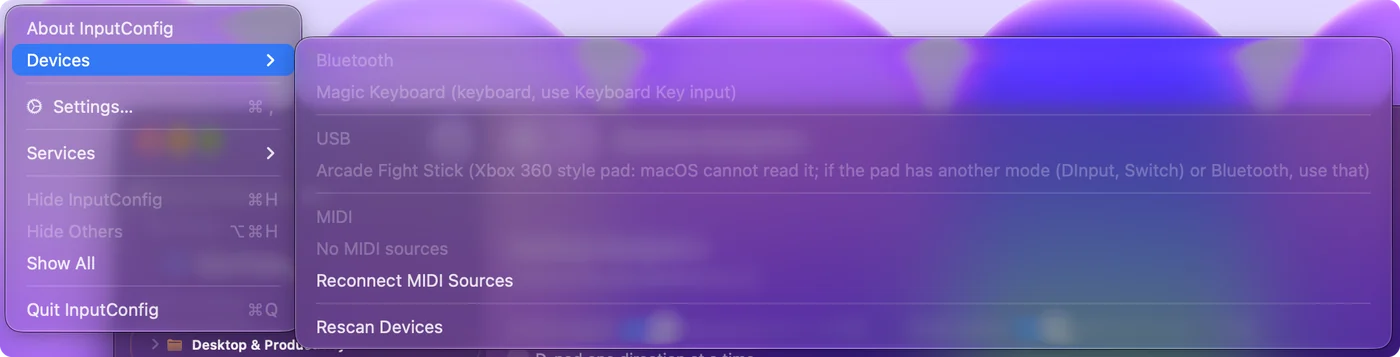
Most dongle trouble on a Mac is the wrong dongle or the wrong mode, so check those two before anything else.
Map it once the Mac sees it
Once the controller lights up in Game Controllers, games with controller support take it from there. For games and apps without controller support, InputConfig reads it like any other controller the Mac pairs.
- You: Open InputConfig, add a row, press Scan and press a button on the controller.
- InputConfig: Binds the row to that button.
- Check: Pick what it sends, a key, a click, a shortcut or a macro, then press Activate and try it.
If you use an 8BitDo pad directly instead, InputConfig shows a note when one is paired in a mode the Mac cannot read, with the mode to use for that model.
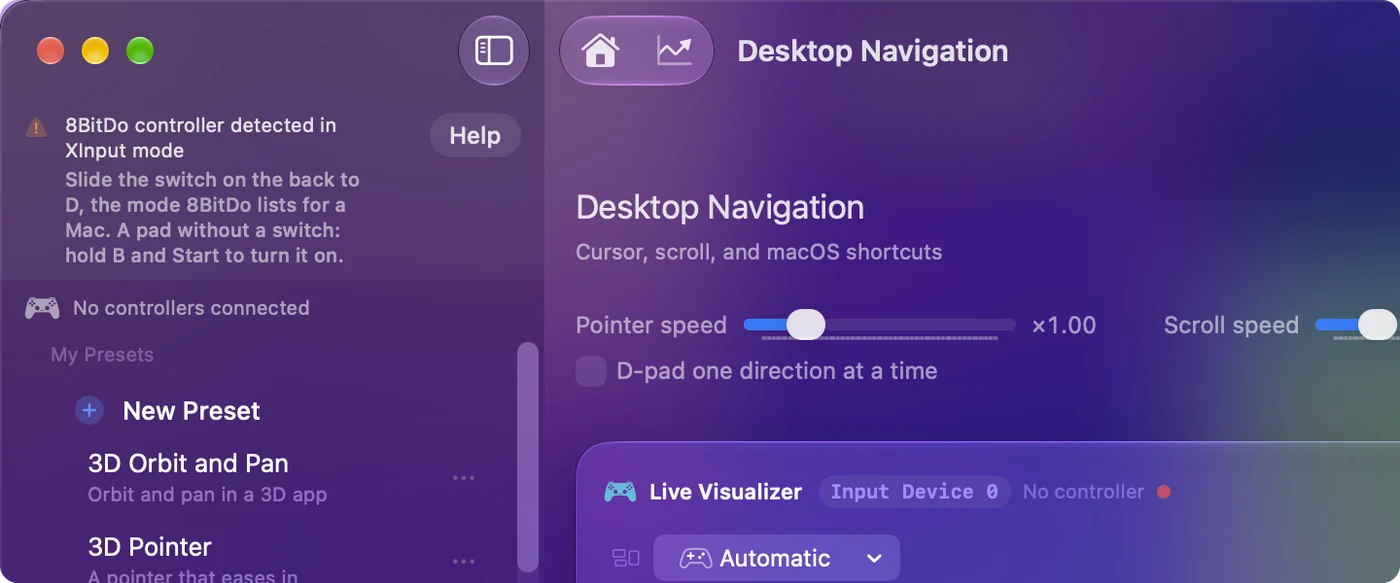
Scan binds what the controller really sends, whatever is printed on the button.
What it cannot do
- No Mac support for the Ultimate dongles. InputConfig cannot change what 8BitDo's 2.4G receivers do on a Mac.
- No features the adapter drops. A DualSense touchpad or Switch Pro motion lost through the adapter is not there for any app to read.
- No 8BitDo profiles. Remaps saved with 8BitDo's software live in their tool. InputConfig remaps on the Mac.
The short version
- Adapter 2. Pair it, then hold the Select-type button and Right for three seconds to set Mac mode.
- Ultimate dongles. They are for Windows, so pair those controllers over Bluetooth.
- Firmware. 8BitDo's updater runs on macOS 10.13 or later.
Set Mac mode by hand, then check Game Controllers before you blame the dongle.
Questions
How do I put the 8BitDo USB Wireless Adapter 2 in Mac mode?
Pair the controller first, then hold the combo for three seconds until the light blinks twice: View and Right on an Xbox controller, Create and Right on a DualSense, Minus and Right on a Switch Pro Controller. 8BitDo says the adapter only switches modes automatically on Windows and Switch.
Does the 8BitDo Ultimate 2.4G dongle work on a Mac?
Not for now, by 8BitDo's page for Apple devices. Pair the Ultimate 2.4G over Bluetooth in D mode by holding the Star button, or use a USB cable in D mode.
Does the 8BitDo Ultimate 2 dongle work on a Mac?
8BitDo lists the Ultimate 2 Wireless 2.4G connection for Windows and Bluetooth for Apple devices, on macOS 26 or later. On a Mac, set the switch to BT and pair it in System Settings, Bluetooth.
Can I update the 8BitDo adapter firmware on a Mac?
8BitDo's firmware updater runs on macOS 10.13 or later and recognizes a connected device. Its page does not list models, so connect the adapter and see whether the tool names it.
Why does my Mac not see my controller through the 8BitDo adapter?
Usually the adapter is not in Mac mode, which it never picks by itself, or the controller is a 2.4G model the adapter does not support. Set Mac mode by hand, then check System Settings, Game Controllers.
Related
Completely free. You don't have to make an account, there are no subscriptions, and nothing is locked. Optimized for Apple silicon. Open source on GitHub.
Updated