Other controllers
 InputConfig is completely free on the Mac App Store. You don't have to make an account, there are no subscriptions, and nothing is locked. Optimized for Apple silicon.
InputConfig reads every controller Apple's framework knows with no setup, and reads most others itself as raw HID devices. That brings in most generic pads, fight sticks, wheels, flight sticks and older controllers. This page lists both groups, the few things that cannot be read, and what to try when a pad does not appear. If yours does not show up, go to the detection ladder.
On this page: 10 sections
Controllers that need no setup
- PlayStation. DualSense, DualSense Edge, DualShock 4, and the Access Controller.
- Xbox. Xbox One, Series and Elite, over Bluetooth, or over USB on macOS 15 Sequoia or later. The Xbox Adaptive Controller, with its switch ports as buttons.
- Nintendo. Switch Pro Controller and Joy-Cons on macOS 13 and later.
- Stadia. Stadia, once switched to Bluetooth mode.
- MFi gamepads. Any MFi gamepad.
If macOS lists it under Game Controllers, InputConfig reads it.
Controllers InputConfig reads itself
- 8BitDo. Pads in X and D modes. See 8BitDo.
- Generic pads and arcade sticks. Generic USB gamepads, and arcade sticks and leverless controllers in their PC or DirectInput mode. In Xbox or XInput mode most sticks speak the wired Xbox 360 protocol and cannot be read. See arcade sticks on a Mac.
- Switch 2 Pro, GameCube and Joy-Con 2. On a USB-C cable, the Joy-Con 2 in their charging grip, or over Bluetooth with Connect Switch 2 Pro, GameCube and Joy-Con 2 controllers over Bluetooth turned on in Settings, Devices. macOS does not read them itself. All of it is experimental, and the Bluetooth part is not yet checked on a controller. See Switch 2 Pro Controller on a Mac and Joy-Con 2 on a Mac.
- The GameCube adapter. All four ports of Nintendo's USB adapter, each its own controller (experimental). See GameCube controllers on a Mac.
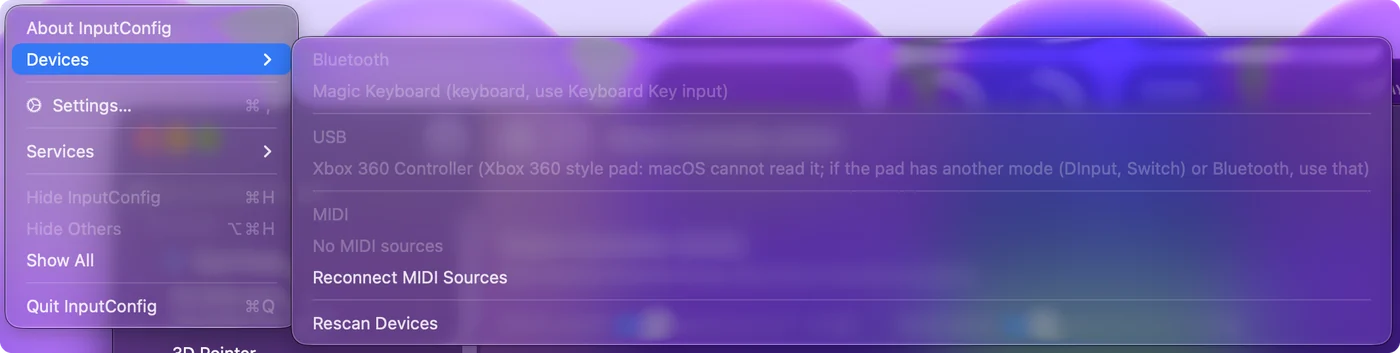
- Xbox pads macOS does not list. Xbox One, Series and Elite Series 2 pads over Bluetooth, with Share on every firmware and the Elite's paddles. The Devices menu names the pads macOS does not read over USB.
- GP2040-CE boards and sticks. In Switch or PS4 mode, every button and stick.
- Contour ShuttlePRO and 3Dconnexion SpaceMouse. Every button, the jog and shuttle, and all six axes of the SpaceMouse.
- 2026 Steam Controller. On a cable, over Bluetooth, or through its Puck (experimental). It has its own Steam Controller page.
- Pads in the SDL GameControllerDB. Pads listed in the community database, such as 8BitDo in DirectInput mode and USB SNES pads, get their buttons named and placed like any other controller. The controller ID lookup searches the list by name or USB ID.
- Logitech F310, F510 and F710. With the switch on D. In D mode their triggers are buttons, not analog. See Logitech pads on a Mac.
- Wheels, flight sticks, throttles and pedals. Every button, the X, Y, Z and rotation axes, sliders and dials at any resolution, and every hat switch. A Logitech wheel in a compatibility mode, a G923 for PlayStation included, is switched to its own mode when it connects, and MOMO, Formula and Driving Force pedals read as separate gas and brake. Thrustmaster wheels use the same axes as Logitech wheels, so a preset carries between them. Force feedback is not driven. See flight sticks and HOTAS.
- Two-player adapters. Two-player adapters and dual arcade encoders give each player a controller of their own.
Other controllers, joysticks and wheels are read as well, shown in a generic drawing. Many controllers that macOS ignores still work in InputConfig.
Xbox 360 and XInput pads
Wired Xbox 360 pads, the Xbox 360 wireless receiver, and many third-party XInput pads cannot be read by macOS, and the wired Xbox 360 protocol cannot be read by a sandboxed app either. InputConfig, Devices lists such a pad grayed out, with the reason.
- Switch the pad's mode. DInput, PC or Switch mode, if it has one.
- Use Bluetooth. If the pad supports it. A genuine Xbox 360 pad and its receiver have no Bluetooth.
- Check your macOS. Wired Xbox One and Series pads need macOS 15 Sequoia or later. On macOS 14, use Bluetooth.
An XInput-only pad needs another mode, because nothing on a Mac can read it as it is.
Set up an Xbox Elite Series 2
Use the default profile, with no profile light lit. Then each paddle reports as P1 to P4 on its own. In a custom profile a paddle copies another button, and the Mac only sees that button. P1 and P2 are on the right, P3 and P4 on the left. Over Bluetooth, InputConfig reads the paddles and the active profile itself when macOS does not list the pad, with the same rule. Default profile, no light: that is the setting that makes the paddles separate.
Connect switch interfaces and sip and puff devices
Switch interfaces such as the AbleNet Hitch and Blue2, Pretorian, RJ Cooper and Tecla, and sip and puff devices such as the Origin Swifty, work in the mode that sends joystick buttons or F13 to F19. In Space or Enter mode the key also reaches the app in front, since InputConfig listens alongside macOS. Prefer the joystick button or F13 to F19 mode, so a switch press never types.
Connect a Stream Deck (experimental)
Stream Deck support is experimental.
- You: Connect the Stream Deck from InputConfig, Devices, then press Scan on a row and press a key.
- InputConfig: Reads its keys as Key 1, Key 2 and so on, a Stream Deck Pedal's as Left, Middle and Right pedal, and a Neo's touch points as Left and Right touch.
- Check: The row fills with the key. If Elgato's app also acts on the press, leave that key empty in Elgato's app, or quit it.
Some models also have dials: four on the Stream Deck +, six on the + XL and two on the Studio. Each dial can be pressed and turned left or right. The + and the + XL also have a touch strip, which can be tapped, long pressed and swiped left or right. Each of these is a button of its own, after the keys, and a turn or a swipe is one short press. Elgato models the app cannot read yet are listed in the Devices menu, not offered.
Elgato's app can also send F13 to F19, and InputConfig binds those like any key. Give each key to one app only, Elgato's or InputConfig.
If a controller is not detected
Climb this ladder, smallest step first:
- Confirm the Mac sees it. In System Settings, Bluetooth, or System Information, USB. If the Mac does not see it either, start with controller not recognized on a Mac.
- Refresh. Click Refresh Controllers in a controller's popover, or Refresh in Settings, Devices.
- Try another mode. Move the mode switch to another position.
- Power it off and on. A fresh connection often fixes a quiet pad.
- Open it by hand. Tick it under InputConfig, Devices in the menu bar.
Start with whether the Mac sees it, because everything after that is InputConfig's side.
What it cannot read
- Controller emulation. InputConfig sends keyboard and mouse events, not a virtual controller, so a game that only accepts a gamepad needs the real gamepad.
- TrackIR. Not read.
- Gaming mouse DPI and profile buttons. They are handled inside the mouse and not read.
- Force feedback. Not driven on wheels and flight sticks.
If a device sends its input only to games, InputConfig cannot see it.
The short version
- Apple-supported pads. No setup at all.
- Everything else. Read as raw HID, with a few experimental newcomers.
- Missing. Check the Mac sees it, refresh, try another mode, then tick it under Devices.
If the Mac can see a controller, there is usually a way to make InputConfig read it.
Questions
Does InputConfig emulate a controller for games that require one?
No. It sends keyboard and mouse events. A game that only accepts a gamepad needs the real gamepad.
Can InputConfig read a HOTAS stick and throttle together?
When the stick and the throttle plug in separately, they are two devices, and each gets its own slot. One preset holds rows for both, and rudder pedals can be a third slot.
Does InputConfig work with a fight stick or a leverless controller?
It does in the controller's PC or DirectInput mode, where it reads as a raw HID device: the lever or direction buttons arrive as a D-pad and every button can be bound. Xbox or XInput mode usually cannot be read. SOCD cleaning stays in the controller's own settings.
My joystick moves the pointer on its own and InputConfig does not list it. Why?
It presents to the Mac as a mouse, not a joystick. Joystick mice and wheelchairs in Bluetooth mouse mode work this way. They need no mapper to move the pointer, and InputConfig can still use their buttons as Mouse inputs and the pointer they move for screen regions.
Related
Completely free. You don't have to make an account, there are no subscriptions, and nothing is locked. Optimized for Apple silicon. Open source on GitHub.
Updated