Steam Controller on a Mac
 InputConfig is completely free on the Mac App Store. You don't have to make an account, there are no subscriptions, and nothing is locked. Optimized for Apple silicon.
Both Steam Controllers work on a Mac: with Steam open, Steam drives them, and with Steam closed, InputConfig reads them. Valve has made two: the original from 2015, with one stick and two round trackpads, and a model released on 4 May 2026, with two thumbsticks and square trackpads under them. InputConfig reads the original wired or through its USB dongle, and the 2026 model on a USB cable, over Bluetooth, or through its Steam Controller Puck (experimental). Neither speaks Apple's controller protocol, so InputConfig reads their raw reports itself, which is how every button, both trackpads and the triggers become things you can bind. To use every button outside Steam, read using it without Steam first.
On this page: 8 sections
Use it with Steam
Steam drives the controller itself. It works in Big Picture, and in a game Steam launched it works through Steam Input, the layout on the game's controller page. The weak spot on macOS is everything outside Big Picture: an Apple Community thread from February 2026 describes an original Steam Controller on macOS 26.3 that works in Big Picture and is ignored on the desktop and in games, even after checking Steam's permissions.
If that matches what you see, climb this ladder, smallest step first:
- Allow Input Monitoring for Steam. In System Settings, Privacy & Security, Input Monitoring.
- Quit Steam fully and open it again. So it picks up the permission.
- Fix it per game. The works in Steam but not in the game page has the per-game fixes, and using a controller with Steam on a Mac covers the setup from the start.
Inside Steam, Steam is in charge of the controller.
Use it without Steam
With Steam closed, the controller falls back to lizard mode, its own mouse and keyboard emulation. macOS then sees a mouse rather than a game controller: you can move the pointer and click, and that is all.
- You: Quit Steam, or turn the controller off in Steam's settings, then activate a preset.
- InputConfig: Switches lizard mode off while the preset runs, and back on when the preset stops or the app quits, so the controller's own mouse and keys return.
- Check: Every button and both trackpads do what the preset says. If bindings come and go or the pointer flickers, Steam is still running.
Steam and InputConfig cannot both drive the controller, so close one before you use the other.
The original Steam Controller (2015)
- How it is read. A helper inside the app opens the controller without seizing it, switches lizard mode off, and repeats the command every 800 milliseconds while a preset runs.
- Buttons. All twenty-two bind, including the two grip buttons on the back, along with the stick, both trackpads and the analog triggers.
- Axes. 0 and 1 are the stick, 2 and 3 the right trackpad, 4 and 5 the triggers, and 6 and 7 the left trackpad while a finger is on it.
- Gyro. Read through the helper, with the accelerometer (experimental).
- Dongle. It is USB-A, so a MacBook with only USB-C ports needs an adapter.
- Built-in preset. The Steam Controller preset puts the pointer on the right trackpad, clicks on the triggers and on a right trackpad press, Return, Escape, Tab and Space on A, B, X and Y, and Shift and Option on the grips.
InputConfig 1.6 fixed its buttons, the stick click and the wireless connection. The original needs nothing but InputConfig and Steam closed.
The 2026 Steam Controller (experimental)
InputConfig reads it itself, with no helper, following the protocol in the open source SDL library. This support was built from the published protocol without the controller in hand, so it is marked Experimental.
- Buttons. A, B, X and Y, the bumpers, both stick presses, View, Menu, Steam, Quick Access, and the four back buttons L4, R4, L5 and R5.
- Triggers. Analog, and the click at the end of the pull counts as fully pressed.
- Trackpads. They bind as clicks, touches and axes: 6 and 7 the left, 8 and 9 the right, 10 and 11 how hard each is pressed.
- Touch. The sticks and grips also report a touch, which binds like a button.
- Gyro, rumble and battery. The gyro drives Motion rows, Haptic feedback on a row rumbles it, and its battery shows with the controller.
- Lizard mode. It goes off while a preset runs, sent again every 2 seconds, and comes back when the preset stops.
- The Puck. Up to four controllers each get a slot of their own when they turn on, and lose it when they turn off.
- Bluetooth. macOS can present the controller together with its lizard-mode keyboard, which InputConfig reads only when Input Monitoring is already allowed for it. If it does not appear over Bluetooth, use the cable or the Puck, or allow Input Monitoring for InputConfig in System Settings, Privacy & Security.
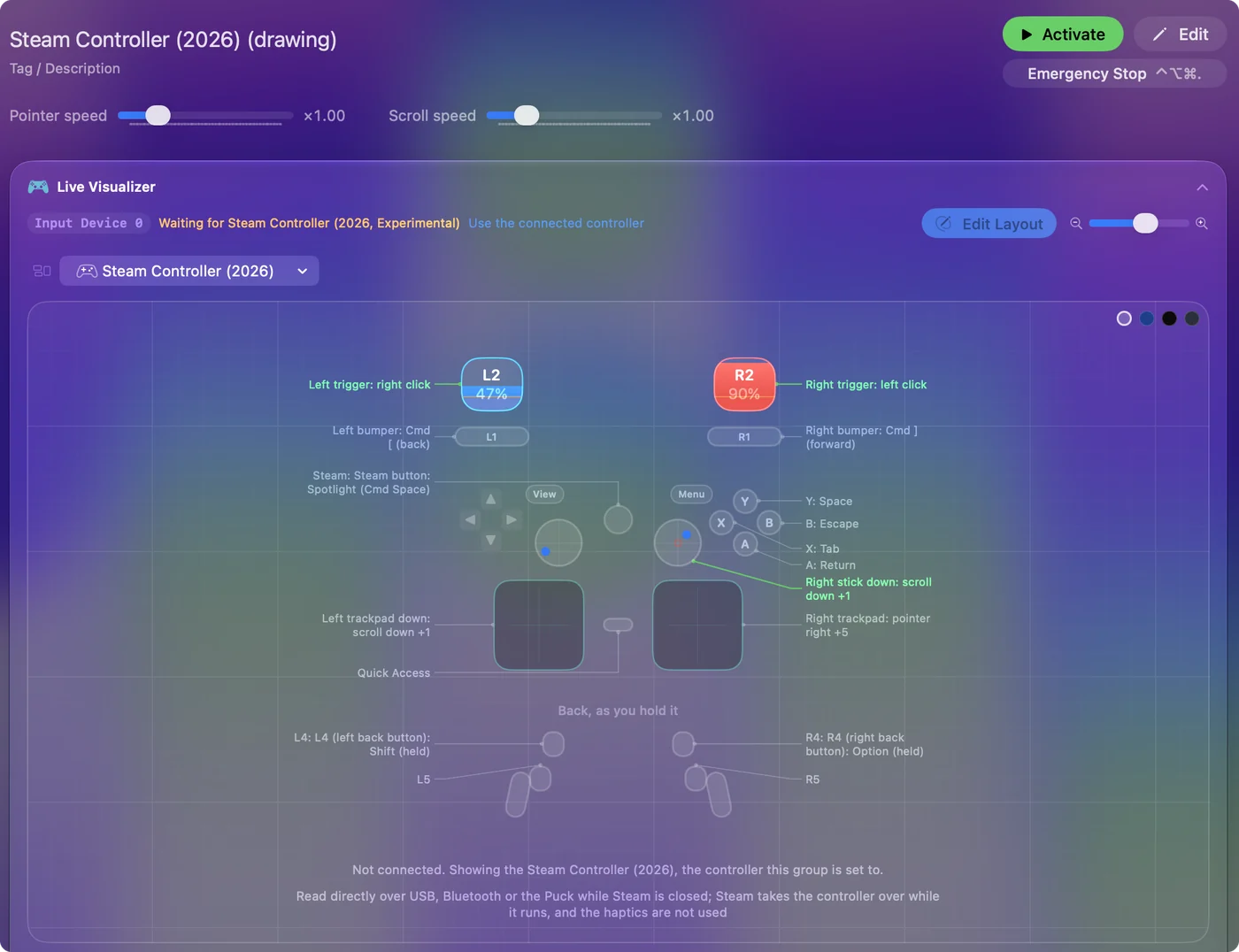
The built-in Steam Controller (2026) preset moves the pointer with the right trackpad, scrolls with the left trackpad and the right stick, and holds Shift and Option on L4 and R4. How to use the 2026 Steam Controller on a Mac walks through it step by step. If Bluetooth gives you trouble, the cable or the Puck is the reliable path.
Use the trackpads on both models
On both controllers, both pads work as trackpads: a row can follow a finger sliding on either one, a tap, a double tap or a press. On a Touchpad row, pick Right pad or Left pad; a Touchpad Gesture row picks the tap or double tap and the pad from its menu. Each pad reads one finger, so there is no two-finger tap. A Steam Controller's pads are read on their own, so a Steam Controller and a DualSense can both use their touch surfaces in one preset. Each pad is a one-finger trackpad of its own. The trackpads as a mouse covers speed and scrolling.
Name the buttons and see them live
The Live Visualizer draws both models, each control where it sits, with what it is bound to listed down both sides. Choosing a Steam Controller under Valve in its menu names the preset's buttons the way that controller prints them, back buttons included, in the editor and the visualizer alike. Pick the model once and every name matches the controller in your hands.
The short version
- With Steam. Steam drives it; if it is ignored outside Big Picture, allow Input Monitoring for Steam and restart Steam.
- Without Steam. Quit Steam and activate a preset; InputConfig turns lizard mode off while it runs.
- The 2026 model. Experimental, on a cable, Bluetooth or the Puck.
One app at a time drives a Steam Controller: Steam or InputConfig.
Questions
Does the Steam Controller work on a Mac?
It works with Steam: in Big Picture and in games Steam launches, though on recent macOS some people find it ignored outside Big Picture. Without Steam it is a basic mouse in lizard mode. To use every button in any app or game, quit Steam and map it with InputConfig.
Does the new 2026 Steam Controller work with InputConfig?
It works as an experimental feature: on a USB cable, over Bluetooth, or through the Steam Controller Puck. Every button, the four back buttons, both trackpads, the gyro, rumble and the battery level work. Quit Steam first, since Steam takes the controller over while it runs.
How do I turn off lizard mode on a Mac?
Run Steam, which takes the controller over while it is open, or quit Steam and start an InputConfig preset. The app turns lizard mode off and keeps it off while the preset runs, sending the command again (every 800 milliseconds on the original, every 2 seconds on the 2026 model) because the controller switches it back on when it hears nothing.
Wired or with the dongle?
Both, for either model. The original reads on a USB cable or through Valve's wireless USB-A dongle. The original in its Bluetooth mode is not read: the Devices menu lists it with how to connect it, on its cable or through the dongle. The 2026 model, an experimental feature, reads on a USB-C cable, over Bluetooth, or through the Steam Controller Puck.
Does the gyro work?
On both models, as part of their experimental support: Motion rows read it. The original's gyro comes through the helper.
Do the back buttons work on a Mac?
The original's two grip buttons and the 2026 model's L4, R4, L5 and R5 (experimental) are separate inputs, so each can be any key, click or macro. Quit Steam first, or it takes the controller back.
Is the Steam Deck supported?
No.
Related
Completely free. You don't have to make an account, there are no subscriptions, and nothing is locked. Optimized for Apple silicon. Open source on GitHub.
Updated