Switch Pro Controller on a Mac
 InputConfig is completely free on the Mac App Store. You don't have to make an account, there are no subscriptions, and nothing is locked. Optimized for Apple silicon.
macOS 13 and later support the Switch Pro Controller natively. It pairs over Bluetooth and shows up as a standard gamepad, so every built-in preset works with it. If it is not paired yet, start with how to connect a Switch Pro Controller to a Mac; this page is about using it once it is.
Steps
- Hold the small Sync button on the top edge, next to the USB-C port, until the four player LEDs run back and forth.
- Open System Settings, Bluetooth on the Mac.
- Click Connect on Pro Controller when it appears.
Use it as a mouse and keyboard
- Desktop Navigation. The Desktop Navigation preset puts the pointer on the left stick, scrolling on the right stick, clicks on the triggers, app switching on the bumpers, arrows on the D-pad, click, undo, cut and paste on the face buttons, and select all on the right stick press.
- Mouse + Scroll. The Mouse + Scroll preset is nothing but a mouse.
- A game. Open the Smart Preset Maker and pick it; the layout lands on the Pro Controller by button position.
To change one control, click its row, choose Scan, and press the button you want. Desktop Navigation turns the Pro Controller into a desktop controller in one click.
Mind the swapped face buttons
Nintendo puts B at the bottom and A on the right, the opposite of Xbox and PlayStation. InputConfig binds by position: button 0 is always the bottom face button, so a preset that says A / Cross fires on what the Switch calls B. To make the letters match on an imported preset, Scan those rows and swap them. FPS (Switch Pro) is built for this pad's positions.
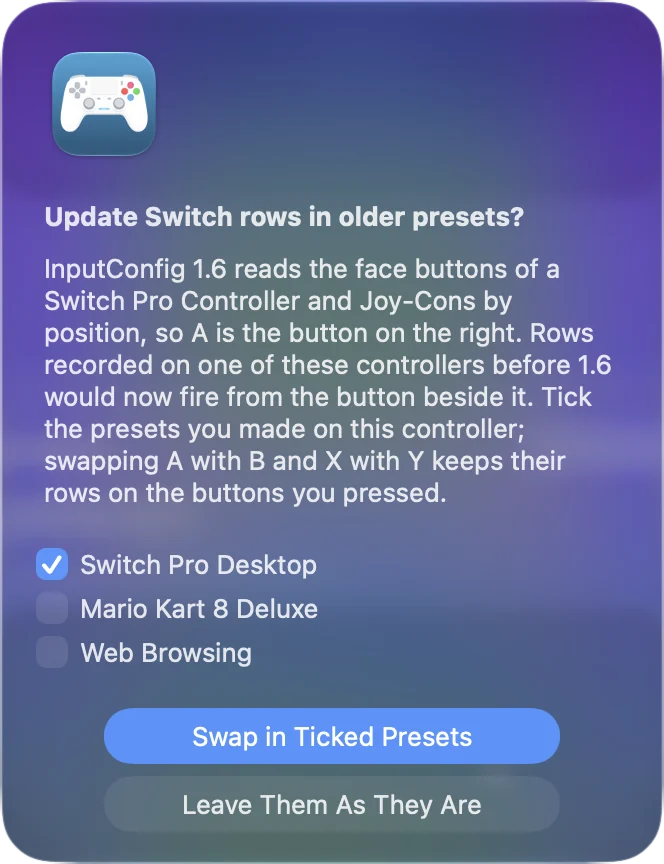
InputConfig 1.6 fixed the face buttons, where pressing A fired the rows meant for B. When the controller first connects, InputConfig offers to update rows recorded on it before 1.6, with a checkbox for each preset; Settings, Advanced, Check Older Presets Again offers it once more.
Bind by pressing the button, and the printed letter never matters.
If it does not pair
Climb this ladder, smallest step first:
- Unpair it from the Switch. It stays paired to the last Switch it was used with. On the Switch, open System Settings, Controllers and Sensors, Disconnect Controllers.
- Pair it again. Hold the Sync button until the player LEDs run back and forth, then click Connect in System Settings, Bluetooth on the Mac.
- Use Bluetooth, not the cable. It charges over USB-C but does not send input over the cable on macOS.
A Pro Controller that will not pair is usually still married to a Switch.
What it cannot do on a Mac
Motion rows read its gyroscope and accelerometer, as on a PlayStation controller, so gyro aim works. macOS does not pass through its HD rumble, so rumble is unavailable on it. Every button, stick and the D-pad work.
The short version
- Pair over Bluetooth. Sync button, then Connect in System Settings, Bluetooth.
- Activate Desktop Navigation. Or make a game layout with the Smart Preset Maker.
- Accept the 1.6 update. If InputConfig offers it for older presets, tick the ones you made on this controller.
Bind by position and the swapped letters stop mattering.
Questions
Does it work by cable?
It charges over USB-C but does not send input over the cable on macOS. Use Bluetooth.
Can I use a Switch Pro Controller as a mouse on a Mac?
You can with InputConfig. Activate the built-in Desktop Navigation preset and the left stick moves the pointer, the right stick scrolls, and the triggers click.
Related
Completely free. You don't have to make an account, there are no subscriptions, and nothing is locked. Optimized for Apple silicon. Open source on GitHub.
Updated