PlayStation Access Controller
 InputConfig is completely free on the Mac App Store. You don't have to make an account, there are no subscriptions, and nothing is locked. Optimized for Apple silicon.
The PlayStation Access Controller works on a Mac, over Bluetooth or USB-C, with nothing to install. The app ships a desktop preset for it, and the automatic layout knows its shape: one stick, eight button sockets, PS and Options, plus rows for the triggers, stick clicks and a right stick, which its profiles can assign. InputConfig reads every socket, button and expansion port by name, so a silent control is a connection or a row, and the ladder below finds which.
Connect it
By cable, plug it in. By Bluetooth, hold the PS button and the profile button together until the light flashes, then connect it in System Settings, Bluetooth. A second Access Controller gets its own slot. Cable or Bluetooth, it needs no driver.
Know what the Mac sees
InputConfig reads the controller itself, not only what its profile sends. Every socket, the center button, the stick and its press, the PS button and the Profile button arrive under their own names, Socket 1 to Socket 8, Center button, Stick press, PS button and Profile button, whatever the active profile assigns them. The functions the profile sends arrive too, so a row made for Cross still works. The expansion ports E1 to E4 are read the same way: a stick in a port is E1 X and E1 Y, a trigger or pedal is E1 X from 0 to 1, and a switch is E1 button.
The controller stores three profiles. In the Live Visualizer, the Profile chip above the drawing names the active one. Over USB-C it lists all three: Use makes one active, and Edit opens it beside the drawing with the PS5's own settings, then Save to Controller stores it. Over Bluetooth the chip shows the active profile and the Profile button switches, because the controller does not open its profiles to a computer that way. macOS reports it in the DualSense family, so the controller's entry in the sidebar says DualSense, which is only a name. Everything on the controller reaches the Mac by its own name, over a cable or Bluetooth.
Use the built-in preset
Access Controller, in Desktop & Productivity, runs the whole desktop from one hand.
- With the base profile. The stick is the pointer, the center button clicks, socket 5 right-clicks, and socket 7 opens Spotlight.
- Every other socket. Scan a row and press the socket you mean: it is bound by its number, and keeps working whichever profile is active. The preset's other rows are double click, Return, scroll up and down, hold Command for shortcuts, Space, and Mission Control.
- The ports. Plug a stick, switch or trigger into E1 to E4 and Scan it, or pick E1 stick, E1 button or E1 trigger from the input menu.
- The PS and Profile buttons. Both are read on their own and can carry a row.
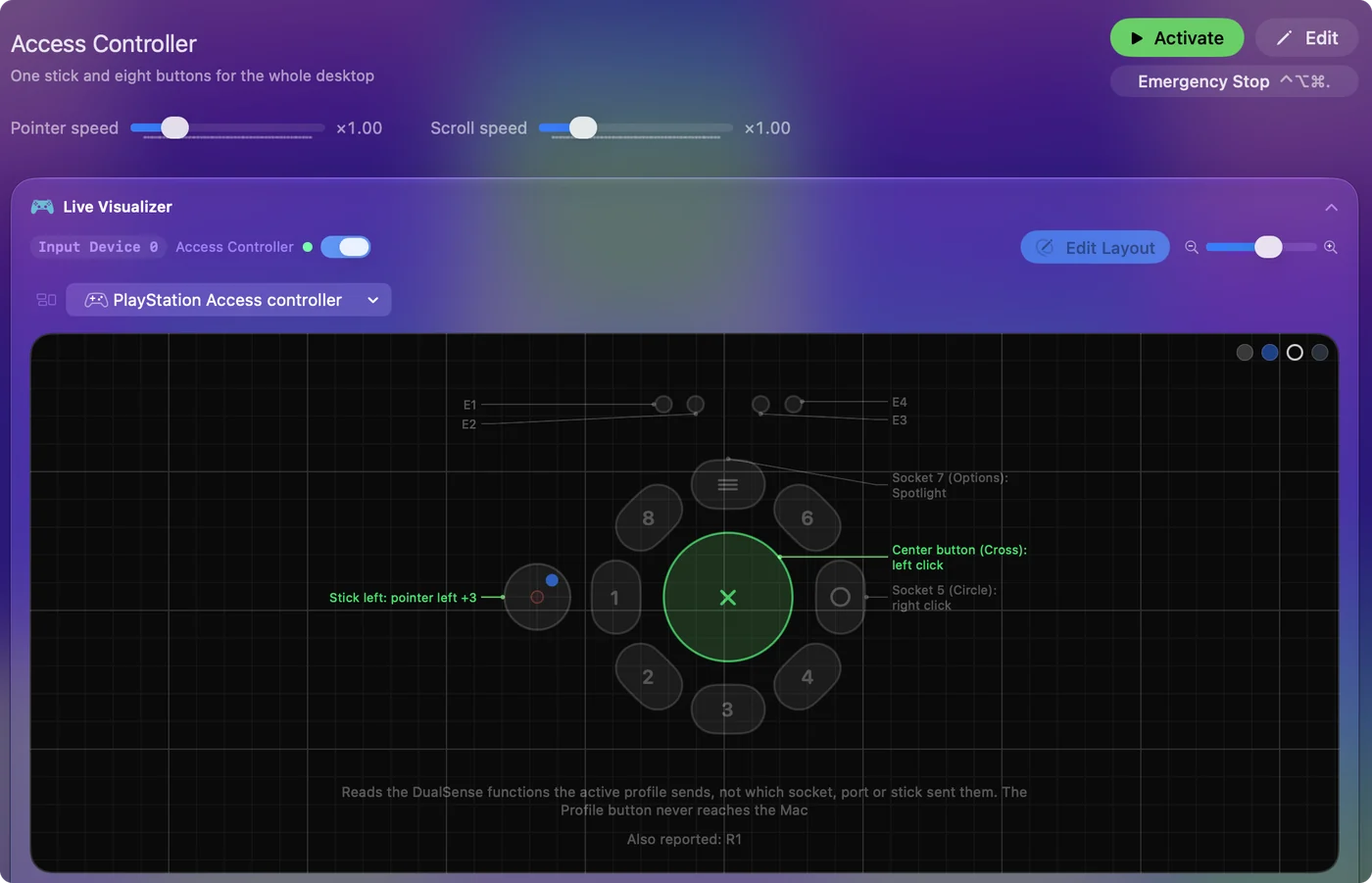
Scan the socket you want, and the row stays on that socket whichever profile is lit.
If a socket sends nothing
Sockets, the stick and the ports no longer depend on the profile. Climb this ladder, smallest step first:
- Check the connection. Over USB-C, try the cable. Over Bluetooth, the Mac must list the controller as connected.
- Check the plug. A stick or trigger in a port needs a four-contact 3.5 mm plug pushed all the way in. The port strip in the Live Visualizer shows what the controller sees there.
- Check the row. A row made for a profile function, such as Circle, fires only when the profile sends it. A row made for the socket itself always fires.
A silent control is a connection or a row, not a profile setting.
The short version
- Connect. Cable, or PS and the profile button for Bluetooth.
- Activate Access Controller. The stick, center button, socket 5 and socket 7 work at once with the base profile.
- More controls. Scan any socket, the PS button, the stick press or anything in a port. On a cable, the Profile chip switches and edits the three profiles.
Everything on the controller reaches the Mac by its own name.
Questions
Can its stick do one-stick driving?
That is one of the setups it was built for.
Related
Completely free. You don't have to make an account, there are no subscriptions, and nothing is locked. Optimized for Apple silicon. Open source on GitHub.
Updated