Anki from a game controller
 The Anki layout is built into InputConfig, free on the Mac App Store. You don't have to make an account, there are no subscriptions, and nothing is locked. Optimized for Apple silicon.
On a Mac: Anki for Mac reads its default review keys from this layout. If you changed the answer keys in Anki's settings, Scan the rating rows and press yours.
Yes, Anki works on a Mac with a PS5, PS4, Xbox or Switch controller: the bottom button shows the answer and rates Good, and the other three rate Again, Hard and Easy. Anki is four buttons pressed a thousand times, and a controller has four buttons under one thumb, so an easy deck is one thumb tapping. It suits language cards with audio, and it is also a built-in preset in the app, linked below the table.
On this page: 7 sections
The layout, control by control
How the layout thinks
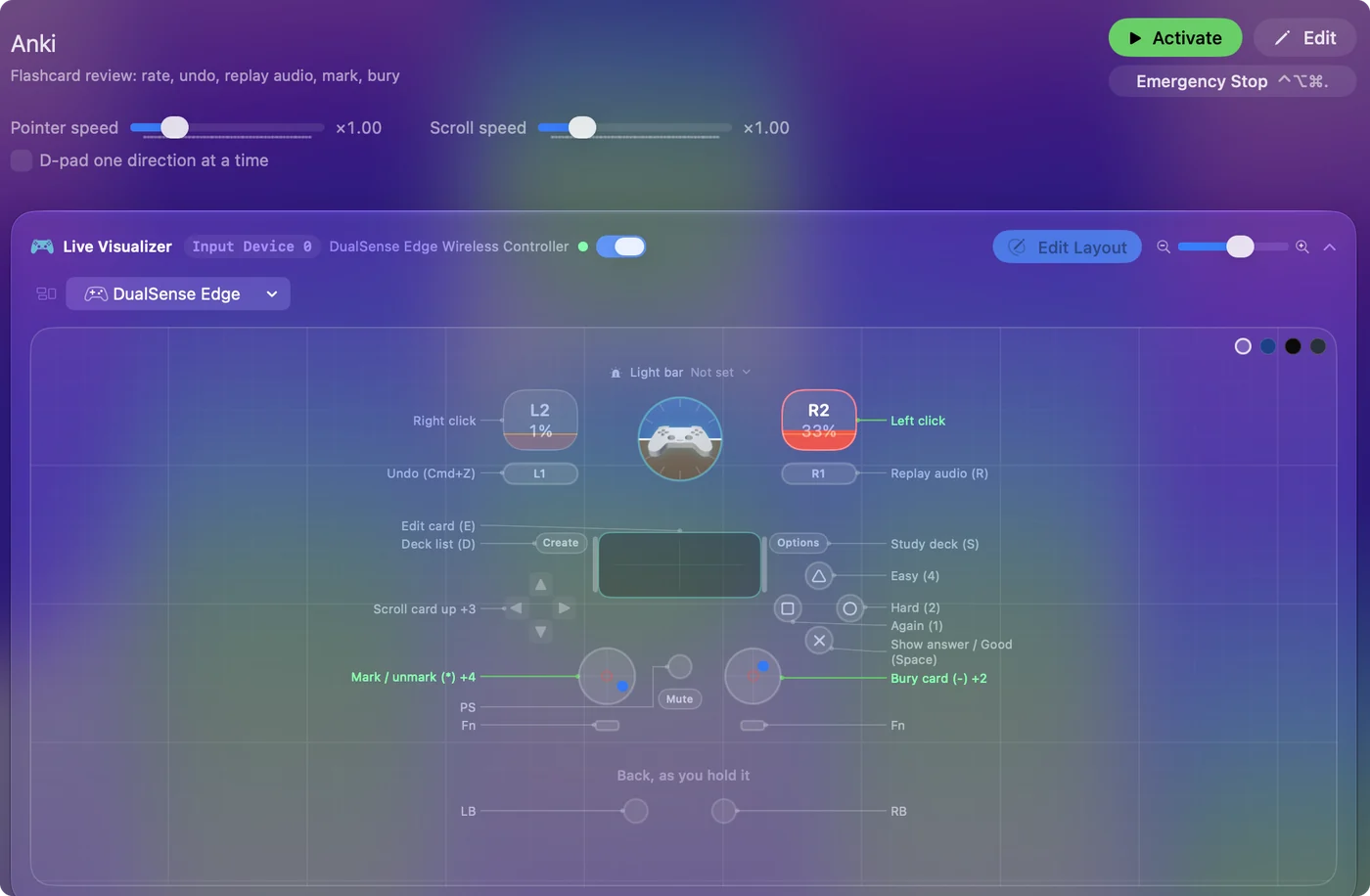
- Rate under one thumb. The bottom face button is Space: show the answer, then Good. Left is Again (1), right is Hard (2), top is Easy (4), which puts the harsh rating on the far reach and the kind ones close.
- Fix a slip. The left bumper is Undo (Command Z) for the mis-rate you notice a second too late.
- Replay the audio. The right bumper is R, the key you press most after Space on language cards.
- Tidy the deck. The stick clicks mark (asterisk) and bury (minus), and the touchpad press edits the card (E).
- Move between decks. Share and Options are D and S, the deck list and study, so you can finish a deck and start the next.
- The rest. The left stick is a pointer, the right stick scrolls a long card, the triggers click, and the D-pad is the arrow keys.
On a PlayStation pad that is Cross for Good, Square for Again, Circle for Hard and Triangle for Easy. Lie down, hold the pad, and the bottom button does most of the work.
Tune it for your Anki
- Your own answer keys. If you changed 1 to 4 or turned off Space as an answer key, Scan the four rating rows and press the keys you use.
- Type-answer cards. Add a Start Dictation row on a spare button. Speak the answer, then the bottom button checks it.
- Speak the card. Speak Selection after Select All reads a card aloud, once Speak selection is on in System Settings, Accessibility, Spoken Content.
- A rhythm. Vibrate at a low strength on the Good row gives a small pulse per card. In a long session it becomes a metronome.
- Add-ons. An add-on that adds a key just needs a Scan on a spare button.
On an 8BitDo Micro or Zero 2, the Anki remote page says which mode to use. If you changed Anki's keys, one Scan per rating row puts them back in step.
The short version
- Nothing to install in Anki. It receives ordinary key presses.
- Let it start itself. The preset can open Anki when it activates and switch on by itself when Anki comes to the front.
- One hand is enough. Every rating is on the right thumb, undo and replay on the bumpers.
The Anki from a controller guide goes further. Four ratings, one thumb, and a deck becomes something you do lying down.
Get it in two clicks
- Get InputConfig free on the Mac App Store, open it, and click Smart Preset Maker on the welcome screen.
- Search for Anki and pick it. The layout is created as a preset in your sidebar, named and ready.
- Press Activate. Every row can be changed afterwards: the editor's Scan button rebinds any control the moment you touch it.
Every binding, as a table
| Controller | Sends | What it does |
|---|---|---|
| A / Cross | Space | Show answer / Good (Space) |
| X / Square | 1 | Again (1) |
| B / Circle | 2 | Hard (2) |
| Y / Triangle | 4 | Easy (4) |
| LB / L1 | Command (Left), Z | Undo (Cmd+Z) |
| RB / R1 | R | Replay audio (R) |
| Back / Share / Select | D | Deck list (D) |
| Start / Options | S | Study deck (S) |
| L3 (left stick click) | Shift (Left), 8 | Mark / unmark (*) |
| R3 (right stick click) | - | Bury card (-) |
| Touchpad press | E | Edit card (E) |
| Left stick left | Mouse motion left (speed 16) | Pointer left |
| Left stick right | Mouse motion right (speed 16) | Pointer right |
| Left stick up | Mouse motion up (speed 16) | Pointer up |
| Left stick down | Mouse motion down (speed 16) | Pointer down |
| Right stick up | Scroll up | Scroll up |
| Right stick down | Scroll down | Scroll down |
| Left trigger | Right click | Right click |
| Right trigger | Left click | Left click |
| D-pad up | Up | Scroll card up |
| D-pad down | Down | Scroll card down |
| D-pad left | Left | Left arrow |
| D-pad right | Right | Right arrow |
Button names follow the Xbox / PlayStation pair shown in the editor, so A / Cross is the bottom face button on either pad. On a Switch Pro Controller the bottom button is labeled B; the mapping still fires on position.
A preset with this name also ships inside the app, with a file you can download: Anki built-in preset.
Questions
Which button does what on a PlayStation controller?
Cross shows and rates Good, Square is Again, Circle is Hard, Triangle is Easy. L1 undoes, R1 replays audio.
Does Anki need anything installed?
No. It receives ordinary key presses. The preset can also open Anki when it activates and switch on by itself when Anki comes to the front.
Can I review one-handed?
Yes: every rating is on the right thumb and undo and replay are on the bumpers. The left hand is only needed for the pointer.
Related
Completely free. You don't have to make an account, there are no subscriptions, and nothing is locked. Optimized for Apple silicon. Open source on GitHub.
Updated