A controller for DOSBox, ScummVM, and retro games on a Mac
 InputConfig is completely free on the Mac App Store. You don't have to make an account, there are no subscriptions, and nothing is locked. Optimized for Apple silicon.
You can play DOSBox, ScummVM and other keyboard-only retro games on a Mac with a controller, with a preset of a few rows in InputConfig. Console emulators are different: OpenEmu, RetroArch, Dolphin, PCSX2 and PPSSPP read gamepads themselves, so set the pad in their own controller screen and use InputConfig only at the edges.
This guide is mostly for the other kind of retro game: DOS games in DOSBox, adventures in ScummVM, browser ports of old arcade and Flash games, and old Mac games that only ever knew a keyboard and mouse. Three or four layouts cover almost everything. If a console emulator ignores your pad, OpenEmu controller not working and emulator controller not working walk through the fixes.
On this page: 10 sections
Steps
- For a console emulator, set the pad in the emulator's own controller settings and stop there.
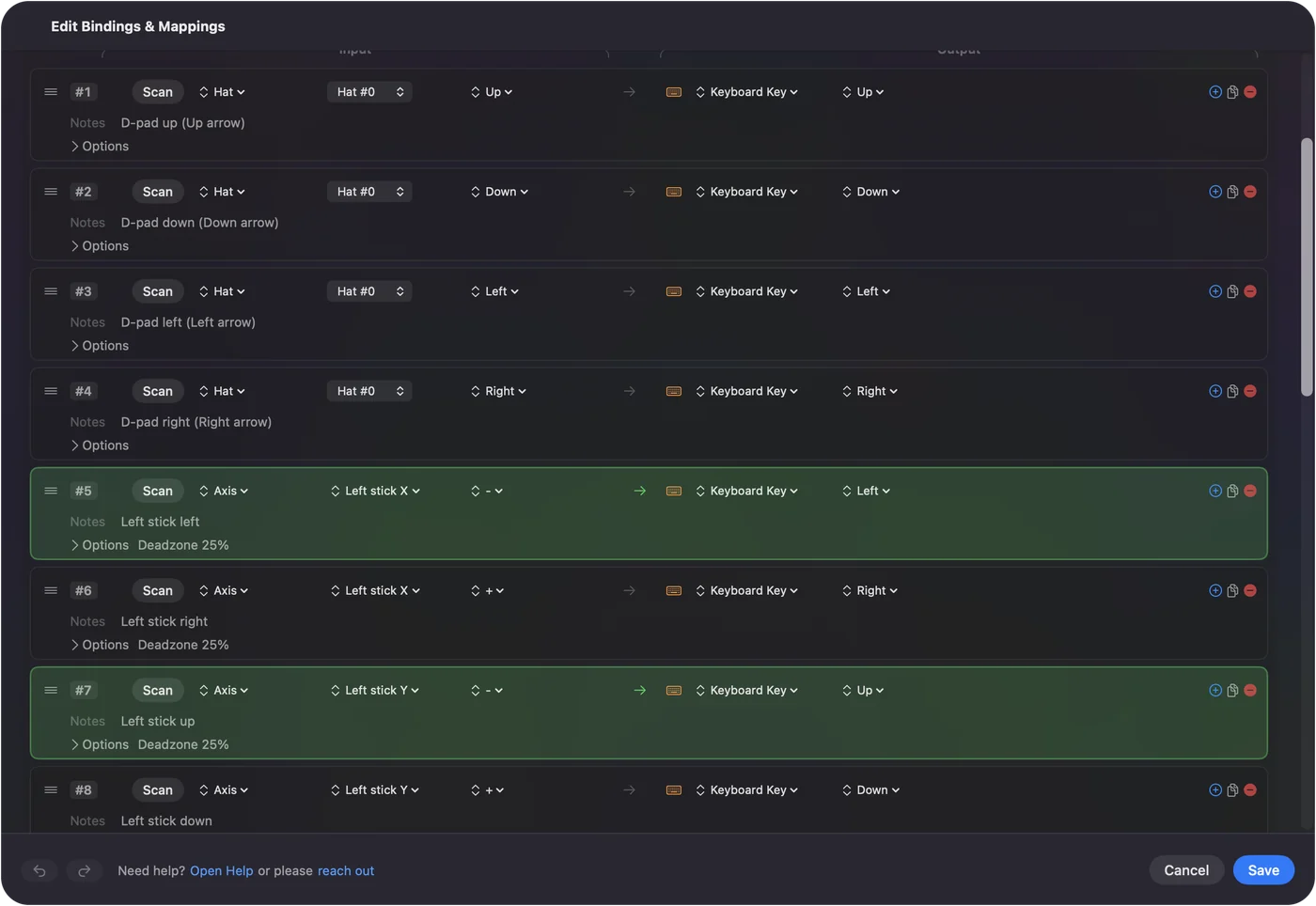
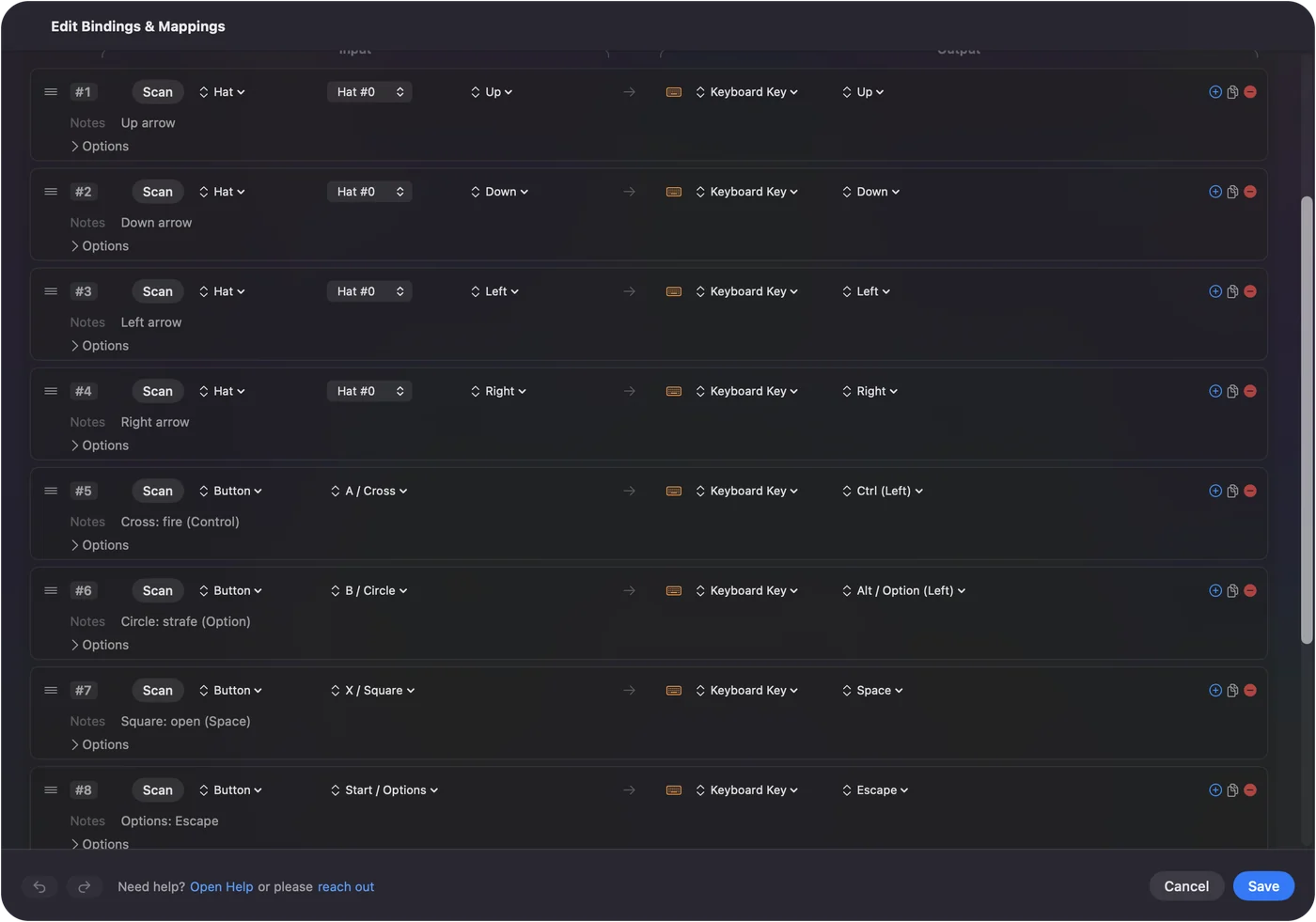
- For DOSBox, map the D-pad and left stick to the arrows, A to Control, B to Alt, X to Space and Start to Escape.
- For ScummVM, put the pointer on the left stick, left and right click on A and B, and Control F5 on Start.
- For browser arcade games, make one preset with the arrows, Z, X, C and Space, and confine and hide the pointer.
- Add each emulator or game to its preset's auto-switch list.
- If every button fires twice, two things are reading the pad: turn one off.
Decide who reads the controller
One rule settles most retro problems. Climb this ladder, and stop at the first rung that fits:
- The emulator reads the pad. OpenEmu, RetroArch, Dolphin, PCSX2, PPSSPP and MAME read controllers directly. Set the pad in the emulator.
- The emulator reads the pad, but some keys are keyboard-only. Save state, fast forward, MAME's menus. A small preset that maps only buttons the emulator leaves unbound puts those keys on the pad.
- The game only knows a keyboard and mouse. DOSBox, ScummVM, browser ports, old Mac games. A full InputConfig preset is the controller.
One reader per button: if the emulator and a preset both answer the same press, it fires twice.
Map DOSBox and DOS games
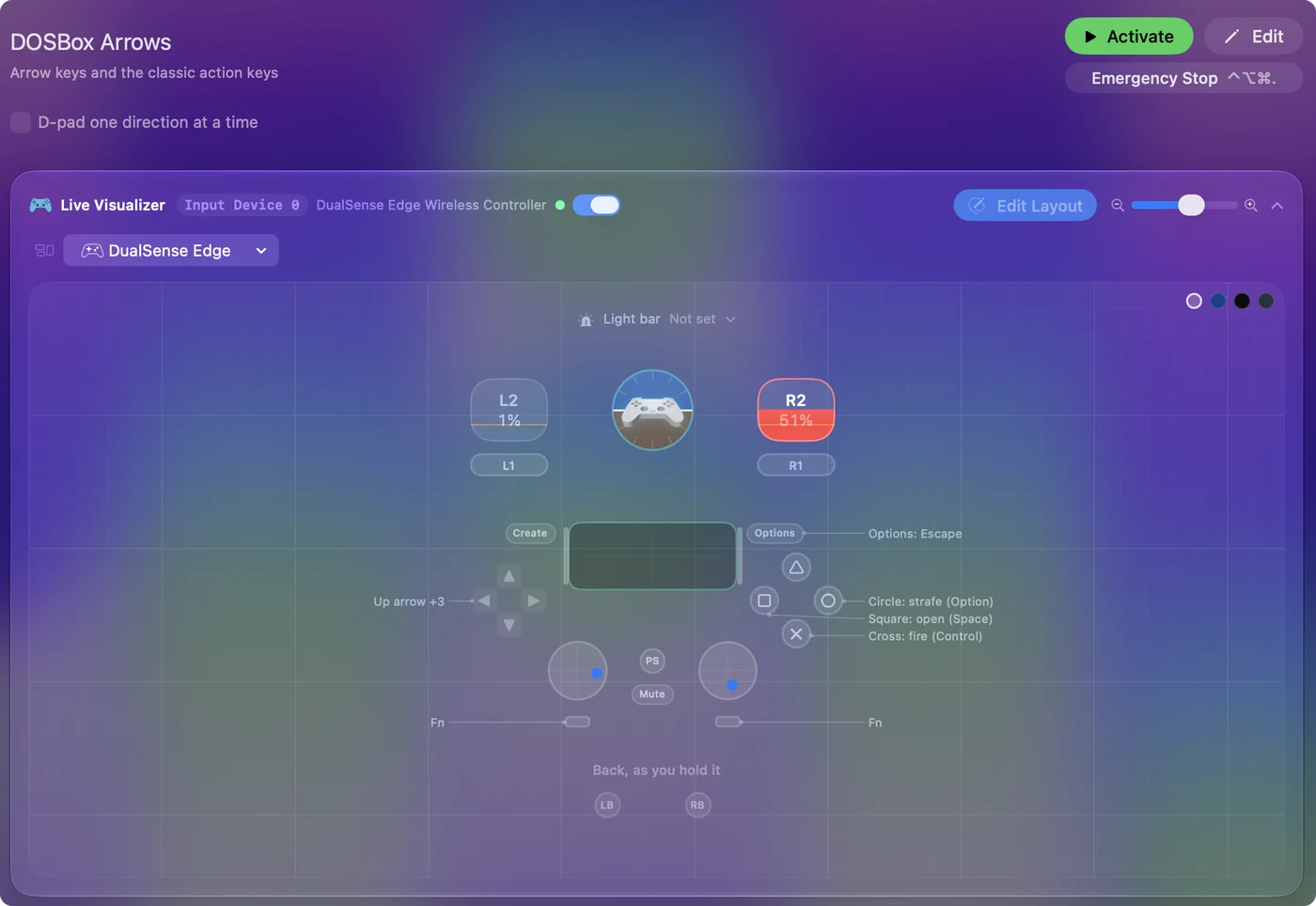
Most DOS action games use the arrow keys plus Control, Alt, and Space:
- Move. The D-pad and the left stick on the arrows.
- Fire. A on Control, which is fire in nearly everything.
- Jump or secondary. B on Alt.
- The rest. X on Space, Y on Return, Start on Escape, and the bumpers on the number keys 1 and 2 for weapon selection.
DOSBox's keymapper can also see a controller, but a preset is easier to keep per game and switches automatically with DOSBox in front. Keep a Type Text row for the game's launch command if you start games from the DOS prompt.
Map ScummVM and point-and-click games
Point-and-click needs a pointer and two buttons:
- Pointer. The left stick, with the Smooth curve.
- Clicks. A for left click, B for right click.
- Inventory. The right stick scrolls, for games with scrolling inventories.
- Menus. Control F5 on Start, ScummVM's shortcut for its Global Main Menu, and Escape on Back to skip cutscenes.
ScummVM 2.2 and later can also bind controller buttons itself, in Global Options, Keymaps, including a virtual mouse on the stick. If that feels right, use it and skip the layout. Do not set up both, or every press arrives twice. The Smart Preset Maker's Emulator / Arcade workflow and the built-in Mouse + Scroll preset are both fine starting points.
Make one preset for browser arcade games
Internet Archive's arcade and console collections, the Flash archives, and thousands of io games run in the browser and read the keyboard. Arrows and Z, X, C, or arrows and Space and Shift, cover most of them.
- You: Make one Browser Arcade preset with the D-pad and stick on the arrows, the face buttons on Z, X, C, and Space, and the bumpers on Shift and Control. Confine and hide the pointer.
- InputConfig: Sends those keys to whatever game is in the browser, with the pointer kept out of the way.
- Check: Load a game and play a level. Tweak a row if a title uses something odd.
The Emulator / Arcade layout is the quickest start, and browser games with a controller covers the web games that read the pad themselves. One arcade preset covers most browser games, so change a row only when a game is odd.
Handle old Mac games, roguelikes and autofire
- Old Mac games. Classic Mac ports and shareware from the keyboard-only era work the same way. A few use the Command key as a modifier for in-game actions. A chord layer on a bumper handles that without a keyboard.
- Text-mode games and roguelikes. NetHack, DCSS and friends want a lot of letters. The eight-direction stick with stick regions for the diagonals gives movement, the face buttons and chords give the twenty most used commands, and dictation is a surprisingly good way to type the rest.
- Autofire. Shooters from the era expected a fire key mashed. Put turbo on the fire row at 15 presses a second and the bumper becomes an autofire, which is also gentler on a hand that cannot mash.
Set the pad in each console emulator
For console emulators the controller belongs in the emulator's own settings. Where each one keeps it on a Mac:
- OpenEmu. Settings, Controls, pick the console and your controller, click a button and press it. If nothing responds, it is usually the Input Monitoring or Bluetooth permission. OpenEmu controller not working.
- RetroArch. Settings, Input, RetroPad Binds, Port 1 Controls, Set All Controls. On a Mac it offers three controller drivers, hid, mfi and sdl2, and switching driver fixes a lot of dead pads.
- Dolphin. Controllers, Standard Controller on port 1, Configure, then choose your pad in the Device menu.
- PCSX2. Settings, Controllers, leave the SDL source on, then Automatic Mapping.
- PPSSPP. Settings, Controls, Control mapping.
- MAME. Reads controllers, but its menus and some machine-specific keys are keyboard-only, so a small preset for the menu keys sits well beside it.
An arcade stick usually works in OpenEmu or RetroArch once it is in a mode the Mac can read: PC or DirectInput on most sticks, not Xbox. Each emulator is covered with its usual failure on emulator controller not working on a Mac.
Where InputConfig helps next to them: putting an emulator's keyboard shortcuts (save state, fast forward, the menu) on buttons the emulator leaves unused, driving the Mac pointer in the game library from the same pad, and the Emulator / Arcade layout for the few that only take a keyboard.
If every button fires twice
Two things are reading the same pad: the emulator itself, and a mapper or Steam Input turning the pad into keys. PCSX2's documentation describes this with Steam, where Circle ends up pausing the game. Climb this ladder:
- Turn off Steam Input for the emulator. If Steam launched it.
- Give the emulator a preset of its own. Auto-switch activates it when the emulator comes to the front. Map only buttons the emulator leaves unbound.
- Map no buttons at all. An empty preset for the emulator lets it read the pad alone.
The short version
- Console emulators. Set the pad in the emulator. InputConfig only for leftover keys.
- DOSBox. It uses the arrows, Control, Alt and Space.
- ScummVM. Pointer, two clicks, Control F5 for the menu.
- Browser arcade. One preset with the arrows, Z, X, C and Space covers it.
If the game only ever knew a keyboard, a few rows make it a controller game.
Questions
Do OpenEmu and RetroArch need this?
No, they read controllers directly. Use InputConfig only for the games and emulators that do not.
What about MAME's keyboard mode?
MAME reads controllers, but its menus and some machine-specific keys are keyboard-only. A small preset for the menu keys next to MAME's own controller input works well.
Will my arcade stick work in OpenEmu or RetroArch on a Mac?
Usually, once the stick is in a mode the Mac can read: PC or DirectInput on most sticks, not Xbox. Assign the buttons in the emulator's own controls screen. InputConfig is only needed for emulators and browser games that read the keyboard alone.
Why does every button fire twice in my emulator?
Two things are reading the same pad: the emulator itself, and a mapper or Steam Input turning the pad into keys. PCSX2's documentation describes this with Steam, where Circle ends up pausing the game. Pick one per emulator. With InputConfig, give the emulator a preset of its own (auto-switch activates it when the emulator comes to the front) that only maps buttons the emulator leaves unbound, or no buttons at all.
Related
This page in other languages: العربية, Čeština, Dansk, Deutsch, Español, Suomi, Français, עברית, Magyar, Bahasa Indonesia, Italiano, 日本語, 한국어, Norsk, Nederlands, Polski, Português, Русский, Slovenčina, Svenska, ไทย, Türkçe, Українська, Tiếng Việt, 繁體中文, 简体中文
Completely free. You don't have to make an account, there are no subscriptions, and nothing is locked. Optimized for Apple silicon. Open source on GitHub.
Updated