Emulators and arcade games with any controller
 The Emulator / Arcade layout is built into InputConfig, free on the Mac App Store. You don't have to make an account, there are no subscriptions, and nothing is locked. Optimized for Apple silicon.
On a Mac: Works everywhere on the Mac. Most emulators see controllers directly and you should use that. This layout is for the ones that do not, for browser and Flash-era games, and for controllers an emulator refuses.
Yes, any controller can play emulators and arcade games on a Mac, and most emulators, OpenEmu and RetroArch included, read a pad natively, so start there. This layout is for the rest: browser emulators, old ports, MAME builds that only want a keyboard, and the controller an emulator lists as unknown. Its keys are the common defaults, Z and X for the main buttons and the arrows for movement, so a lot of things just work.
On this page: 8 sections
The layout, control by control
How the layout thinks
- Move. The D-pad and the left stick both send the arrow keys.
- Face buttons. A sends Z, B sends X, X sends A, and Y sends S.
- Shoulders and triggers. The left shoulder sends Q and the right W. The right trigger repeats Z and the left trigger repeats X.
- Select and Start. Select is Shift and Start is Return.
Z and X are the two keys most emulators and browser games read first.
Make it yours
- Turbo. Set the fire button to Repeats while held in its Options for shooters. Macros, turbo and toggle covers it.
- Two players. One preset holds a layout per controller slot, so give the second pad its own keys, for example W, A, S, D and Space, in the same preset. Only one preset runs at a time.
- Odd defaults. Pick whatever key the emulator wants in that row's output menu.
When an emulator wants different keys, change the row, not the emulator.
With an arcade stick
Try the emulator first. OpenEmu and RetroArch read a USB arcade stick themselves once it is in a mode the Mac can see, which on most sticks is PC or DirectInput, not Xbox. This layout is for the rest: a browser emulator, a port that only reads the keyboard, MAME's menu keys.
- You: Press Scan on each face-button row, and press the stick's buttons from left to right.
- InputConfig: Binds each row to the button you pressed. On a stick the D-pad rows are the lever.
- Check: Press each button in the emulator and watch it do what the row says.
More on modes is in arcade sticks on a Mac. Get the stick into a mode the Mac can see first, and everything else follows from that.
RetroArch: this layout already matches its keyboard
RetroArch's default keyboard binds are the same keys this layout sends: X and Z for the right and bottom buttons, A and S for the left and top, Q and W for the shoulders, Return for Start, and the arrow keys for the D-pad. So in RetroArch the layout works with nothing to set, with one exception: RetroArch's Select is Right Shift, and this layout sends Left Shift. Change the Select row's output to Shift (Right) and it matches.
- Spare-button shortcuts. F2 saves a state, F4 loads one, Space toggles fast forward, R rewinds and F1 opens the menu, so any of those can go on a spare button.
- Escape quits. Escape quits RetroArch outright, so do not put it on a button you press by accident.
If RetroArch sees your pad directly, use that instead and keep only the shortcut rows here. See emulator controller not working on a Mac for its controller drivers. In RetroArch, one change to the Select row is all it takes.
Get it in two clicks
- Get InputConfig free on the Mac App Store, open it, and click Smart Preset Maker on the welcome screen.
- Search for Emulator / Arcade and pick it. The layout is created as a preset in your sidebar, named and ready.
- Press Activate. Every row can be changed afterwards: the editor's Scan button rebinds any control the moment you touch it.
Every binding, as a table
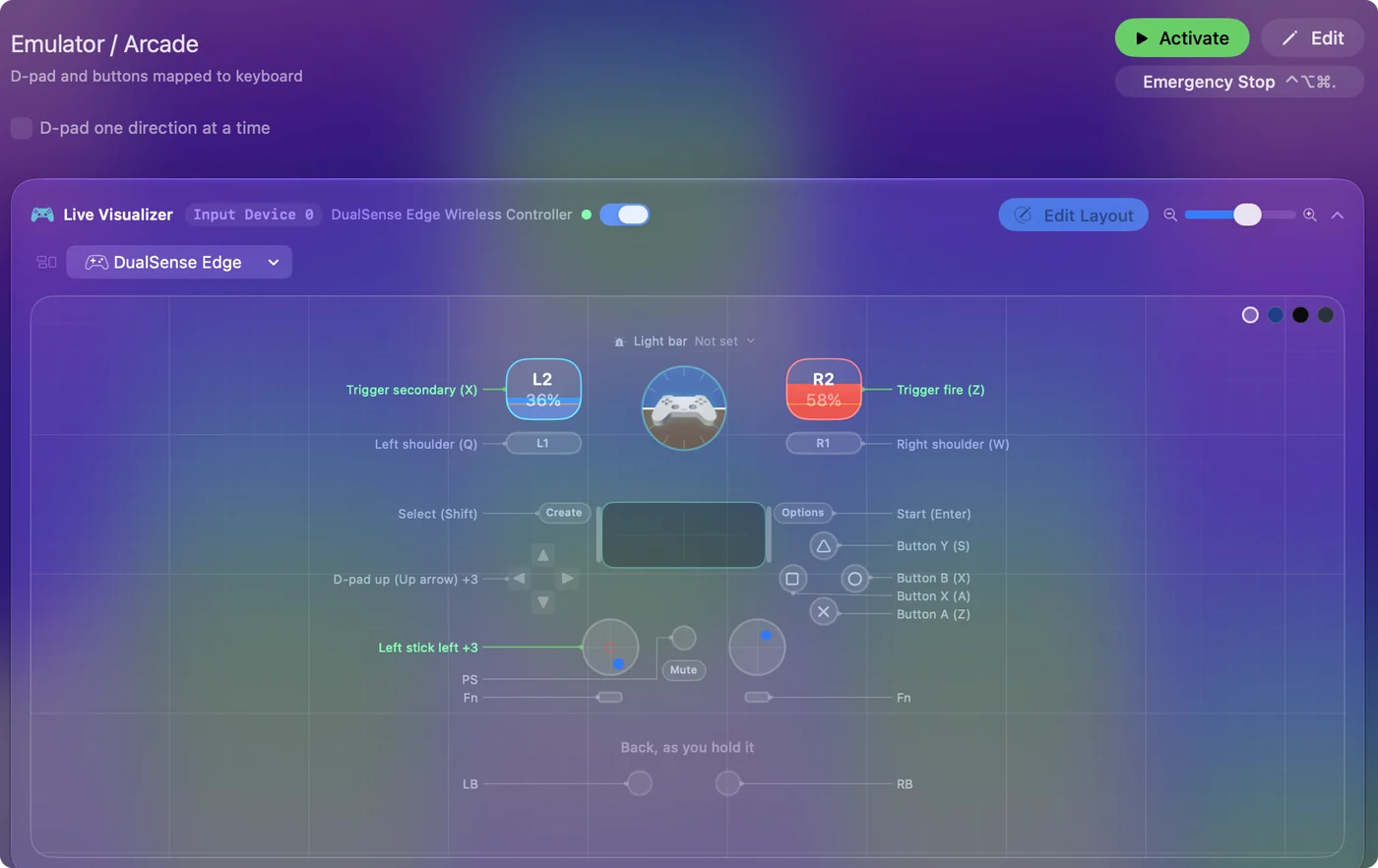
| Controller | Sends | What it does |
|---|---|---|
| D-pad up | Up | D-pad up (Up arrow) |
| D-pad down | Down | D-pad down (Down arrow) |
| D-pad left | Left | D-pad left (Left arrow) |
| D-pad right | Right | D-pad right (Right arrow) |
| Left stick left | Left | Left stick left |
| Left stick right | Right | Left stick right |
| Left stick up | Up | Left stick up |
| Left stick down | Down | Left stick down |
| A / Cross | Z | Button A (Z) |
| B / Circle | X | Button B (X) |
| X / Square | A | Button X (A) |
| Y / Triangle | S | Button Y (S) |
| LB / L1 | Q | Left shoulder (Q) |
| RB / R1 | W | Right shoulder (W) |
| Back / Share / Select | Shift (Left) | Select (Shift) |
| Start / Options | Return | Start (Enter) |
| Right trigger | Z | Trigger fire (Z) |
| Left trigger | X | Trigger secondary (X) |
Button names follow the Xbox / PlayStation pair shown in the editor, so A / Cross is the bottom face button on either pad. On a Switch Pro Controller the bottom button is labeled B; the mapping still fires on position.
Questions
Should I use this or the emulator's own controller support?
The emulator's own, when it sees your pad. This is for when it does not.
Why is my controller not working in OpenEmu on Mac?
First check that macOS sees it: Game Controllers in the System Settings sidebar, or the controller test. If the Mac sees it and OpenEmu still does not, set OpenEmu's keyboard controls to the keys this layout sends (the arrows, Z, X, A, S, Q, W, Return, Shift) and activate the layout. The emulator then reads a keyboard, which it always accepts.
Will the emulator see my controller and these keys at the same time?
If it reads controllers, yes, and then each press arrives twice. Either leave the controller unbound in the emulator and let this layout drive it by keyboard, or bind the pad in the emulator and cut this layout down to the shortcut rows on buttons the emulator does not use. Auto-switch can activate the cut-down preset whenever the emulator is in front.
Related
Completely free. You don't have to make an account, there are no subscriptions, and nothing is locked. Optimized for Apple silicon. Open source on GitHub.
Updated