Celeste on a Mac with a controller
 The Celeste layout is built into InputConfig, free on the Mac App Store. You don't have to make an account, there are no subscriptions, and nothing is locked. Optimized for Apple silicon.
On a Mac: Native on macOS with excellent built-in gamepad support. Use that first. This layout exists for controllers the game does not detect, and for remaps beyond the game's own options, like toggled climb or a dash on turbo.
Celeste supports controllers natively on the Mac, and if your pad shows up in Celeste's options, use the game's own support. Its Assist Mode, with game speed, infinite stamina and invincibility, is a model for the industry, and I am not going to pretend otherwise to keep you on this page.
This layout is for what the game's support cannot do. It does not see every controller macOS sees, such as a Steam Controller, some 8BitDo modes, an adaptive controller, or a pad that only shows up as a keyboard. And its remapping stops at swapping buttons, so it cannot make climb a toggle or put jump and dash on one button. A lot of people can play Celeste with this who could not before.
On this page: 8 sections
The layout, control by control
How the layout thinks
Celeste's keyboard defaults are the arrow keys to move, C to jump, X to dash and Z to climb, and the layout sends exactly those, so the game needs no changes.
- Move on the D-pad. A D-pad is a set of switches, and Celeste wants switches: a stick can be halfway, and there is no halfway in a wall jump. The left stick moves too, and pushing it up or down aims.
- Every move on two buttons. Jump is the bottom and the top face button. Dash is the right and the left. Players hold the pad in strange ways during hard rooms, so whichever thumb position you are in, the move is there.
- Climb on either trigger. Both triggers send Z, so either hand can grab.
The doubling is on purpose: whichever way you hold the pad, every move is under a thumb.
Go past the game's own options
- Toggle climb. Set the climb row's press mode to Toggles on and off. One press grabs, the next lets go, and you never hold a trigger while you also press jump. For some hands this is the difference between finishing Chapter 7 and not.
- One-button jump and dash. Set the jump row to Different action when held, with X as the hold output. Tap jumps, hold dashes. It is not how speedrunners play, and it is exactly how some people can play.
- Slow the game as well. Combine this with Assist Mode's game speed. The layout makes the inputs reachable, and the game makes them slower.
- Hyper and wave dashes. These need dash and jump within a frame or two of each other. A macro row can do it: dash, wait 60 ms, jump. Use it to learn the timing, not instead of learning it, unless you would rather just see the ending, which is also allowed.
Toggle climb plus Assist Mode puts the whole game within reach of a lot more hands.
If Celeste does not see your controller
Celeste's own support is excellent, so a pad that does nothing is a detection problem. Climb this ladder, smallest step first:
- Check the Mac. Game Controllers in the System Settings sidebar should list the pad and light up when you press a button.
- Relaunch with the pad awake. Quit Celeste, press a button on the pad, and launch again.
- Change Steam Input. On Steam, change the Steam Input override under Properties, Controller, and relaunch.
- Try the plain game. If you play a modded copy through Everest, try one launch without it.
- Send it keys. A pad macOS does not hand to games as a gamepad, such as a Steam Controller or a PlayStation Access Controller, will not appear in any of the steps above. InputConfig reads those directly, and the Live Visualizer draws the actual model, so you can watch every press arrive. Then pick Celeste in the Smart Preset Maker and press Activate.
If the game does see your pad, use one or the other, because a running preset doubles every press. The Live Visualizer tells you in seconds whether the pad or the game is the problem.
Celeste controller support: controller or keyboard
Steam's store page lists full controller support for Celeste, so the game was made to be played on a controller, menus included. A keyboard and mouse work as well, and the choice is yours. On a Mac, use the game's own controller support first when it sees your pad; this layout is for a pad it does not see, or for buttons it will not let you move. Full support listed means the controller is a first-class way to play Celeste.
From Steam's listing, checked in October 2026. Every game's listing is in Mac games with controller support.
Get it in two clicks
- Get InputConfig free on the Mac App Store, open it, and click Smart Preset Maker on the welcome screen.
- Search for Celeste and pick it. The layout is created as a preset in your sidebar, named and ready.
- Press Activate. Every row can be changed afterwards: the editor's Scan button rebinds any control the moment you touch it.
To check the controller itself first, the gamepad tester shows every button and stick live in your browser.
Celeste controls: every button and the key it sends
The Sends column is Celeste's default keyboard and mouse controls, as this layout expects them. If you changed a key in the game's settings, change the same row in InputConfig.
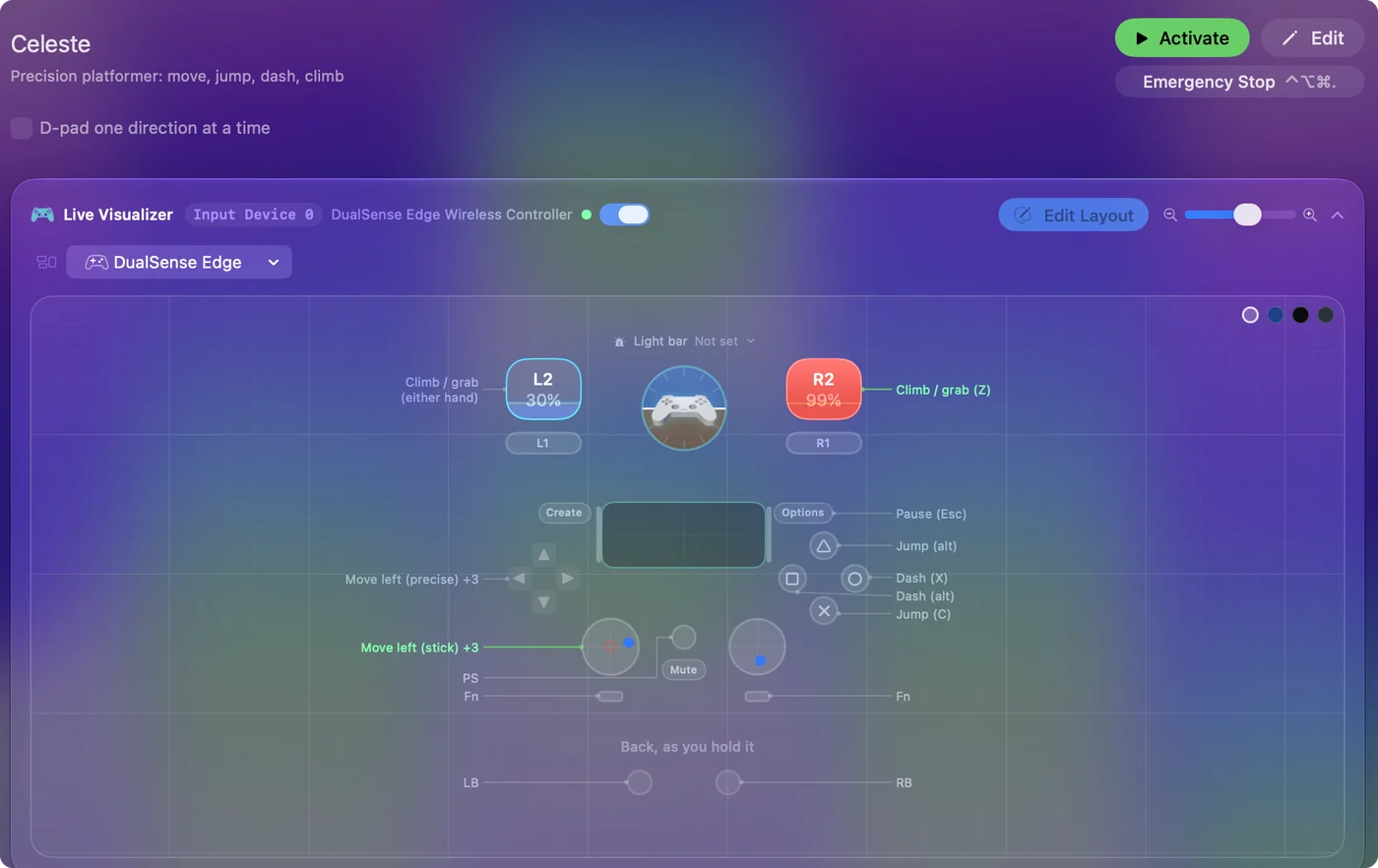
| Controller | Sends | What it does |
|---|---|---|
| D-pad left | Left | Move left (precise) |
| D-pad right | Right | Move right (precise) |
| D-pad up | Up | Aim up |
| D-pad down | Down | Crouch / aim down |
| Left stick left | Left | Move left (stick) |
| Left stick right | Right | Move right (stick) |
| Left stick up | Up | Aim up (stick) |
| Left stick down | Down | Aim down (stick) |
| A / Cross | C | Jump (C) |
| Y / Triangle | C | Jump (alt) |
| B / Circle | X | Dash (X) |
| X / Square | X | Dash (alt) |
| Right trigger | Z | Climb / grab (Z) |
| Left trigger | Z | Climb / grab (either hand) |
| Start / Options | Escape | Pause (Esc) |
Button names follow the Xbox / PlayStation pair shown in the editor, so A / Cross is the bottom face button on either pad. On a Switch Pro Controller the bottom button is labeled B; the mapping still fires on position.
Questions
What are Celeste's keyboard controls on a Mac?
The defaults are the arrow keys to move, C to jump, X to dash and Z to climb. This layout sends exactly those, so the game needs no changes. If you rebound them in the game, re-scan the matching rows.
Is the D-pad really better than the stick for Celeste?
For Celeste, yes. Movement is on or off, and a D-pad is a set of switches. The stick is bound too. Try both and keep whichever your thumb likes.
Can I play Celeste with one hand?
Closer than you would think: movement on the D-pad, jump on a bumper, dash on a trigger, climb toggled, and Assist Mode slowing the game. The one-handed Mac guide has more.
Does Celeste have controller support?
Yes. Steam lists full controller support for Celeste, so every part of the game can be played on a controller.
Is Celeste better with a controller or a keyboard?
Both work. Steam lists full controller support for Celeste, so it was made to be played on a controller, and a keyboard and mouse work as well.
Can I play Celeste on an M1 Mac or a MacBook Air?
Celeste has a native Mac version, and its minimum requirements are listed on its Steam store page, so check your Mac against that list. I have not tested it on each Mac. The controller layout itself works the same on any Mac that runs InputConfig.
Related
Completely free. You don't have to make an account, there are no subscriptions, and nothing is locked. Optimized for Apple silicon. Open source on GitHub.
Updated