Opera from a game controller
 The Opera layout is built into InputConfig, free on the Mac App Store. You don't have to make an account, there are no subscriptions, and nothing is locked. Optimized for Apple silicon.
On a Mac: Opera and Opera GX for Mac are built on Chromium and keep Chrome's Mac shortcuts, so this layout's keys work in both.
Yes, Opera and Opera GX work from a game controller on a Mac with the browser layout, because both are built on Chromium and keep Chrome's Mac shortcuts. The thing worth knowing is Opera GX: a browser game and this layout can both read the pad, so set it up so they do not collide.
The layout, control by control
How the layout thinks
- Point and click. The left stick moves the pointer, the right trigger clicks and the left trigger right-clicks. The right stick scrolls.
- Move through pages. Back, Forward, Reload and New Tab on the face buttons.
- Tabs. Close tab on the left bumper, the address bar on the right, previous and next tab on the D-pad, Escape on Start.
- The sidebar. Opera's messengers and players are a pointer click away.
If a browser game in Opera GX gets clicks too
A browser game reads the controller itself through the Gamepad API. With this layout running, the game also receives its clicks and keys. Climb this ladder, smallest step first:
- Deactivate before you play. From the menu bar, or with a button set to the App Action Deactivate.
- Activate again to browse. The same menu, or a preset key you set in the editor's Key field.
- Read the details. The browser games page covers games that only see a pad after a press.
A game and a browser layout should never run on the same pad at the same time.
Get it in two clicks
- Get InputConfig free on the Mac App Store, open it, and click Smart Preset Maker on the welcome screen.
- Search for Opera and pick it. The layout is created as a preset in your sidebar, named and ready.
- Press Activate. Every row can be changed afterwards: the editor's Scan button rebinds any control the moment you touch it.
Every binding, as a table
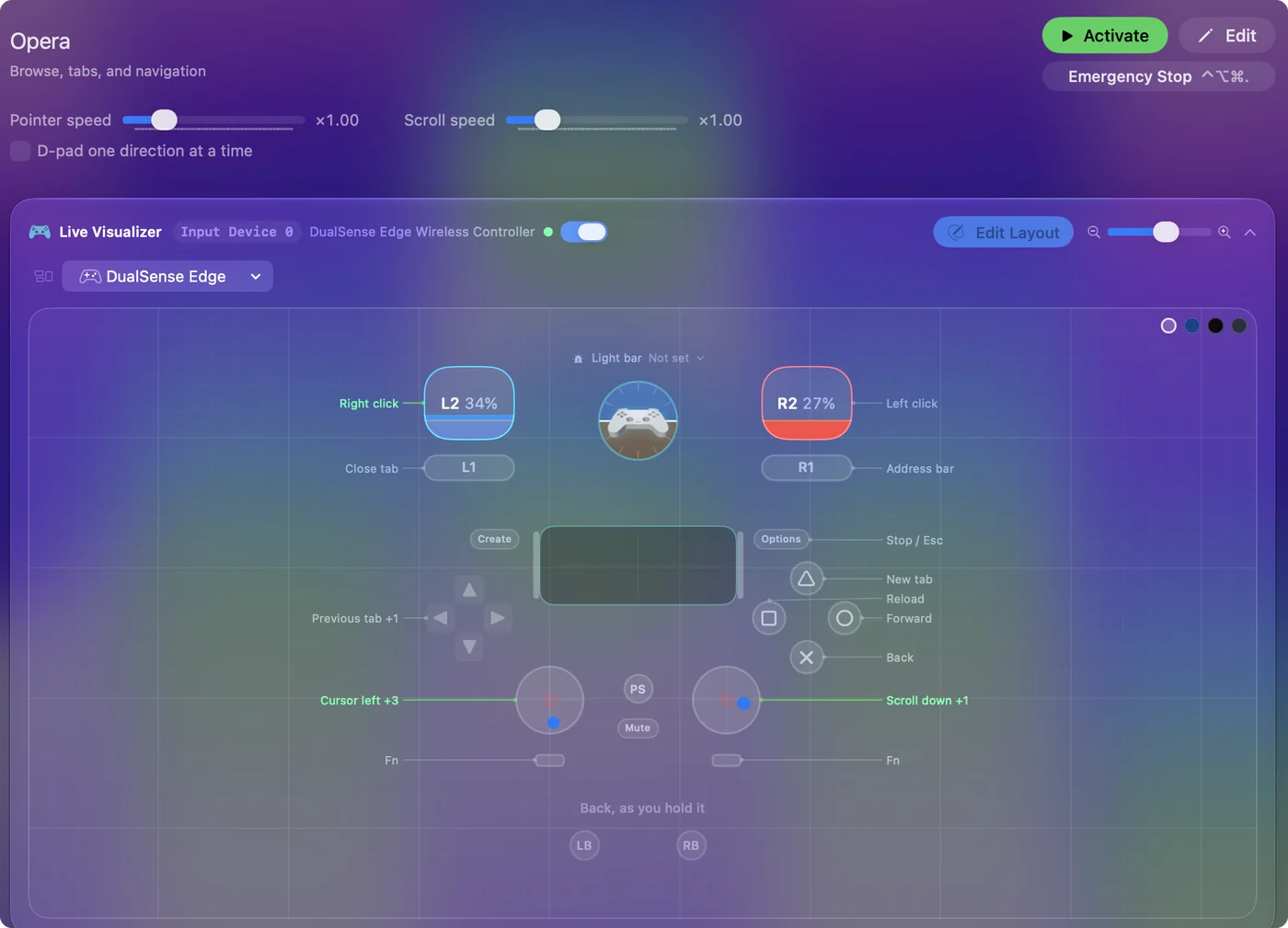
| Controller | Sends | What it does |
|---|---|---|
| Left stick left | Mouse motion left (speed 16) | Cursor left |
| Left stick right | Mouse motion right (speed 16) | Cursor right |
| Left stick up | Mouse motion up (speed 16) | Cursor up |
| Left stick down | Mouse motion down (speed 16) | Cursor down |
| Right stick down | Scroll down | Scroll down |
| Right stick up | Scroll up | Scroll up |
| Right trigger | Left click | Left click |
| Left trigger | Right click | Right click |
| A / Cross | Command (Left), Left | Back |
| B / Circle | Command (Left), Right | Forward |
| X / Square | Command (Left), R | Reload |
| Y / Triangle | Command (Left), T | New tab |
| LB / L1 | Command (Left), W | Close tab |
| RB / R1 | Command (Left), L | Address bar |
| D-pad left | Command (Left), Alt / Option (Left), Left | Previous tab |
| D-pad right | Command (Left), Alt / Option (Left), Right | Next tab |
| Start / Options | Escape | Stop / Esc |
Button names follow the Xbox / PlayStation pair shown in the editor, so A / Cross is the bottom face button on either pad. On a Switch Pro Controller the bottom button is labeled B; the mapping still fires on position.
Questions
Does this work in Opera GX?
Yes. GX keeps Opera's keys.
Related
Completely free. You don't have to make an account, there are no subscriptions, and nothing is locked. Optimized for Apple silicon. Open source on GitHub.
Updated