Questions
How to make a controller rumble or vibrate on a Mac
Turn on Vibrate for a row in a mapper, because on a Mac a controller vibrates when a game tells it to, and at no other time. macOS has no setting that makes a pad buzz when you press a button, run a shortcut, or reach the edge of a stick.
InputConfig, the free mapper I make, adds that: any row in a preset can vibrate the controller when it fires, at a strength and for a length you set. It works on the PS5 DualSense and DualSense Edge, the PS4 DualShock 4, Xbox controllers, and other pads macOS reports haptics for.
On this page: 10 sections
Steps
- Install InputConfig from the Mac App Store and connect the controller.
- Select a preset in the sidebar, or make a new one, and click Edit.
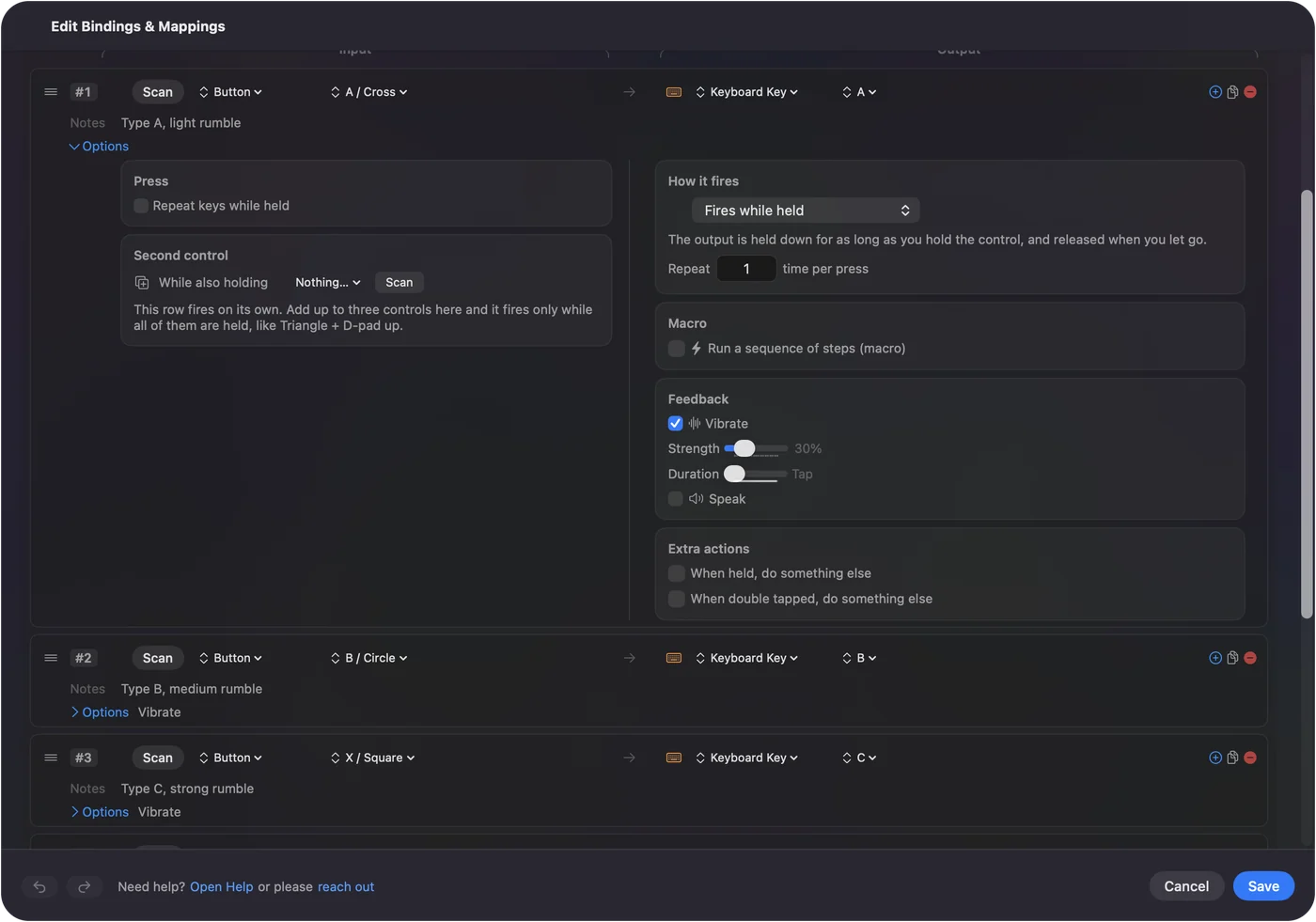
- On the row you want to feel, open Options and tick Vibrate in the Feedback box.
- Set Strength and Duration.
- Click Save, then Activate, and press the control.
Check what macOS does on its own
Rumble on a Mac goes through Apple's Game Controller framework, and a game has to ask for it. If the game never wrote that code, the controller stays still no matter what you do.
The only other place macOS buzzes a controller is System Settings: click Game Controllers in the sidebar, select the controller, and Identify plays a haptic pattern on pads that support it. That is a test, not a feature you can attach to a key. The macOS controller settings page covers everything else that panel does. macOS rumbles for games and for Identify, and for nothing you choose.
 InputConfig is free on the Mac App Store. macOS 14 or later, no account, no tracking, open source.
Make a button vibrate
If the controller is not connected yet, connect a controller to a Mac has the steps for every pad.
Step 1: Tick Vibrate
- You: In the preset editor, open Options on the row you want to feel, and tick Vibrate in the Feedback box.
- InputConfig: Adds the buzz to that row and shows it in the collapsed row's summary, as Vibrate or, for a longer buzz, Vibrate 500 ms.
- Check: The row's summary mentions Vibrate.
Step 2: Set strength and length
- You: Set Strength, from 10 to 100 percent (60 is the default), and Duration, from Tap up to two seconds.
- InputConfig: Keeps both with the row.
- Check: Start with the default and change it after you have felt it.
Step 3: Save and press
- You: Click Save, then Activate, and press the control.
- InputConfig: Vibrates the controller every time that row fires.
- Check: You feel the buzz on each press.
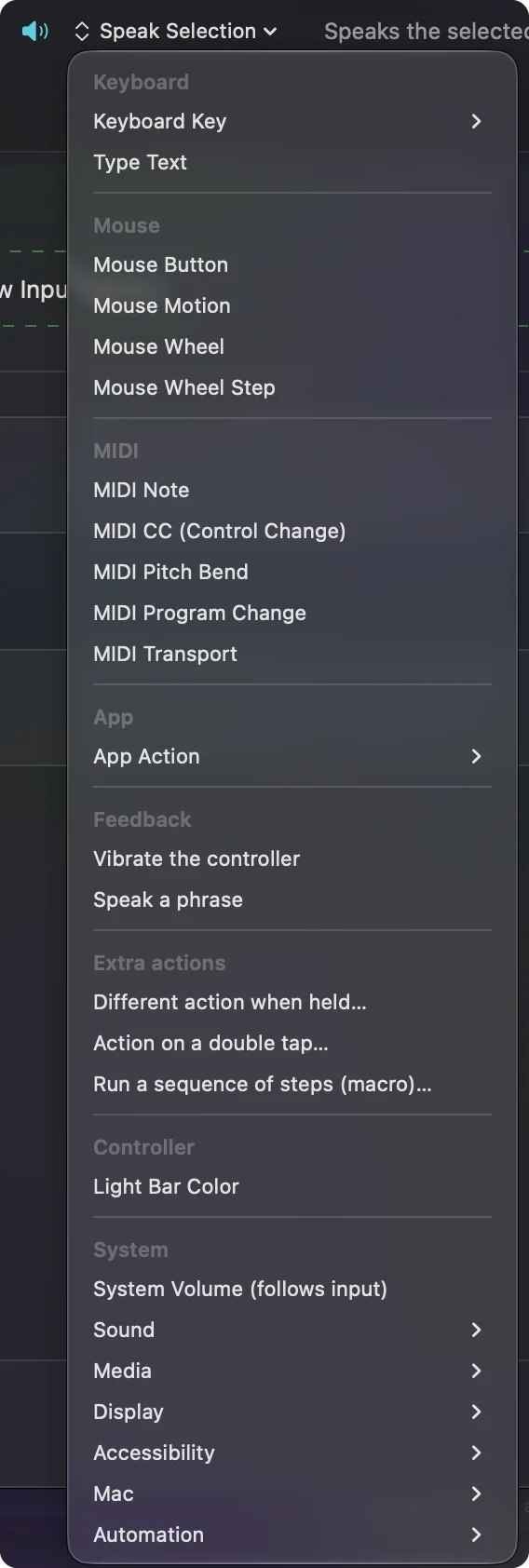
A row does not need an output to vibrate. In the menu where you pick what a row sends, the Feedback section has Vibrate the controller, which makes a row whose only job is the buzz. Any row can buzz, and a row can do nothing but buzz.
Vibrate on something other than a button
Anything a row can listen to can carry Vibrate, so the buzz can mean more than a press:
- The edge of a stick. A stick zone near the edge of travel, so you feel when the stick is all the way over.
- A touchpad zone. A touchpad zone on a DualSense, so a tap confirms you hit the zone you meant.
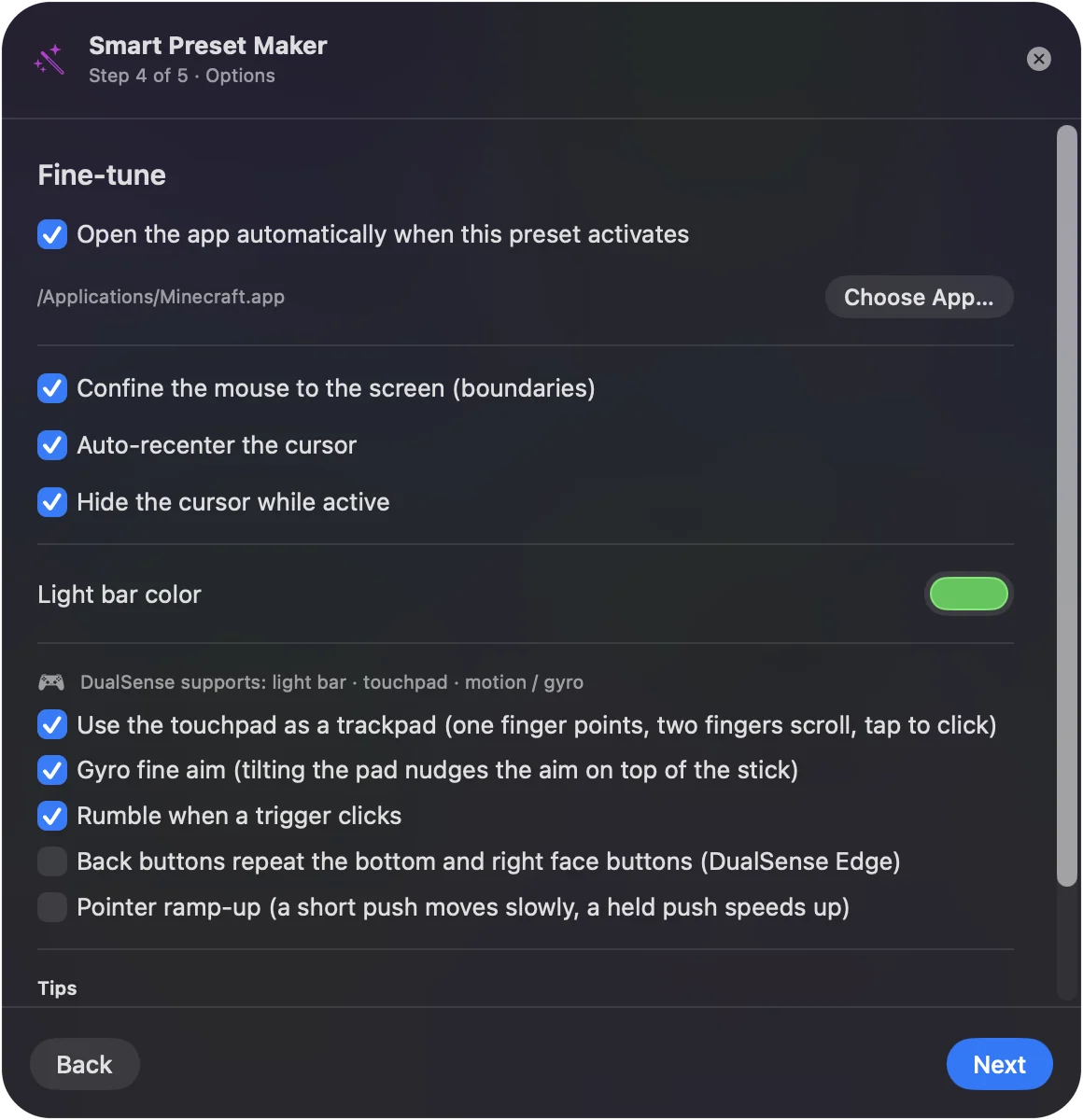
- A trigger click. A trigger past a point, for a click you want to feel. The Smart Preset Maker has a switch for exactly this, Rumble when a trigger clicks, which adds a short buzz at 35 percent to every trigger row that clicks the mouse.
- A silent action. A macro or a hidden shortcut, where nothing on screen tells you it ran.
The buzz is most useful where your eyes cannot confirm the action.
Choose how strong and how long
- Strength. Runs from 10 to 100 percent in steps of five.
- Duration. Runs from Tap to 2.0 seconds. Anything under 60 ms counts as a Tap.
- A Tap on Xbox. One short pulse.
- A Tap on PlayStation. A DualSense makes its rumble with haptic actuators that take about a fifth of a second to reach the strength asked for, so on PlayStation pads a Tap, or any duration shorter than that, is played as a 220 ms buzz. Without that floor, a short buzz at 100 percent felt weaker than a long one at the same setting.
Rows that repeat are kept quiet on purpose. A turbo row vibrates once when it starts repeating, not on every repeat. A toggle row vibrates when you switch it on, and an auto-clicker when you start it. If a buzz feels weak, make it longer before you make it stronger.
Check which controllers vibrate
| Controller | Vibrate in InputConfig |
|---|---|
| DualSense, DualSense Edge | Yes, over Bluetooth and USB, through the same report that sets the light bar, so the preset's color stays put while it buzzes |
| DualShock 4 | Yes, through the same report. The Bluetooth version of that report was written from documentation rather than tried on a DualShock 4 |
| Xbox Wireless, Xbox Elite | Yes, through macOS's own haptics |
| Valve's 2026 Steam Controller | Yes, experimental, through its own report while Steam is closed |
| Switch 2 Pro Controller on USB | No; that support is experimental and reads buttons and sticks only |
| Generic USB pads, arcade sticks, wheels | No; InputConfig reads them directly and sends them nothing back |
| Anything else | If macOS reports haptics for it, yes; if not, Vibrate is skipped quietly |
With two PlayStation controllers connected, each row vibrates only the controller its group reads. Player one's rows never shake player two's pad.
If the controller does not vibrate
Climb this ladder, smallest step first:
- Test the motors first. Press Identify in System Settings, Game Controllers, or follow how to test controller vibration. If nothing buzzes there either, the problem is not the row.
- Check the controller in the table. Generic USB pads, arcade sticks, wheels and the Switch 2 Pro Controller do not vibrate in InputConfig, and Vibrate is skipped quietly on a pad macOS reports no haptics for.
- Close Steam. The 2026 Steam Controller rumbles in InputConfig only while Steam is closed.
- Check which pad the row belongs to. With two PlayStation controllers, a row buzzes only the pad its group reads.
- Make it longer. On a DualSense a short buzz feels soft. Raise Duration and feel it again.
A buzz on Identify and none on the row means the row or the pad's support, never the motors.
What it cannot do
- Textured haptics. This is rumble: both motors at the strength you set. It is not the textured haptics PS5 games use.
- Adaptive triggers. InputConfig reads them as analog inputs and leaves their resistance alone.
- Game rumble. It does not pass a game's own rumble through or add rumble to a game that has none.
- Things it cannot see. It knows what you press and move. It does not know a game's health bar dropped or that a message arrived, so there is no rumble on a notification or on an explosion in a game.
If your real problem is a game that never vibrates, read PS5 controller not vibrating on a Mac. InputConfig vibrates on what you do, not on what happens to you.
The short version
- The setting. Options, Feedback, Vibrate, on any row.
- The defaults. 60 percent and a Tap. Lengthen it on a DualSense.
- The pads. DualSense, DualShock 4, Xbox, and the Steam Controller (experimental, with Steam closed).
Put a buzz on the presses you cannot see, and you will stop looking at the screen to check.
Questions
Can I make my PS5 controller vibrate on a Mac without a game?
Yes. In InputConfig, tick Vibrate in a row's Options and activate the preset. The DualSense buzzes every time that row fires, in any app.
Can I make an Xbox controller rumble on a Mac?
Yes. Games that support rumble use it, and InputConfig's Vibrate setting goes through macOS's haptics for Xbox controllers, so any row can buzz the pad.
Can my controller vibrate when I get a notification?
Not with InputConfig. It vibrates on things you press or move, because those are the only things it reads. It has no way to see notifications or what happens inside a game.
Why does a short buzz feel weak on a DualSense?
Its actuators need about a fifth of a second to reach full strength. InputConfig plays anything shorter as a 220 ms buzz on PlayStation pads for that reason; set a longer Duration for a stronger feel.
Does it work over Bluetooth?
Yes. The DualSense, DualSense Edge and DualShock 4 vibrate over Bluetooth and USB, and Xbox controllers over Bluetooth through macOS.
Related
Free. macOS 14 or later. No account, nothing leaves your Mac. Open source on GitHub.