Motion from a game controller
 The Motion layout is built into InputConfig, free on the Mac App Store. You don't have to make an account, there are no subscriptions, and nothing is locked. Optimized for Apple silicon.
On a Mac: Motion reads keys from this layout like a keyboard. The rows were copied from the Final Cut layout, and Motion uses some of those letters for other things, so change them first.
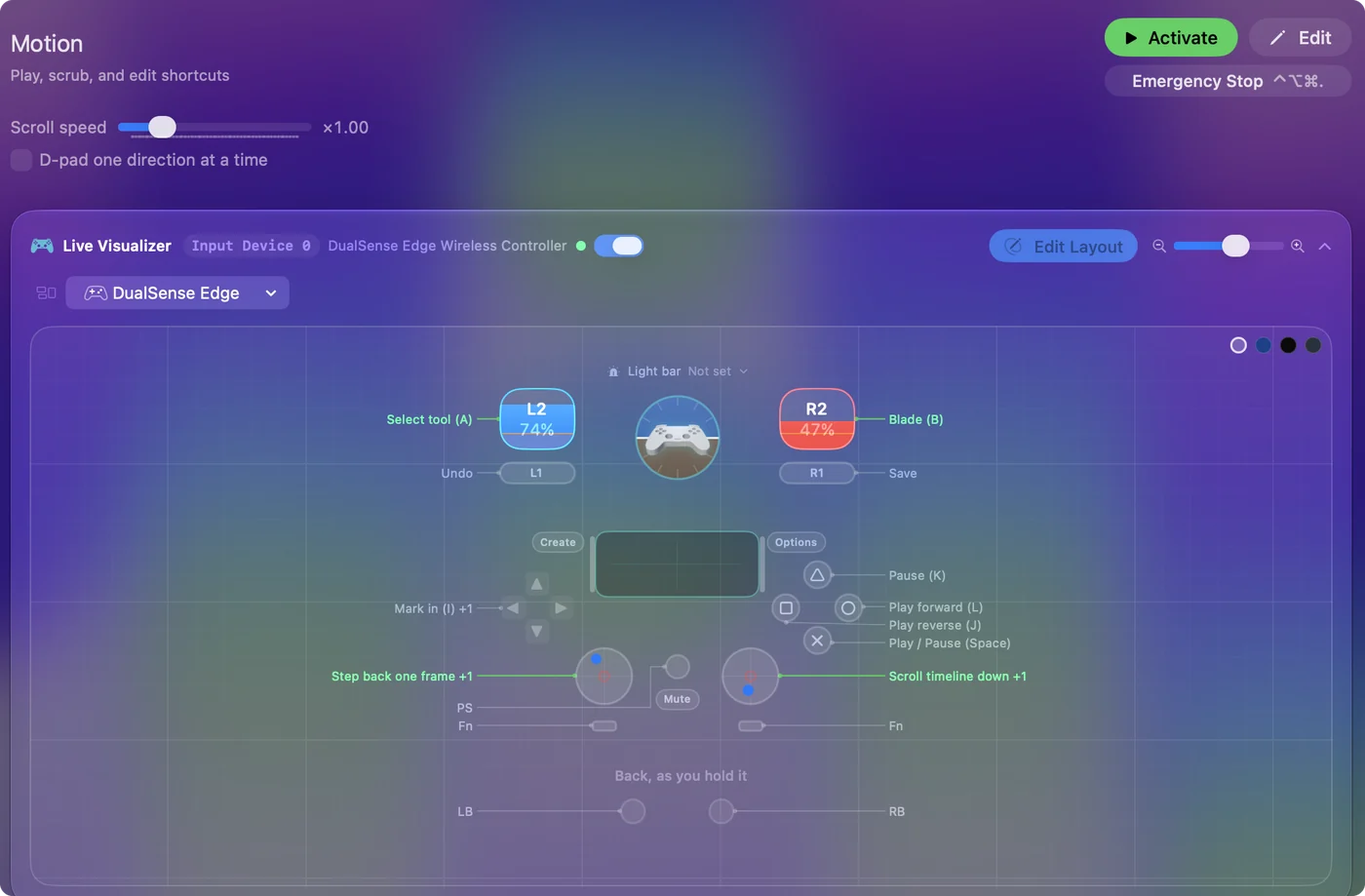
Yes, you can scrub Apple Motion from a game controller on a Mac: play, frame steps, undo and save work as shipped. The rows were copied from the Final Cut layout, and Motion uses some of those letters for other things. Change the two trigger rows before you rely on the layout, because one of them turns animation recording on.
The layout, control by control
How the layout thinks
- Play. Play and pause (Space) on the bottom face button.
- Step. Left stick left and right step one frame.
- Keep your work. Undo on the left bumper. Save (Command S) on the right, which Motion uses too.
- Scroll. The right stick scrolls the timeline.
Change these rows first
Final Cut's keys mean other things in Motion. Climb this ladder, most important first:
- Left trigger, A. In Motion, A toggles animation recording, which changes how every later edit behaves. Give this row another job.
- Right trigger, B. In Motion, B picks the Bezier tool. Give it another job too.
- Right, left and top face buttons, L, J and K. Final Cut's shuttle keys. Loop playback (Shift L) and go to start (Home) fit better.
- D-pad, I and O. Keep them if you use In and Out points on a layer. Option Command I and O set the play range instead.
Fix the left trigger before anything else, or your edits start making keyframes.
Put Motion's own keys on the pad
From Apple's Motion shortcut list:
- Ten frames back and forward. Shift Left Arrow and Shift Right Arrow, good on the triggers once they are free.
- Previous and next keyframe. Option K and Shift K, on D-pad up and down.
- Loop playback. Shift L.
- Go to the start. Home.
- Animation recording. A, somewhere you will not hit by accident, with Vibrate ticked under Feedback so you feel it switch.
Once the triggers step ten frames, Motion is quicker to review from the pad than from the keyboard.
Get it in two clicks
- Get InputConfig free on the Mac App Store, open it, and click Smart Preset Maker on the welcome screen.
- Search for Motion and pick it. The layout is created as a preset in your sidebar, named and ready.
- Press Activate. Every row can be changed afterwards: the editor's Scan button rebinds any control the moment you touch it.
Every binding, as a table
| Controller | Sends | What it does |
|---|---|---|
| A / Cross | Space | Play / Pause (Space) |
| B / Circle | L | Play forward (L) |
| X / Square | J | Play reverse (J) |
| Y / Triangle | K | Pause (K) |
| Left stick left | Left | Step back one frame |
| Left stick right | Right | Step forward one frame |
| Right trigger | B | Blade (B) |
| Left trigger | A | Select tool (A) |
| D-pad left | I | Mark in (I) |
| D-pad right | O | Mark out (O) |
| LB / L1 | Command (Left), Z | Undo |
| RB / R1 | Command (Left), S | Save |
| Right stick down | Scroll down | Scroll timeline down |
| Right stick up | Scroll up | Scroll timeline up |
Button names follow the Xbox / PlayStation pair shown in the editor, so A / Cross is the bottom face button on either pad. On a Switch Pro Controller the bottom button is labeled B; the mapping still fires on position.
Questions
Does this match the Final Cut layout?
The buttons start the same, but Motion uses A and B for other things, so change those rows before you edit.
Why did my edits start making keyframes?
The left trigger sends A, which toggles animation recording in Motion. Press it again to turn recording off, and give the row another key.
Related
Completely free. You don't have to make an account, there are no subscriptions, and nothing is locked. Optimized for Apple silicon. Open source on GitHub.
Updated