Final Cut Pro from a game controller
 The Final Cut Pro layout is built into InputConfig, free on the Mac App Store. You don't have to make an account, there are no subscriptions, and nothing is locked. Optimized for Apple silicon.
On a Mac: Final Cut Pro has no game controller or MIDI settings; it listens to the keyboard. This layout sends its default shortcuts, so there is nothing to set up.
Yes, a PS5, Xbox or Switch controller works as a Final Cut Pro controller on a Mac, free. J, K, L and Space sit on the face buttons, the left stick steps a frame at a time, and the right trigger picks the blade. Editors have bought jog shuttle controllers for thirty years because a keyboard is a bad transport. After an afternoon with this one you stop looking down.
On this page: 7 sections
The layout, control by control
How the layout thinks
- Transport under one thumb. Play and pause (Space) on the bottom face button, play forward (L) on the right, play reverse (J) on the left, pause (K) on the top.
- Frames on the stick. The left stick nudges a frame back or forward.
- Cut with the triggers. The right trigger picks the Blade tool (B) and the left trigger returns to Select (A), so a cut is pull, click, release.
- Marks on the D-pad. D-pad left and right mark in and out.
- The rest. Undo and Command S on the bumpers, and the right stick scrolls the timeline.
One row to rethink: Final Cut saves as you work, so the right bumper's Command S does little. Put Option L or a marker there instead. A shuttle exists to put J, K and L under one thumb.
Final Cut keys worth adding
These come from Apple's Final Cut Pro shortcut list. Change a row's output to one of them, or add it on a chord so the button keeps its first job.
- Half speed. Option L plays forward at half speed and Option J in reverse, for finding the exact cut point.
- Ten frames. Shift Left Arrow and Shift Right Arrow move the playhead ten frames.
- Cut at the playhead. Command B blades the clip at the playhead or skimmer without changing tools. The right trigger picks the Blade tool instead, which then needs a click.
- Previous and next edit. Semicolon and Apostrophe.
- Markers. M adds one. Option M adds one and opens it for a name.
- Zoom. Command Plus and Command Minus zoom the timeline. Shift Z fits it to the window.
- Tools. A for Select, T for Trim, P for Position, B for Blade.
If you add one, make it Command B. Command B cuts at the playhead in one press, with no tool change.
Tune it for editing
- Shuttle speed. Pressing L twice plays at double speed. Set the L row's How it fires to Repeats while held, at a low rate, and a held button steps the speed up the way a shuttle wheel does.
- Feel the cut. Turn on Vibrate under Feedback in the blade row's Options, and you feel the cut land without looking up.
- A knob instead. If you own a MIDI controller, the MIDI controller for Final Cut page turns a knob into a jog wheel. MIDI rows and controller rows can share one preset.
For a fuller build with haptics on the marks and a tool layer, the video editing controller guide has a preset to download. Final Cut only sees keys, so the layout keeps working after every Final Cut update.
Get it in two clicks
- Get InputConfig free on the Mac App Store, open it, and click Smart Preset Maker on the welcome screen.
- Search for Final Cut Pro and pick it. The layout is created as a preset in your sidebar, named and ready.
- Press Activate. Every row can be changed afterwards: the editor's Scan button rebinds any control the moment you touch it.
Every binding, as a table
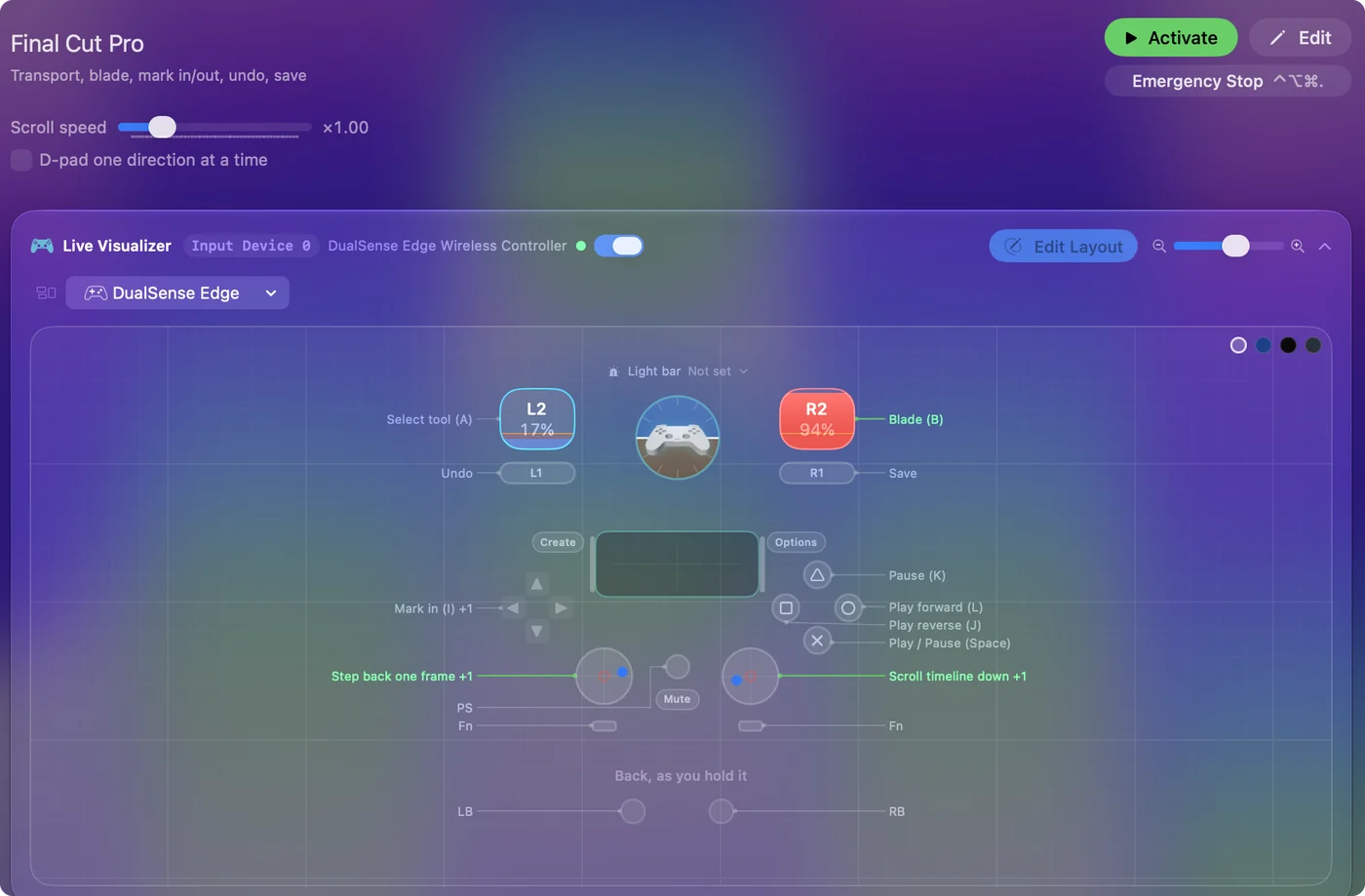
| Controller | Sends | What it does |
|---|---|---|
| A / Cross | Space | Play / Pause (Space) |
| B / Circle | L | Play forward (L) |
| X / Square | J | Play reverse (J) |
| Y / Triangle | K | Pause (K) |
| Left stick left | Left | Step back one frame |
| Left stick right | Right | Step forward one frame |
| Right trigger | B | Blade (B) |
| Left trigger | A | Select tool (A) |
| D-pad left | I | Mark in (I) |
| D-pad right | O | Mark out (O) |
| LB / L1 | Command (Left), Z | Undo |
| RB / R1 | Command (Left), S | Save |
| Right stick down | Scroll down | Scroll timeline down |
| Right stick up | Scroll up | Scroll timeline up |
Button names follow the Xbox / PlayStation pair shown in the editor, so A / Cross is the bottom face button on either pad. On a Switch Pro Controller the bottom button is labeled B; the mapping still fires on position.
Questions
Does Final Cut Pro support game controllers?
Final Cut has no setting for game controllers. It listens to the keyboard, so a mapper turns each button into a shortcut Final Cut already knows. To Final Cut it is a keyboard, which is also why it keeps working after an update.
Can I use a MIDI controller with Final Cut Pro?
Yes, through InputConfig. It reads a MIDI controller's pads, keys and knobs and sends Final Cut's keyboard shortcuts. The MIDI input page shows how to bind a pad.
What about Premiere or DaVinci Resolve?
Both have their own entries in the Smart Preset Maker with their own default shortcuts. The idea is the same.
Related
Completely free. You don't have to make an account, there are no subscriptions, and nothing is locked. Optimized for Apple silicon. Open source on GitHub.
Updated