DaVinci Resolve from a game controller
 The DaVinci Resolve layout is built into InputConfig, free on the Mac App Store. You don't have to make an account, there are no subscriptions, and nothing is locked. Optimized for Apple silicon.
On a Mac: DaVinci Resolve, free or Studio, reads its default keyboard shortcuts from this layout. Its own panel and Speed Editor support is separate and unaffected.
Yes, a PS5, Xbox or Switch controller works as a DaVinci Resolve controller on a Mac, free or Studio, with no Speed Editor needed. J, K and L sit on the face buttons, a frame step on the stick and the blade on a trigger. It is not a jog wheel. It is closer than a keyboard.
On this page: 7 sections
The layout, control by control
How the layout thinks
- Transport under one thumb. Play and pause (Space) on the bottom face button, forward (L) on the right, reverse (J) on the left, stop (K) on the top.
- Frames on the stick. The left stick steps a frame with the arrow keys.
- Cut with the triggers. Blade edit mode (B) on the right trigger, selection mode (A) on the left.
- Marks and the rest. Mark in and out on D-pad left and right, Undo and Save on the bumpers.
Resolve's own panel and Speed Editor support is separate and unaffected. The keys Blackmagic's Speed Editor is built around are all on the pad.
Tune it for Resolve
- Split at the playhead. Put Command B, the Razor, on the touchpad press. It cuts without changing modes.
- Trim mode. Put T on a stick click.
- Pages. Resolve moves between pages with Shift and a number key. Check the numbers in your version's Keyboard Customization, then put the Color page behind a chord, such as L1 and a D-pad direction.
- Feel the cut. Turn on Vibrate on the blade row, under Feedback in its Options.
- Faster shuttle. Pressing L again speeds up playback. Set the L row's How it fires to Repeats while held, at a low rate, and it steps up while held.
- A MIDI pad instead. Pads on J, K, L and the marks, a knob in Turn mode on the arrow keys as a jog wheel. The MIDI controller for Final Cut page has the table, and Resolve shares its blade and zoom keys.
Command B on the touchpad is the row that speeds editing up most. Command B cuts at the playhead without leaving selection mode.
What it cannot do
- No search dial. A pad has no weighted jog wheel.
- Resolve does not know it is there. It sees keystrokes, so grading with real knobs needs Resolve's own panels or Resolve-specific tools.
If Resolve is where you spend your days, the Speed Editor is worth buying. Speed Editor alternatives compares the options. For transport and marks, a pad you already own costs nothing and does the job.
Get it in two clicks
- Get InputConfig free on the Mac App Store, open it, and click Smart Preset Maker on the welcome screen.
- Search for DaVinci Resolve and pick it. The layout is created as a preset in your sidebar, named and ready.
- Press Activate. Every row can be changed afterwards: the editor's Scan button rebinds any control the moment you touch it.
Every binding, as a table
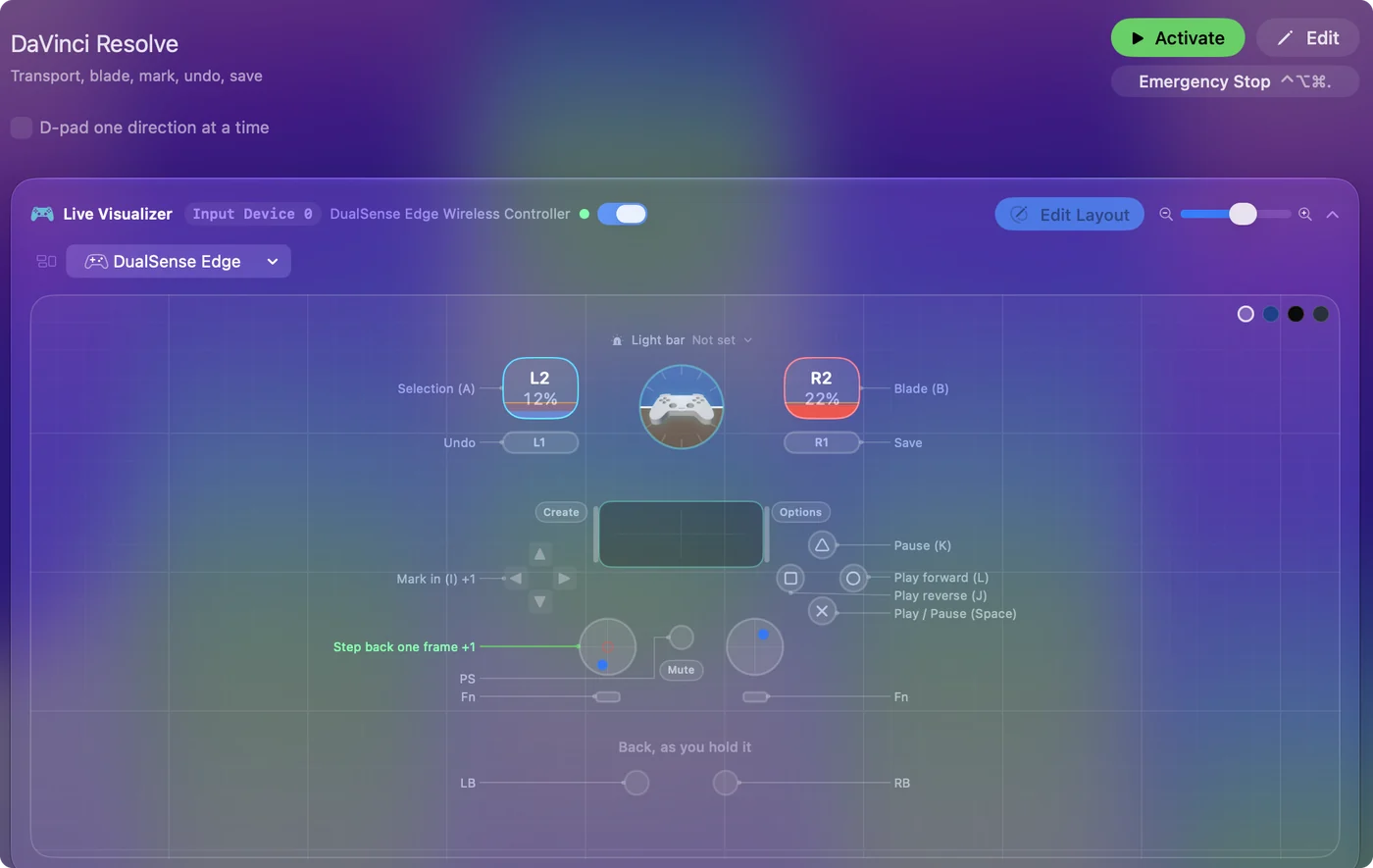
| Controller | Sends | What it does |
|---|---|---|
| A / Cross | Space | Play / Pause (Space) |
| B / Circle | L | Play forward (L) |
| X / Square | J | Play reverse (J) |
| Y / Triangle | K | Pause (K) |
| Left stick left | Left | Step back one frame |
| Left stick right | Right | Step forward one frame |
| Right trigger | B | Blade (B) |
| Left trigger | A | Selection (A) |
| D-pad left | I | Mark in (I) |
| D-pad right | O | Mark out (O) |
| LB / L1 | Command (Left), Z | Undo |
| RB / R1 | Command (Left), S | Save |
Button names follow the Xbox / PlayStation pair shown in the editor, so A / Cross is the bottom face button on either pad. On a Switch Pro Controller the bottom button is labeled B; the mapping still fires on position.
Questions
Does it work with the free version of Resolve?
Yes. The shortcuts are the same.
Is a game controller a Speed Editor alternative?
For the transport and the marks, yes, and it costs nothing if you already own a pad. It has no weighted search dial, and Resolve does not know it is there. If Resolve is where you spend your days, the Speed Editor is worth buying. More in Speed Editor alternatives.
Related
Completely free. You don't have to make an account, there are no subscriptions, and nothing is locked. Optimized for Apple silicon. Open source on GitHub.
Updated