Nuke from a game controller
 The Nuke layout is built into InputConfig, free on the Mac App Store. You don't have to make an account, there are no subscriptions, and nothing is locked. Optimized for Apple silicon.
On a Mac: Nuke for Mac reads keys from this layout like a keyboard. The catalog rows started from an After Effects template, so some need Nuke's own viewer keys.
Yes, Nuke's viewer runs well from a game controller on a Mac: frame steps on the left stick, undo and save on the bumpers. The node graph stays with the mouse or pen. The layout started as the After Effects one, so four rows need Nuke's own viewer keys, and this page says which.
On this page: 7 sections
The layout, control by control
How the layout thinks
- Step through frames. Left stick left and right send the arrow keys, which step one frame back or forward in Nuke's viewer.
- Keep your work. Undo (Command Z) on the left bumper and Save (Command S) on the right work as shipped.
- Scroll. The right stick scrolls whatever panel is under the pointer.
- Transport on the D-pad. D-pad left and right send J and K. In Nuke's viewer J plays backward and K stops, so they are transport keys, not the keyframe jumps the table names.
Change the rows that came from After Effects
The bottom face button sends Space, which in Nuke fills the window with the panel under the cursor instead of playing. The right, left and top face buttons send V, G and H, After Effects tool keys. Fix them in this order:
Step 1: Make the big button play
- You: Click Edit, change the bottom face button's output from Space to L, and Save.
- InputConfig: Sends L, Nuke's play forward key, from the next press.
- Check: With the pointer over the viewer, press the button. Playback runs forward and no panel grows.
Step 2: Give the tool buttons viewer jobs
- You: Change the right face button to K, so stop sits next to play, and the left and top face buttons to two of the channel keys you check most.
- InputConfig: Sends the new keys at once. A running preset picks up a saved change straight away.
- Check: Press each one with the viewer in front and watch the channel or the playhead change.
Space maximizes a panel in Nuke, so the big button is the first row to change.
Tune it for review
- Viewer channels. R, G, B and A show each channel. Put them on the face buttons behind a chord with a stick click, which this layout leaves free: in each row's Options, Second control, While also holding.
- Frame range. Put Nuke's in and out point keys from its own shortcut list behind a chord on the D-pad.
- The node graph. This layout has no pointer rows, so the graph stays with the mouse or pen.
That split is the one I would keep. The controller is the hand that plays and steps, and the pen is the hand that builds the graph.
Get it in two clicks
- Get InputConfig free on the Mac App Store, open it, and click Smart Preset Maker on the welcome screen.
- Search for Nuke and pick it. The layout is created as a preset in your sidebar, named and ready.
- Press Activate. Every row can be changed afterwards: the editor's Scan button rebinds any control the moment you touch it.
Every binding, as a table
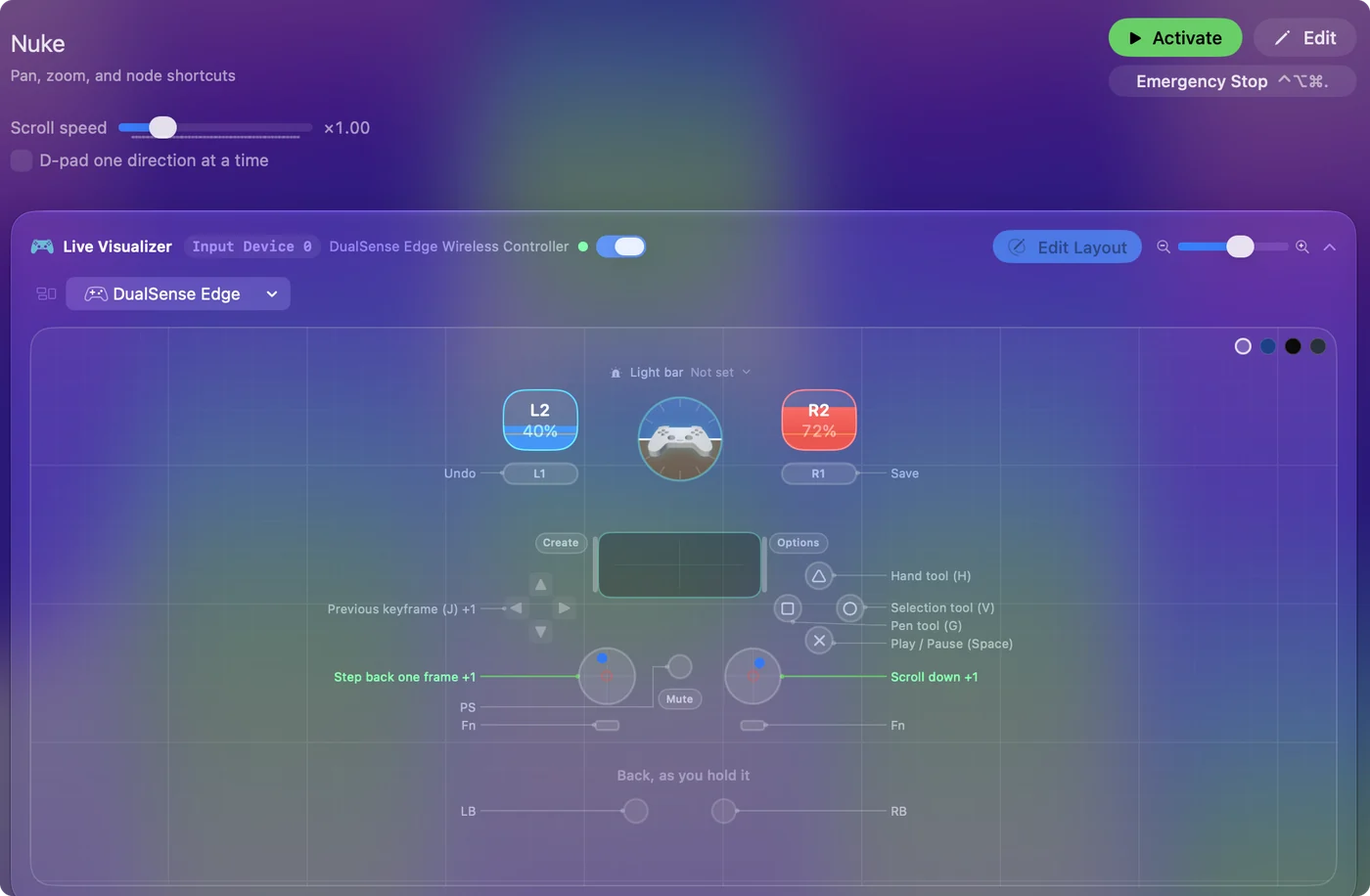
| Controller | Sends | What it does |
|---|---|---|
| A / Cross | Space | Play / Pause (Space) |
| Left stick left | Left | Step back one frame |
| Left stick right | Right | Step forward one frame |
| B / Circle | V | Selection tool (V) |
| X / Square | G | Pen tool (G) |
| Y / Triangle | H | Hand tool (H) |
| LB / L1 | Command (Left), Z | Undo |
| RB / R1 | Command (Left), S | Save |
| Right stick down | Scroll down | Scroll down |
| Right stick up | Scroll up | Scroll up |
| D-pad left | J | Previous keyframe (J) |
| D-pad right | K | Next keyframe (K) |
Button names follow the Xbox / PlayStation pair shown in the editor, so A / Cross is the bottom face button on either pad. On a Switch Pro Controller the bottom button is labeled B; the mapping still fires on position.
Questions
Is this for compositing or for review?
It is for review and playback. The node graph still wants a mouse or pen. The controller is the other hand.
Why does the bottom button enlarge a panel in Nuke?
It sends Space, which Nuke uses to maximize the panel under the cursor. Change the row's output to L and it plays forward instead.
Related
Completely free. You don't have to make an account, there are no subscriptions, and nothing is locked. Optimized for Apple silicon. Open source on GitHub.
Updated