Adobe After Effects from a game controller
 The Adobe After Effects layout is built into InputConfig, free on the Mac App Store. You don't have to make an account, there are no subscriptions, and nothing is locked. Optimized for Apple silicon.
On a Mac: After Effects reads its default shortcuts from this layout. One pair of rows needs changing for frame steps, explained below.
Yes, you can run After Effects from a game controller on a Mac, once you change one pair of rows. Stepping a frame and jumping to the next keyframe are better on a stick and a D-pad than on the keys they hide behind, and this layout is a transport for the non-mouse hand with the three tools you swap between most.
The layout, control by control
How the layout thinks
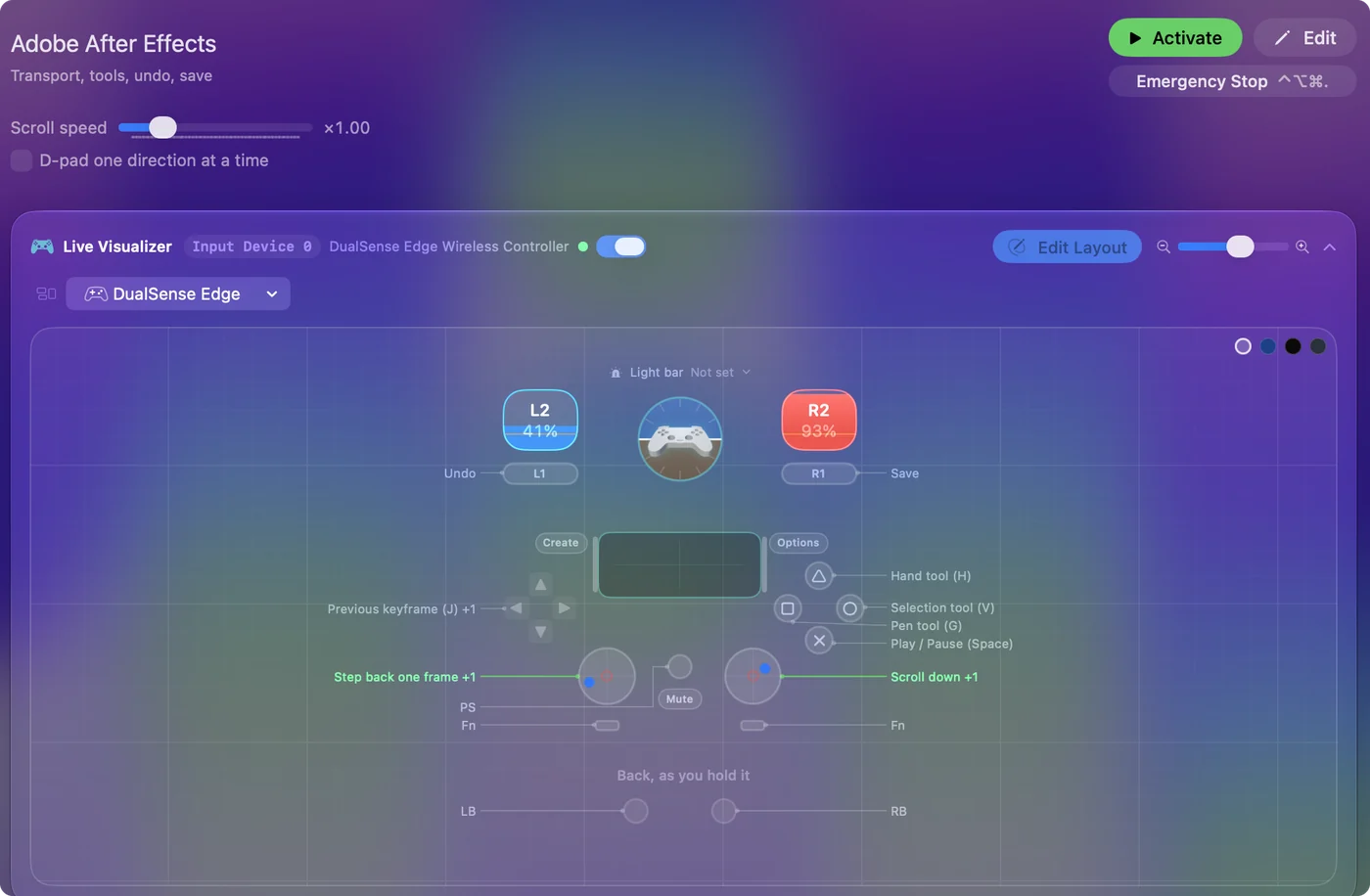
- Play. Play and pause (Space) on the bottom face button.
- Jump between keyframes. D-pad left and right send J and K, previous and next keyframe.
- Swap tools. Selection (V), Pen (G) and Hand (H) on the other face buttons.
- Undo, save, scroll. Undo and Save on the bumpers, and the right stick scrolls the timeline.
The left stick is meant for frame steps, and it needs the fix below first. Keyframe jumps on the D-pad are the reason to use a pad here.
Fix the frame step before you rely on it
The left stick sends the plain Left and Right Arrow keys. In After Effects those nudge a selected layer one pixel, not the playhead one frame.
- You: Open each left stick row's output and record Command Left Arrow and Command Right Arrow, or Page Up and Page Down, then save.
- InputConfig: Sends the keys that move the playhead a frame back and forward.
- Check: With a layer selected, push the stick right. The playhead moves one frame and the layer stays put.
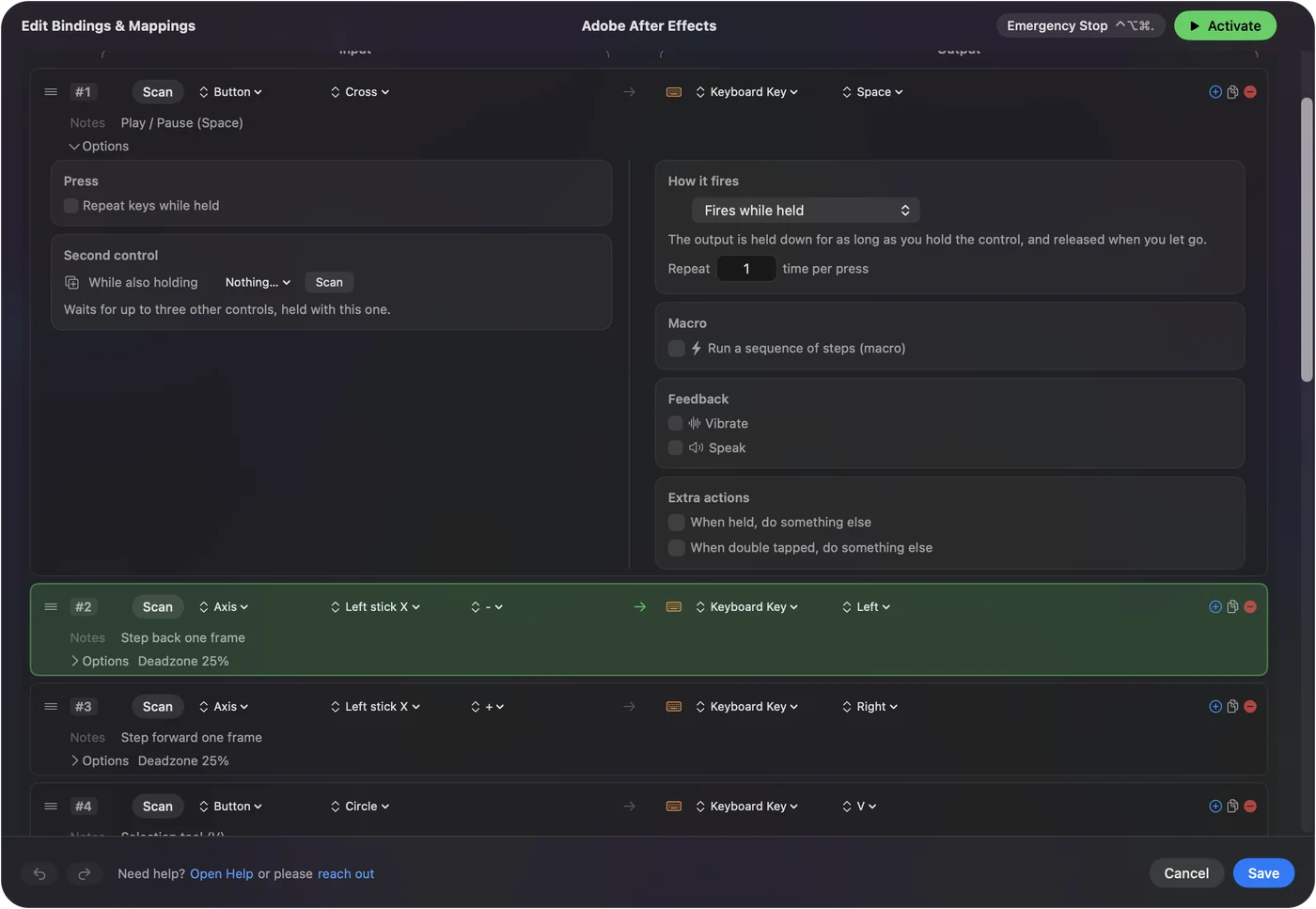
Do this before the first real edit. Plain arrows move layers in After Effects, and Command with the arrows moves the playhead.
Tune it for After Effects
- Ten frames. Command Shift with the arrows moves the playhead ten frames. Put those behind a chord on the stick rows.
- Work area. B and N set its start and end at the playhead. Put them on the stick clicks.
- Preview. Space plays a preview already. 0 on the numeric keypad is the older full preview, for the touchpad press.
- A pulse on each keyframe jump. Vibrate on the J and K rows tells you the jump happened.
Dragging values is still the mouse's job. For stepping and jumping, a pad is more precise than a keyboard.
Get it in two clicks
- Get InputConfig free on the Mac App Store, open it, and click Smart Preset Maker on the welcome screen.
- Search for Adobe After Effects and pick it. The layout is created as a preset in your sidebar, named and ready.
- Press Activate. Every row can be changed afterwards: the editor's Scan button rebinds any control the moment you touch it.
Every binding, as a table
| Controller | Sends | What it does |
|---|---|---|
| A / Cross | Space | Play / Pause (Space) |
| Left stick left | Left | Step back one frame |
| Left stick right | Right | Step forward one frame |
| B / Circle | V | Selection tool (V) |
| X / Square | G | Pen tool (G) |
| Y / Triangle | H | Hand tool (H) |
| LB / L1 | Command (Left), Z | Undo |
| RB / R1 | Command (Left), S | Save |
| Right stick down | Scroll down | Scroll down |
| Right stick up | Scroll up | Scroll up |
| D-pad left | J | Previous keyframe (J) |
| D-pad right | K | Next keyframe (K) |
Button names follow the Xbox / PlayStation pair shown in the editor, so A / Cross is the bottom face button on either pad. On a Switch Pro Controller the bottom button is labeled B; the mapping still fires on position.
Questions
Is a controller precise enough for keyframes?
For stepping and jumping, more than a keyboard. Dragging values is still the mouse's job.
Why does the stick move my layer instead of the playhead?
The stick sends the plain arrow keys, which nudge a selected layer. Change those two rows to Command Left Arrow and Command Right Arrow for frame steps.
Related
Completely free. You don't have to make an account, there are no subscriptions, and nothing is locked. Optimized for Apple silicon. Open source on GitHub.
Updated