iMovie from a game controller
 The iMovie layout is built into InputConfig, free on the Mac App Store. You don't have to make an account, there are no subscriptions, and nothing is locked. Optimized for Apple silicon.
On a Mac: Play and pause, the frame steps, undo and the timeline scroll work as shipped. The rows copied from Final Cut (J, K, L, B, A, I, O) are not iMovie shortcuts. The keys to put on them are below.
Yes, you can edit in iMovie on a Mac from a game controller, but this layout started from the Final Cut one and only part of it fits iMovie. Space plays and pauses, the left stick steps a frame at a time with the arrow keys, the left bumper undoes, and the right stick scrolls the timeline, all as iMovie expects. The other rows send Final Cut keys that are not in Apple's iMovie list, so give them iMovie keys, starting with Command B to split a clip.
The layout, control by control
What works in iMovie today
- Play and pause. Space on the bottom face button.
- Step frames. Left stick left and right step one frame back and forward.
- Undo. Command Z on the left bumper.
- Scroll the timeline. The right stick.
- Free to reassign. The other face buttons (L, J, K), the triggers (B, A), the D-pad (I, O) and the right bumper (Command S). iMovie saves as you work, so the save row can go too.
J, K, L, the blade (B), the select tool (A) and mark in and out (I and O) are Final Cut keys. Play, frame steps, undo and scroll work as shipped, and the rest is yours to fill.
iMovie keys worth putting on the pad
From Apple's list of iMovie shortcuts for the Mac. Change a row's output to one of these in the binding editor:
- Split a clip at the playhead. Command B. The right trigger is the natural home, where the blade was.
- Select the whole clip. X.
- Play the selection. Slash (/).
- Jump to the start of the clip, or the one before. Up Arrow.
- Rate as favorite, or reject. F rates as favorite. Delete rejects, or deletes from the timeline.
- Add the browser selection to the movie. E.
- Redo. Shift Command Z.
- Play full screen. Shift Command F. Escape leaves it.
- Voiceover. V.
Vibrate on the split row lets you feel each cut land. Put Command B on the right trigger first, and a cut is one press.
Get it in two clicks
- Get InputConfig free on the Mac App Store, open it, and click Smart Preset Maker on the welcome screen.
- Search for iMovie and pick it. The layout is created as a preset in your sidebar, named and ready.
- Press Activate. Every row can be changed afterwards: the editor's Scan button rebinds any control the moment you touch it.
Every binding, as a table
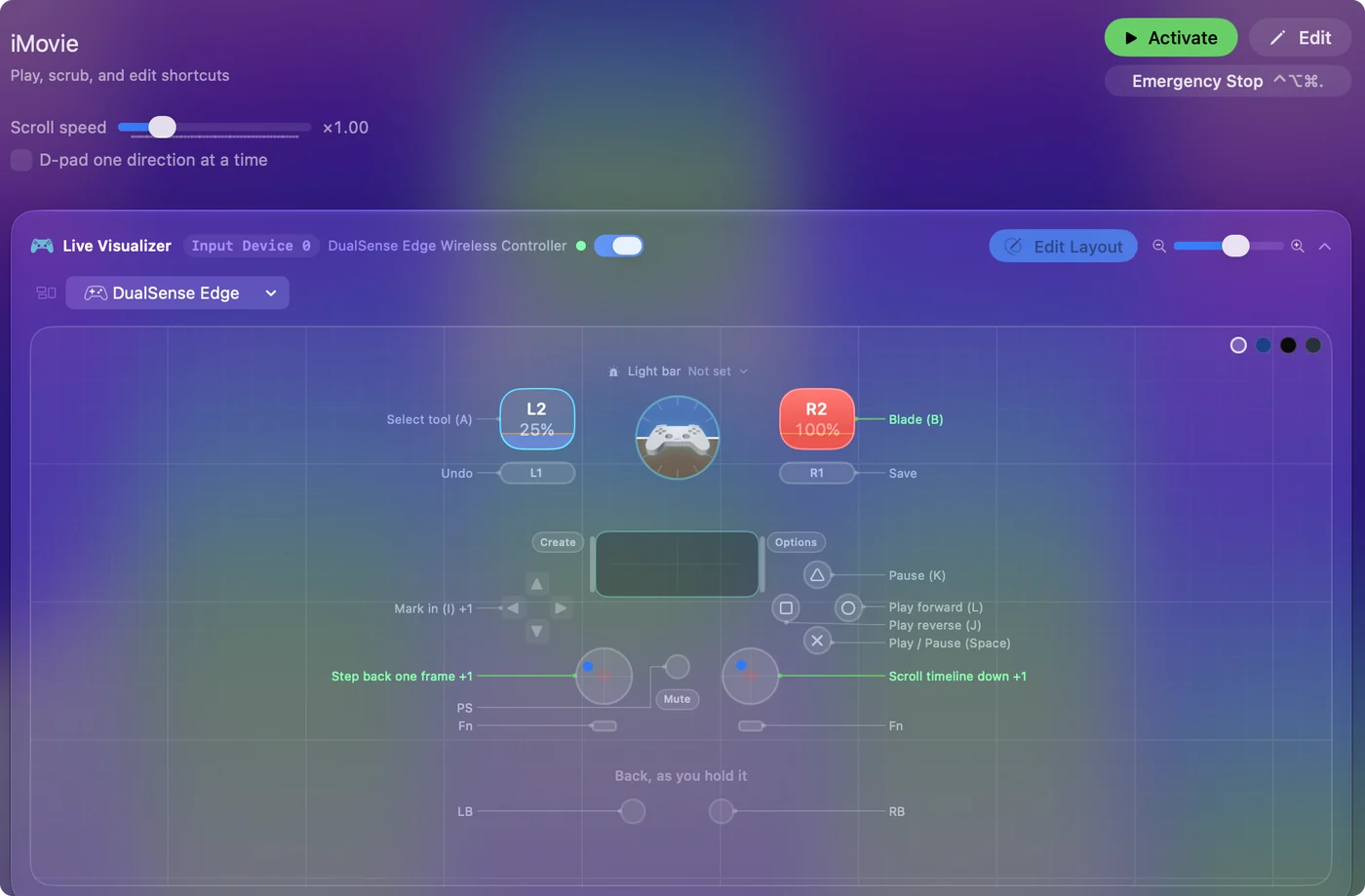
| Controller | Sends | What it does |
|---|---|---|
| A / Cross | Space | Play / Pause (Space) |
| B / Circle | L | Play forward (L) |
| X / Square | J | Play reverse (J) |
| Y / Triangle | K | Pause (K) |
| Left stick left | Left | Step back one frame |
| Left stick right | Right | Step forward one frame |
| Right trigger | B | Blade (B) |
| Left trigger | A | Select tool (A) |
| D-pad left | I | Mark in (I) |
| D-pad right | O | Mark out (O) |
| LB / L1 | Command (Left), Z | Undo |
| RB / R1 | Command (Left), S | Save |
| Right stick down | Scroll down | Scroll timeline down |
| Right stick up | Scroll up | Scroll timeline up |
Button names follow the Xbox / PlayStation pair shown in the editor, so A / Cross is the bottom face button on either pad. On a Switch Pro Controller the bottom button is labeled B; the mapping still fires on position.
Questions
What is the keyboard shortcut to split a clip in iMovie?
Command B splits a clip at the playhead, according to Apple's iMovie shortcut list. Put it on a controller button and a cut is one press.
Does iMovie use Final Cut's J, K, L keys?
Not according to Apple's iMovie shortcut list. Space plays and pauses, and the arrow keys step frames.
Related
Completely free. You don't have to make an account, there are no subscriptions, and nothing is locked. Optimized for Apple silicon. Open source on GitHub.
Updated