Key code finder
 InputConfig is completely free on the Mac App Store.
InputConfig stores every keyboard output as a HID usage code, which is the same number a USB keyboard sends. Press a key below to find its code and the name the editor shows, or search the table. The code is what you see in a preset file, like key 44 for Space.
Click here, then press any key. Tab is not captured, so it still moves you on; its code is 43.
Modifier keys show their left or right code. The fn key is not reported by browsers; in the app it is fn / Globe (hold), code 400, and a Globe tap on its own is code 401.
| Code | Name in InputConfig | Group | In a preset file |
|---|---|---|---|
| 4 | A | Letter Keys | key 4 |
| 5 | B | Letter Keys | key 5 |
| 6 | C | Letter Keys | key 6 |
| 7 | D | Letter Keys | key 7 |
| 8 | E | Letter Keys | key 8 |
| 9 | F | Letter Keys | key 9 |
| 10 | G | Letter Keys | key 10 |
| 11 | H | Letter Keys | key 11 |
| 12 | I | Letter Keys | key 12 |
| 13 | J | Letter Keys | key 13 |
| 14 | K | Letter Keys | key 14 |
| 15 | L | Letter Keys | key 15 |
| 16 | M | Letter Keys | key 16 |
| 17 | N | Letter Keys | key 17 |
| 18 | O | Letter Keys | key 18 |
| 19 | P | Letter Keys | key 19 |
| 20 | Q | Letter Keys | key 20 |
| 21 | R | Letter Keys | key 21 |
| 22 | S | Letter Keys | key 22 |
| 23 | T | Letter Keys | key 23 |
| 24 | U | Letter Keys | key 24 |
| 25 | V | Letter Keys | key 25 |
| 26 | W | Letter Keys | key 26 |
| 27 | X | Letter Keys | key 27 |
| 28 | Y | Letter Keys | key 28 |
| 29 | Z | Letter Keys | key 29 |
| 30 | 1 | Number Keys | key 30 |
| 31 | 2 | Number Keys | key 31 |
| 32 | 3 | Number Keys | key 32 |
| 33 | 4 | Number Keys | key 33 |
| 34 | 5 | Number Keys | key 34 |
| 35 | 6 | Number Keys | key 35 |
| 36 | 7 | Number Keys | key 36 |
| 37 | 8 | Number Keys | key 37 |
| 38 | 9 | Number Keys | key 38 |
| 39 | 0 | Number Keys | key 39 |
| 45 | - | Other Characters | key 45 |
| 46 | = | Other Characters | key 46 |
| 47 | [ | Other Characters | key 47 |
| 48 | ] | Other Characters | key 48 |
| 49 | \ | Other Characters | key 49 |
| 50 | # | Other Characters | key 50 |
| 51 | ; | Other Characters | key 51 |
| 52 | ' | Other Characters | key 52 |
| 53 | ` | Other Characters | key 53 |
| 54 | , | Other Characters | key 54 |
| 55 | . | Other Characters | key 55 |
| 56 | / | Other Characters | key 56 |
| 79 | Right | Arrow Keys | key 79 |
| 80 | Left | Arrow Keys | key 80 |
| 81 | Down | Arrow Keys | key 81 |
| 82 | Up | Arrow Keys | key 82 |
| 227 | Command (Left) | Modifier Keys | key 227 |
| 231 | Command (Right) | Modifier Keys | key 231 |
| 225 | Shift (Left) | Modifier Keys | key 225 |
| 229 | Shift (Right) | Modifier Keys | key 229 |
| 226 | Alt / Option (Left) | Modifier Keys | key 226 |
| 230 | Alt / Option (Right) | Modifier Keys | key 230 |
| 224 | Ctrl (Left) | Modifier Keys | key 224 |
| 228 | Ctrl (Right) | Modifier Keys | key 228 |
| 400 | fn / Globe (hold) | Modifier Keys | key 400 |
| 44 | Space | Other Keys | key 44 |
| 40 | Return | Other Keys | key 40 |
| 41 | Escape | Other Keys | key 41 |
| 42 | Backspace | Other Keys | key 42 |
| 43 | Tab | Other Keys | key 43 |
| 73 | Insert | Other Keys | key 73 |
| 74 | Home | Other Keys | key 74 |
| 75 | PageUp | Other Keys | key 75 |
| 76 | Delete | Other Keys | key 76 |
| 77 | End | Other Keys | key 77 |
| 78 | PageDown | Other Keys | key 78 |
| 57 | Caps Lock | Other Keys | key 57 |
| 70 | PrintScreen | Other Keys | key 70 |
| 101 | Application | Other Keys | key 101 |
| 58 | F1 | Function Keys | key 58 |
| 59 | F2 | Function Keys | key 59 |
| 60 | F3 | Function Keys | key 60 |
| 61 | F4 | Function Keys | key 61 |
| 62 | F5 | Function Keys | key 62 |
| 63 | F6 | Function Keys | key 63 |
| 64 | F7 | Function Keys | key 64 |
| 65 | F8 | Function Keys | key 65 |
| 66 | F9 | Function Keys | key 66 |
| 67 | F10 | Function Keys | key 67 |
| 68 | F11 | Function Keys | key 68 |
| 69 | F12 | Function Keys | key 69 |
| 104 | F13 | Function Keys | key 104 |
| 105 | F14 | Function Keys | key 105 |
| 106 | F15 | Function Keys | key 106 |
| 107 | F16 | Function Keys | key 107 |
| 108 | F17 | Function Keys | key 108 |
| 109 | F18 | Function Keys | key 109 |
| 110 | F19 | Function Keys | key 110 |
| 111 | F20 | Function Keys | key 111 |
| 112 | F21 | Function Keys | key 112 |
| 113 | F22 | Function Keys | key 113 |
| 114 | F23 | Function Keys | key 114 |
| 115 | F24 | Function Keys | key 115 |
| 83 | Numlock | Keypad Keys | key 83 |
| 84 | Keypad / | Keypad Keys | key 84 |
| 85 | Keypad * | Keypad Keys | key 85 |
| 86 | Keypad - | Keypad Keys | key 86 |
| 87 | Keypad + | Keypad Keys | key 87 |
| 88 | Keypad Enter | Keypad Keys | key 88 |
| 89 | Keypad 1 | Keypad Keys | key 89 |
| 90 | Keypad 2 | Keypad Keys | key 90 |
| 91 | Keypad 3 | Keypad Keys | key 91 |
| 92 | Keypad 4 | Keypad Keys | key 92 |
| 93 | Keypad 5 | Keypad Keys | key 93 |
| 94 | Keypad 6 | Keypad Keys | key 94 |
| 95 | Keypad 7 | Keypad Keys | key 95 |
| 96 | Keypad 8 | Keypad Keys | key 96 |
| 97 | Keypad 9 | Keypad Keys | key 97 |
| 98 | Keypad 0 | Keypad Keys | key 98 |
| 99 | Keypad . | Keypad Keys | key 99 |
| 103 | Keypad = | Keypad Keys | key 103 |
| 133 | Keypad , | Keypad Keys | key 133 |
| 71 | Brightness Down | Special Keys | key 71 |
| 72 | Brightness Up | Special Keys | key 72 |
| 303 | Dashboard/Launchpad | Special Keys | key 303 |
| 304 | Mission Control | Special Keys | key 304 |
| 305 | Keyboard Light Down | Special Keys | key 305 |
| 306 | Keyboard Light Up | Special Keys | key 306 |
| 401 | Globe Key (Emoji) | Special Keys | key 401 |
| 307 | Rewind Track | Special Keys | key 307 |
| 308 | Play Audio Track | Special Keys | key 308 |
| 309 | Fast Forward Track | Special Keys | key 309 |
| 310 | Mute Sound | Special Keys | key 310 |
| 311 | Volume Up | Special Keys | key 311 |
| 312 | Volume Down | Special Keys | key 312 |
| 313 | Eject | Special Keys | key 313 |
Notes
- Letters are 4 to 29 (A to Z), digits 1 to 9 are 30 to 38, and 0 is 39. F1 to F12 are 58 to 69; F13 to F24 are 104 to 115 and are the safest keys to assign as app hotkeys, because no Mac keyboard has them.
- Modifiers have a left and a right code. A chord such as Command Shift 3 is stored as three outputs on one row, modifiers first, and sent as a real chord.
- Codes 303 and up are the Mac's special keys (Mission Control, Launchpad, brightness, media, volume) and are sent as those keys, not as F-keys.
- Delete here is the forward delete (code 76); the key labeled Delete on a Mac keyboard is Backspace (42).
How this fits with InputConfig
This page tests a keyboard in the browser. InputConfig works one step later: it can make any key, F13 to F19 and keys on gaming, ISO and Japanese keyboards included, send a shortcut, a click, typed text or a macro, in every app or only in one.
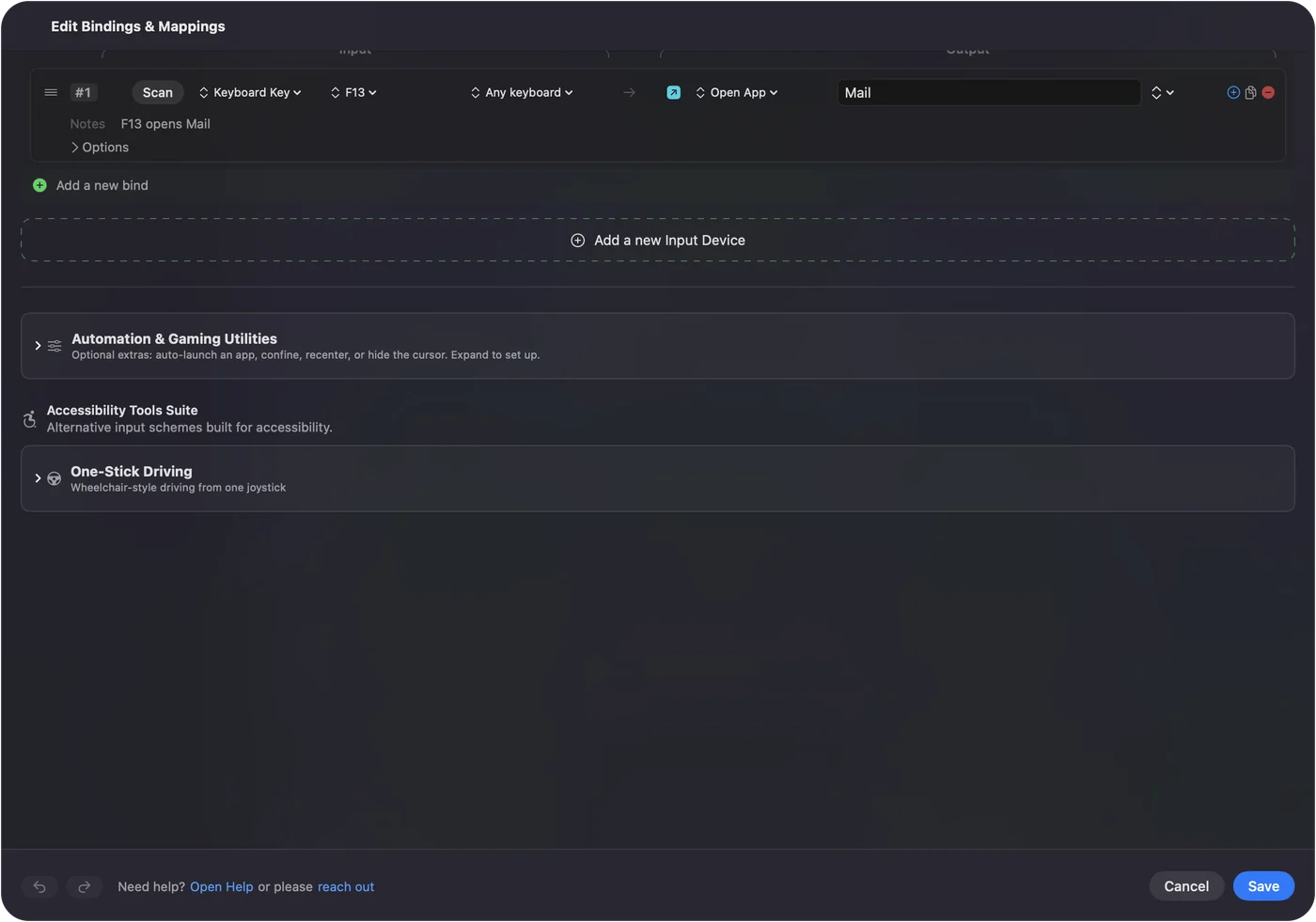
Per-app keyboard shortcuts on a Mac shows it step by step. InputConfig is free on the Mac App Store.
More keyboard tests
Related
Completely free. You don't have to make an account, there are no subscriptions, and nothing is locked. Optimized for Apple silicon. Open source on GitHub.
Updated