A game controller as a shortcut remote for drawing and photo editing
 InputConfig is completely free on the Mac App Store. You don't have to make an account, there are no subscriptions, and nothing is locked. Optimized for Apple silicon.
A game controller you already own can be a free left-hand shortcut remote for drawing and photo editing on a Mac, the job artists buy a TourBox, a Tabmate or an ExpressKey Remote for, so the pen hand never leaves the tablet. A controller has more buttons than most of those, and two sticks as well. InputConfig maps them to tools, brush size, undo and modifiers in any Mac app.
I built InputConfig because my own hands do not work well, and this guide is the drawing and photo editing deck I would hand to anyone: tools on the face buttons, brush size on the D-pad, undo under the thumb, Shift and Option latched with one press, pan and temporary move on the triggers, zoom on a stick. It is built for Photoshop with a preset to download, and the last sections point to ready decks for Lightroom, Clip Studio Paint, Krita, Affinity and the rest.
On this page: 11 sections
Steps
- Pick a controller for where your other hand is, and press every button in the Live Visualizer once.
- Add the Photo Editing Deck (Photoshop) preset from this page and activate it.
- For another app, start from its ready deck in the Smart Preset Maker, or duplicate this one and Scan each button onto its new key.
- Turn on per-app auto-switch in Settings, Advanced so the deck appears with the app.
- Put Command Q and Command W on holds so nothing important is one accidental press away.
Choose the controller to hold
Any controller the Mac sees will do, and the right one depends on where your other hand is:
- Pen in the other hand, controller in your lap or on the desk. A full-size DualSense or Xbox pad gives you the most controls. The DualSense adds a touchpad you can split into tap regions, which is four or more extra buttons you do not have to look for.
- Controller beside the tablet. A small pad is easier to leave on the desk. A single Joy-Con held sideways is a four-button, two-shoulder remote with a stick (pair each one on its own). Small 8BitDo pads are popular with artists for the same reason. Put one in a gamepad mode rather than its keyboard mode, and see which mode the Mac reads.
- No keyboard at all. A full-size pad, with the left stick as the pointer for menus and panels and the pen doing the drawing.
An 8BitDo Micro or Zero 2 in keyboard mode already sends keys with no app at all, and for a few fixed shortcuts that may be all you need. For holds, toggles, chords and a different deck per app, use a gamepad mode and InputConfig. Whatever you pick, open the Live Visualizer and press everything once. If a button lights up there, it can be mapped.
Learn the Photoshop deck
| Control | Photoshop |
|---|---|
| A / Cross | B (brush) |
| B / Circle | E (eraser) |
| X / Square | Command Z (undo). Hold for Command Shift Z |
| Y / Triangle | L (lasso); hold for M (marquee) |
| D-pad up / down | Bracket right / left (brush size) |
| D-pad left / right | Shift bracket (brush hardness) |
| LB / L1 | Shift, toggle mode |
| RB / R1 | Option, toggle mode (eyedropper while painting) |
| Left trigger | Space, held (hand tool while pulled) |
| Right trigger | Command, held (temporary move tool) |
| Right stick up / down | Command plus / minus (zoom), turbo 6 per second |
| Right stick left / right | Option bracket (previous / next layer) |
| Left stick | Pointer, for menus and panels |
| L3 | Command 0 (fit on screen) |
| R3 | X (swap foreground and background) |
| Start / Options | Command S |
| Back / Share | Command Shift N (new layer) |
| Touchpad press | Tab (hide panels) |
The tablet keeps working normally. InputConfig only sends keys. The left stick can move the pointer and a trigger can hold the mouse button, so it can draw the way a mouse can, but it is a menu and panel tool, not a brush.
Make the modifiers behave
Two patterns, each one switch in the row's Options:
- Latched on the bumpers. Shift and Option use Toggle mode: press to latch, press to release, so a hand that cannot hold a bumper while drawing does not have to.
- Momentary on the triggers. Space and Command are held only while the trigger is pulled, because panning and temporary move are momentary by nature.
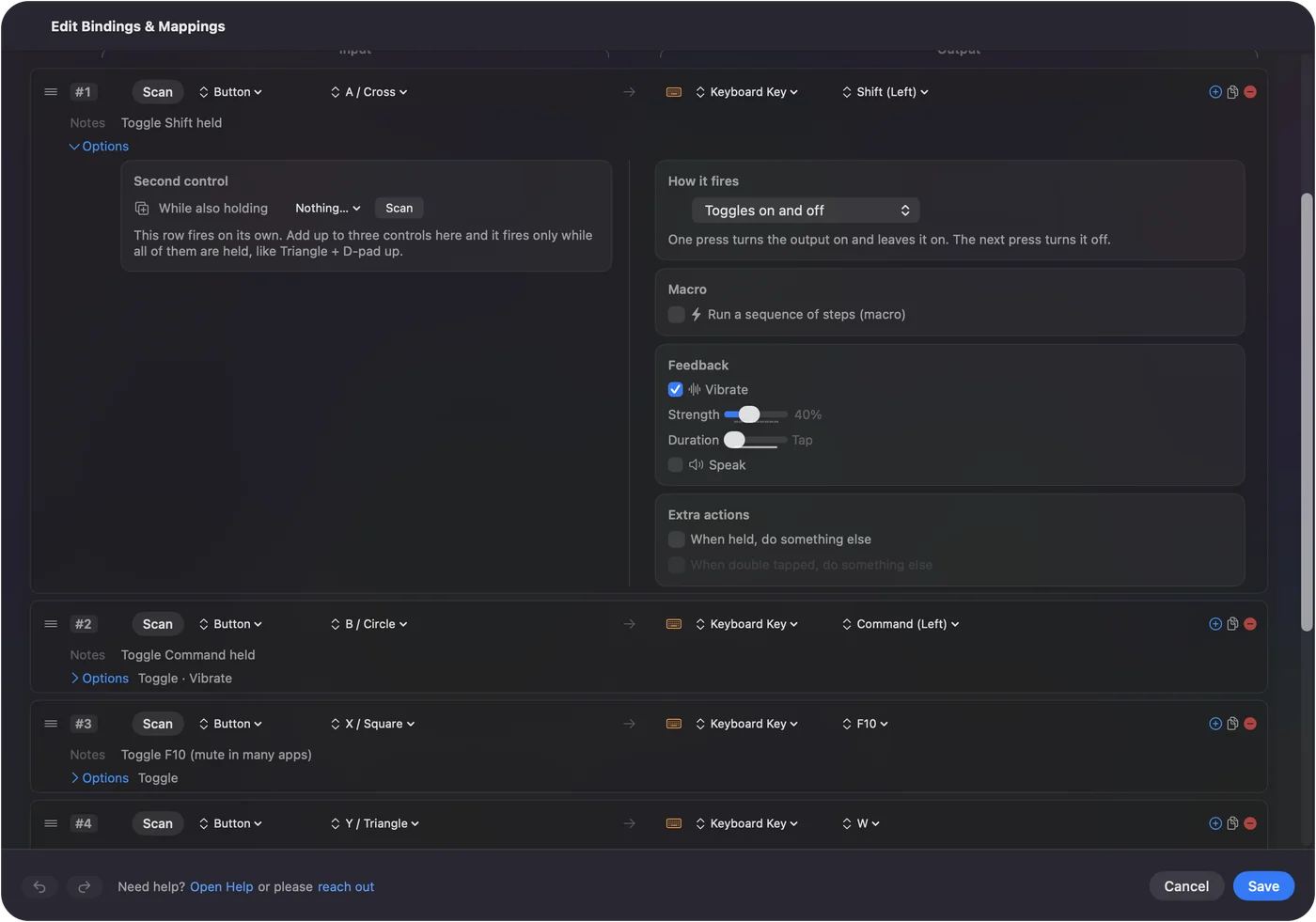
Latch the things you hold for a while, and keep momentary the things you only need for a moment.
Size the brush smoothly
A bracket key per press is coarse. Two smoother ways:
- A stick. Put the bracket keys on a stick's vertical axis with turbo at 10 per second and Variable Sensitivity off. It steps the size smoothly while held: push a little for a few steps, hold for a sweep. Lightroom users can point the same rows at the exposure or the slider nudge keys.
- A MIDI knob. The one thing a TourBox or a Keydial does better than a gamepad is the dial. A small MIDI controller with endless knobs closes that gap: a knob in Turn mode fires a short nudge every few steps of rotation, one output clockwise and another counterclockwise. Put the bracket keys on one knob and brush size follows your wrist. Put Command plus and Command minus on another and it is a zoom wheel.
A controller in one hand and a knob box on the desk run from the same preset.
Adapt it to other apps
Climb this ladder, least work first:
- A ready deck. The Smart Preset Maker has one for each app listed in the next section.
- Close enough already. In Affinity Photo and Designer the tool letters mostly match, and brush size is bracket keys too.
- Same shape, different letters. For Clip Studio, Krita and GIMP, duplicate the preset, then Scan each button and pick its new key.
- A different job. For Lightroom Classic, replace tools with ratings (numbers), flags (P, X), and the develop sliders' nudges. The D-pad becomes previous and next photo. The Smart Preset Maker's Photo Review workflow is a start.
iPad apps through Sidecar work too: the controller sends keys to the Mac, and Sidecar passes them to the Mac app on the iPad screen. Procreate itself is an iPad app and is not reachable this way.
Put the keyboard away
With a tablet in the drawing hand and the controller in the other, the keyboard can leave the desk.
- You: Switch on per-app auto-switch once in Settings, Advanced, add the app to the deck's list, and put Command Q and Command W on holds.
- InputConfig: Brings the deck up when the app comes to the front.
- Check: A quick press on the quit button does nothing. Only a hold quits.
Put anything that closes your work on a hold, so nothing important is one accidental press away.
Ready decks for every art and photo app
The Smart Preset Maker in the app has a ready layout for each of these, and each page lists every button:
- Painting and illustration. Photoshop, Clip Studio Paint, Krita, Pixelmator Pro, OpenToonz, and a general layout for any art app.
- Photo. Lightroom culling, Affinity Photo, Photos and Preview.
- Vector and layout. Illustrator, Affinity Designer, Inkscape, Figma, InDesign, Affinity Publisher.
- 3D. Blender, ZBrush.
Turn on per-app auto-switch and each deck appears when its app comes to the front.
The short version
- Any controller works. A full-size one sits in the lap, and a Joy-Con or a small 8BitDo sits beside the tablet.
- Tools on the face buttons, size on the D-pad. Keep Undo under the thumb.
- Latched Shift and Option, momentary pan and move. One switch per row.
- A MIDI knob for a dial. Use Turn mode on the bracket keys.
The controller in your drawer is already a shortcut remote, and all it needs is a deck.
Download
- Photo Editing Deck (Photoshop) presetThe table above, with toggle-mode Shift and Option on the bumpers and momentary Space and Command on the triggers. 12 KB
To add a downloaded preset: drop the file on InputConfig's Dock icon, or click the … button next to any preset in the sidebar, choose Import Preset File, and pick the file. It lands in the sidebar, ready to activate or edit. Any launch target inside a preset file is cleared on import; add one yourself in the editor if you want it.
Questions
Does the tablet keep working normally?
InputConfig sends keys. The tablet is untouched.
Can the controller's stick draw?
It can move the pointer and the trigger can hold the mouse button, so yes in the sense that a mouse can draw. It is a menu and panel tool, not a brush.
Is there a free TourBox alternative for Mac?
If you own a game controller, InputConfig can be one. It is free on the Mac App Store and turns a PS5, Xbox, 8BitDo or Switch controller into a shortcut remote for any Mac app. A TourBox's dials are nicer for brush size. A MIDI knob in Turn mode covers that. The full comparison is on the TourBox alternative page.
Can I use a Joy-Con as a drawing shortcut remote on a Mac?
Pair one Joy-Con on its own and hold it sideways: four face buttons, two shoulder buttons and a stick. Map brush, eraser, undo and brush size to it, and add a hold on a button for a second action.
Can I use an 8BitDo Micro or Zero 2 for drawing on a Mac?
Their keyboard mode already sends keys with no app at all, and for a few fixed shortcuts that may be all you need. For holds, toggles, chords and a different deck per app, put the pad in a gamepad mode and map it in InputConfig. Press every button in the Live Visualizer first to confirm the Mac sees it.
Does it work with Procreate?
No. Procreate runs on the iPad and InputConfig runs on the Mac, so it cannot reach it. On the Mac, Photoshop, Clip Studio Paint, Krita, Affinity Photo and Pixelmator Pro all have ready decks, and a Mac app shown on an iPad through Sidecar still takes the controller's keys.
Related
This page in other languages: العربية, Čeština, Dansk, Deutsch, Español, Suomi, Français, עברית, Magyar, Bahasa Indonesia, Italiano, 日本語, 한국어, Norsk, Nederlands, Polski, Português, Русский, Slovenčina, Svenska, ไทย, Türkçe, Українська, Tiếng Việt, 繁體中文, 简体中文
Completely free. You don't have to make an account, there are no subscriptions, and nothing is locked. Optimized for Apple silicon. Open source on GitHub.
Updated