Adobe Photoshop from a game controller
 The Adobe Photoshop layout is built into InputConfig, free on the Mac App Store. You don't have to make an account, there are no subscriptions, and nothing is locked. Optimized for Apple silicon.
On a Mac: Photoshop has no controller support of its own. It reads its default shortcuts from this layout. Set the preset's launch path to your Photoshop version if it differs from the one listed.
Yes, an Xbox, PS5 or any other gamepad works as a left-hand deck for Photoshop on a Mac: brush size on the bumpers, brush and eraser, undo and redo, a held trigger to sample a color. Photoshop has no controller support of its own. It reads its default shortcuts from this layout. The pen hand never has to leave the tablet.
On this page: 7 sections
The layout, control by control
How the layout thinks
- Paint. The right trigger paints (left click), the left stick is the pointer, the right stick scrolls.
- Brush size. Smaller and larger on the bumpers, the two keys a painter presses most.
- Tools. Brush (B) on the bottom face button, Eraser (E) on the right.
- Fix. Undo on the left face button, Redo (Command Shift Z) on the top.
- Sample a color. The left trigger holds Option: pull it while painting and you are sampling. Release and you are painting again.
- Save. On Back, Share or View.
If your Photoshop version differs from the one in the preset's launch path, set the path to yours.
Tune brush size, opacity and panning
Photoshop's own keys on a Mac: the bracket keys make the brush smaller and larger, Shift with a bracket makes it softer or harder, and holding Control and Option while dragging sizes the brush with a live preview. To sweep the size instead of stepping it, turn on turbo or Repeat keys while held on the bumper rows.
- Opacity. With a painting tool active, the number keys set opacity: 1 is 10 percent, 0 is 100. Put four of them behind a chord on the D-pad.
- Zoom. Command Plus and Command Minus on the stick clicks, Command 0 to fit on the touchpad press.
- Hand tool. Hold Space and drag with the pen, or make one row with Space and a left click held together.
- Layers. New layer (Command Shift N) and merge down (Command E) behind a chord.
Repeat keys while held on the bumpers turns two buttons into a brush size dial.
Add a MIDI knob or an iPad
- A MIDI knob. A knob in Turn mode on the bracket keys is a brush size dial. The MIDI controller for Photoshop page has a full deck.
- An iPad with Sidecar. This layout works the same, because the keys go to Photoshop on the Mac. See the iPad as a drawing tablet page.
The controller you already own is a better left-hand deck than none, and it costs nothing to try.
Get it in two clicks
- Get InputConfig free on the Mac App Store, open it, and click Smart Preset Maker on the welcome screen.
- Search for Adobe Photoshop and pick it. The layout is created as a preset in your sidebar, named and ready.
- Press Activate. Every row can be changed afterwards: the editor's Scan button rebinds any control the moment you touch it.
Every binding, as a table
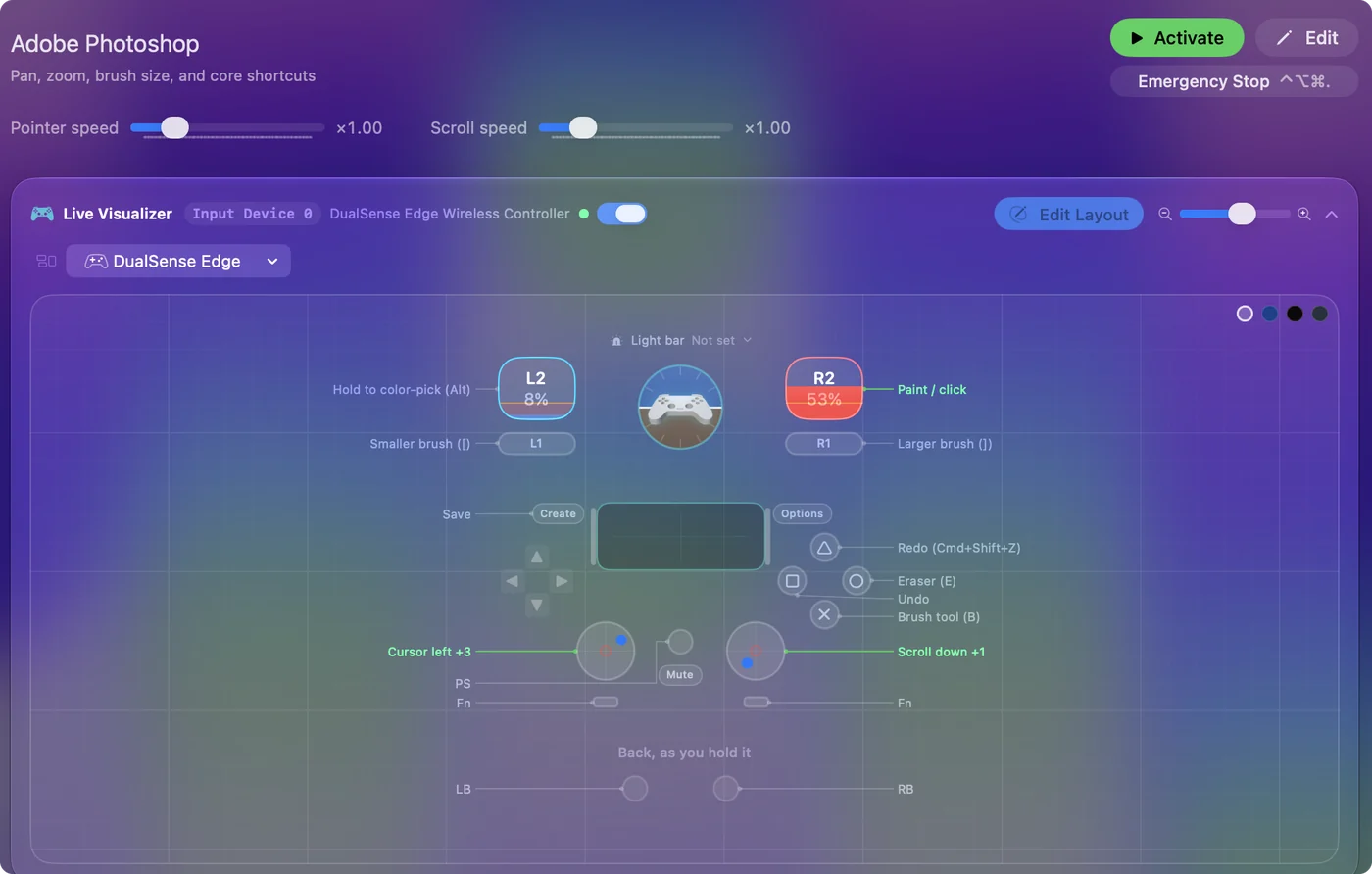
| Controller | Sends | What it does |
|---|---|---|
| Left stick left | Mouse motion left (speed 16) | Cursor left |
| Left stick right | Mouse motion right (speed 16) | Cursor right |
| Left stick up | Mouse motion up (speed 16) | Cursor up |
| Left stick down | Mouse motion down (speed 16) | Cursor down |
| Right stick down | Scroll down | Scroll down |
| Right stick up | Scroll up | Scroll up |
| Right trigger | Left click | Paint / click |
| LB / L1 | [ | Smaller brush ([) |
| RB / R1 | ] | Larger brush (]) |
| A / Cross | B | Brush tool (B) |
| B / Circle | E | Eraser (E) |
| X / Square | Command (Left), Z | Undo |
| Y / Triangle | Command (Left), Shift (Left), Z | Redo (Cmd+Shift+Z) |
| Left trigger | Alt / Option (Left) | Hold to color-pick (Alt) |
| Back / Share / Select | Command (Left), S | Save |
Button names follow the Xbox / PlayStation pair shown in the editor, so A / Cross is the bottom face button on either pad. On a Switch Pro Controller the bottom button is labeled B; the mapping still fires on position.
Questions
Can I use an Xbox or PS5 controller with Photoshop on a Mac?
Yes. Photoshop has no controller support of its own, so InputConfig turns the buttons into Photoshop's keyboard shortcuts and the stick into the pointer. Pick Photoshop in the Smart Preset Maker.
Does this replace a pen tablet?
No. It replaces the keyboard beside the tablet. For a hand that cannot use a keyboard, it is the keyboard.
What is the best controller for Photoshop on a Mac?
The one you already own. A DualSense or Xbox pad gives the most buttons, and the DualSense touchpad can be split into tap regions. A single Joy-Con or a small 8BitDo pad sits better beside a pen tablet. A TourBox has dials, which are nicer for brush size.
Related
Completely free. You don't have to make an account, there are no subscriptions, and nothing is locked. Optimized for Apple silicon. Open source on GitHub.
Updated